Xamarin.forms: TapGestureRecognizer not working with Spans on iOS
Description
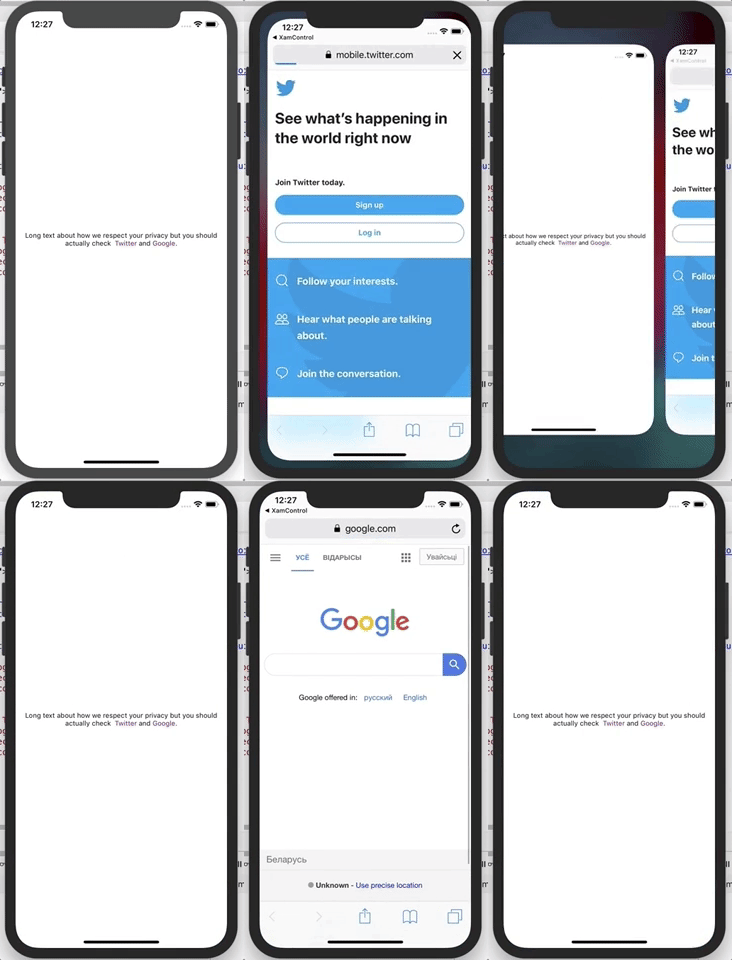
Having a Label with multiple Spans with TapGestureRecognizers are not working on iOS.
Steps to Reproduce
- Add the next
LabeltoMainPage.xaml:
<Label
    FontSize="Micro"
    VerticalTextAlignment="Center"
    HorizontalTextAlignment="Center">
    <Label.FormattedText>
        <FormattedString>
            <Span Text="Long text about how we respect your privacy but you should actually check " />
            <Span Text=" Twitter " TextColor="Purple">
                <Span.GestureRecognizers>
                    <TapGestureRecognizer Tapped="OpenPP" />
                </Span.GestureRecognizers>
            </Span>
            <Span Text="and" />
            <Span Text=" Google" TextColor="Purple">
                <Span.GestureRecognizers>
                    <TapGestureRecognizer Tapped="OpenToc" />
                </Span.GestureRecognizers>
            </Span>
            <Span Text="." />
        </FormattedString>
    </Label.FormattedText>
</Label>
- Add
EventHandlersfor bothOpenTocandOpenPP.
Expected Behavior
When the user tap on Twitter or Google spans the action described in the EventHandlers should happen.
Actual Behavior
When the user tap on Twitter or Google spans the action described in the EventHandlers never happen.
Basic Information
- Version with issue: 3.4.0.1009999
Reproduction Link
https://github.com/yuv4ik/XFFormattedStringBug/
Might be related to https://github.com/xamarin/Xamarin.Forms/issues/4143
 yuv4ik
All 15 comments
Works fine with latest master code
 AndreiMisiukevich
on 18 Jan 2019
AndreiMisiukevich
on 18 Jan 2019
Glad to hear. I guess it is fixed just not released yet.
yuv4ik
on 22 Jan 2019
I tested with 3.5.0-pre3, and it works! You can update to that package now. Thank you!
 samhouts
on 25 Jan 2019
samhouts
on 25 Jan 2019
But if you rotate the device and then tap on it, it just didnt work.
 dhruvcom
on 17 Jun 2019
dhruvcom
on 17 Jun 2019
did anybody resolved this issue? I am facing the same issue. My app needs to work on iPad in landscape mode.
 srivastava1july
on 18 Sep 2019
srivastava1july
on 18 Sep 2019
The fix was merged but I think it just missed the 4.4.0 release. Hopefully the next release or prerelease.
 charlesroddie
on 13 Dec 2019
charlesroddie
on 13 Dec 2019
Funny thing, it's not yet working in 2020 :D
Tried and Command and Tapped, no luck.
Xamarin.Forms 4.6.0.379-pre1
Any news about this issue?
 idchlife
on 27 Mar 2020
idchlife
on 27 Mar 2020
The gesture is fired when the text in the span is in one line. but if the text is multi-line then the event is not fired.
 abdelbena
on 30 Apr 2020
abdelbena
on 30 Apr 2020
Works only on label element but Not Working on span element. after updating visual studio for windows and mac to the latest version.
 edmlbox
on 4 May 2020
edmlbox
on 4 May 2020
Works only on label element but Not Working on span element. after updating visual studio for windows and mac to the latest version.
just found out that it works, but only on first word of the sentence.
edmlbox
on 4 May 2020
Encountered this issue just now. Setting the VerticalOptions to Center doesn't allow the second line to be selected. Haven't tested other LayoutOptions. This has something to do with the height request update of the span I think.
Solutions: You can either set the _HeighRequest_ of the Label with Span and clicking the second line tap gesture will work or just leave the _VerticalOptions_ to default and it will also work.
 arvicxyz
on 9 Jun 2020
arvicxyz
on 9 Jun 2020
Experiencing the same problem. Nothing I do will make the gesture recognizer fire.
 donniefitz2
on 9 Jun 2020
donniefitz2
on 9 Jun 2020
@samhouts Can you reopen this pls, it still doesn't work on iOS.
My specific use case is the label with spans is in a cell in a listview.
 JohnH-FF
on 10 Jun 2020
JohnH-FF
on 10 Jun 2020
I've tested the original repo with 4.6.0.847, and I can tap the spans, even after rotating my device.
This leads me to believe that there is a different issue here. Can you please create a new issue and attach a small reproduction project that demonstrates the problem? Thanks!
samhouts
on 10 Jun 2020
I've tested the original repo with 4.6.0.847, and I can tap the spans, even after rotating my device.
This leads me to believe that there is a different issue here. Can you please create a new issue and attach a small reproduction project that demonstrates the problem? Thanks!
I'm having an issue with multi tap gesture recognizers on a grid on iOS 13.5
I have a recognizer for 1 tap, and a second recognizer for 2 taps, both on the same grid.
Only gesture recognizer with 1 tap fires on iOS while both gesture for 1 tap, and 2 taps fire on Android.
(Editted)
Expected behavior is as on Android.
When tapped once, handler for 1 tap should fire and when tapped twice the handler for 2 taps should fire.
Tested on XF 4.6 and 4.7 on Visual studio Mac 8.6.5(build 23) and Microsoft Visual Studio 2019 Ver. 16.6.3
 andyfmking
on 7 Jul 2020
andyfmking
on 7 Jul 2020
Related issues
samhouts
·
3Comments
 mattregul
·
3Comments
mattregul
·
3Comments
 Stensan
·
3Comments
Stensan
·
3Comments
 jgold6
·
3Comments
jgold6
·
3Comments
 joseluisct
·
3Comments
joseluisct
·
3Comments