Xamarin.forms: When changing IsPassword property of an entry in runtime into true, the keyboard setting of entry is changed from numeric to default
Description
My requirement is to use Numeric keyboard for an entry which IsPassword property is changed into true at run time through a button click but when the button is clicked, the keyboard setting is changed to default only in UWP platform
Steps to Reproduce
- Set keyboard as numeric for an entry
- Through button click changes IsPassword property of entry into true
- The keyboard is changed into default in UWP
Expected Behavior
The Keyboard do not change from numeric after changing IsPassword into true
Actual Behavior
The Keyboard changes from numeric into default after changing IsPassword into true
Screenshots
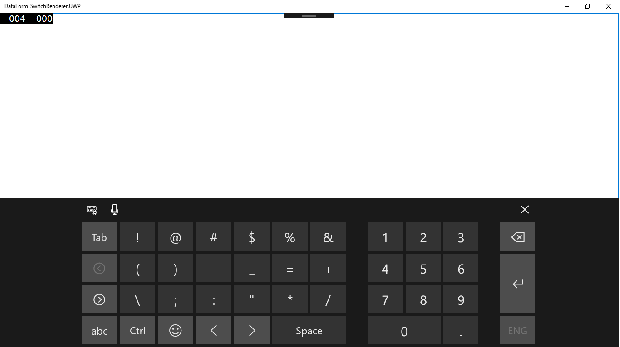
After changing IsPassword into true
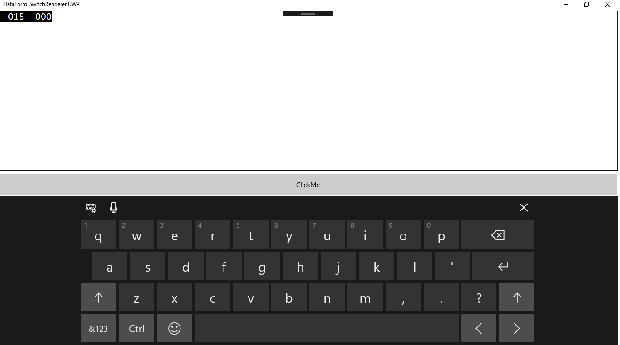
Reproduction Link
 AjitKRuin
All 16 comments
In FormsTextBox.cs, we aren't preserving the Numeric setting when changing to password mode.
 hartez
on 17 Oct 2018
hartez
on 17 Oct 2018
When will be the fix available for this issue?
AjitKRuin
on 17 Oct 2018
@hartez Any way we could also have you fix #3647 soon? I try circumventing most UI issues and wait for bug fixes, but I can't seem to find a workaround for this one, and since the keyboard covers a significant portion of the device screen, it's difficult to ignore.
 adrianknight89
on 17 Oct 2018
adrianknight89
on 17 Oct 2018
@hartez why is the InputScope changed at all whenever is switched to IsPassword?
IMO we could take out the whole setting the InputScope when toggling to password mode? Text prediction etc. is set with other properties. Or am I overlooking something?
 jfversluis
on 22 Oct 2018
jfversluis
on 22 Oct 2018
@hartez why is the InputScope changed at all whenever is switched to IsPassword?
You make a good point. TBH, I don't remember why the FormsTextBox has a separate InputScope for Password mode. It may have been necessary for WinRT, or it might have just been a poor implementation choice on my part. Regardless, it doesn't look like it's necessary to prevent text prediction and spell check while in Password mode, so we should probably just drop it and simplify the control.
hartez
on 22 Oct 2018
If you want I can whip it up later today and get you a PR for it. Still need that Hackoberfest shirt...
jfversluis
on 22 Oct 2018
If you want I can whip it up later today and get you a PR for it. Still need that Hackoberfest shirt...
Not gonna say "no" to a PR ... :)
hartez
on 22 Oct 2018
@hartez might we suppress text prediction when entering a password so that we don't auto complete the password?
Like, if you unlocked my phone with my thumb as I slept, then went to the ACME corp app written in Xamarin Forms and started entering in every letter in the alphabet into the password field until one of them triggered the auto complete with the rest of the password.
 kingces95
on 26 Oct 2018
kingces95
on 26 Oct 2018
@hartez might we suppress text prediction when entering a password so that we don't auto complete the password?
We _do_ suppress text prediction:
if (IsPassword)
{
    _cachedInputScope = InputScope;
    _cachedSpellCheckSetting = IsSpellCheckEnabled;
    _cachedPredictionsSetting = IsTextPredictionEnabled;
    InputScope = PasswordInputScope;
    IsTextPredictionEnabled = false; // <---- Right here
    IsSpellCheckEnabled = false;
}
That's why the InputScope thing doesn't make sense; InputScope is independent of prediction and spell check.
The confusing bit is why we ever thought we needed to set a separate input scope. The comments imply that it had something to do with disabling suggestions; maybe there is some sort of suggestion mechanism that setting IsTextPredictionEnabled and IsSpellCheckEnabled to false does not cover? We should be able to determine that by testing #4181.
If it does turn out that there's a problematic suggestion mechanism that's built into one of the InputScope options, we should look to see whether we need to disable _only_ that option in password mode (instead of disabling all but 'default'). The numeric InputScope _should_ be an option when entering a password.
hartez
on 26 Oct 2018
@hartez Cool. It may well be the case that the separate input scope is not needed. But if we can fix the issue while keeping the scope then we don't have to figure out why it was put in or the consequence of taking it out. I wouldn't think twice about it except that it seems awfully scary to publish a version that starts auto-completing passwords in some corner case we didn't cover...
kingces95
on 30 Oct 2018
I guess what we could simply do then is add an additional check within the if (IsPassword) scope to see if the input type is numeric. If so, we set the input scope to that, else to the PasswordInputScope. Something like this:
if (IsPassword)
{
    _cachedInputScope = InputScope;
    _cachedSpellCheckSetting = IsSpellCheckEnabled;
    _cachedPredictionsSetting = IsTextPredictionEnabled;

        // Pseudo-code to get the idea
        if (currentInputScope == Numeric)
            InputScope = NumericInputScope;
        else
        InputScope = PasswordInputScope;

    IsTextPredictionEnabled = false; // <---- Right here
    IsSpellCheckEnabled = false;
}
From what I dug up from the documentation (https://msdn.microsoft.com/en-us/library/windows/apps/mt280229.aspx?f=255&MSPPError=-2147217396), you can only have password or numeric input scope anyway.
Important The InputScope property on PasswordBox supports only the Password and NumericPin values. Any other value is ignored.
So that should cover all scenarios without having the risk of autosuggesting passwords?
jfversluis
on 30 Oct 2018
@kingces95 For context, I'm about 98% sure that the Password InputScope is just a carry-over from the WP8 custom Textbox (https://github.com/xamarin/Duplo/blob/master/Xamarin.Forms.Platform.WP8/FormsPhoneTextBox.cs#L74), because on that platform there was no way to set spell check and text prediction independently of the InputScope.
@jfversluis I think your idea makes sense and covers the original bug; unless @kingces95 has any objections, let's go with that.
hartez
on 30 Oct 2018
Yeah, @jfversluis if you could just leave the scopes that would be great. Could you also attach an updated reproduction case.
kingces95
on 1 Nov 2018
So, here is something weird. While looking to implement this fix, I noticed this.
This is the original code, taken from above.
if (IsPassword)
{
    _cachedInputScope = InputScope;
    _cachedSpellCheckSetting = IsSpellCheckEnabled;
    _cachedPredictionsSetting = IsTextPredictionEnabled;
    InputScope = PasswordInputScope;
    IsTextPredictionEnabled = false; // <---- Right here
    IsSpellCheckEnabled = false;
}
Then when I look at what PasswordInputScope is, it is this:
InputScope PasswordInputScope
{
    get
    {
        if (_passwordInputScope != null)
        {
            return _passwordInputScope;
        }

        _passwordInputScope = new InputScope();
        var name = new InputScopeName { NameValue = InputScopeNameValue.Default };
        _passwordInputScope.Names.Add(name);

        return _passwordInputScope;
    }
}
Especially this is curious: var name = new InputScopeName { NameValue = InputScopeNameValue.Default }; since there is also a InputScopeNameValue.Password.
My gut says that, since it is on default right now, we should've had the problem of suggesting passwords already?
jfversluis
on 1 Nov 2018
Reproduction added in gallery app (#4181), full size recording: https://www.dropbox.com/s/j01l9vxx122omuj/IsPasswordNumeric.mov?dl=0

jfversluis
on 6 Nov 2018
Especially this is curious: var name = new InputScopeName { NameValue = InputScopeNameValue.Default }; since there is also a InputScopeNameValue.Password.
My gut says that, since it is on default right now, we should've had the problem of suggesting passwords already?
On UWP, InputScope only affects what controls are available one the touch keyboard; it doesn't have any effect on text prediction/suggestions. So Default just means "the default keyboard layout"; Password includes more punctuation and mathematical symbols (things people _should_ be using in passwords).
So really, the "default" InputScope then IsPassword is true should probably be Password; if the developer overrides that with a different Keyboard setting, then the developer's setting should be honored.
hartez
on 15 Nov 2018
Related issues
 rmarinho
·
3Comments
rmarinho
·
3Comments
 simontocknell
·
3Comments
simontocknell
·
3Comments
 MartinWegner
·
3Comments
MartinWegner
·
3Comments
 mattregul
·
3Comments
mattregul
·
3Comments
 jgold6
·
3Comments
jgold6
·
3Comments