Xamarin.forms: [iOS] ViewCell not rendered properly when binding to own property
Description
When creating a custom ViewCell with a bindable property, and one of the child controls binds to that property of the custom ViewCell, the control is not properly rendered on iOS (size of the control is not updated). It works as expected on Android and UWP.
This is a regression in 3.0, because it worked fine on all platforms in previous versions of Xamarin.Forms
Steps to Reproduce
Create a custom ViewCell, with a bindable property for example:
public partial class MyCell
{
    public static readonly BindableProperty TextProperty = BindableProperty.Create(nameof(Text), typeof(string), typeof(MyCell), string.Empty);

    public string Text
    {
        get => (string) GetValue(TextProperty);
        set => SetValue(TextProperty, value);
    }

    public MyCell ()
    {
        InitializeComponent ();
    }
}
XAML:
<?xml version="1.0" encoding="UTF-8"?>
<ViewCell xmlns="http://xamarin.com/schemas/2014/forms"
             xmlns:x="http://schemas.microsoft.com/winfx/2009/xaml"
             x:Class="BugCellView.MyCell"
             x:Name="Self"
          >
      <StackLayout Padding="5">
          <Label Text="{Binding Text, Source={x:Reference Self}}" />
      </StackLayout>
</ViewCell>
The label defined in the ViewCell references the bindable property "Text" of MyCell
When this custom viewcell is used in a listview on iOS, the label is updated correctly, but the size of the label is not changed. This is the result on iOS:
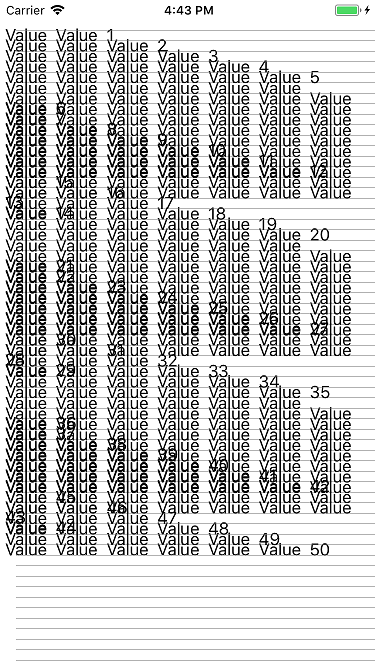
When scrolling the listview a little, the cells that were scrolled off screen and back in view are rendered properly:

This worked fine in Xamarin Forms 2.5 and earlier. It also works fine with Xamarin Forms 3.0 on Android and UWP
Basic Information
- Version with issue: 3.0.0.482510
- Last known good version: 2.5
- IDE: VS 2017
- Platform Target Frameworks:
- iOS: 11.3
- Android: 8.1 (SDK 27)
- UWP: 1703
Reproduction Link
Minimal test project, 100% reproduceable:
 activa
All 11 comments
@activa
Was this on the latest version of 2.5 you said it was working? I tested your code against 2.5 and 3.0 and both have the same result

 PureWeen
on 23 May 2018
PureWeen
on 23 May 2018
To be honest, I didn't test the repro on XF 2.5, but the reason I started investigating this was that this issue appeared in our app after upgrading to XF 3.0. So I assumed it was something that was introduced in 3.0
activa
on 23 May 2018
Yea it looks like when going through a bindable object like that it renderers the rows as the empty value first which is how it gets measured. Binding against a ViewModel it measures out correctly
If you can isolate what was working in 2.5 and what broke in 3.0 that would be helpful.
PureWeen
on 23 May 2018
Looks like it didn't work in earlier versions either. Right before we upgraded to XF 3.0, I made a few small changes to eliminate boilerplate code (such as making use of bindings in XAML instead of setting properties in code). Those changes exposed this bug but I didn't catch it at the time because it wasn't immediately obvious in most cases.
activa
on 23 May 2018
This issue seems no longer limited to iOS. In a ViewCell, binding to a property of the ViewCell itself doesn't work on any platform. It works on all other views, but not for ViewCells.
activa
on 18 Jul 2018
Have you tried using Cell.ForceUpdateSize? see https://docs.microsoft.com/en-us/xamarin/xamarin-forms/user-interface/listview/customizing-list-appearance#runtime-resizing-of-rows
 samhouts
on 30 Jul 2018
samhouts
on 30 Jul 2018
@samhouts I don't remember if I tried that, but it's not a solution to the problem. It's not just a resizing issue. Binding anything to ViewCell properties is seriously broken on all platforms. I will try to create a repro that shows the full extent of the problem.
activa
on 31 Jul 2018
I can confirm there is a bug with ListView and ViewCell Binding.
I have a viewcell with Bindable properties in the code behind, with a callback on OnPropertyChanging. Sometimes it fires, sometimes it does not and I can't figured out what's going on as it is randomly bugging/working. On the contrary, Binding outside a viewcell is always working ...
 vincentcastagna
on 23 Jan 2019
vincentcastagna
on 23 Jan 2019
This issue doesn't seem to have had any activity in a long time. We're working on prioritizing issues and resolving them as quickly as we can. To help us get through the list, we would appreciate an update from you to let us know if this is still affecting you on the latest version of Xamarin.Forms, since it's possible that we may have resolved this as part of another related or duplicate issue. If we don't see any new activity on this issue in the next 30 days, we'll evaluate whether this issue should be closed. Thank you!
samhouts
on 1 Sep 2020
@samhouts I have tested this on XF 4.8 and the issue is no longer reproducible.
activa
on 1 Sep 2020
HOORAY! Thank you @activa !!
samhouts
on 2 Sep 2020
Related issues
 Stensan
·
3Comments
Stensan
·
3Comments
 rmarinho
·
3Comments
rmarinho
·
3Comments
 Hudhud
·
3Comments
Hudhud
·
3Comments
 fazil1987
·
3Comments
fazil1987
·
3Comments
 simontocknell
·
3Comments
simontocknell
·
3Comments
Most helpful comment
@samhouts I don't remember if I tried that, but it's not a solution to the problem. It's not just a resizing issue. Binding anything to ViewCell properties is seriously broken on all platforms. I will try to create a repro that shows the full extent of the problem.