Xamarin.forms: ListView items are not layout if fling is performed either at bottom or top of the view.
Hi Team,
Description
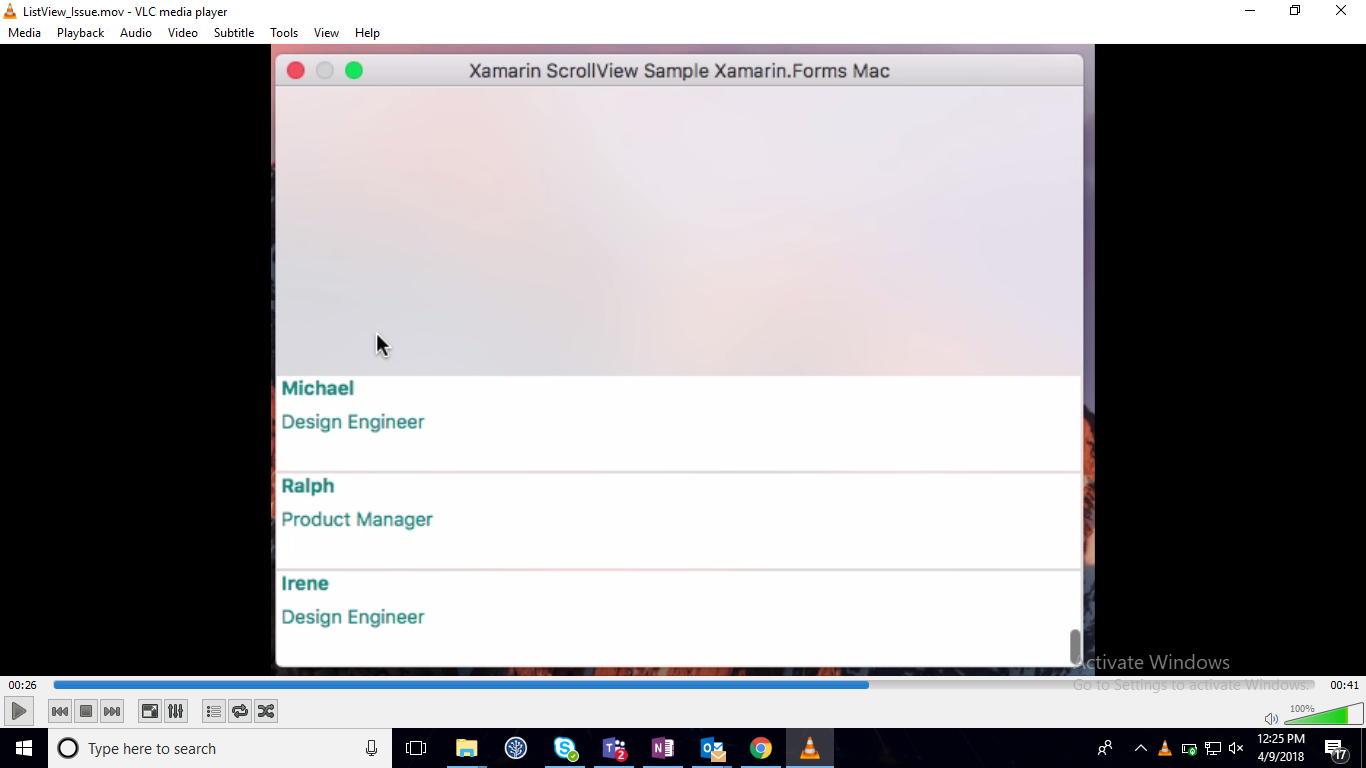
We are currently implementing a custom control with Xamarin Forms macOS support which is similar to the Xamarin Forms ListView and it is entirely based on the item Virtualization concept. In that, we are facing a strange issue in Xamarin Forms macOS i.e., if we fling the view either to top or bottom of the view, the items are not layout properly. We could not able to find the actual root cause for this issue.
Since, it is replicated in the Xamarin Forms ListView too. Can you please check this one and revert us with the actual root cause for this issue and timeline for the fix? Also, please share the workaround to resolve this issue.
Steps to Reproduce
- Run the attached sample in macOS
- Perform fling action upto bottom of the view.
- The listview items are not layout as expected. (issue)
We have attached the replication procedure through the video link. You can find it below.
ListView_Issue_macOS.zip
Expected Behavior
Items need to layout properly when both fling and pan action is performed.
Actual Behavior
Items are not layout at the bottom of the view if fling is performed.
Basic Information
-Version with issue: Xamarin Forms version (v 2.5.0.280555)
Last known good version: Issue replicates even from the 2.3 version.
=== Xamarin Studio Community ===
Version 6.3 (build 864)
Installation UUID: bccf7e7d-f92c-4226-90cb-5a2028a26649
Runtime:
Mono 5.8.0.129 (2017-10/835a98d8559) (64-bit)
GTK+ 2.24.23 (Raleigh theme)
Package version: 508000129
=== NuGet ===
Version: 3.5.0.0
=== Xamarin.Profiler ===
Version: 1.6.1
Location: /Applications/Xamarin Profiler.app/Contents/MacOS/Xamarin Profiler
=== Xamarin.Android ===
Not Installed
=== Apple Developer Tools ===
Xcode 8.3.2 (12175)
Build 8E2002
=== Xamarin.Mac ===
Version: 4.2.0.20 (Xamarin Studio Community)
=== Xamarin Inspector ===
Not Installed
=== Xamarin.iOS ===
Version: 11.8.0.20 (Xamarin Studio Community)
Hash: 1c6f300e
Branch: d15-6
Build date: 2018-02-07 23:42:40-0500
=== Build Information ===
Release ID: 603000864
Git revision: 6c2f6737278ccc3e81e12276d49c0d92f975f189
Build date: 2017-04-24 11:26:01-04
Xamarin addins: d8d46e577d8507c35260ce9d73df3c33415bb214
Build lane: monodevelop-lion-d15-1
=== Operating System ===
Mac OS X 10.12.5
Darwin syncmacn11829.local 16.6.0 Darwin Kernel Version 16.6.0
Fri Apr 14 16:21:16 PDT 2017
root:xnu-3789.60.24~6/RELEASE_X86_64 x86_64
Screenshots
Reproduction Link
Regards,
Dinesh Babu Yadav
 DineshBabuYadav
All 11 comments
@PureWeen , we are from Syncfusion SfListView team. We use UI Virtualization concept in our control and facing this issue in our control too.
Can you please give high priority to this issue? this issue is annoying to us.
DineshBabuYadav
on 12 Apr 2018
Hi @DineshBabuYadav I m not able to reproduce this issue using the sample provided. You said it happens with the normal ListView like your sample right? no custom renderer.
 rmarinho
on 13 Apr 2018
rmarinho
on 13 Apr 2018
@rmarinho , Yes, the issue replicates with the Xamarin ListView and custom control with no custom renderer. i have attached the video too. Please have a look over the video and this one is easily replicated.
Replication Procedure:
1.Perform the scrolling action with trackpad (fling/fast scroll) so that scrollbar needs to scroll to end.
- Perform this action repeatedly two or more time. You can see the reported issue as like in the Video.
DineshBabuYadav
on 14 Apr 2018
@rmarinho , In addition to that, i have attached the custom control sample below for your reference.
In the custom scrollview, the scrolled event notification for PCL view is not triggered which have been reported in the #2141 bug report.
So, i have manually pushed the scroll notification to PCL ScrollView using custom renderer to replicate the issue to you in which a notification observer is used as like you did in the ScrollViewRenderer.
You can run the sample and follow the above replication procedure. The data is not updated properly (reported issue).
Here, you can easily replicate the issue.
Thanks for your valuable time!
👍 👍 👍
DineshBabuYadav
on 14 Apr 2018
I do sort of see the behavior described. When I scroll down to the bottom of the list quickly, occasionally the last five items do not render immediately. It takes about a half second for them to render. I am using my touchpad to scroll down, whereas the video uses the mouse, so I assume that precision and inertia play a part. Confirming this for further investigation. Thanks!
 samhouts
on 17 Apr 2018
samhouts
on 17 Apr 2018
@samhouts ,
can you please update on this.
This one is very critical for us and facing an odd experience. Can you please provide any work around for us until then.
DineshBabuYadav
on 16 May 2018
Hi Team,
Any update on this?
 cnharikrishnan
on 20 Aug 2018
cnharikrishnan
on 20 Aug 2018
Hi Team,
Can you please look into this with high priority?
Thanks.
 Muthukumaran-G
on 27 Aug 2018
Muthukumaran-G
on 27 Aug 2018
Hi Team,
Can you please take this issue as high priority? In meantime, Is there any workaround for this?
 ganesanvelusamy
on 11 Sep 2018
ganesanvelusamy
on 11 Sep 2018
This issue doesn't seem to have had any activity in a long time. We're working on prioritizing issues and resolving them as quickly as we can. To help us get through the list, we would appreciate an update from you to let us know if this is still affecting you on the latest version of Xamarin.Forms, since it's possible that we may have resolved this as part of another related or duplicate issue. If we don't see any new activity on this issue in the next 30 days, we'll evaluate whether this issue should be closed. Thank you!
samhouts
on 24 Jul 2020
Since we haven't heard from you in more than 30 days, we hope this issue is no longer affecting you. If it is, please reopen this issue and provide the requested information so that we can look into it further. Thank you!
samhouts
on 15 Sep 2020
Related issues
 AppGrate
·
3Comments
AppGrate
·
3Comments
 jgold6
·
3Comments
rmarinho
·
3Comments
jgold6
·
3Comments
rmarinho
·
3Comments
 xabre
·
3Comments
xabre
·
3Comments
 MartinWegner
·
3Comments
MartinWegner
·
3Comments
Most helpful comment
@samhouts ,
can you please update on this.
This one is very critical for us and facing an odd experience. Can you please provide any work around for us until then.