Xamarin.forms: Upgrading to Xamarin.Forms.2.5.1.444934 breaks Android WebView login
Description
Upgrading Xamarin.Forms and Xamarin.Forms.Maps from v.2.5.0.280555 to v.2.5.1.444934 causes WebView issues that prevent user data entry
Steps to Reproduce
- Run app with WebView login
- Open NuGet Manager and upgrade from Xamarin.Forms.2.5.0.280555 to Xamarin.Forms.2.5.1.444934
- Rebuild and run app with WebView login
Expected Behavior
I normally see a login page served up, and user can enter email address.
Actual Behavior
With this update to Forms, the login page takes a LOT longer to come up, and then is constantly being refreshed so that users can't bring up the virtual keyboard to enter data. Debug log is also a mess.
Basic Information
I updated Xamarin.Forms.Maps with Xamarin.Forms, but I don't think that affects the bug.
- Version with issue: 2.5.1.444934
- Last known good version: 2.5.0.280555
- IDE: VS 2017 v15.6.5
- Platform Target Frameworks:
- iOS: Not affected
- Android: 8.1 (Oreo)
- Android Support Library Version: v8.2.0.16
- Affected Devices: All Android
Screenshots
See attached debug logs.
Reproduction Link
https://play.google.com/store/apps/details?id=com.voterscience.trc (v1.1.1 had issue, but v1.1.2 reverted to 2.5.0.280555 in order to work around problem)
Xamarin.Forms.2.5.0.280555.log
Xamarin.Forms.2.5.1.444934.log
 Magendanz
All 15 comments
Thats very very strange. I am trying to figure out for the life of me what might cause this since we didn't change anything with WebView or basically anything it does between 2.5.0-sr5 and 2.5.1. It doesn't even show up in the diff between those versions. Is it possible you updated more than just Xamarin.Forms? Maybe there is a compatibility issue with a different Google Play Services?
 jassmith
on 7 Apr 2018
jassmith
on 7 Apr 2018
I can't seem to reproduce your issue at all unfortunately with basic testing. My testing (loading google) shows it working the same between 2.5.0 and 2.5.1
jassmith
on 7 Apr 2018
I can confirm that the only thing that changed is that I updated the two NuGet packages. I can send you the source project, but can't post it publicly here. Given time, I might be able to strip down a project that could be posted here, but I figured you'd want to know about this ASAP.
If you take a look at the debug logs, you'll see that the behavior is VERY different.
Magendanz
on 7 Apr 2018
Okay, here's a stripped down project that shows the problem. Run it first as is, then upgrade to v.2.5.1.444934 and see what happens.
TRC.Issue.2393.zip
Magendanz
on 7 Apr 2018
What else do you need for this? I just did a complete project file rebuild from the latest templates, and the bug is still there on v.2.5.1.444934. Reverting to the previous release and rebuilding fixes it, but there are changes in the latest Xamarin Forms that I'm eventually going to need.
Others have hit this problem in the past here, and there are many theories discussed about the cause here.
Magendanz
on 13 Apr 2018
+1 to this. I upgraded to 2.5.1.444934 this morning and hit the same issue with my WebView being constantly refreshed. Seems to be refreshing the page it's currently on, but in an asynchronous manner which can mean the WebView navigates back to a previous page if it receives the navigations out of order.
There doesn't seem to be any obvious regressions between 2.5.0.280555 and 2.5.1.444934, but reverting as removed the problem.
 nd-srogers
on 26 Apr 2018
nd-srogers
on 26 Apr 2018
Still present in v2.5.1.527436.
Magendanz
on 5 May 2018
Appears to be present in 3.0.0.446417.
nd-srogers
on 8 May 2018
I've reduced this test project down to just...
public partial class App : Application
{
    public App()
    {
        InitializeComponent();

        MainPage = new NavigationPage();
    }

    protected override void OnStart()
    {
        // Hand off to website for sign in process
        var view = new WebView { Source = new Uri("http://google.com") };
        MainPage.Navigation.PushAsync(new ContentPage { Content = view });
    }
}
Note that the problem only occurs when the ContentPage with WevView is pushed on a NavigationPage. Just replacing MainPage seems to work fine.
Magendanz
on 23 May 2018
Issue2393.zip
with sln file
 samhouts
on 20 Jun 2018
samhouts
on 20 Jun 2018
@Magendanz @nd-srogers Do you see this issue on emulators, or just devices? Is it only on devices running 8.1, or have you seen it on different versions of Android?
samhouts
on 21 Jun 2018
@samhouts I see the issue with the solution you posted on an Emulator running 7.1 or 8.1, and when I deploy it to my Samsung S8 running 8.0, using Visual Studio 15.7.4.
I do not see it running on my S8 when using Live Player.
I used the Navigated event on the webview to confirm the issue is happening:
protected override void OnStart()
{
    // Hand off to website for sign in process
    var view = new WebView { Source = new Uri("http://google.com") };
    view.Navigated += View_Navigated;
    MainPage.Navigation.PushAsync(new ContentPage { Content = view });
}

private void View_Navigated(object sender, WebNavigatedEventArgs e)
{
    //
}
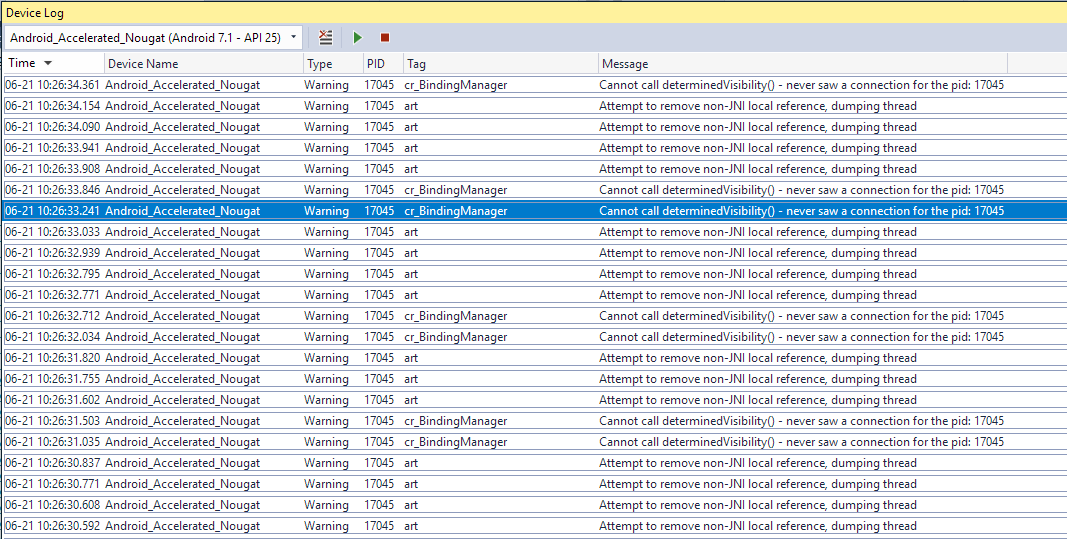
Do you see the same W/cr_BindingManager( 4914): Cannot call determinedVisibility() - never saw a connection for the pid: 4914 messages in your log files?
samhouts
on 21 Jun 2018
Yes, different PID but same message, along with Attempt to remove non-JNI local reference, dumping thread:
nd-srogers
on 21 Jun 2018
I think the Attempt to remove non-JNI local reference, dumping thread message is due to this: https://stackoverflow.com/questions/32911238/android-webview-using-gsap-attempt-to-remove-non-jni-local-reference-dumping-t
samhouts
on 21 Jun 2018
Related issues
 AppGrate
·
3Comments
AppGrate
·
3Comments
 rmarinho
·
3Comments
rmarinho
·
3Comments
 jgold6
·
3Comments
jgold6
·
3Comments
 MartinWegner
·
3Comments
MartinWegner
·
3Comments
 Hudhud
·
3Comments
Hudhud
·
3Comments
Most helpful comment
WebView.Issue.2393.zip
I've reduced this test project down to just...
Note that the problem only occurs when the ContentPage with WevView is pushed on a NavigationPage. Just replacing MainPage seems to work fine.