Xamarin.forms: [UWP] fails to show context menu of a list view item
Description
on UWP, context menu of a list view item cell won't be opened if the mouse is clicked outside any children controls of that cell
Steps to Reproduce
open the
interactivityListViewsample project provided by official xamarin-forms-samples
open the
interactiveListViewCode.cs, add a button to the ViewCell. the picture below shows the code differences, the right part shows the code we added

- run the UWP sample project
Expected Behavior
the APP shows as

the dotted rectangle shows size of a cell. it's supposed to show the context menu if the mouse is right clicked at ANY POSITION of this cell because the context menu is associated with this cell
Actual Behavior
unfortunately, only if we click in the areas of child controls in a cell (as the red rectangles shown below), the context menu would be showed. if the mouse is clicked in other position of that cell, there's is no context menu.

if HorizontalOptions of Label is set to FillAndExpand, the label expands to the whole cell, as the dotted rectangle shown below. So if we click in any position of this rectangle, the context menu DOES SHOW. but if we click in those red rectangles, it WON'T
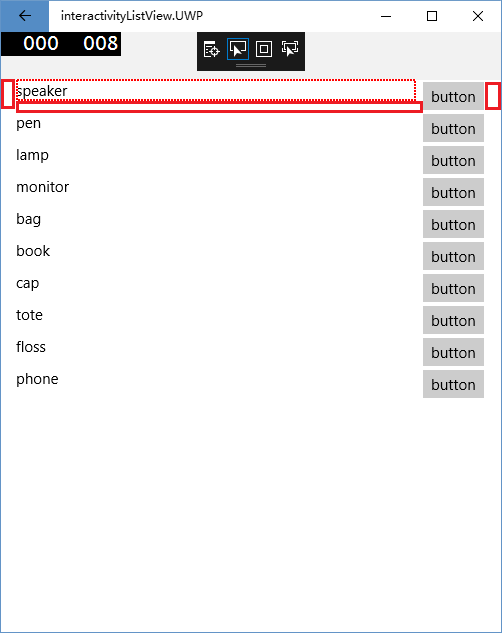
Basic Information
- Version with issue: Xamarin Form 2.5.0.280555. I've tested 2.4.0.280, the problem is also there.
- Last known good version:
- IDE: Visual Studio 2017 15.6.3
- Platform Target Frameworks:
- UWP: 16299
Reproduction Link
 FrankChen021
All 4 comments
It appears to occur when using the horizontal orientation on the layout.
 pauldipietro
on 20 Mar 2018
pauldipietro
on 20 Mar 2018
@pauldipietro whether it's horizontal orientation or vertical orientation makes no difference
why does the original sample project work? it definitely uses vertical orientation. but it works not because that. in vertical orientation, the default value of HorizontalOptions of controls is Fill, these control stretch to fill the layout horizontally. in most of case, the position where a mouse is clicked inside a cell is in a sub control, so the context menu shows. if you change value of HorizontalOptionsto Startor End, this problem would be easier to reproduce.
FrankChen021
on 20 Mar 2018
This issue doesn't seem to have had any activity in a long time. We're working on prioritizing issues and resolving them as quickly as we can. To help us get through the list, we would appreciate an update from you to let us know if this is still affecting you on the latest version of Xamarin.Forms, since it's possible that we may have resolved this as part of another related or duplicate issue. If we don't see any new activity on this issue in the next 30 days, we'll evaluate whether this issue should be closed. Thank you!
 samhouts
on 8 Jul 2020
samhouts
on 8 Jul 2020
Since we haven't heard from you in more than 30 days, we hope this issue is no longer affecting you. If it is, please reopen this issue and provide the requested information so that we can look into it further. Thank you!
samhouts
on 7 Aug 2020
Related issues
 EmilAlipiev
·
3Comments
EmilAlipiev
·
3Comments
 MartinWegner
·
3Comments
MartinWegner
·
3Comments
 Hudhud
·
3Comments
Hudhud
·
3Comments
 mattregul
·
3Comments
mattregul
·
3Comments
 joseluisct
·
3Comments
joseluisct
·
3Comments