Xamarin.forms: Picker: width calculation should be based on the longest item, not the selected item
Description
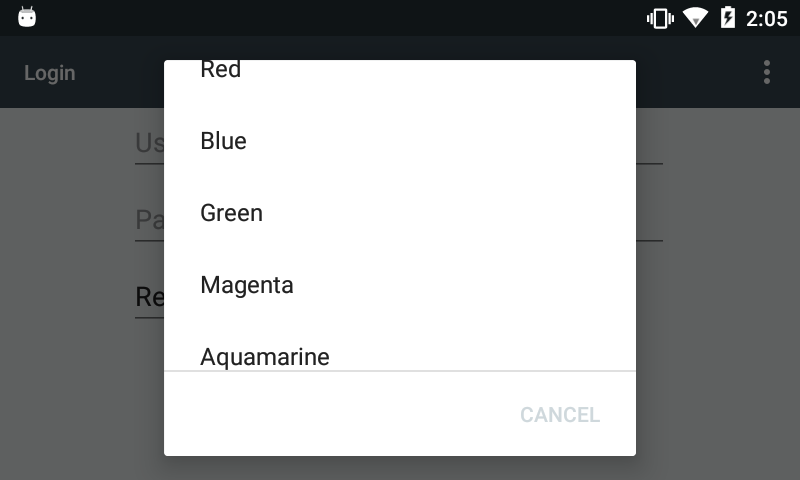
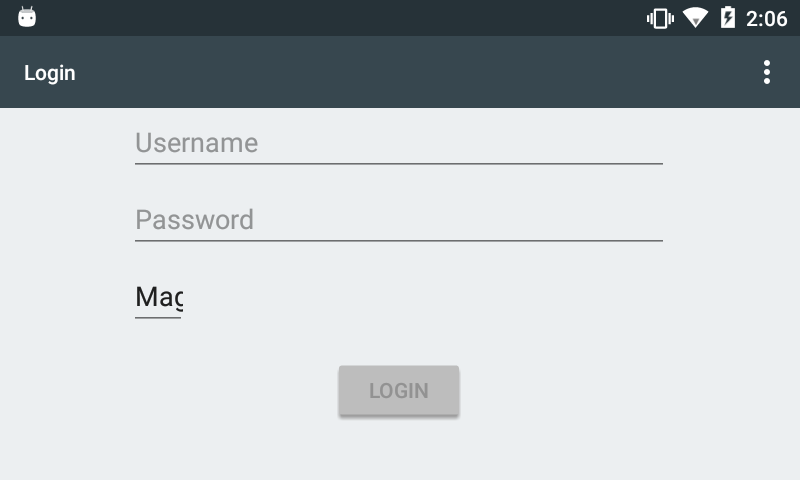
In Xamarin Forms XAML, using HorizontalOptions="Start" or HorizontalOptions="StartAndExpand" for a Picker element may cause the final layout width of the Picker to be insufficient, and therefore truncate longer items upon selection.
Steps to Reproduce
- Follow the recommended steps from Xamarin for a basic Picker.
- In the XAML, inside the
Pickerelement, set its horizontal options to beHorizontalOptions="Start". - In the view model, create a list of strings to display in the picker:
Red,Blue,Green,Magenta,Aquamarine. - In the view model, set the initial selected index property to be
0so thatRedis selected by default. - Run the app, and note that the width of the picker exactly matches the width of the initial selected item, rather than matching the width of the longest item.
- Tap on the picker and select
MagentaorAquamarine.
Expected Behavior
The width of the Picker element at runtime should be wide enough to accommodate the longest value in the list ("best fit").
Actual Behavior
The width of the Picker element at runtime is insufficient, which truncates longer values upon selection.
Basic Information
- Version with issue: Xamarin.Forms (2.5.0.280555)
- Last known good version: (unknown)
- IDE: Visual Studio for Mac 7.4 Preview (7.4 build 1026)
- Platform Target Frameworks:
- Android: 8.0
- Android Support Library Version: 26.1.0.1
- Nuget Packages:
- ReactiveUI.XamForms (8.0.0-alpha0117)
- Xam.Plugins.Settings (3.1.1)
- Xam.Plugins.TextToSpeech (3.2.1)
- Xam.Plugins.Vibrate (3.0.1)
- Xamarin.Plugins.Clipboard (2.0.0)
- Affected Devices: Android devices
Screenshots

 ajhuntsman
All 6 comments
The native picker controls do not expose to us their maximum potential width unfortunately (when you measure the native controls the result you get is the size of the current selection).
A fix we can and should do is trigger a relayout when the picker control selection is changed.
 jassmith
on 28 Feb 2018
jassmith
on 28 Feb 2018
Thanks for the fast response, @jassmith!
ajhuntsman
on 28 Feb 2018
Is also Bug 57539
 ThomasOst
on 11 Mar 2018
ThomasOst
on 11 Mar 2018
This bug affects Android and iOS but not UWP.
 charlesroddie
on 5 Mar 2020
charlesroddie
on 5 Mar 2020
I use this workaround:
```C#
private void Picker_SelectedIndexChanged(object sender, EventArgs e)
{
ControlsHelper.InvalidateMeasure((Picker)sender);
}
It won't set size based on the longest item, but it will properly display all selected items.
InvalidateMeasure method inside my ControlsHelper.cs class (various Xamarin workarounds):

```C#
/// <summary>
/// Some controls fail to resize. Use this function as a workaround.
/// </summary>
/// <param name="control"></param>
public static void InvalidateMeasure(this VisualElement control)
{
    if (control == null)
        throw new ArgumentNullException(nameof(control));
    var methods = typeof(VisualElement).GetTypeInfo().DeclaredMethods;
    var method = methods.FirstOrDefault(x => x.Name == "InvalidateMeasure");
    if (method != null)
        method.Invoke(control, null);
}
 EJocys
on 16 Mar 2020
EJocys
on 16 Mar 2020
This issue doesn't seem to have had any activity in a long time. We're working on prioritizing issues and resolving them as quickly as we can. To help us get through the list, we would appreciate an update from you to let us know if this is still affecting you on the latest version of Xamarin.Forms, since it's possible that we may have resolved this as part of another related or duplicate issue. If we don't see any new activity on this issue in the next 30 days, we'll evaluate whether this issue should be closed. Thank you!
 samhouts
on 15 Sep 2020
samhouts
on 15 Sep 2020
Related issues
samhouts
·
3Comments
 jgold6
·
3Comments
jgold6
·
3Comments
 EmilAlipiev
·
3Comments
EmilAlipiev
·
3Comments
 fazil1987
·
3Comments
fazil1987
·
3Comments
 MartinWegner
·
3Comments
MartinWegner
·
3Comments
Most helpful comment
I use this workaround:
```C#
private void Picker_SelectedIndexChanged(object sender, EventArgs e)
{
ControlsHelper.InvalidateMeasure((Picker)sender);
}