Xamarin-android: Visual Studio 16.9: Missing Java Binding Library Template
In Visual Studio 16.8.5 everything works fine .
But after I update Visual Studio 16.9.0, the template for android binding library is missing .
Screen shot

Related thread
 ColeXm
All 10 comments
Yes, this is also the case in the latest Visual Studio 2019 v16.10 Preview 1
 AmrAlSayed0
on 9 Mar 2021
AmrAlSayed0
on 9 Mar 2021
This is fixed on Visual Studio 2019 v16.10 Preview 2. The workaround is to open an existing binding library instead of creating a new one. If anybody's interested I can create one and paste a zip here. (Edit: attached)
Bindings.zip
 joj
on 9 Mar 2021
joj
on 9 Mar 2021
@mattleibow also faced this issue https://discord.com/channels/732297728826277939/732297837953679412/814623538215518209
AmrAlSayed0
on 9 Mar 2021
Visualstudio 16.9.2 , no Class Liberay(Android), no Binding Library. I'm so tired to xamarin for these bug.
 xtuzy
on 20 Mar 2021
xtuzy
on 20 Mar 2021
VS(windows)版本,v16.9.x 版本需要在设置中关闭某个功能,才能在新建项目中看到Xamarin.Android 绑定库,类库等选项
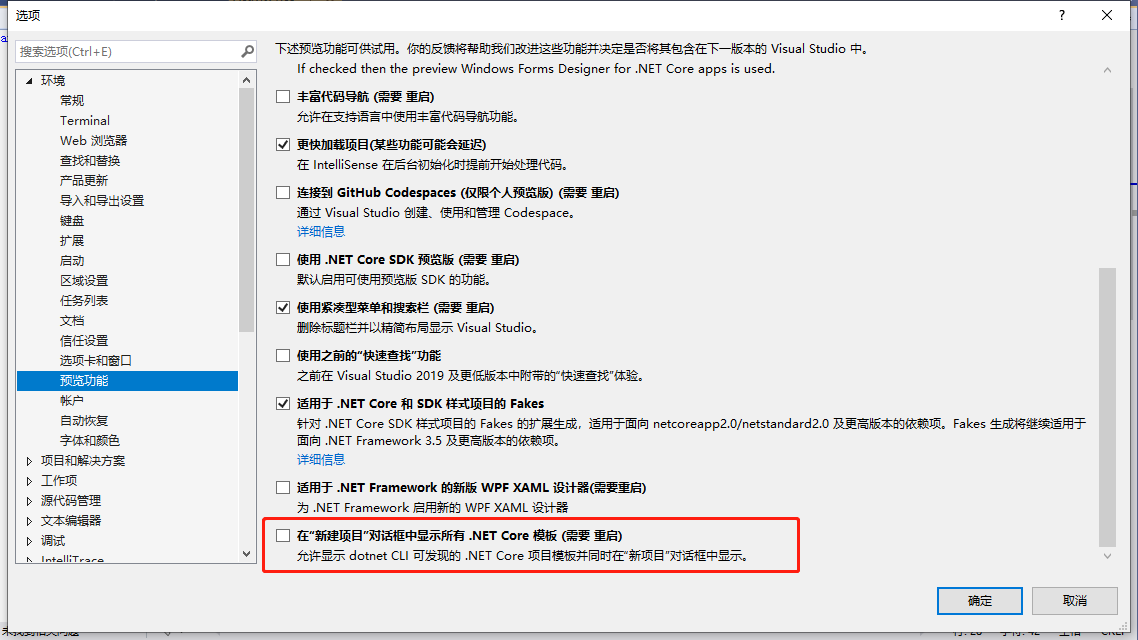
 wangyankun33
on 25 Mar 2021
wangyankun33
on 25 Mar 2021
Thanks @wangyankun33!
Unchecking the Show all .NET Core templates in the New project dialog option will make the template show up.
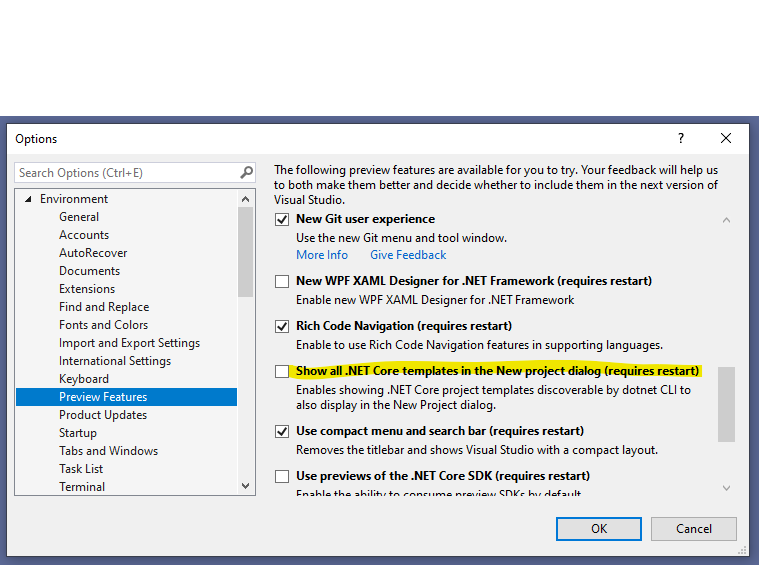
 jpobst
on 25 Mar 2021
jpobst
on 25 Mar 2021
Blank solution is also gone in the stable release. Crazy how VS team is doing updates
 EmilAlipiev
on 25 Mar 2021
EmilAlipiev
on 25 Mar 2021
Thanks @wangyankun33!
Unchecking the
Show all .NET Core templates in the New project dialogoption will make the template show up.
Disable Show all .NET Core templates in the New project dialog worked for me, thanks
 sact1909
on 10 Apr 2021
sact1909
on 10 Apr 2021
Templates were added back in the latest stable version (16.9.4).
 maarkristof
on 16 Apr 2021
maarkristof
on 16 Apr 2021
Yep, this should be fixed in 16.9.4:
https://docs.microsoft.com/en-us/visualstudio/releases/2019/release-notes#--visual-studio-2019-version-1694-
jpobst
on 19 Apr 2021
Related issues
 sgong-pdftron
·
4Comments
sgong-pdftron
·
4Comments
 Sebastian1989101
·
4Comments
Sebastian1989101
·
4Comments
 jonpryor
·
3Comments
joj
·
4Comments
jonpryor
·
3Comments
joj
·
4Comments
 mathiasnielsen
·
4Comments
mathiasnielsen
·
4Comments
Most helpful comment
Thanks @wangyankun33!
Unchecking the

Show all .NET Core templates in the New project dialogoption will make the template show up.