Xamarin-android: JNI logs as "UNHANDLED EXCEPTION" an handled exception
I split this issue from the original one #4548 since this is in fact 2 different issues.
JNI considers a perfectly caught exception as an unhandled exception.
If in RELEASE or ran in DEBUG mode without debugging, an UNHANDLED EXCEPTION is raised in the log, but the app doesn't crash.
- It causes performance issues since the code is located in the "draw" path of a view.
- It also floods adb with exception stack, making it really hard to monitor log messages.
Here is my scenario:
public class StopException : Exception {} // same result if RuntimeException

public class RealtimeBlurView : View
{
    ....

    public override void Draw(Canvas canvas)
    {
        if (mIsRendering)
        {
            // Quit here, don't draw views above me
            throw STOP_EXCEPTION;
        }

        if (RENDERING_COUNT > 0)
        {
            // Doesn't support blurview overlap on another blurview
        }
        else
        {
            base.Draw(canvas);
        }
    }
}

...

class PreDrawCallback : ViewTreeObserver.IOnPreDrawListener
{
    public bool OnPreDraw()
    {

        try
        {
            ...

            decor.Draw(blurView.mBlurringCanvas);
            // |=>  throws custom StopException since BlurView is an indirect child of decor
            //    |=>  monodroid is logging "UNHANDLED EXCEPTION + StopException <stack trace>"
        }
        catch(Exception e)
        {
            // the code here is executed, so the exception, is handled
            // even if monodroid logs the unhandled exception
        }
    }
}
The exception is handled in the try catch as a StopException, so why JNI thinks it's unhandled ?
In pure Java world the StopException wouldn't be considered as an uncaught exception, but in the Xamarin context, it does.

Details
I am here trying to create blur views for Xamarin.Forms, for the android implementation I chose https://github.com/mmin18/RealtimeBlurView.
I translated in C# all the classes, you can find them here:
In his java implementation, mmin18 has the following code:
For stoping the drawing process he throws a custom "STOP_EXCEPTION" in the Draw method of the blur view:
Remark: you have to interrupt the drawing of all the next children, so returning in the blur view's Draw method is not enough....
Steps to Reproduce
- Clone https://github.com/roubachof/Xamarin-Forms-Practices
- Select the "secret" branch
- Select DebugInfinite configuration
- Debug on android emulator
Expected Behavior
No UNHANDLED EXCEPTION should be raised and logged.
Actual Behavior
Version Information
Microsoft Visual Studio Community 2019
Version 16.5.2
VisualStudio.16.Release/16.5.2+29926.136
Microsoft .NET Framework
Version 4.8.03752
Installed Version: Community
Visual C++ 2019 00435-60000-00000-AA963
Microsoft Visual C++ 2019
ASP.NET and Web Tools 2019 16.5.236.49856
ASP.NET and Web Tools 2019
ASP.NET Web Frameworks and Tools 2019 16.5.236.49856
For additional information, visit https://www.asp.net/
Azure App Service Tools v3.0.0 16.5.236.49856
Azure App Service Tools v3.0.0
Azure Functions and Web Jobs Tools 16.5.236.49856
Azure Functions and Web Jobs Tools
C# Tools 3.5.0-beta4-20153-05+20b9af913f1b8ce0a62f72bea9e75e4aa3cf6b0e
C# components used in the IDE. Depending on your project type and settings, a different version of the compiler may be used.
Common Azure Tools 1.10
Provides common services for use by Azure Mobile Services and Microsoft Azure Tools.
Extensibility Message Bus 1.2.0 (d16-2@8b56e20)
Provides common messaging-based MEF services for loosely coupled Visual Studio extension components communication and integration.
Fabric.DiagnosticEvents 1.0
Fabric Diagnostic Events
IntelliCode Extension 1.0
IntelliCode Visual Studio Extension Detailed Info
JetBrains ReSharper Ultimate 2019.3.4 Build 193.0.20200226.112949
JetBrains ReSharper Ultimate package for Microsoft Visual Studio. For more information about ReSharper Ultimate, visit http://www.jetbrains.com/resharper. Copyright © 2020 JetBrains, Inc.
Microsoft Azure Service Fabric Tools for Visual Studio 16.0
Microsoft Azure Service Fabric Tools for Visual Studio
Microsoft Azure Tools 2.9
Microsoft Azure Tools for Microsoft Visual Studio 2019 - v2.9.30207.1
Microsoft Continuous Delivery Tools for Visual Studio 0.4
Simplifying the configuration of Azure DevOps pipelines from within the Visual Studio IDE.
Microsoft JVM Debugger 1.0
Provides support for connecting the Visual Studio debugger to JDWP compatible Java Virtual Machines
Microsoft Library Manager 2.1.25+gdacdb9b7a1
Install client-side libraries easily to any web project
Microsoft MI-Based Debugger 1.0
Provides support for connecting Visual Studio to MI compatible debuggers
Microsoft Visual C++ Wizards 1.0
Microsoft Visual C++ Wizards
Microsoft Visual Studio Tools for Containers 1.1
Develop, run, validate your ASP.NET Core applications in the target environment. F5 your application directly into a container with debugging, or CTRL + F5 to edit & refresh your app without having to rebuild the container.
Microsoft Visual Studio VC Package 1.0
Microsoft Visual Studio VC Package
Mono Debugging for Visual Studio 16.5.514 (c4f36a9)
Support for debugging Mono processes with Visual Studio.
NuGet Package Manager 5.5.0
NuGet Package Manager in Visual Studio. For more information about NuGet, visit https://docs.nuget.org/
ProjectServicesPackage Extension 1.0
ProjectServicesPackage Visual Studio Extension Detailed Info
ResXManager 1.40.3444.0
Manage localization of all ResX-Based resources in one place. Shows all resources of a solution and let's you edit the strings and their localizations in a well-arranged data grid.
SettingsWindow Extension 1.0
SettingsWindow Visual Studio Extension Detailed Info
SQL Server Data Tools 16.0.62003.05170
Microsoft SQL Server Data Tools
StylerPackage Extension 1.0
StylerPackage Visual Stuido Extension Detailed Info
TypeScript Tools 16.0.20225.2001
TypeScript Tools for Microsoft Visual Studio
Visual Basic Tools 3.5.0-beta4-20153-05+20b9af913f1b8ce0a62f72bea9e75e4aa3cf6b0e
Visual Basic components used in the IDE. Depending on your project type and settings, a different version of the compiler may be used.
Visual F# Tools 10.8.0.0 for F# 4.7 16.5.0-beta.20104.8+7c4de19faf36647c1ef700e655a52350840c6f03
Microsoft Visual F# Tools 10.8.0.0 for F# 4.7
Visual Studio Code Debug Adapter Host Package 1.0
Interop layer for hosting Visual Studio Code debug adapters in Visual Studio
Visual Studio Container Tools Extensions (Preview) 1.0
View, manage, and diagnose containers within Visual Studio.
Visual Studio Tools for Containers 1.0
Visual Studio Tools for Containers
Visual Studio Tools for Kubernetes 1.0
Visual Studio Tools for Kubernetes
VisualStudio.DeviceLog 1.0
Information about my package
VisualStudio.Mac 1.0
Mac Extension for Visual Studio
Xamarin 16.5.000.528 (d16-5@2b54082)
Visual Studio extension to enable development for Xamarin.iOS and Xamarin.Android.
Xamarin Designer 16.5.0.470 (remotes/origin/d16-5@681de3fd6)
Visual Studio extension to enable Xamarin Designer tools in Visual Studio.
Xamarin Templates 16.5.49 (0904f41)
Templates for building iOS, Android, and Windows apps with Xamarin and Xamarin.Forms.
Xamarin.Android SDK 10.2.0.100 (d16-5/988c811)
Xamarin.Android Reference Assemblies and MSBuild support.
Mono: c0c5c78
Java.Interop: xamarin/java.interop/d16-5@fc18c54
ProGuard: xamarin/proguard/master@905836d
SQLite: xamarin/sqlite/3.28.0@46204c4
Xamarin.Android Tools: xamarin/xamarin-android-tools/d16-5@9f4ed4b
Xamarin.iOS and Xamarin.Mac SDK 13.16.0.11 (aa73e41)
Xamarin.iOS and Xamarin.Mac Reference Assemblies and MSBuild support.
 roubachof
All 11 comments
Hi, I just tried to reproduce this locally (VSMac) and, please confirm if I'm wrong, but I believe I got the expected behavior:
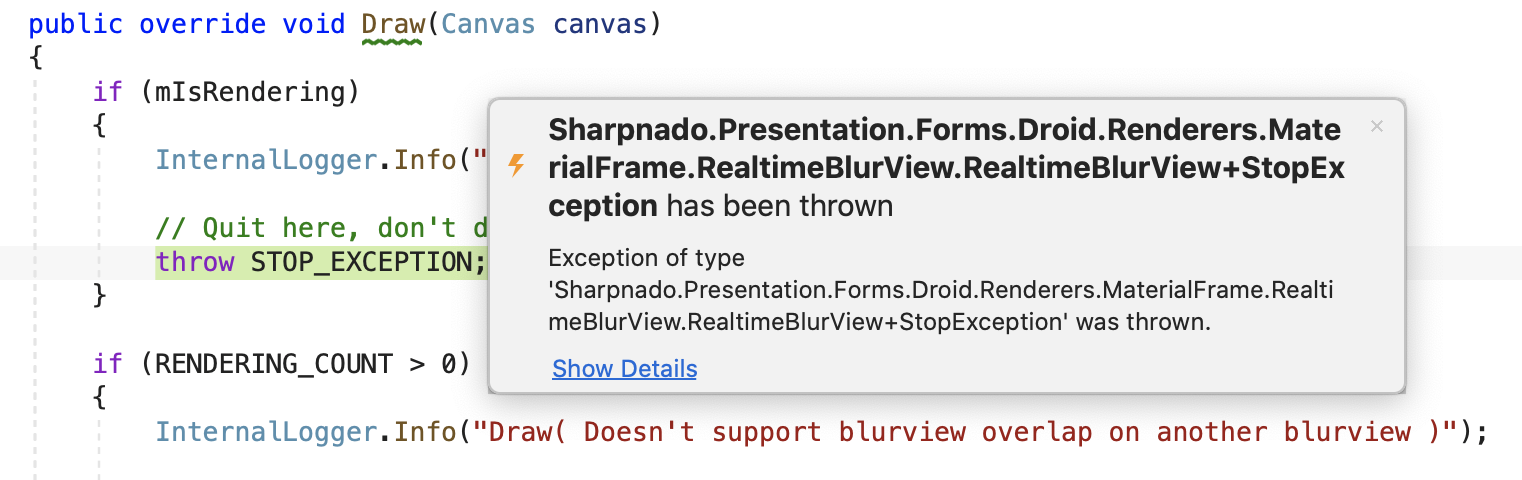
I'm using VSMac with the following version of the product: https://gist.github.com/VincentDondain/7e38ef531ffb97c69dfb874ad71d420b
So either this is a VS Windows specific issue or it's been fixed in the .6 series.
@roubachof have you tried with the .6 series? https://devblogs.microsoft.com/visualstudio/visual-studio-2019-version-16-6-preview-2/
⚠️ Important for the team trying to reproduce this: you need to also clone / download https://github.com/roubachof/Sharpnado.Presentation.Forms inside Xamarin-Forms-Practices to make it build (:
 VincentDondain
on 29 Apr 2020
VincentDondain
on 29 Apr 2020
Note: https://github.com/roubachof/Sharpnado.Presentation.Forms in the Xamarin-Forms-Practices is a sub-module, so you don't have to clone it just update it with git submodule update in the submodule folder.
The issue described is about non debugging situation. The debugging issue (causing SIGSEGV) is already opened #4548.
The StopException is in fact handled here:
https://github.com/roubachof/Sharpnado.Presentation.Forms/blob/5d535c316d65f1da6f3eb64150dbe961c159675a/Sharpnado.Presentation.Forms.Droid/Renderers/MaterialFrame/RealtimeBlurView/RealtimeBlurView.cs#L318-L333
try
{
    blurView.mBlurringCanvas.Scale(
        1f * blurView.mBitmapToBlur.Width / blurView.Width,
        1f * blurView.mBitmapToBlur.Height / blurView.Height);
    blurView.mBlurringCanvas.Translate(-x, -y);
    if (decor.Background != null)
    {
        decor.Background.Draw(blurView.mBlurringCanvas);
    }

    decor.Draw(blurView.mBlurringCanvas);
}
catch (StopException)
{
    // code here is executed as well, giving the exception a Schrödinger cat semantic
    // (both caught and unhandled :)
}
As you can see the StopException is clearly caught in the code above, but it is logged as UNHANDLED EXCEPTION in adb logs.
roubachof
on 30 Apr 2020
Hi, would it be possible to see if anyone could investigate this issue? @roubachof has created the fantastic MaterialFrame library which is being used in a real world application. However, this issue seems to be causing some sort of a memory leak which quickly makes the application grind to a halt and make it effectively unusable. If this cannot be resolved, it would mean that his library would not be truly usable by anyone and it would also require a significant portion of our UI to be rewritten.
It would really be great if someone could investigate this for us, as it really would be shame to see all the hard work that @roubachof has put into this library go to waste.
 mauro-dasilva
on 11 Jun 2020
mauro-dasilva
on 11 Jun 2020
To be more precised, it doesn't seem to be a memory leak, but more the giant spam of Unhandled Exception stack that floods the logs and seems to cause the sluggishness.
roubachof
on 11 Jun 2020
Another issue appeared on top of that since the UNHANDLED EXCEPTION stack seems to get bigger and bigger with each occurrence of the exception.
More info here: https://github.com/roubachof/Sharpnado.MaterialFrame/issues/7
roubachof
on 11 Jun 2020
Smaller reproduction steps
Create a new Android App (Xamarin) > Single View App.
Add the following class:
public class CustomView : View
{
   class StopException : Exception
   {
   }

   static StopException STOP_EXCEPTION = new StopException();

   public CustomView(Context context) : base(context)
   {
   }

   protected override void OnDraw(Android.Graphics.Canvas canvas)
   {
       throw STOP_EXCEPTION;
   }
}
Add the following lines to the
FabOnClick()method:try { new CustomView(this).Draw(new Android.Graphics.Canvas()); } catch (Exception ex) { }Launch the app without the debugger attached, and tap the letter icon button in the lower right of the screen.
(Edit: Adding example results from this smaller test scenario.)
Actual results
After step 4, the adb logcat output shows:
I MonoDroid: UNHANDLED EXCEPTION:
I MonoDroid: AndroidAppSingleView1.CustomView+StopException: Exception of type 'AndroidAppSingleView1.CustomView+StopException' was thrown.
I MonoDroid:   at AndroidAppSingleView1.CustomView.OnDraw (Android.Graphics.Canvas canvas) [0x0000c] in <528edab69a684c74808b0dd301524e97>:0
I MonoDroid:   at Android.Views.View.n_OnDraw_Landroid_graphics_Canvas_ (System.IntPtr jnienv, System.IntPtr native__this, System.IntPtr native_canvas) [0x0000f] in <43cddc76fe22432dbdbcea2397b6fcd7>:0
I MonoDroid:   at (wrapper dynamic-method) Android.Runtime.DynamicMethodNameCounter.16(intptr,intptr,intptr)
If I add the following line to OnDraw():
Console.WriteLine(new System.Diagnostics.StackTrace());
I can see more about the transitions between managed and Java:
I mono-stdout:   at AndroidAppSingleView1.CustomView.OnDraw (Android.Graphics.Canvas canvas) [0x00000] in <528edab69a684c74808b0dd301524e97>:0
I mono-stdout:   at Android.Views.View.n_OnDraw_Landroid_graphics_Canvas_ (System.IntPtr jnienv, System.IntPtr native__this, System.IntPtr native_canvas) [0x00000] in <43cddc76fe22432dbdbcea2397b6fcd7>:0
I mono-stdout:   at Android.Runtime.DynamicMethodNameCounter.16 (System.IntPtr , System.IntPtr , System.IntPtr ) [0x00000] in <43cddc76fe22432dbdbcea2397b6fcd7>:0
I mono-stdout:   at Java.Interop.NativeMethods.java_interop_jnienv_call_nonvirtual_void_method_a (System.IntPtr , System.IntPtr& , System.IntPtr , System.IntPtr , System.IntPtr , System.IntPtr ) [0x00000] in <5acdf2a255594ffca4d005d50c796774>:0
I mono-stdout:   at Java.Interop.JniEnvironment+InstanceMethods.CallNonvirtualVoidMethod (Java.Interop.JniObjectReference instance, Java.Interop.JniObjectReference type, Java.Interop.JniMethodInfo method, Java.Interop.JniArgumentValue* args) [0x00000] in <5acdf2a255594ffca4d005d50c796774>:0
I mono-stdout:   at Java.Interop.JniPeerMembers+JniInstanceMethods.InvokeVirtualVoidMethod (System.String encodedMember, Java.Interop.IJavaPeerable self, Java.Interop.JniArgumentValue* parameters) [0x00000] in <5acdf2a255594ffca4d005d50c796774>:0
I mono-stdout:   at Android.Views.View.Draw (Android.Graphics.Canvas canvas) [0x00000] in <43cddc76fe22432dbdbcea2397b6fcd7>:0
I mono-stdout:   at AndroidAppSingleView1.MainActivity.FabOnClick (System.Object sender, System.EventArgs eventArgs) [0x00000] in <528edab69a684c74808b0dd301524e97>:0
I mono-stdout:   at Android.Views.View+IOnClickListenerImplementor.OnClick (Android.Views.View v) [0x00000] in <43cddc76fe22432dbdbcea2397b6fcd7>:0
I mono-stdout:   at Android.Views.View+IOnClickListenerInvoker.n_OnClick_Landroid_view_View_ (System.IntPtr jnienv, System.IntPtr native__this, System.IntPtr native_v) [0x00000] in <43cddc76fe22432dbdbcea2397b6fcd7>:0
I mono-stdout:   at Android.Runtime.DynamicMethodNameCounter.15 (System.IntPtr , System.IntPtr , System.IntPtr ) [0x00000] in <43cddc76fe22432dbdbcea2397b6fcd7>:0
There isn't anything particularly surprising there, but it helps confirm that the scenario involves an exception that propagates from managed to Java and then back to managed before the catch block.
 brendanzagaeski
on 18 Jun 2020
brendanzagaeski
on 18 Jun 2020
Alternative minimal steps to reproduce
(Steps without a dependency on Android.Views.View.Draw())
Create a new Android App (Xamarin) > Single View App.
Similar to https://github.com/xamarin/xamarin-android/issues/4548#issuecomment-614722534, add the following C# class:
// C#
public class CSharpThrows : Java.Lang.Object, Java.Lang.IRunnable
{
   class StopException : Exception
   {
   }

   static StopException STOP_EXCEPTION = new StopException();

   public void Run()
   {
       throw STOP_EXCEPTION;
   }
}
And add the following in a _JavaRunner.java_ file with the Build Action set to AndroidJavaSource:
// Java
public class JavaRunner {
   public void callRun(Runnable r) {
       r.run();
   }
}
Add the following to the
FabOnClick()method:try { IntPtr class_ref = JNIEnv.FindClass("JavaRunner"); IntPtr id_ctor_I = JNIEnv.GetMethodID(class_ref, "<init>", "()V"); IntPtr lrefInstance = JNIEnv.NewObject(class_ref, id_ctor_I, new JValue()); var value = new Java.Lang.Object(lrefInstance, JniHandleOwnership.TransferLocalRef); IntPtr id_callRun = JNIEnv.GetMethodID(class_ref, "callRun", "(Ljava/lang/Runnable;)V"); JNIEnv.CallVoidMethod(value.Handle, id_callRun, new JValue(new CSharpThrows())); } catch (Exception ex) { }Launch the app without the debugger attached, and tap the letter icon button in the lower right of the screen.
brendanzagaeski
on 19 Jun 2020
Handled exceptions result in "UNHANDLED EXCEPTION" printed to adb logcat. The reason is because:
Every Java-to-managed invocation is wrapped in a
System.Reflection.Emit-generated "wrapper" method, viaJNINativeWrapper.CreateDelegate():That SRE-emitted wrapper wraps the method actually responsible for invoking the C# method in a try/catch block, and the
catchblock invokesJNINativeWrapper.exception_handler_method:…which is setup to point to
AndroidEnvironment.UnhandledException():…which is what prints the
UNHANDLED EXCEPTIONmessage:
What's the fix? We need to keep the AndroidEnvironment.UnhandledException() invocation, but remove the Logger.Log() calls to instead be in JNIEnv.PropagateUncaughtException(), probably line 286:
 jonpryor
on 19 Jun 2020
jonpryor
on 19 Jun 2020
Would it explain why in the following issue https://github.com/roubachof/Sharpnado.MaterialFrame/issues/7#issuecomment-642575469, the exception stack is getting bigger and bigger?
I’m just concerned that the logging issue will be fixed but that an exception stack issue will still remain silently.
The repro sample for this issue is here: https://github.com/roubachof/Sharpnado.MaterialFrame/files/4758361/App1.Update.with.Pattern.zip
roubachof
on 21 Jun 2020
I have submitted a new issue https://github.com/xamarin/xamarin-android/issues/4987 for the behavior where the stack trace gets longer on repeated uses of an exception instance.
_Release status update for the UNHANDLED EXCEPTION fix_
A new Preview version of Xamarin.Android has now been published that includes the fix for this item that addresses the behavior where these handled exceptions were appearing in the app log output as _UNHANDLED EXCEPTION_. The fix is not yet included in a Release version. I will update this item again when a Release version is available that includes the fix.
Fix included in Xamarin.Android SDK version 11.0.99.9.
Fix included on Windows in Visual Studio 2019 version 16.8 Preview 1. To try the Preview version that includes the fix, check for the latest updates in Visual Studio Preview.
Fix included on macOS in Visual Studio 2019 for Mac version 8.8 Preview 1. To try the Preview version that includes the fix, check for the latest updates on the Preview updater channel.
brendanzagaeski
on 6 Aug 2020
_Release status update for the UNHANDLED EXCEPTION fix_
A new Release version of Xamarin.Android has now been published that includes the fix for this item that addresses the behavior where these handled exceptions were appearing in the app log output as _UNHANDLED EXCEPTION_.
Fix included in Xamarin.Android SDK version 11.1.0.17.
Fix included on Windows in Visual Studio 2019 version 16.8. To get the new version that includes the fix, check for the latest updates or install the most recent release from https://visualstudio.microsoft.com/downloads/.
Fix included on macOS in Visual Studio 2019 for Mac version 8.8. To get the new version that includes the fix, check for the latest updates on the Stable updater channel.
brendanzagaeski
on 10 Nov 2020
Related issues
 tipa
·
45Comments
tipa
·
45Comments
 hesamdarbandi
·
59Comments
hesamdarbandi
·
59Comments
 darkblackcorner
·
49Comments
darkblackcorner
·
49Comments
 gmck
·
54Comments
gmck
·
54Comments
 johnthiriet
·
61Comments
johnthiriet
·
61Comments