Xamarin-android: Crash reports in Google Play: UnsatisfiedLinkError
Steps to Reproduce
I am receiving app crash reports in Google Play after I switched from uploading 2 APKs (for 32 & 64bit) to an .aab Bundle. No other major changes in the code and project settings were made compared to the previous app version.
Affected devices (so far) are Galaxy A50, Galaxy J4+, LG G6, Galaxy S10, Galaxy J7 (all running Android 9)
Expected Behavior
App loads without any problems during startup
Actual Behavior
App crashes with java.lang.UnsatisfiedLinkError
java.lang.UnsatisfiedLinkError:
  at java.lang.Runtime.loadLibrary0 (Runtime.java:1016)
  at java.lang.System.loadLibrary (System.java:1669)
  at mono.MonoPackageManager.LoadApplication (Unknown Source:220)
  at mono.MonoRuntimeProvider.attachInfo (Unknown Source:41)
  at android.app.ActivityThread.installProvider (ActivityThread.java:6786)
  at android.app.ActivityThread.installContentProviders (ActivityThread.java:6333)
  at android.app.ActivityThread.handleBindApplication (ActivityThread.java:6248)
  at android.app.ActivityThread.access$1200 (ActivityThread.java:240)
  at android.app.ActivityThread$H.handleMessage (ActivityThread.java:1797)
  at android.os.Handler.dispatchMessage (Handler.java:106)
  at android.os.Looper.loop (Looper.java:214)
  at android.app.ActivityThread.main (ActivityThread.java:7094)
  at java.lang.reflect.Method.invoke (Native Method)
  at com.android.internal.os.RuntimeInit$MethodAndArgsCaller.run (RuntimeInit.java:494)
  at com.android.internal.os.ZygoteInit.main (ZygoteInit.java:975)
Version Information
The app was build with VS 16.4.0 and the Xamarin.iOS version that came with it
Other
  <PropertyGroup Condition=" '$(Configuration)|$(Platform)' == 'Release|AnyCPU' ">
    <Optimize>true</Optimize>
    <OutputPath>bin\Release</OutputPath>
    <ErrorReport>prompt</ErrorReport>
    <WarningLevel>4</WarningLevel>
    <AndroidUseSharedRuntime>false</AndroidUseSharedRuntime>
    <AotAssemblies>true</AotAssemblies>
    <EnableLLVM>true</EnableLLVM>
    <AndroidEnableMultiDex>false</AndroidEnableMultiDex>
    <AndroidSupportedAbis />
    <AndroidLinkMode>Full</AndroidLinkMode>
    <AndroidHttpClientHandlerType>Xamarin.Android.Net.AndroidClientHandler</AndroidHttpClientHandlerType>
    <AndroidTlsProvider>btls</AndroidTlsProvider>
    <BundleAssemblies>true</BundleAssemblies>
    <AndroidEnableSGenConcurrent>true</AndroidEnableSGenConcurrent>
    <NoWarn>IDE0044</NoWarn>
    <AndroidDexTool>d8</AndroidDexTool>
    <AndroidLinkTool>r8</AndroidLinkTool>
    <EmbedAssembliesIntoApk>true</EmbedAssembliesIntoApk>
    <AndroidUseAapt2>true</AndroidUseAapt2>
    <AndroidCreatePackagePerAbi>false</AndroidCreatePackagePerAbi>
    <AndroidEnableProfiledAot>false</AndroidEnableProfiledAot>
    <DefineConstants>TRACE</DefineConstants>
    <LangVersion>8.0</LangVersion>
    <AndroidPackageFormat>aab</AndroidPackageFormat>
  </PropertyGroup>
 tipa
tipa
All 31 comments
Any idea what the problem is? I also got reports from users that the app won't start on Chromebooks any more.
tipa
on 15 Dec 2019
I'm seeing the same :( It only happens with Android 9 so far.
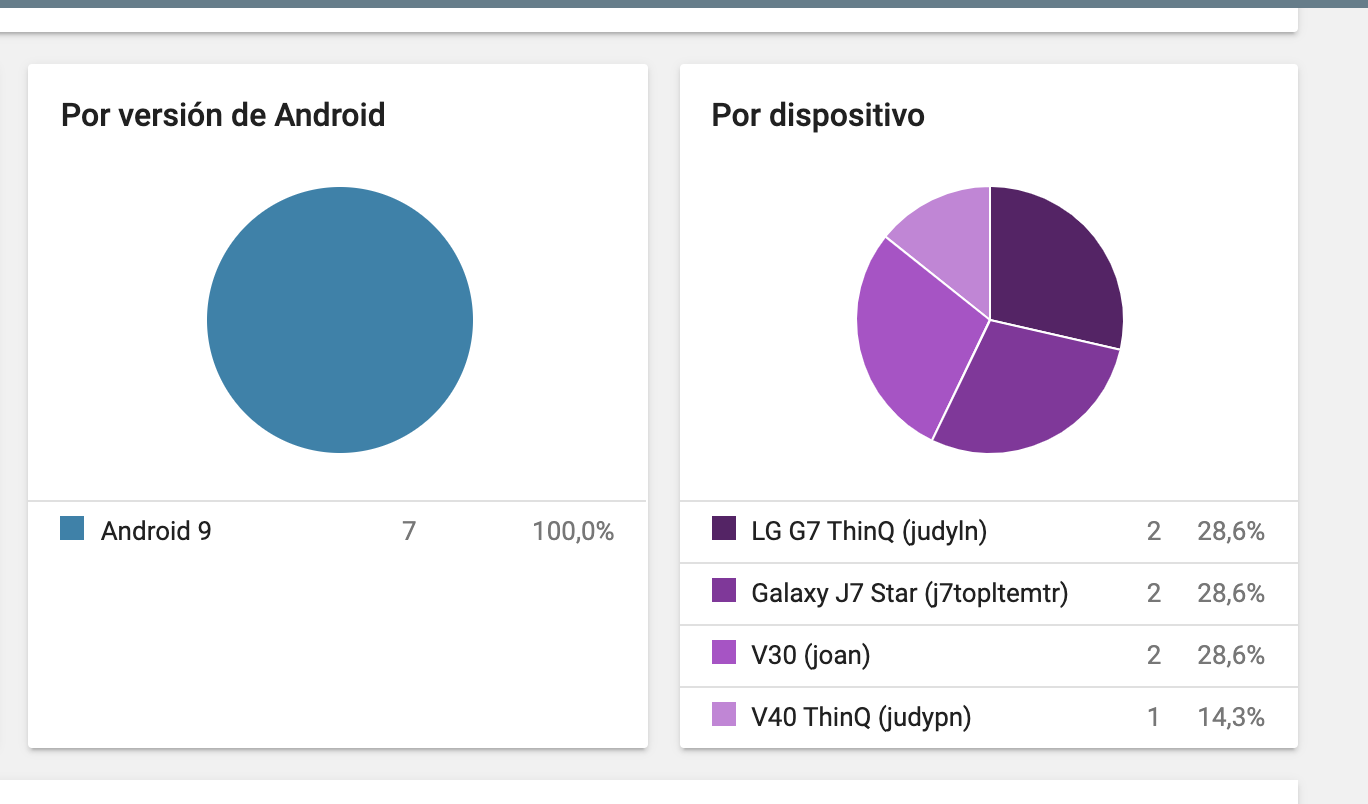
 claudioredi
on 23 Dec 2019
claudioredi
on 23 Dec 2019
@tipa or @claudioredi can you reproduce the issue? Or only have reports from Google Play?
Can you post the adb logcat output?
 jonathanpeppers
on 7 Jan 2020
jonathanpeppers
on 7 Jan 2020
@jonathanpeppers I only see it on google play, sorry :(
claudioredi
on 7 Jan 2020
Same here, not able to reproduce the issue, only reports from Google Play.
Seems to affect Android 9 devices exclusively and mainly Samsung Galaxy Phones + Tablets.
tipa
on 7 Jan 2020
We are unable to investigate this issue further without the requested information.
Hopefully you found a resolution meanwhile! If not, please try the latest version of the product and if the problem still occurs, reply with the requested information and reopen this issue.
 radekdoulik
on 7 Feb 2020
radekdoulik
on 7 Feb 2020
I'm also seeing this issue through Google Play only, on a small number of devices (but users seem persistent, and keep trying the app), and since I've changed to aab.
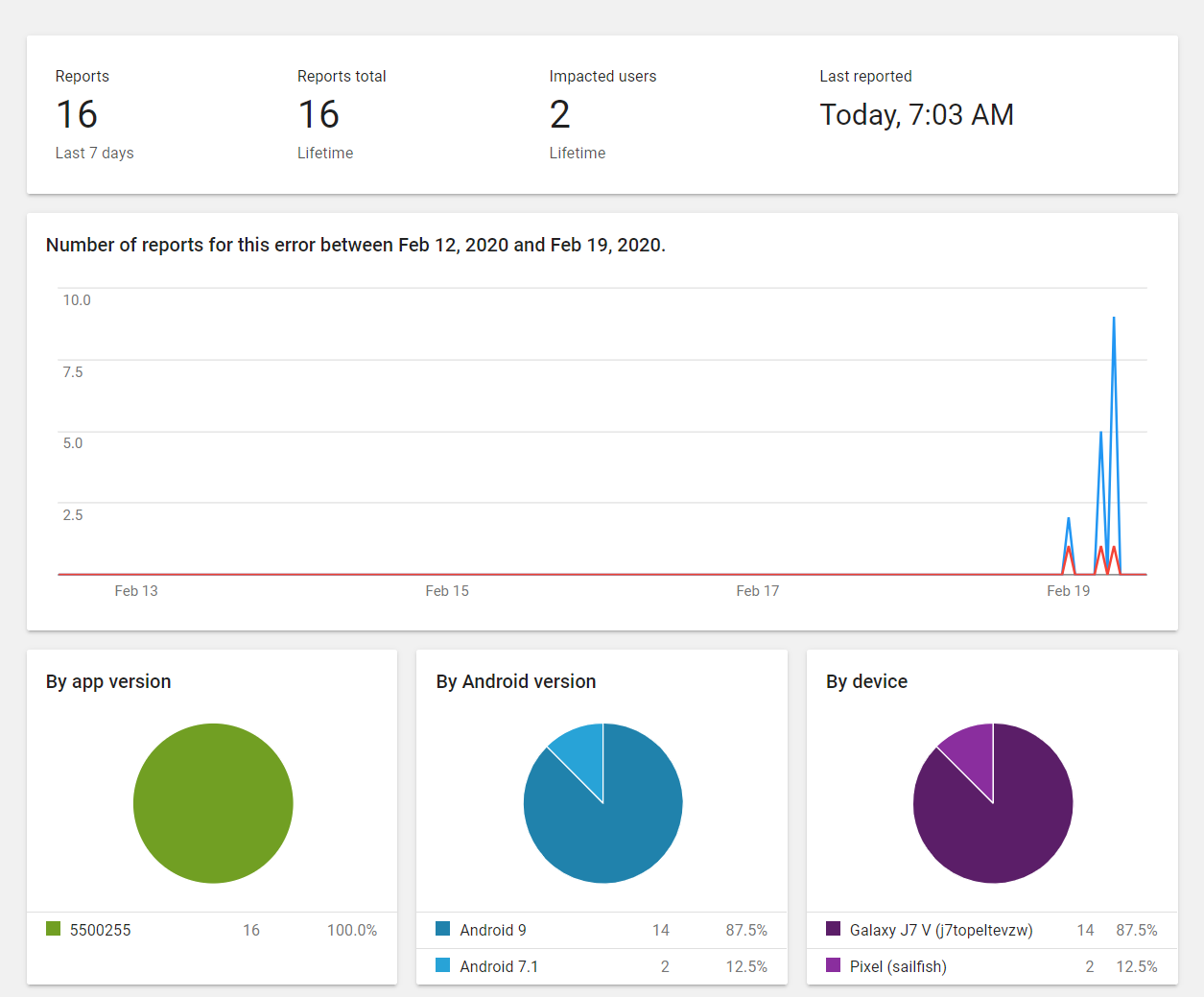
Are you guys saying this is closed since we don't have a local repro?
 wouterattoptal
on 19 Feb 2020
wouterattoptal
on 19 Feb 2020
@radekdoulik We are also having Google Play Crashes regarding UnsatisfiedLinkError:

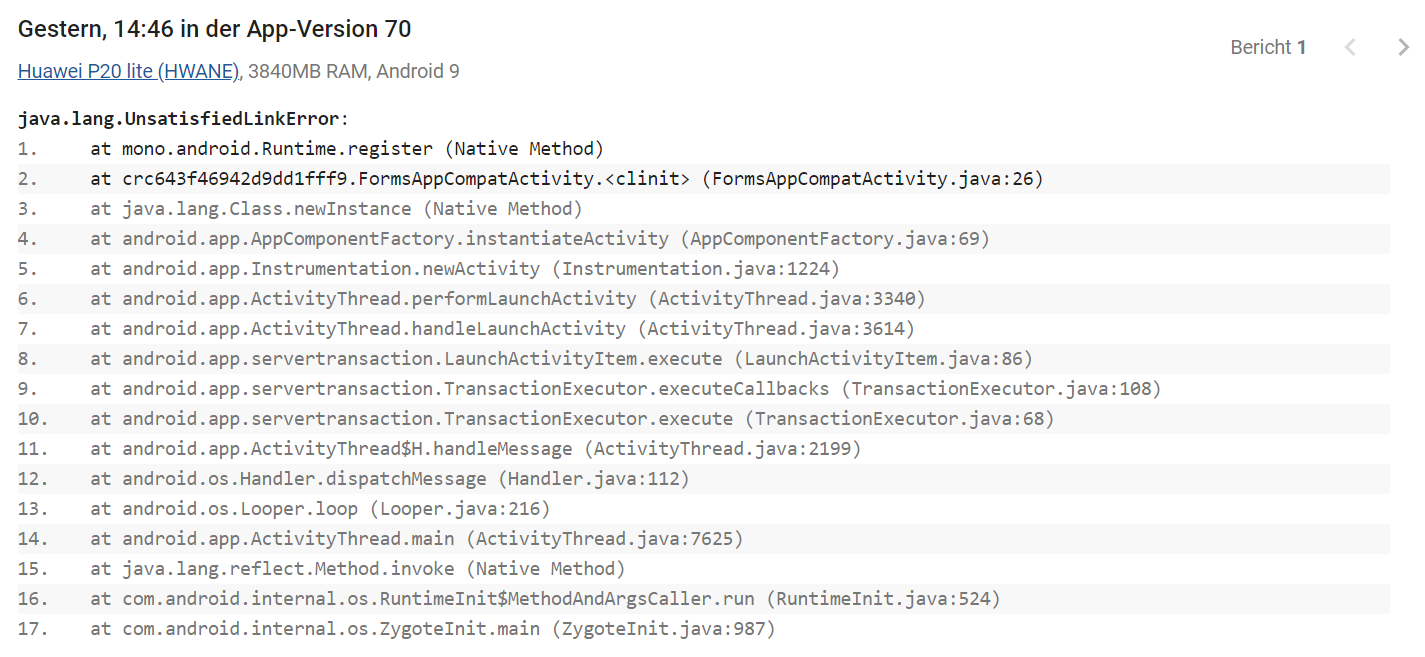
We are using App Bundle and Visual Studio 2019 16.4.5 targeting Android 10.
These two are the most popular crashes in our app and we don't know how to solve it or investigate further as we are not able to reproduce these crashes even with the same test devices with same Android versions.
So what do you suggest in order to solve these issues?
 MarvinFrankenfeld
on 18 Mar 2020
MarvinFrankenfeld
on 18 Mar 2020
I'm also seeing this error. App has worked fine for a long time with over a thousand installs. Just seen on one device so far, four times, a Galaxy J7 Neo with Android 9. I also recently switched to an app bundle. Occurs in loadLibrary0, identical stack trace. VS 2019 16.5.5 was used to make it.
Just going to link to the currently open issue: https://github.com/xamarin/xamarin-android/issues/4557
 BioTurboNick
on 5 Jun 2020
BioTurboNick
on 5 Jun 2020
@radekdoulik , any updates here? Crashes still occuring and I can see we are not the only ones having this kind of problem.
MarvinFrankenfeld
on 11 Sep 2020
I have the same problem. Any updates?
 holecekp
on 24 Sep 2020
holecekp
on 24 Sep 2020
Same issue here - after switching to app bundle. So perhaps the issue is with app bundle?
 JesperBalslev
on 22 Oct 2020
JesperBalslev
on 22 Oct 2020
This stack trace after updating an app definitely happens regardless of whether you use an app bundle or not. I always get a handful of these after every update I do. So it is possible that the aab aspect is a red herring, and the simple act of updating the app has led to the problem.
For the people who are experiencing it, how many existing installs do you have, and how many users are affected after updating?
 bellissimo
on 22 Oct 2020
bellissimo
on 22 Oct 2020
Maybe related to ProGuard?
JesperBalslev
on 22 Oct 2020
I doubt it. I used to get this error even before I used ProGuard. I think the issue is rather more fundamental in that one or more of the shared libraries are simply not present.
bellissimo
on 22 Oct 2020
FWIW, I didn't have an instance after any other update. ~1500 active installs
BioTurboNick
on 22 Oct 2020
How many users had this failure out of the 1500?
bellissimo
on 22 Oct 2020
BioTurboNick
on 22 Oct 2020
See: https://github.com/xamarin/xamarin-android/issues/5149
Does anyone have a crash reporter like Firebase.Crashlytics setup? It could potentially give us more information. Right now we don't really know what is going on here.
Looking at AppCenter's SDK, I don't think it could possibly catch this crash because it occurs before any managed C# code runs.
jonathanpeppers
on 22 Oct 2020
@jonathanpeppers I am using AppCenter and correct, it did not catch it.
BioTurboNick
on 22 Oct 2020
Yep, it does not get through to AppCenter, as you may expect since it does not seem to get as far as starting the app.
Regarding the App Bundle aspect of this, as far as I understand it the AAR is simply used to generate an APK specific to the device, using bundletool. So it is hard to see how the AAR could be a cause of this issue, unless there is a bug with bundletool.
bellissimo
on 22 Oct 2020
I have also the same problem. I did some research on the statistics provided by Google Play Console and my suspicion is that these crashes happen when the application is installed on a new device (not updates). I have thought that this is problem of Xamarin.Forms so I created an issue with more details there (https://github.com/xamarin/Xamarin.Forms/issues/12218#issuecomment-698899776)
holecekp
on 22 Oct 2020
I was able to use the latest Xamarin.Firebase.Crashlytics NuGet package and get crash reports of UnsatisfiedLinkError.
I listed a few manual steps for this here: https://github.com/xamarin/xamarin-android/issues/5149#issuecomment-716846107
Would someone be able to try this in their app? Thanks!
jonathanpeppers
on 26 Oct 2020
Has anyone been able to try Xamarin.Firebase.Crashlytics?
I realized that my Github repo wasn't public, but I fixed that so it is public now:
https://github.com/jonathanpeppers/xamarin-crashes
The important bit is moving the ContentProvider so it runs first and can report on crashes in Xamarin.Android startup:
jonathanpeppers
on 12 Nov 2020
@CDrosos when I looked AppCenter doesn't use an Android ContentProvider written in Java/Kotlin to configure itself. It appears to only be configured in C# and can't possibly report on a native crash in Xamarin.Android startup. It is crashing before any managed C# code is running.
jonathanpeppers
on 12 Nov 2020
I also have those UnsatisfiedLinkError crashes in my app, many of them.
I have noticed however this:
In Google Play Console all those errors appear in the Crashes & ANR section when no filter is selected. If i select the filter: "Installed from Google Play" then all those crashes disappear.
Does this mean i don't actually have to worry about this crash? Is it maybe being installed automatically from some other free android store market? How can an app being installed from another source other than Google Play? i haven't put the app or the apk on another store.
 CDrosos
on 12 Nov 2020
CDrosos
on 12 Nov 2020
I'm seeing the same as @CDrosos : The errors seem to occur outside Play Store installs.
BioTurboNick
on 13 Nov 2020
@CDrosos / @BioTurboNick if these installs are outside Google Play, there is probably one these happening:
- A user is sideloading your
.apkon a device your app doesn't really support. - Someone is pirating your app, and submitting it to a _different_ app store.
- You are using Android app bundles, and users are trying to sideload your app, but are completely doing it wrong. I can't imagine they would be able to run bundletool correctly or get the proper set of
.apkfiles for their specific device. You would generally need to install 4.apkfiles for an app bundle manually, if you aren't usingbundletool.
When I worked for a different company, our games were commonly pirated in China and other countries. So much so, we made an official version for China with custom content and submitted this version to 20+ of their app stores.
jonathanpeppers
on 13 Nov 2020
@jonathanpeppers You are right. I have also a plenty of these error reports but I could not believe that these are from a pirated, or sideloaded app. I could not see a reason why would someone bother pirating my application when it is free and it is also available also on AppGallery for Huawei devices that cannot install apps from Google Play (however, this is a slightly modified version with the same name but with a suffix in the identifier, so I can rule out that these errors are be from the AppGallery version).
Then I tried to search my application on apkpure.com and I found it! It had been uploaded by someone called "Phạm Tam". So you are right. These errors are not from the official version.
holecekp
on 13 Nov 2020
@jonathanpeppers , in our case the crashes also appear for officially installed apps by Google Play. Unfortunately we are using MS AppCenter and cannot use Firebase.
MarvinFrankenfeld
on 13 Nov 2020
@MarvinFrankenfeld maybe is a good idea to use bundletool to create the apks from bundle manually and debug those apks for errors. Bundletool documentation suggests that also
CDrosos
on 13 Nov 2020
Related issues
 KSemenenko
·
3Comments
KSemenenko
·
3Comments
 Sebastian1989101
·
4Comments
Sebastian1989101
·
4Comments
 rusanov-vladimir
·
4Comments
rusanov-vladimir
·
4Comments
 EDMIStephen
·
4Comments
EDMIStephen
·
4Comments
 jonpryor
·
4Comments
jonpryor
·
4Comments
Most helpful comment
@CDrosos / @BioTurboNick if these installs are outside Google Play, there is probably one these happening:
.apkon a device your app doesn't really support..apkfiles for their specific device. You would generally need to install 4.apkfiles for an app bundle manually, if you aren't usingbundletool.When I worked for a different company, our games were commonly pirated in China and other countries. So much so, we made an official version for China with custom content and submitted this version to 20+ of their app stores.