Xamarin-android: No Launchable Activity even though it's set
Even though MainLauncher is set as follows:
[Activity(Label = "AppName", Icon = "@drawable/Icon", Theme = "@style/MainTheme", MainLauncher = true, ConfigurationChanges = ConfigChanges.ScreenSize | ConfigChanges.Orientation)]
public class MainActivity : global::Xamarin.Forms.Platform.Android.FormsAppCompatActivity
I get:
No Launchable Activity: This project does not contain any activities marked MainLauncher. It has been deployed to the device, but no activity will be launched.
To mark an activity as launchable, add the [Activity] attribute to it with MainLauncher = true:
[Activity (MainLauncher = true)]
public class MyActivity : Activity
 KNSSoftware
All 23 comments
@KNSSoftware are you able to provide a sample project to repo the issue? Or at the very least you're AndroidManifest.xml file from both your project AND the one generated in the intermediate output path (ob\Debug\android\AndroidManifest.xml). We need to figure out why the launcher is not be auto generated and added to the manifest. The Activity attribute should be handling that.
 dellis1972
on 28 Nov 2019
dellis1972
on 28 Nov 2019
@dellis1972 @jonathanpeppers I could provide my real life project, but it would have to be provided in private and remain so, and not openly on github (if this a way forward, let me know how). I can't make a new project suddenly 'repro' this issue, and I have moved other apps from VS2015 to VS2019 without issue, but my punt would be something about specific projects that were created and work in 2015 that suddenly stop working in 2019. If I strip the one in question to within an inch of it's life, it does deploy, but that is 99% of the app gone, that I don't know what the issue is. It is then easy to say I have something wrong, but it works and continues to work in 2015, just not 2019, and I need to start using the new API targets for PlayStore, so I have no choice. Not only this, the fact remains VS2019 is claiming there is no launcher activity, which is not the case, so even if there is a compatibility issue somewhere, the error is misleading.
The supplementary outputs you have asked for have been provided by another user on VS who reported the incident last month, and it didn't shed any more light,
In summary if you want a physical project that exhibits the problem in private to interrogate, let me know how.
KNSSoftware
on 28 Nov 2019
@KNSSoftware can you share the APK file with the issue?
A diagnostic MSBuild log would also help, thanks!
 jonathanpeppers
on 2 Dec 2019
KNSSoftware
on 2 Dec 2019
jonathanpeppers
on 2 Dec 2019
KNSSoftware
on 2 Dec 2019
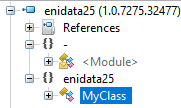
Reviewing this APK, the manifest has no activities listed at all. Is MyActivity.cs added to the project?
I don't see it in the build log or the decompiled assembly?
jonathanpeppers
on 2 Dec 2019
Ah, sorry, the original error was not logged by me, but another user on a different forum. Mine is exactly the same, so as they worded the issue so well, I copied their whole OP. I should have removed/changed the activity class they had made. Mine does have over 50 activities, but not one called that.
As the original issue regards the error "no launcher activity" set, and the APK the debugger deploys looks to confirm this (as it installs, with no icon, but no activity launches), I suspect this has nothing to do with the 'MainLauncher' attribute, and more the fact that VS2019 in this instance is not finding any of the activities, let alone a launchable one (if you are saying you can't find any of mine).
KNSSoftware
on 2 Dec 2019
Sorry did not mean to close it (not sure how I even did it).
KNSSoftware
on 2 Dec 2019
What .NET assembly and activity/class name should I be looking for?
jonathanpeppers
on 2 Dec 2019
What do you mean in terms of .Net assembly? All of the activities reside in the main assembly, so are not referenced into the project, if that is what you mean. enidata25 is the root, and the activity with the MainLauncher attribute is called 'actSplash'. Hopefully I have not misunderstood what you need to know.
KNSSoftware
on 3 Dec 2019
So if you look at my screenshot: https://github.com/xamarin/xamarin-android/issues/3970#issuecomment-560550573
enidata25.dll only has 1 class named Class1, looking further it is a Portable Class Library.
Do you have two assemblies named the same? One is a PCL and one is a Xamarin.Android app containing your MainActivity?
jonathanpeppers
on 3 Dec 2019
Yes there is an unused PCL, that I left from creating as a shared project (I left it just in case i was going to make an iOS version, so was ready to shift code into shared). It is called 'enidata25'. I am not sure which field is being used as the assembly name for the android project, as it is not so clear:
[assembly: AssemblyTitle ("enidata25.Android")]
package="uk.co.enidata.enidata25"
android:label="enidata25"
Just for clarification, if you are saying this is an issue, it is all named the same in the VS2015 solutions (as it was a direct copy and paste), and that didn't have an issue with these naming.
KNSSoftware
on 3 Dec 2019
Just for completeness, I removed the reference to the PCL, and rebuilt the xamarin.Android app containing my MainActivity; the same issue persists. Please see new log and APK for evidence/information.
KNSSoftware
on 3 Dec 2019
enidata25.dll in this new APK is still a PCL, and I'm not finding enidata25.Android.dll?
Can you change this value in your .csproj file?
<AssemblyName>enidata25.Android</AssemblyName>
OK here is what happened:
Based on your comment, I re-checked “Manage References” and the dependency was gone, however there was still a reference under the 'References' folder. I removed this manually, as well as the actual PCL, which I was not using anyway. It still did not fix the problem.
I manually changed the .csproj file as you requested, and it broke things. It did however highlight the field it is attached to, which was well named and somehow, I still missed. After reverting the csproj, and using the properties editor to change the assembly name, the deployment began to work again.
To make sure we are all happy with the actual issue, I decided to do the following tests:
I replaced the solution with the original (the one with the PCL), and tried the assembly renaming attempts again. It only worked when the android project was renamed something different to the PCL.
In conclusion, for some reason VS2015 did not mind when both assemblies were named the same. I am not sure if it handles it differently under the hood, but the bottom line is, VS2019 does not handle the two assemblies being named the same, while VS2015 does. Whether this is intended/bug/something that can be realigned back to how VS2015 handled the situation, is down to you guys, but at least the source of the issue has been identified...
Thanks for your help.
KNSSoftware
on 3 Dec 2019
So I'm not sure how this would work in 2015 either...
Your .NET assemblies are _inside_ the APK at assemblies/. Which one is used at runtime? Who knows? It is probably just "lucky" that it somehow worked in 2015?
We should probably add some kind of an error message for this scenario.
jonathanpeppers
on 3 Dec 2019
In case you are as curious as me, I have attached the diagnostics log and APK from 2015. Maybe 2015 builds the projects in a slightly different order or even any async building you may have added, coupled with maybe first/last project to build 'win' and makes it as the assembly to be included??
I would totally agree about adding the check and warning, as I would like to think it would be fairly straight forward for you guys to add, and leaving the issue to flow downstream results in a wild goose chase of an error.
KNSSoftware
on 3 Dec 2019
I've had this issue since September 20th. Visual Studio issue tracker: https://developercommunity.visualstudio.com/content/problem/741940/no-launchable-activity-even-though-its-set.html.
 Jakar510
on 6 Dec 2019
Jakar510
on 6 Dec 2019
@Jakar510 the issue here was that two assemblies were named the same (which won't work). Is that happening in your solution?
jonathanpeppers
on 6 Dec 2019
I have the same problem after trying to migrate from .netstandard 1.6 to 2.0
 alexandresanlim
on 9 Jan 2020
alexandresanlim
on 9 Jan 2020
@alexandresanlim as @jonathanpeppers pointed out the issue here was the NETStandard assembly had the same name as the main application assembly. Can you check the assemblyName settings for both your NetStandard Project and the Android one?
dellis1972
on 10 Jan 2020
that was it
alexandresanlim
on 20 Jan 2020
@alexandresanlim, thank you for the information.
@dellis1972 @jonathanpeppers could we close the issue or do you plan to add a new error message for that?
 radekdoulik
on 26 Feb 2020
radekdoulik
on 26 Feb 2020
Im just gonna leave this comment here in case someone has the same problem. I had the same issue and the reason for that was I had two application elements inside AndroidManifest.xml with the same label. You only can have one apparently.
 rjlovesu
on 8 Jul 2020
rjlovesu
on 8 Jul 2020
Related issues
 muhaym
·
59Comments
muhaym
·
59Comments
 dlpopescu
·
51Comments
dlpopescu
·
51Comments
 marcellangmaier
·
47Comments
marcellangmaier
·
47Comments
 hesamdarbandi
·
59Comments
hesamdarbandi
·
59Comments
 darkblackcorner
·
49Comments
darkblackcorner
·
49Comments
Most helpful comment
Im just gonna leave this comment here in case someone has the same problem. I had the same issue and the reason for that was I had two application elements inside AndroidManifest.xml with the same label. You only can have one apparently.