Xamarin-android: App Bundle crashes on startup on x86 Chromebooks when install location set to internalOnly
Updated repro steps
- File->New Xamarin Android
- Set package format to AAB
- Set ABIs to include x86 and x86_64
- Set manfiest install location to
internalOnly - Distribute through Store and install on x86 Chromebook
- Notice that app crashes upon launch with following logcat output
10-31 17:12:12.129  1700  1700 F art     : art/runtime/java_vm_ext.cc:471] JNI DETECTED ERROR IN APPLICATION: mid == null
10-31 17:12:12.129  1700  1700 F art     : art/runtime/java_vm_ext.cc:471]     in call to CallStaticIntMethodV
10-31 17:12:12.129  1700  1700 F art     : art/runtime/java_vm_ext.cc:471]     from void mono.android.Runtime.initInternal(java.lang.String, java.lang.String[], java.lang.String, java.lang.String[], java.lang.ClassLoader, java.lang.String[], java.lang.String[], int, boolean)
10-31 17:12:12.129  1700  1700 F art     : art/runtime/java_vm_ext.cc:471] "main" prio=5 tid=1 Runnable
10-31 17:12:12.129  1700  1700 F art     : art/runtime/java_vm_ext.cc:471]   | group="main" sCount=0 dsCount=0 obj=0x759eae50 self=0xed28b400
10-31 17:12:12.129  1700  1700 F art     : art/runtime/java_vm_ext.cc:471]   | sysTid=1700 nice=-5 cgrp=default sched=0/0 handle=0xf2592534
10-31 17:12:12.129  1700  1700 F art     : art/runtime/java_vm_ext.cc:471]   | state=R schedstat=( 448327563 73124974 294 ) utm=21 stm=23 core=0 HZ=100
10-31 17:12:12.129  1700  1700 F art     : art/runtime/java_vm_ext.cc:471]   | stack=0xff5ca000-0xff5cc000 stackSize=8MB
10-31 17:12:12.130  1700  1700 F art     : art/runtime/java_vm_ext.cc:471]   | held mutexes= "mutator lock"(shared held)
10-31 17:12:12.130  1700  1700 F art     : art/runtime/java_vm_ext.cc:471]   native: #00 pc 0058848e  /system/lib/libart.so (_ZN3art15DumpNativeStackERNSt3__113basic_ostreamIcNS0_11char_traitsIcEEEEiP12BacktraceMapPKcPNS_9ArtMethodEPv+238)
10-31 17:12:12.130  1700  1700 F art     : art/runtime/java_vm_ext.cc:471]   native: #01 pc 00553ebe  /system/lib/libart.so (_ZNK3art6Thread9DumpStackERNSt3__113basic_ostreamIcNS1_11char_traitsIcEEEEbP12BacktraceMap+526)
10-31 17:12:12.130  1700  1700 F art     : art/runtime/java_vm_ext.cc:471]   native: #02 pc 00550ebb  /system/lib/libart.so (_ZNK3art6Thread4DumpERNSt3__113basic_ostreamIcNS1_11char_traitsIcEEEEbP12BacktraceMap+75)
10-31 17:12:12.130  1700  1700 F art     : art/runtime/java_vm_ext.cc:471]   native: #03 pc 0039c27e  /system/lib/libart.so (_ZN3art9JavaVMExt8JniAbortEPKcS2_+1518)
10-31 17:12:12.130  1700  1700 F art     : art/runtime/java_vm_ext.cc:471]   native: #04 pc 0039ce5c  /system/lib/libart.so (_ZN3art9JavaVMExt9JniAbortFEPKcS2_z+124)
10-31 17:12:12.130  1700  1700 F art     : art/runtime/java_vm_ext.cc:471]   native: #05 pc 003ff26d  /system/lib/libart.so (_ZN3art3JNI20CallStaticIntMethodVEP7_JNIEnvP7_jclassP10_jmethodIDPc+221)
10-31 17:12:12.130  1700  1700 F art     : art/runtime/java_vm_ext.cc:471]   native: #06 pc 0000f3b3  /data/app/com.barebonesdev.powerplannerbundle-1/split_config.x86.apk (???)
10-31 17:12:12.130  1700  1700 F art     : art/runtime/java_vm_ext.cc:471]   native: #07 pc 0000f36c  /data/app/com.barebonesdev.powerplannerbundle-1/split_config.x86.apk (???)
10-31 17:12:12.130  1700  1700 F art     : art/runtime/java_vm_ext.cc:471]   native: #08 pc 000006fb   (???)
10-31 17:12:12.130  1700  1700 F art     : art/runtime/java_vm_ext.cc:471]   at mono.android.Runtime.initInternal(Native method)
10-31 17:12:12.130  1700  1700 F art     : art/runtime/java_vm_ext.cc:471]   at mono.MonoPackageManager.LoadApplication(MonoPackageManager.java:61)
10-31 17:12:12.130  1700  1700 F art     : art/runtime/java_vm_ext.cc:471]   at mono.MonoRuntimeProvider.attachInfo(MonoRuntimeProvider.java:35)
10-31 17:12:12.130  1700  1700 F art     : art/runtime/java_vm_ext.cc:471]   at android.app.ActivityThread.installProvider(ActivityThread.java:5999)
10-31 17:12:12.130  1700  1700 F art     : art/runtime/java_vm_ext.cc:471]   at android.app.ActivityThread.installContentProviders(ActivityThread.java:5591)
10-31 17:12:12.130  1700  1700 F art     : art/runtime/java_vm_ext.cc:471]   at android.app.ActivityThread.handleBindApplication(ActivityThread.java:5530)
10-31 17:12:12.130  1700  1700 F art     : art/runtime/java_vm_ext.cc:471]   at android.app.ActivityThread.-wrap2(ActivityThread.java:-1)
10-31 17:12:12.130  1700  1700 F art     : art/runtime/java_vm_ext.cc:471]   at android.app.ActivityThread$H.handleMessage(ActivityThread.java:1595)
10-31 17:12:12.130  1700  1700 F art     : art/runtime/java_vm_ext.cc:471]   at android.os.Handler.dispatchMessage(Handler.java:102)
10-31 17:12:12.130  1700  1700 F art     : art/runtime/java_vm_ext.cc:471]   at android.os.Looper.loop(Looper.java:154)
10-31 17:12:12.130  1700  1700 F art     : art/runtime/java_vm_ext.cc:471]   at android.app.ActivityThread.main(ActivityThread.java:6320)
10-31 17:12:12.130  1700  1700 F art     : art/runtime/java_vm_ext.cc:471]   at java.lang.reflect.Method.invoke!(Native method)
10-31 17:12:12.130  1700  1700 F art     : art/runtime/java_vm_ext.cc:471]   at com.android.internal.os.ZygoteInit$MethodAndArgsCaller.run(ZygoteInit.java:891)
10-31 17:12:12.130  1700  1700 F art     : art/runtime/java_vm_ext.cc:471]   at com.android.internal.os.ZygoteInit.main(ZygoteInit.java:781)
Workaround
Change install location to auto and the app bundle launches fine
Version Information
VS 16.4 Preview 2
Original description
Note that I've switched my source code to use install location auto so the bug no longer repros with it.
When I build an app bundle, my app crashes upon startup on chromebooks. If I build separate APKs per platform, it works correctly.
App source code: https://github.com/powerplanner/powerplannerapps
Version Information
VS 16.3 (I'm using Azure DevOps Hosted Agent Windows 2019, which they confirmed was updated to 16.3 eight days ago.
I'll be switching back to APKs for now.
 andrewleader
All 29 comments
@andrewleader could you provide a full output of the crash, please?
 grendello
on 4 Oct 2019
grendello
on 4 Oct 2019
@grendello @brendanzagaeski here's the FULL LOGCAT while I launched the app and it crashed immediately on chromebook.
App is "powerplanner" and the process ID is 921. You can install the app using internal app sharing with this link.
Here's some relevant snippets I noticed...
921 921 W ResourceType: ResTable_typeSpec entry count inconsistent: given 174, previously 179
Idk if this is related to localization? One user mentioned that the spanish language stopped working and it reverted back to English.
10-04 10:49:38.044   921   921 W monodroid: Unknown Mono AOT mode: 1
10-04 10:49:38.047   921   921 W monodroid: Using runtime path: /data/app/com.barebonesdev.powerplanner-1/lib/x86
This seems suspicious... Maybe app bundles don't work together with AOT? I'm using AOT.
10-04 10:49:47.884   921   921 F art     : art/runtime/java_vm_ext.cc:471] JNI DETECTED ERROR IN APPLICATION: mid == null
10-04 10:49:47.884   921   921 F art     : art/runtime/java_vm_ext.cc:471]     in call to CallStaticIntMethodV
10-04 10:49:47.884   921   921 F art     : art/runtime/java_vm_ext.cc:471]     from void mono.android.Runtime.initInternal(java.lang.String, java.lang.String[], java.lang.String, java.lang.String[], java.lang.ClassLoader, java.lang.String[], java.lang.String[], int, boolean)
10-04 10:49:47.884   921   921 F art     : art/runtime/java_vm_ext.cc:471] "main" prio=5 tid=1 Runnable
10-04 10:49:47.884   921   921 F art     : art/runtime/java_vm_ext.cc:471]   | group="main" sCount=0 dsCount=0 obj=0x759eae50 self=0xf078b400
10-04 10:49:47.893   921   921 F art     : art/runtime/java_vm_ext.cc:471]   | sysTid=921 nice=0 cgrp=bg_non_interactive sched=0/0 handle=0xf5a81534
10-04 10:49:47.893   921   921 F art     : art/runtime/java_vm_ext.cc:471]   | state=R schedstat=( 884809697 8770416908 2190 ) utm=32 stm=55 core=0 HZ=100
10-04 10:49:47.893   921   921 F art     : art/runtime/java_vm_ext.cc:471]   | stack=0xff0d7000-0xff0d9000 stackSize=8MB
10-04 10:49:47.893   921   921 F art     : art/runtime/java_vm_ext.cc:471]   | held mutexes= "mutator lock"(shared held)
10-04 10:49:47.893   921   921 F art     : art/runtime/java_vm_ext.cc:471]   native: #00 pc 0058848e  /system/lib/libart.so (_ZN3art15DumpNativeStackERNSt3__113basic_ostreamIcNS0_11char_traitsIcEEEEiP12BacktraceMapPKcPNS_9ArtMethodEPv+238)
10-04 10:49:47.893   921   921 F art     : art/runtime/java_vm_ext.cc:471]   native: #01 pc 00553ebe  /system/lib/libart.so (_ZNK3art6Thread9DumpStackERNSt3__113basic_ostreamIcNS1_11char_traitsIcEEEEbP12BacktraceMap+526)
10-04 10:49:47.893   921   921 F art     : art/runtime/java_vm_ext.cc:471]   native: #02 pc 00550ebb  /system/lib/libart.so (_ZNK3art6Thread4DumpERNSt3__113basic_ostreamIcNS1_11char_traitsIcEEEEbP12BacktraceMap+75)
10-04 10:49:47.893   921   921 F art     : art/runtime/java_vm_ext.cc:471]   native: #03 pc 0039c27e  /system/lib/libart.so (_ZN3art9JavaVMExt8JniAbortEPKcS2_+1518)
10-04 10:49:47.893   921   921 F art     : art/runtime/java_vm_ext.cc:471]   native: #04 pc 0039ce5c  /system/lib/libart.so (_ZN3art9JavaVMExt9JniAbortFEPKcS2_z+124)
10-04 10:49:47.893   921   921 F art     : art/runtime/java_vm_ext.cc:471]   native: #05 pc 003ff26d  /system/lib/libart.so (_ZN3art3JNI20CallStaticIntMethodVEP7_JNIEnvP7_jclassP10_jmethodIDPc+221)
10-04 10:49:47.893   921   921 F art     : art/runtime/java_vm_ext.cc:471]   native: #06 pc 0000f3b3  /data/app/com.barebonesdev.powerplanner-1/split_config.x86.apk (???)
10-04 10:49:47.893   921   921 F art     : art/runtime/java_vm_ext.cc:471]   native: #07 pc 0000f36c  /data/app/com.barebonesdev.powerplanner-1/split_config.x86.apk (???)
10-04 10:49:47.893   921   921 F art     : art/runtime/java_vm_ext.cc:471]   native: #08 pc 000065a3   (???)
10-04 10:49:47.893   921   921 F art     : art/runtime/java_vm_ext.cc:471]   at mono.android.Runtime.initInternal(Native method)
10-04 10:49:47.893   921   921 F art     : art/runtime/java_vm_ext.cc:471]   at mono.MonoPackageManager.LoadApplication(MonoPackageManager.java:61)
10-04 10:49:47.893   921   921 F art     : art/runtime/java_vm_ext.cc:471]   at mono.MonoRuntimeProvider.attachInfo(MonoRuntimeProvider.java:35)
10-04 10:49:47.893   921   921 F art     : art/runtime/java_vm_ext.cc:471]   at android.app.ActivityThread.installProvider(ActivityThread.java:5999)
10-04 10:49:47.893   921   921 F art     : art/runtime/java_vm_ext.cc:471]   at android.app.ActivityThread.installContentProviders(ActivityThread.java:5591)
10-04 10:49:47.893   921   921 F art     : art/runtime/java_vm_ext.cc:471]   at android.app.ActivityThread.handleBindApplication(ActivityThread.java:5530)
10-04 10:49:47.893   921   921 F art     : art/runtime/java_vm_ext.cc:471]   at android.app.ActivityThread.-wrap2(ActivityThread.java:-1)
10-04 10:49:47.893   921   921 F art     : art/runtime/java_vm_ext.cc:471]   at android.app.ActivityThread$H.handleMessage(ActivityThread.java:1595)
10-04 10:49:47.893   921   921 F art     : art/runtime/java_vm_ext.cc:471]   at android.os.Handler.dispatchMessage(Handler.java:102)
10-04 10:49:47.893   921   921 F art     : art/runtime/java_vm_ext.cc:471]   at android.os.Looper.loop(Looper.java:154)
10-04 10:49:47.893   921   921 F art     : art/runtime/java_vm_ext.cc:471]   at android.app.ActivityThread.main(ActivityThread.java:6320)
10-04 10:49:47.893   921   921 F art     : art/runtime/java_vm_ext.cc:471]   at java.lang.reflect.Method.invoke!(Native method)
10-04 10:49:47.893   921   921 F art     : art/runtime/java_vm_ext.cc:471]   at com.android.internal.os.ZygoteInit$MethodAndArgsCaller.run(ZygoteInit.java:891)
10-04 10:49:47.893   921   921 F art     : art/runtime/java_vm_ext.cc:471]   at com.android.internal.os.ZygoteInit.main(ZygoteInit.java:781)
10-04 10:49:47.893   921   921 F art     : art/runtime/java_vm_ext.cc:471]
That seems like something!! A quick google search brings up this, however my install location IS set to internalOnly, so that's not it.
andrewleader
on 4 Oct 2019
Disabling AOT doesn't fix it, error seems kind of similar... (FULL LOGS, link to app without AOT)
10-04 10:49:48.485  1308  1308 F DEBUG   : pid: 921, tid: 921, name: ev.powerplanner  >>> com.barebonesdev.powerplanner <<<
10-04 10:49:48.485  1308  1308 F DEBUG   : signal 6 (SIGABRT), code -6 (SI_TKILL), fault addr --------
10-04 10:49:48.487  1308  1308 F DEBUG   : Abort message: 'art/runtime/java_vm_ext.cc:471] JNI DETECTED ERROR IN APPLICATION: mid == null'
10-04 10:49:48.487  1308  1308 F DEBUG   :     eax 00000000  ebx 00000399  ecx 00000399  edx 00000006
10-04 10:49:48.487  1308  1308 F DEBUG   :     esi f5a8158c  edi f5a81534
10-04 10:49:48.487  1308  1308 F DEBUG   :     xcs 00000023  xds 0000002b  xes 0000002b  xfs 0000006b  xss 0000002b
10-04 10:49:48.487  1308  1308 F DEBUG   :     eip f59a0a40  ebp ff8d1868  esp ff8d180c  flags 00000296
10-04 10:49:48.497  1308  1308 F DEBUG   :
10-04 10:49:48.497  1308  1308 F DEBUG   : backtrace:
10-04 10:49:48.497  1308  1308 F DEBUG   :     #00 pc 00000a40  [vdso:f59a0000] (__kernel_vsyscall+16)
10-04 10:49:48.497  1308  1308 F DEBUG   :     #01 pc 0008aafc  /system/lib/libc.so (tgkill+28)
10-04 10:49:48.497  1308  1308 F DEBUG   :     #02 pc 00086355  /system/lib/libc.so (pthread_kill+85)
10-04 10:49:48.497  1308  1308 F DEBUG   :     #03 pc 00036d3a  /system/lib/libc.so (raise+42)
10-04 10:49:48.497  1308  1308 F DEBUG   :     #04 pc 0002e246  /system/lib/libc.so (abort+86)
10-04 10:49:48.497  1308  1308 F DEBUG   :     #05 pc 0052cda5  /system/lib/libart.so (_ZN3art7Runtime5AbortEPKc+565)
10-04 10:49:48.497  1308  1308 F DEBUG   :     #06 pc 0011def3  /system/lib/libart.so (_ZN3art10LogMessageD1Ev+1939)
10-04 10:49:48.497  1308  1308 F DEBUG   :     #07 pc 0039cb81  /system/lib/libart.so (_ZN3art9JavaVMExt8JniAbortEPKcS2_+3825)
10-04 10:49:48.497  1308  1308 F DEBUG   :     #08 pc 0039ce5c  /system/lib/libart.so (_ZN3art9JavaVMExt9JniAbortFEPKcS2_z+124)
10-04 10:49:48.497  1308  1308 F DEBUG   :     #09 pc 003ff26d  /system/lib/libart.so (_ZN3art3JNI20CallStaticIntMethodVEP7_JNIEnvP7_jclassP10_jmethodIDPc+221)
10-04 10:49:48.497  1308  1308 F DEBUG   :     #10 pc 0000f3b3  /data/app/com.barebonesdev.powerplanner-1/split_config.x86.apk (offset 0x4c6c000)
10-04 10:49:48.497  1308  1308 F DEBUG   :     #11 pc 0000f36c  /data/app/com.barebonesdev.powerplanner-1/split_config.x86.apk (offset 0x4c6c000)
10-04 10:49:48.497  1308  1308 F DEBUG   :     #12 pc 000065a3  <anonymous:d7426000>
Note that I also tried all three garbage collection options (tarjan, new, old), nothing seems to make a difference. I tried disabling linking too (and I don't have proguard enabled either), no luck.
I also tried the VS 16.4 Preview, no difference here either.
andrewleader
on 4 Oct 2019
@andrewleader I built your app from the tip of the master branch in Release (Android) configuration (without AOT) and it runs fine on the Pixel 3 XL device. Could you generate a listing of your .aab archive (unzip -l will work fine) so that I can take a look at what's inside? For comparison, please find attached listing of the AAB I built.
grendello
on 10 Oct 2019
Thanks @grendello, but it crashes on chromebooks, not ARM phones. x86 chromebooks.
andrewleader
on 10 Oct 2019
Oh, I missed that bit in the OP, sorry :) My request still stands, however - please post the listing of the aab, thanks :)
grendello
on 10 Oct 2019
Listing with AOT: listing-aot.txt
Listing without AOT: listing-no-aot.txt
andrewleader
on 10 Oct 2019
andrewleader
on 10 Oct 2019
So, the only difference between listing-no-aot.txt (listing--sorted-01.txt in the diff) and aab-listing.txt is this:
$ diff -U3 listing-sorted-01.txt listing-sorted-02.txt
--- listing-sorted-01.txt   2019-10-10 19:23:27.163359560 +0200
+++ listing-sorted-02.txt   2019-10-10 19:22:13.596278016 +0200
@@ -1029,6 +1029,6 @@
 base/root/third_party/java_src/error_prone/project/annotations/Annotations.gwt.xml
 base/root/third_party/java_src/error_prone/project/annotations/Google_internal.gwt.xml
 BundleConfig.pb
-META-INF/BAREBONE.RSA
-META-INF/BAREBONE.SF
+META-INF/ANDROIDD.RSA
+META-INF/ANDROIDD.SF
 META-INF/MANIFEST.MF
Note that it crashes regardless of AOT, I was just including both variations in case one of them helped debugging (like maybe it's tougher to debug the root cause from an AOT package, so since it also crashes on non-AOT, you could use that).
The issue is that using App Bundles causes the app (regardless of AOT) to crash immediately upon startup on x86 chromebooks. If I just use APKs per each ABI, it doesn't crash.
andrewleader
on 10 Oct 2019
@andrewleader on what x86 chromebooks do you see the crash? I tried to reproduce it on a Pixelbook (both x86_64 and x86), but no luck.
 lewurm
on 10 Oct 2019
lewurm
on 10 Oct 2019
@andrewleader the version @lewurm was testing was built from the tip of your master branch with an up-to-date 16.3
grendello
on 10 Oct 2019
@andrewleader my version info:
Microsoft Visual Studio Enterprise 2019
Version 16.3.3
VisualStudio.16.Release/16.3.3+29403.142
Microsoft .NET Framework
Version 4.8.03752

Installed Version: Enterprise

Visual C++ 2019   00433-90050-34155-AA455
Microsoft Visual C++ 2019

Application Insights Tools for Visual Studio Package   9.1.00913.1
Application Insights Tools for Visual Studio

ASP.NET and Web Tools 2019   16.3.284.37798
ASP.NET and Web Tools 2019

Azure App Service Tools v3.0.0   16.3.284.37798
Azure App Service Tools v3.0.0

C# Tools   3.3.1-beta3-19461-02+2fd12c210e22f7d6245805c60340f6a34af6875b
C# components used in the IDE. Depending on your project type and settings, a different version of the compiler may be used.

Common Azure Tools   1.10
Provides common services for use by Azure Mobile Services and Microsoft Azure Tools.

Extensibility Message Bus   1.2.0 (d16-2@8b56e20)
Provides common messaging-based MEF services for loosely coupled Visual Studio extension components communication and integration.

IntelliCode Extension   1.0
IntelliCode Visual Studio Extension Detailed Info

Microsoft JVM Debugger   1.0
Provides support for connecting the Visual Studio debugger to JDWP compatible Java Virtual Machines

Microsoft MI-Based Debugger   1.0
Provides support for connecting Visual Studio to MI compatible debuggers

Microsoft Visual C++ Wizards   1.0
Microsoft Visual C++ Wizards

Microsoft Visual Studio VC Package   1.0
Microsoft Visual Studio VC Package

Mono Debugging for Visual Studio   16.3.7 (9d260c5)
Support for debugging Mono processes with Visual Studio.

NuGet Package Manager   5.3.0
NuGet Package Manager in Visual Studio. For more information about NuGet, visit https://docs.nuget.org/

Project System Tools   1.0
Tools for working with C#, VisualBasic, and F# projects.

ProjectServicesPackage Extension   1.0
ProjectServicesPackage Visual Studio Extension Detailed Info

Test Adapter for Boost.Test   1.0
Enables Visual Studio's testing tools with unit tests written for Boost.Test.  The use terms and Third Party Notices are available in the extension installation directory.

Test Adapter for Google Test   1.0
Enables Visual Studio's testing tools with unit tests written for Google Test.  The use terms and Third Party Notices are available in the extension installation directory.

TypeScript Tools   16.0.10821.2002
TypeScript Tools for Microsoft Visual Studio

Visual Basic Tools   3.3.1-beta3-19461-02+2fd12c210e22f7d6245805c60340f6a34af6875b
Visual Basic components used in the IDE. Depending on your project type and settings, a different version of the compiler may be used.

Visual F# Tools 10.4 for F# 4.6   16.3.0-beta.19455.1+0422ff293bb2cc722fe5021b85ef50378a9af823
Microsoft Visual F# Tools 10.4 for F# 4.6

Visual Studio Code Debug Adapter Host Package   1.0
Interop layer for hosting Visual Studio Code debug adapters in Visual Studio

Visual Studio Tools for CMake   1.0
Visual Studio Tools for CMake

Visual Studio Tools for CMake   1.0
Visual Studio Tools for CMake

VisualStudio.Mac   1.0
Mac Extension for Visual Studio

Xamarin   16.3.0.275 (d16-3@35ef585)
Visual Studio extension to enable development for Xamarin.iOS and Xamarin.Android.

Xamarin Designer   16.3.0.246 (remotes/origin/d16-3@bd2f86892)
Visual Studio extension to enable Xamarin Designer tools in Visual Studio.

Xamarin Templates   16.3.565 (27e9746)
Templates for building iOS, Android, and Windows apps with Xamarin and Xamarin.Forms.

Xamarin.Android SDK   10.0.3.0 (d16-3/4d45b41)
Xamarin.Android Reference Assemblies and MSBuild support.
    Mono: mono/mono/2019-06@5608fe0abb3
    Java.Interop: xamarin/java.interop/d16-3@5836f58
    LibZipSharp: grendello/LibZipSharp/d16-3@71f4a94
    LibZip: nih-at/libzip/rel-1-5-1@b95cf3fd
    ProGuard: xamarin/proguard/master@905836d
    SQLite: xamarin/sqlite/3.27.1@8212a2d
    Xamarin.Android Tools: xamarin/xamarin-android-tools/d16-3@cb41333


Xamarin.iOS and Xamarin.Mac SDK   13.2.0.47 (c2cbd34)
Xamarin.iOS and Xamarin.Mac Reference Assemblies and MSBuild support.
Pixelbook is a 64-bit device, which exhibit a different issue: if you actually start using the app it will crash at runtime, and the crashes are due to unlogical things like for some reason it thinks the dates being added are incorrect (throwing out of range exceptions, and other weird null references that shouldn't be null). I filed a separate issue (on the Xamarin Forums site) for that. Try doing some things in the app and see if it crashes (I don't personally have a 64-bit device so I haven't been able to repro that, but two of my users have confirmed that behavior, where it launches, but then crashes after they try to do a few things in the app).
Most chromebooks (other than Pixelbook, and one HP) are only x86 32-bit and they crash immediately upon startup.
I'm building using Azure DevOps windows-2019 hosted, which was on the latest 16.3 at the time of the builds, and I also tried the 16.4 preview and it also crashes on startup for x86 chromebooks.
My primary concern is the crashing on the x86 chromebooks, since those are the most popular. I'd definitely like the x64 issue resolved too, but that's a much smaller set of users that are impacted, so less important than the x86 problem at this moment
andrewleader
on 10 Oct 2019
If you have a Google Play publisher account, it's really easy to view which chromebooks are 64-bit vs 32-bit by using the Device catalog under the Release management menu.
The only 64-bit chromebooks are...
- Google Pixel Slate
- Google Pixelbook
- Google Chromebox
- HP Chromebook x2
- Samsung Chromebook Plus (V2)
All other chromebooks in existence are 32-bit (like I have the HP Chromebook 11).
andrewleader
on 10 Oct 2019
To drop in one quick idea that might or might not be relevant, there's a chance that using version 0.10.1 or higher of bundletool might help with this issue. I just noticed today that https://github.com/google/bundletool/releases/tag/0.10.1 mentions:
Set
isSplitRequiredattribute in AndroidManifest.xml to prevent the installation of incomplete set of APKs when installing only the base would lead to a crash.
Barring unexpected complications, the upcoming Visual Studio 2019 version 16.4 Preview 2 will include bundletool version 0.10.2, so that would be one way to try the new version. Another idea could be to download a newer version from the bundletool GitHub page and run the command manually on the command line. (Or in theory, it would also be fine to overwrite the current bundletool.jar file in the Xamarin.Android installation under the Visual Studio install directory with a newer version.)
 brendanzagaeski
on 14 Oct 2019
brendanzagaeski
on 14 Oct 2019
Good idea, trying that now (replaced existing file in VS install directory)... I'll report back!
andrewleader
on 14 Oct 2019
Edit: Ah nevermind, you have to switch the installer to Google sources (untrusted) to install the Android 10 SDK
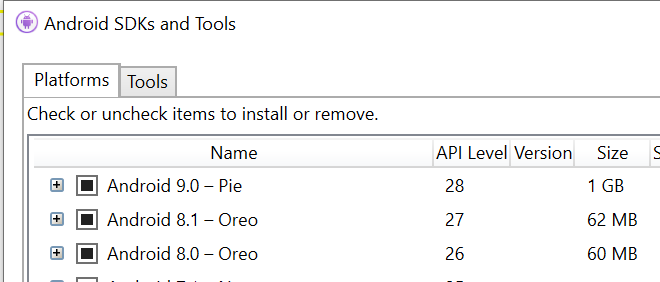
Hmm, Android 10 SDK isn't out yet? It sounds like it should be, but in both the latest public 2019 and preview 2019 VS, it only has SDK 9 (I even uninstalled and reinstalled and no luck). And that isSplitRequired attribute requires SDK 10 to compile.
andrewleader
on 14 Oct 2019
Doesn't fix it :/
From what I was able to find, isSplitRequired is something that the tool itself sets (you can see that they have methods for setting it in their source code, and I found this article that talks some about it). It seems to be a property only relevant to APKs (which the bundletool (running inside Google Play Store) later creates from the AAB). Setting this property and using the latest bundletool version results in zero difference in the generated AAB (compared the ZIP with a tool), and all variations (true/false) crash the same upon startup.
andrewleader
on 14 Oct 2019
Ah darn. Thanks for testing it out!
brendanzagaeski
on 15 Oct 2019
Note that this also repros with a blank file->new project, same logcat errors...
- File->New Xamarin Android
- Set package format to AAB
- Set ABIs to include x86 and x86_64
- Set manfiest install location to internal only (just since there was that other bug where non-internal only was causing a crash with basically the same callstack)
- Distribute through Store and install on x86 Chromebook
- Crashes upon launch
10-31 17:12:12.129  1700  1700 F art     : art/runtime/java_vm_ext.cc:471] JNI DETECTED ERROR IN APPLICATION: mid == null
10-31 17:12:12.129  1700  1700 F art     : art/runtime/java_vm_ext.cc:471]     in call to CallStaticIntMethodV
10-31 17:12:12.129  1700  1700 F art     : art/runtime/java_vm_ext.cc:471]     from void mono.android.Runtime.initInternal(java.lang.String, java.lang.String[], java.lang.String, java.lang.String[], java.lang.ClassLoader, java.lang.String[], java.lang.String[], int, boolean)
10-31 17:12:12.129  1700  1700 F art     : art/runtime/java_vm_ext.cc:471] "main" prio=5 tid=1 Runnable
10-31 17:12:12.129  1700  1700 F art     : art/runtime/java_vm_ext.cc:471]   | group="main" sCount=0 dsCount=0 obj=0x759eae50 self=0xed28b400
10-31 17:12:12.129  1700  1700 F art     : art/runtime/java_vm_ext.cc:471]   | sysTid=1700 nice=-5 cgrp=default sched=0/0 handle=0xf2592534
10-31 17:12:12.129  1700  1700 F art     : art/runtime/java_vm_ext.cc:471]   | state=R schedstat=( 448327563 73124974 294 ) utm=21 stm=23 core=0 HZ=100
10-31 17:12:12.129  1700  1700 F art     : art/runtime/java_vm_ext.cc:471]   | stack=0xff5ca000-0xff5cc000 stackSize=8MB
10-31 17:12:12.130  1700  1700 F art     : art/runtime/java_vm_ext.cc:471]   | held mutexes= "mutator lock"(shared held)
10-31 17:12:12.130  1700  1700 F art     : art/runtime/java_vm_ext.cc:471]   native: #00 pc 0058848e  /system/lib/libart.so (_ZN3art15DumpNativeStackERNSt3__113basic_ostreamIcNS0_11char_traitsIcEEEEiP12BacktraceMapPKcPNS_9ArtMethodEPv+238)
10-31 17:12:12.130  1700  1700 F art     : art/runtime/java_vm_ext.cc:471]   native: #01 pc 00553ebe  /system/lib/libart.so (_ZNK3art6Thread9DumpStackERNSt3__113basic_ostreamIcNS1_11char_traitsIcEEEEbP12BacktraceMap+526)
10-31 17:12:12.130  1700  1700 F art     : art/runtime/java_vm_ext.cc:471]   native: #02 pc 00550ebb  /system/lib/libart.so (_ZNK3art6Thread4DumpERNSt3__113basic_ostreamIcNS1_11char_traitsIcEEEEbP12BacktraceMap+75)
10-31 17:12:12.130  1700  1700 F art     : art/runtime/java_vm_ext.cc:471]   native: #03 pc 0039c27e  /system/lib/libart.so (_ZN3art9JavaVMExt8JniAbortEPKcS2_+1518)
10-31 17:12:12.130  1700  1700 F art     : art/runtime/java_vm_ext.cc:471]   native: #04 pc 0039ce5c  /system/lib/libart.so (_ZN3art9JavaVMExt9JniAbortFEPKcS2_z+124)
10-31 17:12:12.130  1700  1700 F art     : art/runtime/java_vm_ext.cc:471]   native: #05 pc 003ff26d  /system/lib/libart.so (_ZN3art3JNI20CallStaticIntMethodVEP7_JNIEnvP7_jclassP10_jmethodIDPc+221)
10-31 17:12:12.130  1700  1700 F art     : art/runtime/java_vm_ext.cc:471]   native: #06 pc 0000f3b3  /data/app/com.barebonesdev.powerplannerbundle-1/split_config.x86.apk (???)
10-31 17:12:12.130  1700  1700 F art     : art/runtime/java_vm_ext.cc:471]   native: #07 pc 0000f36c  /data/app/com.barebonesdev.powerplannerbundle-1/split_config.x86.apk (???)
10-31 17:12:12.130  1700  1700 F art     : art/runtime/java_vm_ext.cc:471]   native: #08 pc 000006fb   (???)
10-31 17:12:12.130  1700  1700 F art     : art/runtime/java_vm_ext.cc:471]   at mono.android.Runtime.initInternal(Native method)
10-31 17:12:12.130  1700  1700 F art     : art/runtime/java_vm_ext.cc:471]   at mono.MonoPackageManager.LoadApplication(MonoPackageManager.java:61)
10-31 17:12:12.130  1700  1700 F art     : art/runtime/java_vm_ext.cc:471]   at mono.MonoRuntimeProvider.attachInfo(MonoRuntimeProvider.java:35)
10-31 17:12:12.130  1700  1700 F art     : art/runtime/java_vm_ext.cc:471]   at android.app.ActivityThread.installProvider(ActivityThread.java:5999)
10-31 17:12:12.130  1700  1700 F art     : art/runtime/java_vm_ext.cc:471]   at android.app.ActivityThread.installContentProviders(ActivityThread.java:5591)
10-31 17:12:12.130  1700  1700 F art     : art/runtime/java_vm_ext.cc:471]   at android.app.ActivityThread.handleBindApplication(ActivityThread.java:5530)
10-31 17:12:12.130  1700  1700 F art     : art/runtime/java_vm_ext.cc:471]   at android.app.ActivityThread.-wrap2(ActivityThread.java:-1)
10-31 17:12:12.130  1700  1700 F art     : art/runtime/java_vm_ext.cc:471]   at android.app.ActivityThread$H.handleMessage(ActivityThread.java:1595)
10-31 17:12:12.130  1700  1700 F art     : art/runtime/java_vm_ext.cc:471]   at android.os.Handler.dispatchMessage(Handler.java:102)
10-31 17:12:12.130  1700  1700 F art     : art/runtime/java_vm_ext.cc:471]   at android.os.Looper.loop(Looper.java:154)
10-31 17:12:12.130  1700  1700 F art     : art/runtime/java_vm_ext.cc:471]   at android.app.ActivityThread.main(ActivityThread.java:6320)
10-31 17:12:12.130  1700  1700 F art     : art/runtime/java_vm_ext.cc:471]   at java.lang.reflect.Method.invoke!(Native method)
10-31 17:12:12.130  1700  1700 F art     : art/runtime/java_vm_ext.cc:471]   at com.android.internal.os.ZygoteInit$MethodAndArgsCaller.run(ZygoteInit.java:891)
10-31 17:12:12.130  1700  1700 F art     : art/runtime/java_vm_ext.cc:471]   at com.android.internal.os.ZygoteInit.main(ZygoteInit.java:781)
@brendanzagaeski I might have figured it out!!
If you leave the manifest install location set to auto, the blank app will correctly run! I had it set to internalOnly because of the previous bug #3298, where anything non-internalOnly was causing it to crash.
It seems like the fix of that bug inverted the behavior, now it MUST be auto for it to work on Chromebooks 😂
I still need to test with my full app if this works, and also I believe I need it to be internalOnly so that the system boot trigger works (so my app can schedule reminders), so bug still isn't resolved, but the scope has been narrowed down!!
Update: Using the workaround of setting it to auto is working well for me. This bug should probably be fixed, but I'm not blocked by it at least! Wahoo!
andrewleader
on 1 Nov 2019
@brendanzagaeski I might have figured it out!!
If you leave the manifest install location set to
auto, the blank app will correctly run! I had it set tointernalOnlybecause of the previous bug #3298, where anything non-internalOnly was causing it to crash.It seems like the fix of that bug inverted the behavior, now it MUST be
autofor it to work on Chromebooks 😂I still need to test with my full app if this works, and also I believe I need it to be internalOnly so that the system boot trigger works (so my app can schedule reminders), so bug still isn't resolved, but the scope has been narrowed down!!
_Update_: Using the workaround of setting it to
autois working well for me. This bug should probably be fixed, but I'm not blocked by it at least! Wahoo!
My app is set to 'preferInternal' (auto) and that doesn't seem to make a difference. I've needed to revert back to an APK unfortunately until this gets resolved.
 bardigolriz
on 10 Jan 2020
bardigolriz
on 10 Jan 2020
One other thing worth noting. The Chromebook I tried it on (Pixelbook 2017 i5) was pre-loaded with Chrome OS 70.0.03538.110. The AAB version of my app actually opened up on it fine. However, when I updated Chrome OS to the latest version 79.0.3945.86, it would get stuck on the splash screen. In other words, there was an update to Chrome OS at some point in the last X months/years that hasn't helped.
bardigolriz
on 10 Jan 2020
Small update: I did some more testing, and can clarify one, possibly important, point. When I installed the AAB version of the app on Chrome OS 70.0.03538.110 and then proceeded to update Chrome OS to the latest version, then the app would launch fine. However, when I uninstalled the app, and then re-installed it, it would get stuck on the Splash screen. Basically, the problem appears to surface only if you install an AAB fresh from Play on the latest Chrome OS. I haven't tested what happens if you install the app first on 70.0.x, and then update the app to a newer version when you're on 79.0.x.
bardigolriz
on 15 Jan 2020
_Update_: Using the workaround of setting it to
autois working well for me. This bug should probably be fixed, but I'm not blocked by it at least! Wahoo!
This does not work for me unfortunately. I would greatly appreciate a fix in the near future, apparently it is quite easy to reproduce this problem with a 64bit Chromebook.
 tipa
on 15 Jan 2020
tipa
on 15 Jan 2020
Would it make sense to create a new issue for this problem as it shifted from what this issues title expresses? The app bundles crash on 64 bit Chromebooks, no matter what value the install location has been set to in the app manifest.
tipa
on 8 Feb 2020
Would it make sense to create a new issue for this problem as it shifted from what this issues title expresses?
I have just created one https://github.com/xamarin/xamarin-android/issues/4291
Please let me know if it is a dup or issue description is incorrect as I do not have Chromebook, just users reporting the issue.
 VitalyKnyazev
on 20 Feb 2020
VitalyKnyazev
on 20 Feb 2020
Related issues
 jonpryor
·
3Comments
jonpryor
·
3Comments
 NatElkins
·
4Comments
NatElkins
·
4Comments
 joj
·
4Comments
joj
·
4Comments
 srdmnc
·
3Comments
srdmnc
·
3Comments
 jamesmontemagno
·
3Comments
jamesmontemagno
·
3Comments
Most helpful comment
This does not work for me unfortunately. I would greatly appreciate a fix in the near future, apparently it is quite easy to reproduce this problem with a 64bit Chromebook.