Xamarin-android: error XA3001: Could not link native shared library
Steps to Reproduce
- Install Visual Studio for Mac on Mac OS Catalina
- cease Xamarin Forms Mobile project for iOS and Android
- Configure and Run Android project
Expected Behavior
Emulator open and Run the app
Actual Behavior
Could not link native shared library
/Library/Frameworks/Mono.framework/External/xbuild/Xamarin/Android/Xamarin.Android.Common.targets(2931,3): error XA3001: Could not link native shared library: libxamarin-app.so
/Library/Frameworks/Mono.framework/External/xbuild/Xamarin/Android/Xamarin.Android.Common.targets(2931,3): error XA3001: Could not link native shared library: libxamarin-app.so
Version Information
 muhammadhussain16
All 35 comments
I have the same issue. Here's some more info:
Target "_CreateApplicationSharedLibraries" in file "/Library/Frameworks/Mono.framework/External/xbuild/Xamarin/Android/Xamarin.Android.Common.targets":
  Building target "_CreateApplicationSharedLibraries" completely.
  Output file "obj/Debug/app_shared_libraries/armeabi-v7a/libxamarin-app.so" does not exist.
  Using "LinkApplicationSharedLibraries" task from assembly "/Library/Frameworks/Mono.framework/External/xbuild/Xamarin/Android/Xamarin.Android.Build.Tasks.dll".
  Task "LinkApplicationSharedLibraries"
    [Native Linker] /Users/icejovanoski/Library/Developer/Xamarin/android-sdk-macosx/build-tools/29.0.2/arm-linux-androideabi-ld --unresolved-symbols=ignore-in-shared-libs --export-dynamic -soname libxamarin-app.so -z relro -z noexecstack --enable-new-dtags --eh-frame-hdr -shared --build-id --warn-shared-textrel --fatal-warnings -o obj/Debug/app_shared_libraries/armeabi-v7a/libxamarin-app.so -X -m armelf_linux_eabi obj/Debug/android/typemap.jm.armeabi-v7a.o obj/Debug/android/typemap.mj.armeabi-v7a.o obj/Debug/android/environment.armeabi-v7a.o
    [Native Linker] /Users/icejovanoski/Library/Developer/Xamarin/android-sdk-macosx/build-tools/29.0.2/aarch64-linux-android-ld --unresolved-symbols=ignore-in-shared-libs --export-dynamic -soname libxamarin-app.so -z relro -z noexecstack --enable-new-dtags --eh-frame-hdr -shared --build-id --warn-shared-textrel --fatal-warnings -o obj/Debug/app_shared_libraries/arm64-v8a/libxamarin-app.so --fix-cortex-a53-843419 -m aarch64linux obj/Debug/android/typemap.jm.arm64-v8a.o obj/Debug/android/typemap.mj.arm64-v8a.o obj/Debug/android/environment.arm64-v8a.o
    /Library/Frameworks/Mono.framework/External/xbuild/Xamarin/Android/Xamarin.Android.Common.targets(2906,3): error XA3001: Could not link native shared library: libxamarin-app.so
  Done executing task "LinkApplicationSharedLibraries" -- FAILED.
Done building target "_CreateApplicationSharedLibraries" in project "Makedox2019.Android.csproj" -- FAILED.
VS:
=== Visual Studio Community 2019 for Mac (Preview) ===
Version 8.3 Preview (8.3 build 1290)
Installation UUID: 7ac86217-d231-4c77-9e3d-1ad4c48a2db7
GTK+ 2.24.23 (Raleigh theme)
Xamarin.Mac 5.16.1.0 (d16-3 / 3de2dad6)Package version: 604000165
=== Mono Framework MDK ===
Runtime:
Mono 6.4.0.165 (2019-06/a7919897e8b) (64-bit)
Package version: 604000165=== NuGet ===
Version: 5.2.0.6067
=== .NET Core ===
Runtime: /usr/local/share/dotnet/dotnet
Runtime Versions:
3.0.0-preview8-28405-07
2.1.12
2.1.11
2.1.9
2.1.8
2.1.2
2.1.1
SDK: /usr/local/share/dotnet/sdk/3.0.100-preview8-013656/Sdks
SDK Versions:
3.0.100-preview8-013656
2.1.701
2.1.700
2.1.505
2.1.504
2.1.302
2.1.301
MSBuild SDKs: /Library/Frameworks/Mono.framework/Versions/6.4.0/lib/mono/msbuild/Current/bin/Sdks=== Xamarin.Profiler ===
Version: 1.6.10
Location: /Applications/Xamarin Profiler.app/Contents/MacOS/Xamarin Profiler=== Updater ===
Version: 11
=== Xamarin.Android ===
Version: 10.0.0.4 (Visual Studio Community)
Commit: xamarin-android/d16-3/a1f7825
Android SDK: /Users/icejovanoski/Library/Developer/Xamarin/android-sdk-macosx
Supported Android versions:
5.0 (API level 21)
7.1 (API level 25)
8.1 (API level 27)SDK Tools Version: 26.1.1
SDK Platform Tools Version: 29.0.2
SDK Build Tools Version: 29.0.2Build Information:
Mono: mono/mono/2019-06@17ac7dcfc74
Java.Interop: xamarin/java.interop/d16-3@5836f58
LibZipSharp: grendello/LibZipSharp/d16-3@71f4a94
LibZip: nih-at/libzip/rel-1-5-1@b95cf3f
ProGuard: xamarin/proguard/master@905836d
SQLite: xamarin/sqlite/3.27.1@8212a2d
Xamarin.Android Tools: xamarin/xamarin-android-tools/d16-3@cb41333=== Microsoft Mobile OpenJDK ===
Java SDK: /Users/icejovanoski/Library/Developer/Xamarin/jdk/microsoft_dist_openjdk_8.0.25
1.8.0-25
Android Designer EPL code available here:
https://github.com/xamarin/AndroidDesigner.EPL=== Android SDK Manager ===
Version: 1.4.0.22
Hash: 0bea4f4
Branch: remotes/origin/d16-3~14
Build date: 2019-08-08 19:01:16 UTC=== Android Device Manager ===
Version: 1.2.0.105
Hash: 7fdb3d0
Branch: remotes/origin/d16-3~1
Build date: 2019-08-08 19:01:36 UTC=== Apple Developer Tools ===
Xcode 10.2.1 (14490.122)
Build 10E1001=== Xamarin.Mac ===
Version: 5.16.1.9 (Visual Studio Community)
Hash: a12e76f3
Branch: d16-3
Build date: 2019-07-31 19:34:59-0400=== Xamarin.iOS ===
Version: 12.16.1.9 (Visual Studio Community)
Hash: a12e76f3
Branch: d16-3
Build date: 2019-07-31 19:35:00-0400=== Xamarin Designer ===
Version: 16.3.0.147
Hash: c301d21d7
Branch: remotes/origin/d16-3
Build date: 2019-08-07 15:23:02 UTC=== Xamarin Inspector ===
Version: 1.4.3
Hash: db27525
Branch: 1.4-release
Build date: Mon, 09 Jul 2018 21:20:18 GMT
Client compatibility: 1=== Build Information ===
Release ID: 803001290
Git revision: 42b8de4ed6237a823e5795bf3d96d76f006c6a00
Build date: 2019-08-12 17:46:41+00
Build branch: release-8.3
Xamarin extensions: 9de44b711b40469c2e98c604b38b0ae33f2024a4=== Operating System ===
Mac OS X 10.15.0
Darwin 19.0.0 Darwin Kernel Version 19.0.0
Thu Jun 27 20:18:24 PDT 2019
root:xnu-6153.0.13.131.3~1/RELEASE_X86_64 x86_64
Same thing happens on latest stable, I just switched to preview to see if it occurs there too.
 ice-j
on 19 Aug 2019
ice-j
on 19 Aug 2019
@muhammadhussain16 @ice-j thanks for the bug report.
Do either of you have a full diagnostic build log (either text or binlog) we could take a look at?
From the snippet you posted it seems that we are using the linker from the sdk.
android-sdk-macosx/build-tools/29.0.2/aarch64-linux-android-ld
I though we shipped our own versions of that... (@grendello is that right ?)
 dellis1972
on 20 Aug 2019
dellis1972
on 20 Aug 2019
@dellis1972 we will be using our own copy, but in the released XA we're still using the linker from Android SDK
 grendello
on 20 Aug 2019
grendello
on 20 Aug 2019
I have fixed the issue in a weird way. I had the older version of VS
XAMARIN in my other mac. I copied the Xamarin.Android sub folders and
replaces each sub directory one by one starting from last sub directory.
Then I retired and now its compiling and every thing is working.
On Tue, Aug 20, 2019, 3:00 PM Dean Ellis notifications@github.com wrote:
@muhammadhussain16 https://github.com/muhammadhussain16 @ice-j
https://github.com/ice-j thanks for the bug report.
Do either of you have a full diagnostic build log (either text or binlog)
we could take a look at?From the snippet you posted it seems that we are using the linker from the
sdk.android-sdk-macosx/build-tools/29.0.2/aarch64-linux-android-ld
I though we shipped our own versions of that... (@grendello
https://github.com/grendello is that right ?)—
You are receiving this because you were mentioned.
Reply to this email directly, view it on GitHub
https://github.com/xamarin/xamarin-android/issues/3520?email_source=notifications&email_token=AM5GOJMFSBRZY3BOZ7QM55DQFPMGZA5CNFSM4INCNJCKYY3PNVWWK3TUL52HS4DFVREXG43VMVBW63LNMVXHJKTDN5WW2ZLOORPWSZGOD4WBDFY#issuecomment-522981783,
or mute the thread
https://github.com/notifications/unsubscribe-auth/AM5GOJIL5OX7PO323QUSIMTQFPMGZANCNFSM4INCNJCA
.
muhammadhussain16
on 20 Aug 2019
@muhammadhussain16: Are you running the macOS Catalina beta? macOS Catalina does not support running 32-bit binaries, so if you are using an older SDK or NDK, your build may be attempting to use a 32-bit linker, which will fail.
The forthcoming Xamarin.Android 10.0 release (d16-3) includes its own linker, which is 64-bit and should behave properly.
Alternatively, updating your Android SDK build-tools package & NDK may suffice.
 jonpryor
on 20 Aug 2019
jonpryor
on 20 Aug 2019
@jonpryor @dellis1972 Here's a pastebin of the entire log.
I am running macOS Catalina Beta. I tried the alternate of updating my Android SDK build-tools & NDK but it still is showing the same error.
 saamerm
on 23 Aug 2019
saamerm
on 23 Aug 2019
@saamerm thanks for the log, unfortunately that is not a diagnostic log. As a result we cannot see the commands which were executed.
if you are doing this from the command line you need to add /v:diag or turn on diagnostic log verbosity in the IDE.
dellis1972
on 23 Aug 2019
@dellis1972 just learnt how to do that from here! Here you go, the diagnostic build log
PS: Don't judge me for the 2015's projects usage of outdated libraries and packages, just hopped on a few weeks ago
saamerm
on 23 Aug 2019
Also experiencing a similar issue when attempting to build to device.
/Library/Frameworks/Mono.framework/External/xbuild/Xamarin/Android/Xamarin.Android.Common.targets(2931,3): error XA3001: Could not link native shared library: libxamarin-app.so
/Library/Frameworks/Mono.framework/External/xbuild/Xamarin/Android/Xamarin.Android.Common.targets(2931,3): error XA3001: Could not link native shared library: libxamarin-app.so
2 Error(s)
 knbrlo
on 24 Aug 2019
knbrlo
on 24 Aug 2019
It looks like our MSBuild Task is not outputting the actual linker error in this case :(
[Native Linker] /Users/saamer/Library/Developer/Xamarin/android-sdk-macosx/build-tools/29.0.2/aarch64-linux-android-ld --unresolved-symbols=ignore-in-shared-libs --export-dynamic -soname libxamarin-app.so -z relro -z noexecstack --enable-new-dtags --eh-frame-hdr -shared --build-id --warn-shared-textrel --fatal-warnings -o obj/RA-QA/app_shared_libraries/arm64-v8a/libxamarin-app.so --fix-cortex-a53-843419 -m aarch64linux obj/RA-QA/android/typemap.jm.arm64-v8a.o obj/RA-QA/android/typemap.mj.arm64-v8a.o obj/RA-QA/android/environment.arm64-v8a.o
    [Native Linker] /Users/saamer/Library/Developer/Xamarin/android-sdk-macosx/build-tools/29.0.2/arm-linux-androideabi-ld --unresolved-symbols=ignore-in-shared-libs --export-dynamic -soname libxamarin-app.so -z relro -z noexecstack --enable-new-dtags --eh-frame-hdr -shared --build-id --warn-shared-textrel --fatal-warnings -o obj/RA-QA/app_shared_libraries/armeabi-v7a/libxamarin-app.so -X -m armelf_linux_eabi obj/RA-QA/android/typemap.jm.armeabi-v7a.o obj/RA-QA/android/typemap.mj.armeabi-v7a.o obj/RA-QA/android/environment.armeabi-v7a.o
    /Library/Frameworks/Mono.framework/External/xbuild/Xamarin/Android/Xamarin.Android.Common.targets(2931,3): error XA3001: Could not link native shared library: libxamarin-app.so
Any chance someone can run this command manually from the terminal (after you have tried to build) to see if we can get any extra data? You can grab the command from the log output and in theory just paste it in to the terminal. e.g
/Users/saamer/Library/Developer/Xamarin/android-sdk-macosx/build-tools/29.0.2/arm-linux-androideabi-ld --unresolved-symbols=ignore-in-shared-libs --export-dynamic -soname libxamarin-app.so -z relro -z noexecstack --enable-new-dtags --eh-frame-hdr -shared --build-id --warn-shared-textrel --fatal-warnings -o obj/RA-QA/app_shared_libraries/armeabi-v7a/libxamarin-app.so -X -m armelf_linux_eabi obj/RA-QA/android/typemap.jm.armeabi-v7a.o obj/RA-QA/android/typemap.mj.armeabi-v7a.o obj/RA-QA/android/environment.armeabi-v7a.o
maybe try adding a --verbose argument in there too.
dellis1972
on 26 Aug 2019
I put that command into terminal and got
zsh: bad CPU type in executable: /Users/saamer/Library/Developer/Xamarin/android-sdk-macosx/build-tools/29.0.2/arm-linux-androideabi-ld
I made sure that the executable file is actually in that location, and running that executable also gave me the same error
saamerm
on 26 Aug 2019
@saamerm thanks for doing that. That helps. It also confirms what @jonpryor said, you will need to install and use the ndk linker tools.
dellis1972
on 26 Aug 2019
@dellis1972 I tried to switch to the VS for Mac Preview channel on another mac and I was facing way too many other errors. So apart from moving VS for Mac to Preview, what else can I do? Please note that I have already updated my Android SDK build-tools & NDK.
saamerm
on 26 Aug 2019
@grendello is there a way to force the tooling to use the NDK linker rather than the one in the SDK?
dellis1972
on 27 Aug 2019
@dellis1972 /p:AndroidSdkBuildToolsPath=$NDK_ROOT/toolchains/$TARGET-4.9/prebuilt/darwin-x86_64/bin might work, where $TARGET is one of:
- aarch64-linux-android
- arm-linux-androideabi
- x86
- x86_64
grendello
on 27 Aug 2019
I'm also running Catalina and i had the same error. As a workaround, I disabled all 32-bits supported ABIs, leaving only x86_64 and arm64-v8a and my app is deploying again on my 64-bits Android devices.
 lalibertemarc
on 30 Aug 2019
lalibertemarc
on 30 Aug 2019
@lalibertemarc Yeah I am just getting Android prod builds using the App Center's integration with Github.
@grandello What's the command we can put into terminal, or where do we change the settings?
saamerm
on 30 Aug 2019
Make sure your emulator is also on 64-bit arch. If you are deploying the app to an emulator with arch x86, the deployment will fail. I created a new emulator with x86_64 and was able to deploy.
 hnabbasi
on 4 Sep 2019
hnabbasi
on 4 Sep 2019
@saamerm you can just copy the binaries (*-as, *-ld and *-strip) from Xamarin.Android location to your build-tools/[VERSION] directory, symlinks would work too. This commit fixes it the Right Way™, but it's only in master for now.
grendello
on 5 Sep 2019
@hnabbasi The system image used in the emulator should not matter. The emulator itself (both the launcher, emulator*, and the included QEMU binaries in emulator/qemu) are 64-bit executables:
$ file emulator
emulator: Mach-O 64-bit executable x86_64

$ file qemu/darwin-x86_64/qemu-system-i386
qemu/darwin-x86_64/qemu-system-i386: Mach-O 64-bit executable x86_64
So unless HAXM on Catalina is somehow prevented from running x86 VMs, it should not matter since the code is executing inside the emulator, not on the host machine and the host machine doesn't know anything about what's running in there.
grendello
on 5 Sep 2019
So unless HAXM on Catalina is somehow prevented from running x86 VMs,
May be. That is what I had to do to successfully deploy to my emulator. The build was fine, the deployment was failing. I created a new AVD with 64-bit arch and the deployment worked fine.
🤷♂
hnabbasi
on 5 Sep 2019
@dellis1972 I need this so I can archive from my computer. The only archives I can build right now is 64 bit. Testing is fine, I can do that using just the 64 bit build, but Android Archive builds have to support both architectures in order to submit on the Play Store.
@grendello I found the folder to paste the binaries into "build-tools/[VERSION]", but I can't find the binaries (*-as, *-ld and *-strip) from the Xamarin.Android folder. Where can I find this folder on the Mac?
I also tried to copy libxamarin-app.so from the Project.Droid/obj/Release/arm64-v8a folder into the Project.Droid/obj/Release/armeabi-v7a folder, the app completed archiving, but the archive seemed to be faulty because it was much smaller, and crashed on load.
saamerm
on 6 Sep 2019
Having the same issue when deploying to physical device, Xiaomi Mi A1
 pfedotovsky
on 9 Sep 2019
pfedotovsky
on 9 Sep 2019
I have the same problem. Is there any updated about this issuse ?
 Thanghand
on 14 Sep 2019
Thanghand
on 14 Sep 2019
Hi guys, I'm ready to release. Can you please show me how to fix this problem?
Thanghand
on 14 Sep 2019
Same here
 mduchev
on 17 Sep 2019
mduchev
on 17 Sep 2019
@dellis1972 I need this so I can archive from my computer. The only archives I can build right now is 64 bit. Testing is fine, I can do that using just the 64 bit build, but Android Archive builds have to support both architectures in order to submit on the Play Store.
@grendello I found the folder to paste the binaries into "build-tools/[VERSION]", but I can't find the binaries (*-as, *-ld and *-strip) from the Xamarin.Android folder. Where can I find this folder on the Mac?
They're in /Library/Frameworks/Xamarin.Android.framework/Versions/Current/lib/xamarin.android/xbuild/Xamarin/Android/Darwin/ndk
I also tried to copy libxamarin-app.so from the Project.Droid/obj/Release/arm64-v8a folder into the Project.Droid/obj/Release/armeabi-v7a folder, the app completed archiving, but the archive seemed to be faulty because it was much smaller, and crashed on load.
It failed because the library you copied is 64-bit, but the process is 32-bit on device - it is not possible to mix the two.
grendello
on 17 Sep 2019
@Thanghand @mduchev Please see https://github.com/xamarin/xamarin-android/issues/3520#issuecomment-528309594 and the comment above
grendello
on 17 Sep 2019
They're in
/Library/Frameworks/Xamarin.Android.framework/Versions/Current/lib/xamarin.android/xbuild/Xamarin/Android/Darwin/ndk
@grendello I don't see an ndk folder there.
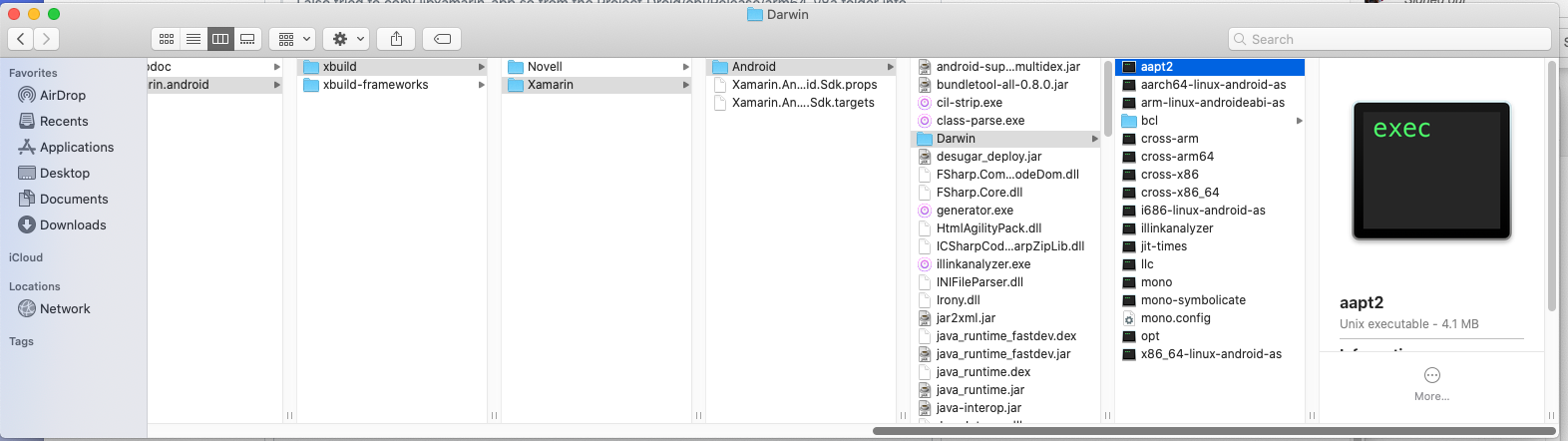 saamerm
on 17 Sep 2019
saamerm
on 17 Sep 2019
@saamerm You need to install the preview release of Xamarin.Android to get those files and, after copying them, you can install your current version of XA back (https://github.com/xamarin/xamarin-android/#downloads lists a number of XA downloads, including the preview versions)
grendello
on 17 Sep 2019
Bookkeeping comment to record version numbers
The new *-as, *-ld, and *-strip binaries themselves are available starting in Xamarin.Android 10.0.0.40, published as part of Visual Studio 2019 for Mac version 8.3 Preview 3.
To work around the issue when using Xamarin.Android 9.4 in Visual Studio 2019 for Mac version 8.2, follow the steps grendello mentioned in the preceding comment to copy the binaries out of the preview version.
The newer preview version Xamarin.Android 10.0.0.43 that was released on Monday as part of Visual Studio 2019 for Mac version 8.3 Preview 5 now also includes the backported commit that "fixes it the Right Way™." To try the Preview version that includes the complete fix, check for the latest updates on the Preview updater channel in Visual Studio for Mac Preview.
Summary: A new Preview version has now been published that includes a fix for this item. The fix is not yet included in a Release version. I will update this item again when a Release version is available that includes the fix.
Fix included in Xamarin.Android 10.0.0.43.
Fix included on macOS in Visual Studio 2019 for Mac version 8.3 Preview 5.
(The fix is not relevant for Windows.)
 brendanzagaeski
on 18 Sep 2019
brendanzagaeski
on 18 Sep 2019
Release status update
A new Release version has now been published that includes the fix for this item that "fixes it the Right Way™."
Fix included in Xamarin.Android 10.0.0.43
Fix included on macOS in Visual Studio 2019 for Mac version 8.3. To get the new version that includes the fix, check for the latest updates on the Stable updater channel.
(The fix is not relevant for Windows.)
brendanzagaeski
on 25 Sep 2019
@brendanzagaeski Still issue occurs after upgrading.. my Mac VS version is 8.4 and XA is 10.2.0
 xhashimks
on 16 Mar 2020
xhashimks
on 16 Mar 2020
@xhashimks, thanks for the info! When you get a chance, if you could submit a new issue with additional details about your scenario, including the diagnostic build output or possibly an example project, so that the team can take a look, that would be perfect.
Thanks in advance!
brendanzagaeski
on 18 Mar 2020
This is crazy - I had the same problem... hadn't build for Android for a while and then got those messages that files in the build directory (which are there) couldn't be found. Didn't work for my new project as well as for older ones which built well before as well as for a plain-vanilla empty template project.
The actual error was
Unhandled exception: System.ComponentModel.Win32Exception (0x80004005): ApplicationName='/Library/Frameworks/Xamarin.Android.framework/Libraries/xbuild/Xamarin/Android/Darwin/ndk/i686-linux-android-as', CommandLine='--warn -o typemaps.x86.o -g typemaps.x86.s', CurrentDirectory='obj/Debug/android/', Native error= Cannot find the specified file
repeating for all files in the obj/Debug/android folder (typemaps & environment).
I already had uninstalled and re-installed the complete Xamarin Android Framework which didn't help.
Then I tried to build on my Mac Mini which also has Xamarin installed and it worked.
So I also just rsynced the whole /Library/Frameworks/Xamarin.Android.framework from mac Mini to my MBP and ... tadaa... all working well again. Unbelievable....
 KerryXEX
on 1 Jul 2020
KerryXEX
on 1 Jul 2020
Related issues
 NatElkins
·
4Comments
NatElkins
·
4Comments
 Adlbert
·
4Comments
Adlbert
·
4Comments
 rusanov-vladimir
·
4Comments
rusanov-vladimir
·
4Comments
 glintpursuit
·
4Comments
glintpursuit
·
4Comments
 rubo
·
3Comments
rubo
·
3Comments
Most helpful comment
Bookkeeping comment to record version numbers
The new *-as, *-ld, and *-strip binaries themselves are available starting in Xamarin.Android 10.0.0.40, published as part of Visual Studio 2019 for Mac version 8.3 Preview 3.
To work around the issue when using Xamarin.Android 9.4 in Visual Studio 2019 for Mac version 8.2, follow the steps grendello mentioned in the preceding comment to copy the binaries out of the preview version.
The newer preview version Xamarin.Android 10.0.0.43 that was released on Monday as part of Visual Studio 2019 for Mac version 8.3 Preview 5 now also includes the backported commit that "fixes it the Right Way™." To try the Preview version that includes the complete fix, check for the latest updates on the Preview updater channel in Visual Studio for Mac Preview.
Summary: A new Preview version has now been published that includes a fix for this item. The fix is not yet included in a Release version. I will update this item again when a Release version is available that includes the fix.
Fix included in Xamarin.Android 10.0.0.43.
Fix included on macOS in Visual Studio 2019 for Mac version 8.3 Preview 5.
(The fix is not relevant for Windows.)