Xamarin-android: Crash while using kotlinx-couroutine
Steps to Reproduce
We have created a binding from a AAR file that has kotlinx-couroutine as one of its dependency. While creating the binding the dependency is added as below.
The app that uses the binding builds fine and on launch it crashes with the below exception.
[AndroidRuntime] FATAL EXCEPTION: main
[AndroidRuntime] Process: com.sample.xamarinsampleapp, PID: 20262
[AndroidRuntime] java.lang.IllegalStateException: Module with the Main dispatcher is missing. Add dependency providing the Main dispatcher, e.g. 'kotlinx-coroutines-android'
[AndroidRuntime] at kotlinx.coroutines.internal.MissingMainCoroutineDispatcher.missing(MainDispatchers.kt:73)
[AndroidRuntime] at kotlinx.coroutines.internal.MissingMainCoroutineDispatcher.isDispatchNeeded(MainDispatchers.kt:54)
[AndroidRuntime] at kotlinx.coroutines.DispatchedKt.resumeCancellable(Dispatched.kt:373)
[AndroidRuntime] at kotlinx.coroutines.intrinsics.CancellableKt.startCoroutineCancellable(Cancellable.kt:25)
[AndroidRuntime] at kotlinx.coroutines.CoroutineStart.invoke(CoroutineStart.kt:109)
[AndroidRuntime] at kotlinx.coroutines.AbstractCoroutine.start(AbstractCoroutine.kt:160)
[AndroidRuntime] at kotlinx.coroutines.BuildersKt__Builders_commonKt.launch(Builders.common.kt:54)
[AndroidRuntime] at kotlinx.coroutines.BuildersKt.launch(Unknown Source:1)
[AndroidRuntime] at kotlinx.coroutines.BuildersKt__Builders_commonKt.launch$default(Builders.common.kt:47)
[AndroidRuntime] at kotlinx.coroutines.BuildersKt.launch$default(Unknown Source:1)
[AndroidRuntime] at com.sample.core.compliance.ComplianceExecutor$Companion.runTaskParallel(ComplianceExecutor.kt:30)
[AndroidRuntime] at com.sample.core.compliance.ComplianceManager.executeTask(ComplianceManager.kt:61)
[AndroidRuntime] at com.sample.core.compliance.AWComplianceHelper.executeRestrictions(Unknown Source:74)
[AndroidRuntime] at com.sample.sdk.context.state.processor.SDKStateProcessor.onConfigurationChanged(Unknown Source:34)
[AndroidRuntime] at com.sample.sdk.configuration.BaseConfigurationImpl.notifyPreferenceListeners(Unknown Source:33)
[AndroidRuntime] at com.sample.sdk.configuration.BaseConfigurationImpl.lambda$notifyPreferenceListeners$0$BaseConfigurationImpl(Unknown Source:0)
[AndroidRuntime] at com.sample.sdk.configuration.BaseConfigurationImpl$$Lambda$0.run(Unknown Source:6)
[AndroidRuntime] at android.os.Handler.handleCallback(Handler.java:883)
[AndroidRuntime] at android.os.Handler.dispatchMessage(Handler.java:100)
[AndroidRuntime] at android.os.Looper.loop(Looper.java:214)
[AndroidRuntime] at android.app.ActivityThread.main(ActivityThread.java:7319)
[AndroidRuntime] at java.lang.reflect.Method.invoke(Native Method)
[AndroidRuntime] at com.android.internal.os.RuntimeInit$MethodAndArgsCaller.run(RuntimeInit.java:492)
[AndroidRuntime] at com.android.internal.os.ZygoteInit.main(ZygoteInit.java:934)
[Process] Sending signal. PID: 20262 SIG: 9
Visual Studio :
=== Visual Studio Enterprise 2019 for Mac ===
Version 8.1.5 (build 9)
Installation UUID: 5bba6d13-ac9c-4c7c-b27c-1f9467a37562
GTK+ 2.24.23 (Raleigh theme)
Xamarin.Mac 5.6.0.25 (d16-0 / 50f75273)
Package version: 518010028
=== Mono Framework MDK ===
Runtime:
Mono 5.18.1.28 (2018-08/223ea7ef92e) (64-bit)
Package version: 518010028
=== NuGet ===
Version: 5.0.2.5988
=== .NET Core ===
Runtime: /usr/local/share/dotnet/dotnet
Runtime Versions:
2.1.11
2.1.9
2.1.8
2.1.2
2.1.1
SDK: /usr/local/share/dotnet/sdk/2.1.700/Sdks
SDK Versions:
2.1.700
2.1.505
2.1.504
2.1.302
2.1.301
MSBuild SDKs: /Library/Frameworks/Mono.framework/Versions/5.18.1/lib/mono/msbuild/Current/bin/Sdks
=== Xamarin.Profiler ===
Version: 1.6.10
Location: /Applications/Xamarin Profiler.app/Contents/MacOS/Xamarin Profiler
=== Updater ===
Version: 11
=== Xamarin.Android ===
Version: 9.3.0.23 (Visual Studio Enterprise)
Commit: HEAD/d0b48056f
Android SDK: /Users/mbhattathiri/Library/Developer/Xamarin/android-sdk-macosx
Supported Android versions:
7.1 (API level 25)
8.0 (API level 26)
8.1 (API level 27)
SDK Tools Version: 26.1.1
SDK Platform Tools Version: 28.0.1
SDK Build Tools Version: 27.0.3
Build Information:
Mono: mono/mono/2018-08@3a07bd426d3
Java.Interop: xamarin/java.interop/d16-1@5ddc3e3
LibZipSharp: grendello/LibZipSharp/d16-1@44de300
LibZip: nih-at/libzip/rel-1-5-1@b95cf3f
ProGuard: xamarin/proguard/master@905836d
SQLite: xamarin/sqlite/3.27.1@8212a2d
Xamarin.Android Tools: xamarin/xamarin-android-tools/d16-1@acabd26
=== Microsoft Mobile OpenJDK ===
Java SDK: /Users/mbhattathiri/Library/Developer/Xamarin/jdk/microsoft_dist_openjdk_1.8.0.25
1.8.0-25
Android Designer EPL code available here:
https://github.com/xamarin/AndroidDesigner.EPL
=== Android Device Manager ===
Version: 1.2.0.44
Hash: aac645b
Branch: remotes/origin/d16-1
Build date: 2019-05-29 19:55:24 UTC
=== Apple Developer Tools ===
Xcode 10.2.1 (14490.122)
Build 10E1001
=== Xamarin.Mac ===
Version: 5.10.0.157 (Visual Studio Enterprise)
Hash: 6bd94753
Branch: d16-1
Build date: 2019-06-12 17:28:48-0400
=== Xamarin.iOS ===
Version: 12.10.0.157 (Visual Studio Enterprise)
Hash: 6bd94753
Branch: d16-1
Build date: 2019-06-12 17:28:47-0400
=== Xamarin Designer ===
Version: 16.1.0.467
Hash: f1657e133
Branch: remotes/origin/d16-1-new-document-model
Build date: 2019-06-18 21:57:42 UTC
=== Xamarin Inspector ===
Version: 1.4.3
Hash: db27525
Branch: 1.4-release
Build date: Mon, 09 Jul 2018 21:20:18 GMT
Client compatibility: 1
=== Build Information ===
Release ID: 801050009
Git revision: bd0ab28ba941b19b39322247db020dcd0fb305d0
Build date: 2019-07-03 17:15:21+00
Build branch: release-8.1
Xamarin extensions: 8cc25b5cb090e6c23b62a7901000c299977eb08d
=== Operating System ===
Mac OS X 10.14.5
Darwin 18.6.0 Darwin Kernel Version 18.6.0
Thu Apr 25 23:16:27 PDT 2019
root:xnu-4903.261.4~2/RELEASE_X86_64 x86_64
Additional information:
Seems that Xamarin build process is not taking care of copying kotlinx-coroutines files.
We assume this can be fixed by copying the files from original/META-INF to the APK dir’s META-INF folder. The following files should be excluded though: .MF, .SF, *.RSA.
 Maddy79
All 25 comments
@spouliot , Please suggest if this is a known issue.
Maddy79
on 15 Jul 2019
@Maddy79 would you be able to attach the binding project you've created? That would help us further investigate a path towards a fix.
 pjcollins
on 16 Jul 2019
pjcollins
on 16 Jul 2019
@pjcollins , do you need the .aar file also?
Maddy79
on 19 Jul 2019
same one have solution to this problem?
 kaitbellahs
on 21 Jul 2019
kaitbellahs
on 21 Jul 2019
@Maddy79 yeah the .aar file itself may be sufficient, as we may be able to create our own binding project from it to test it out. However a complete reproduction with an Android app referencing the binding project(w/ .aar) would likely be most useful.
pjcollins
on 24 Jul 2019
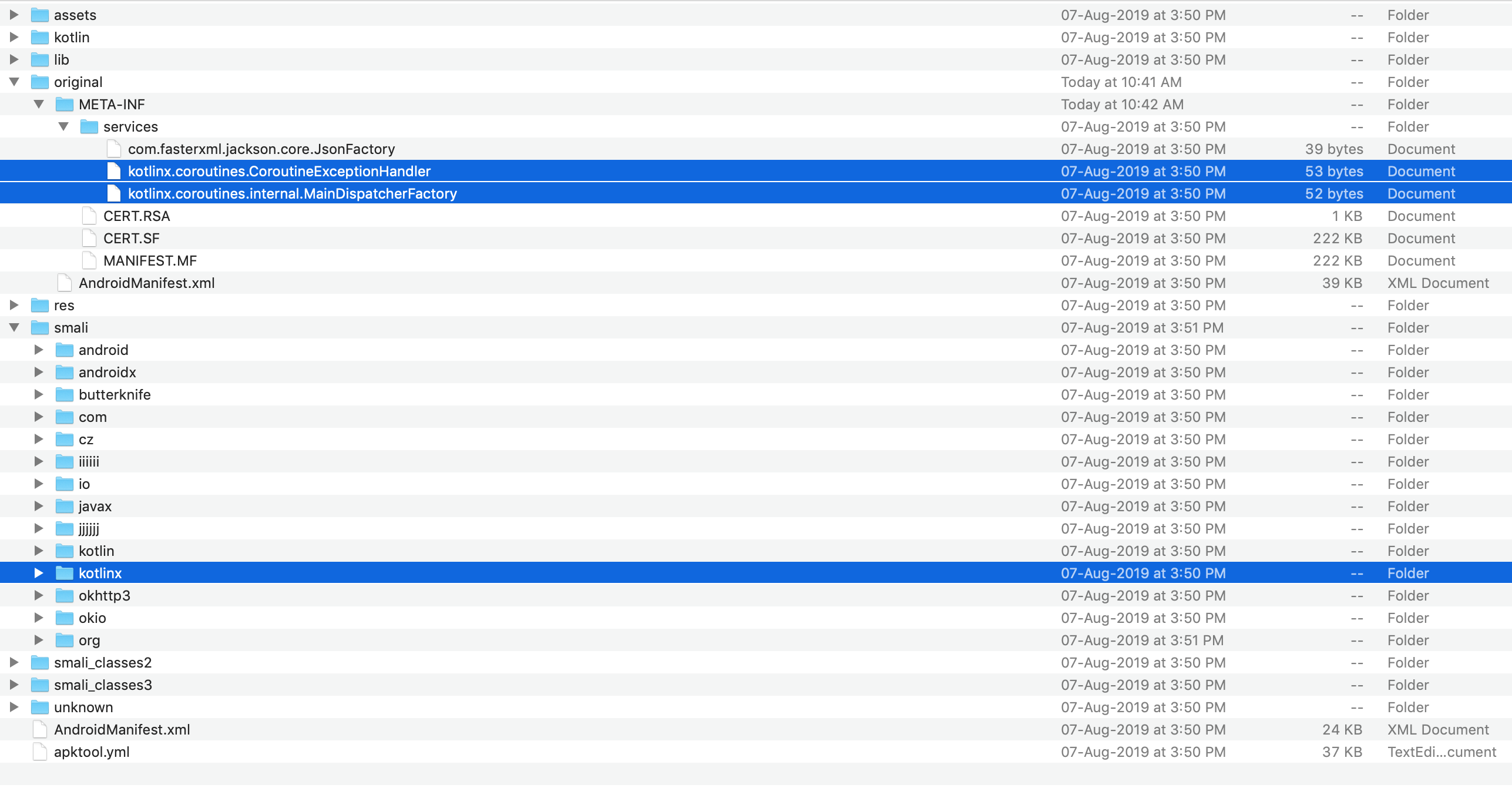
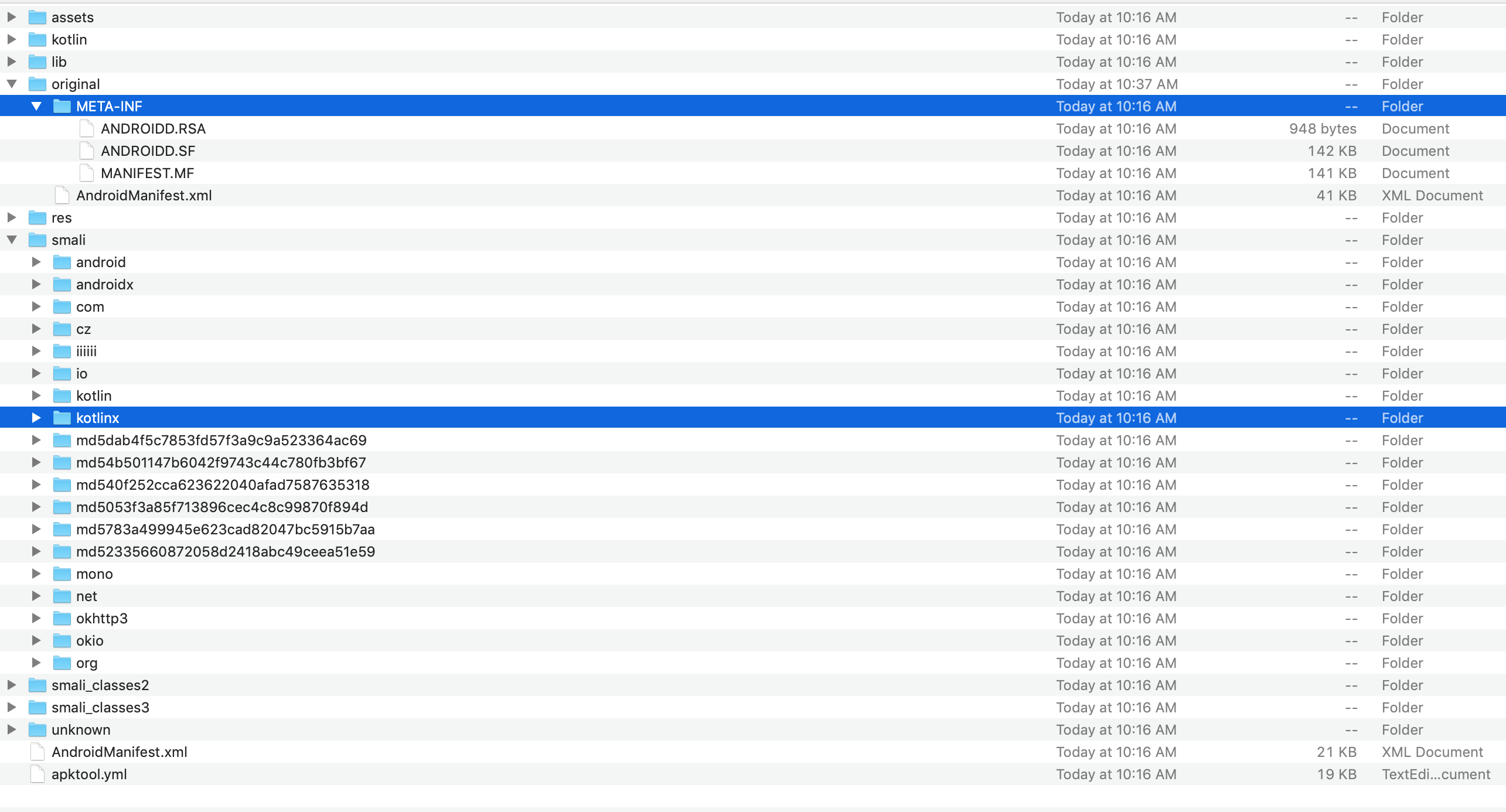
@pjcollins when we use kotlinx-coroutine-core library there is services folder created inside META-INF of build app , this package we don't see after we build xamarin app , I will attach META-INF folder screenshots of app complied with Android Studio and the one complied with Xamarin Studio , I am sure that is cause of the error , Can you guys take a look
This is App compiled with Android STUDIO
This is App compiled with Xamarin STUDIO
 Shubhamchitranshu
on 30 Aug 2019
Shubhamchitranshu
on 30 Aug 2019
@pjcollins , any update on the above?
Maddy79
on 6 Sep 2019
Same here when using Preview Channel.
 aphex3k
on 10 Sep 2019
aphex3k
on 10 Sep 2019
@Maddy79 @aphex3k @Shubhamchitranshu @kaitbellahs can someone attach a simple Xamarin.Android project showing the issue? Thanks!
 jonathanpeppers
on 20 Sep 2019
jonathanpeppers
on 20 Sep 2019
@jonathanpeppers , the app is in the below repo.
https://github.com/vmwareairwatchsdk/Xamarin-AWSDK/tree/master/samples/XamarinAndroidSampleApp
Maddy79
on 24 Sep 2019
After changing a few settings I was able to run this project with VS 2019 16.3: https://github.com/vmwareairwatchsdk/Xamarin-AWSDK/compare/master...jonathanpeppers:fixup-project
I did have to do a weird hack because one of the dependencies was including a duplicate multidex.jar in the app.
@Maddy79 on startup I get a popup that says Login Error:
09-24 09:46:13.092 E/AirWatch(32024): SDKLoginSplashChain
09-24 09:46:13.092 E/AirWatch(32024): com.airwatch.sdk.AirWatchSDKException: AirWatchSDKException Not able to get the anchor app
09-24 09:46:13.092 E/AirWatch(32024):   at com.airwatch.sdk.context.awsdkcontext.handlers.anchor.FetchSrvDetailsAnchor.handleStandaloneMode(FetchSrvDetailsAnchor.java:124)
09-24 09:46:13.092 E/AirWatch(32024):   at com.airwatch.sdk.context.awsdkcontext.handlers.anchor.FetchSrvDetailsAnchor.onFailed(FetchSrvDetailsAnchor.java:130)
09-24 09:46:13.092 E/AirWatch(32024):   at com.airwatch.sdk.context.awsdkcontext.SDKContextCallable.onFailure(SDKContextCallable.java:37)
09-24 09:46:13.092 E/AirWatch(32024):   at com.airwatch.task.CallbackFuture.lambda$onFailure$1$CallbackFuture(CallbackFuture.java:86)
09-24 09:46:13.092 E/AirWatch(32024):   at com.airwatch.task.CallbackFuture$$Lambda$1.run(Unknown Source:4)
09-24 09:46:13.092 E/AirWatch(32024):   at android.os.Handler.handleCallback(Handler.java:883)
09-24 09:46:13.092 E/AirWatch(32024):   at android.os.Handler.dispatchMessage(Handler.java:100)
09-24 09:46:13.092 E/AirWatch(32024):   at android.os.Looper.loop(Looper.java:214)
09-24 09:46:13.092 E/AirWatch(32024):   at android.app.ActivityThread.main(ActivityThread.java:7356)
09-24 09:46:13.092 E/AirWatch(32024):   at java.lang.reflect.Method.invoke(Native Method)
09-24 09:46:13.092 E/AirWatch(32024):   at com.android.internal.os.RuntimeInit$MethodAndArgsCaller.run(RuntimeInit.java:492)
09-24 09:46:13.092 E/AirWatch(32024):   at com.android.internal.os.ZygoteInit.main(ZygoteInit.java:930)
Do I need to do something else to test this? Thanks!
jonathanpeppers
on 24 Sep 2019
@jonathanpeppers , will it be possible for you to share the apk with the changes you made, we can check that and share the details on the above issue.
Maddy79
on 24 Sep 2019
You should be able to just use my branch locally? https://github.com/vmwareairwatchsdk/Xamarin-AWSDK/compare/master...jonathanpeppers:fixup-project
<uses-library android:name="org.apache.http.legacy" android:required="false" /> is needed in the manifest because changes since Android O, Google deprecated some APIs.
I was getting a build error until I removed the duplicate multidex.jar.
The other changes were general cleanliness or better settings.
jonathanpeppers
on 24 Sep 2019
Let me try that.
Maddy79
on 24 Sep 2019
Hi @jonathanpeppers you can find the sample project from the link below
Here TestKotlinx is a AndroidLibrary which uses an .aar for generating the binding
and TestKotlinxApp is using binding generated from above project and calling a function .
If you build a app crash can be observed .
I had already mentioned about, the reason of crash here https://github.com/xamarin/xamarin-android/issues/3348#issuecomment-526459097
Missing files are part of kotlinx-coroutines-android-1.3.1.jar which are not copied to the apk
Let me know if you need more details .
https://onevmw-my.sharepoint.com/:f:/g/personal/schitranshu_vmware_com/EmphdQMU0NhEhEKh5ldoZ3ABoAEodHJ0U8pEGRwmI4oBPQ?e=6f3LnH
Shubhamchitranshu
on 30 Sep 2019
@Shubhamchitranshu ok, this makes sense. It looks like the ServiceLoader class is used in some form by the Kotlin standard libraries. There is not currently anything in Xamarin.Android that would copy the META-INF/services directory into the final APK.
We will do some research into what the Android Gradle Plugin is doing to make this scenario work in Android Studio. It is not something that has come up with Xamarin.Android needing to support until now.
jonathanpeppers
on 30 Sep 2019
Thanks @jonathanpeppers for your amazing work on this fix!
aphex3k
on 3 Oct 2019
@jonathanpeppers , thanks for helping to get this closed.
@dellis1972 , do we have any timeline on when this will be available in the Preview channel?
Maddy79
on 3 Oct 2019
@dellis1972, please suggest when this fix will be available in the Visual Studio builds.
Maddy79
on 16 Oct 2019
@Maddy79 this should be in d16-4 Preview 3.
 dellis1972
on 16 Oct 2019
dellis1972
on 16 Oct 2019
Thanks @dellis1972 , will it be available by this week?
Maddy79
on 16 Oct 2019
@dellis1972 , seems there was a new Preview build , don't see this issue in the list though.
Visual Studio Enterprise 2019 for Mac (Preview)
Version 8.4 Preview (8.4 build 1935)
Xamarin.Android
Version: 10.1.0.1 (Visual Studio Enterprise)
Commit: xamarin-android/d16-4/ee1dfb6
Maddy79
on 18 Oct 2019
Release status update
A new Preview version has now been published that includes the fix for this item. The fix is not yet included in a Release version. I will update this item again when a Release version is available that includes the fix.
Fix included in Xamarin.Android 10.1.0.29.
Fix included on macOS in Visual Studio 2019 for Mac version 8.4 Preview 2. To try the Preview version that includes the fix, check for the latest updates on the Preview updater channel.
Fix included on Windows in Visual Studio 2019 version 16.4 Preview 3. To try the Preview version that includes the fix, check for the latest updates in Visual Studio Preview.
 brendanzagaeski
on 4 Nov 2019
brendanzagaeski
on 4 Nov 2019
Release status update
A new Release version has now been published on Windows that includes the fix for this item. The fix is not yet published in a Release version on macOS. I will update this item again when a Release version is available on macOS that includes the fix.
Fix included in Xamarin.Android 10.1.0.30.
Fix included on Windows in Visual Studio 2019 version 16.4. To get the new version that includes the fix, check for the latest updates or install the latest version from https://visualstudio.microsoft.com/downloads/.
(Fix also included on macOS in Visual Studio 2019 for Mac version 8.4 Preview 2.1 and higher. To try the Preview version that includes the fix, check for the latest updates on the Preview updater channel.)
brendanzagaeski
on 4 Dec 2019
Release status update
A new Release version has now been published on macOS that includes the fix for this item.
Fix included in Xamarin.Android 10.1.1.0.
Fix included on macOS in Visual Studio 2019 for Mac version 8.4. To get the new version that includes the fix, check for the latest updates on the Stable updater channel.
(Fix also included on Windows in Visual Studio 2019 version 16.4 and higher. To get the new version that includes the fix, check for the latest updates or install the latest version from https://visualstudio.microsoft.com/downloads/.)
brendanzagaeski
on 8 Jan 2020
Related issues
 jonpryor
·
3Comments
jonpryor
·
3Comments
 sgong-pdftron
·
4Comments
sgong-pdftron
·
4Comments
 Panasjuk
·
4Comments
Panasjuk
·
4Comments
 sdebruyn
·
3Comments
sdebruyn
·
3Comments
 dominik-weber
·
3Comments
dominik-weber
·
3Comments
Most helpful comment
Let me try that.