Xamarin-android: Android App Bundles Crashing on Startup
Steps to Reproduce
Build a project with the following configuration
<PropertyGroup Condition=" '$(Configuration)|$(Platform)' == 'PROD|AnyCPU' ">
    <DebugType>
    </DebugType>
    <Optimize>true</Optimize>
    <OutputPath>bin\PROD</OutputPath>
    <DefineConstants>PROD</DefineConstants>
    <WarningLevel>4</WarningLevel>
    <AndroidLinkMode>Full</AndroidLinkMode>
    <JavaMaximumHeapSize>
    </JavaMaximumHeapSize>
    <EmbedAssembliesIntoApk>true</EmbedAssembliesIntoApk>
    <AndroidUseSharedRuntime>false</AndroidUseSharedRuntime>
    <AndroidDexTool>d8</AndroidDexTool>
    <BundleAssemblies>false</BundleAssemblies>
    <AndroidLinkTool>r8</AndroidLinkTool>
    <AndroidAotAdditionalArguments>no-write-symbols,nodebug</AndroidAotAdditionalArguments>
    <AndroidHttpClientHandlerType>System.Net.Http.HttpClientHandler</AndroidHttpClientHandlerType>
    <AotAssemblies>true</AotAssemblies>
    <EnableLLVM>true</EnableLLVM>
    <AndroidUseAapt2>true</AndroidUseAapt2>
    <AndroidPackageFormat>aab</AndroidPackageFormat>
    <AndroidSupportedAbis>arm64-v8a;armeabi-v7a</AndroidSupportedAbis>
    <AndroidEnableProfiledAot>false</AndroidEnableProfiledAot>
  </PropertyGroup>
Used MSBuild to build the project as mentioned in #2727
Opened app in One Plus One, the app crash after Splash screen
Opened app in One Plus Six, the app works fine
Crashed in Galaxy Prime, Lenovo
When I tried adding x86 to the SupportedAbis, the behaviour was different, the app was stuck at splash screen.
Apk Build works fine in every phone.
Expected Behavior
Should Open App in every phone without crash
Actual Behavior
App crashes during startup in most of the phones.
Version Information
Microsoft Visual Studio Community 2019 Preview
Version 16.2.0 Preview 3.0
VisualStudio.16.Preview/16.2.0-pre.3.0+29021.104
Microsoft .NET Framework
Version 4.7.03056
Installed Version: Community
Azure App Service Tools v3.0.0 16.2.226.19058
Azure App Service Tools v3.0.0
C# Tools 3.2.0-beta3-19312-05+5905d757a89126ebbcdb383b1a10cadda8c6fdc3
C# components used in the IDE. Depending on your project type and settings, a different version of the compiler may be used.
Common Azure Tools 1.10
Provides common services for use by Azure Mobile Services and Microsoft Azure Tools.
Extensibility Message Bus 1.2.0 (d16-2@8b56e20)
Provides common messaging-based MEF services for loosely coupled Visual Studio extension components communication and integration.
IntelliCode Extension 1.0
IntelliCode Visual Studio Extension Detailed Info
Microsoft JVM Debugger 1.0
Provides support for connecting the Visual Studio debugger to JDWP compatible Java Virtual Machines
Microsoft MI-Based Debugger 1.0
Provides support for connecting Visual Studio to MI compatible debuggers
Mono Debugging for Visual Studio 16.2.3 (373927b)
Support for debugging Mono processes with Visual Studio.
NuGet Package Manager 5.2.0
NuGet Package Manager in Visual Studio. For more information about NuGet, visit https://docs.nuget.org/
ProjectServicesPackage Extension 1.0
ProjectServicesPackage Visual Studio Extension Detailed Info
ResourcePackage Extension 1.0
ResourcePackage Visual Studio Extension Detailed Info
ResourcePackage Extension 1.0
ResourcePackage Visual Studio Extension Detailed Info
Visual Basic Tools 3.2.0-beta3-19312-05+5905d757a89126ebbcdb383b1a10cadda8c6fdc3
Visual Basic components used in the IDE. Depending on your project type and settings, a different version of the compiler may be used.
Visual F# Tools 10.4 for F# 4.6 16.2.0-beta.19306.3+3de631a4ba0f54953bad33661008d39fb6df7669
Microsoft Visual F# Tools 10.4 for F# 4.6
Visual Studio Code Debug Adapter Host Package 1.0
Interop layer for hosting Visual Studio Code debug adapters in Visual Studio
VisualStudio.Mac 1.0
Mac Extension for Visual Studio
Xamarin 16.2.0.81 (d16-2@df3a2fccb)
Visual Studio extension to enable development for Xamarin.iOS and Xamarin.Android.
Xamarin Designer 16.2.0.289 (remotes/origin/d16-2@495a9f28a)
Visual Studio extension to enable Xamarin Designer tools in Visual Studio.
Xamarin Templates 16.3.113 (866233a)
Templates for building iOS, Android, and Windows apps with Xamarin and Xamarin.Forms.
Xamarin.Android SDK 9.4.0.34 (d16-2/7cce305)
Xamarin.Android Reference Assemblies and MSBuild support.
Mono: mono/mono/2019-02@c6edaa62f94
Java.Interop: xamarin/java.interop/d16-2@b2b2610
LibZipSharp: grendello/LibZipSharp/d16-2@caa0c74
LibZip: nih-at/libzip/rel-1-5-1@b95cf3f
ProGuard: xamarin/proguard/master@905836d
SQLite: xamarin/sqlite/3.27.1@8212a2d
Xamarin.Android Tools: xamarin/xamarin-android-tools/master@4f717b6
Xamarin.iOS and Xamarin.Mac SDK 12.14.0.93 (55ad141)
Xamarin.iOS and Xamarin.Mac Reference Assemblies and MSBuild support.
Log File
I could share the source code / apk / app bundles privately to the Xamarin Android team
 muhaym
All 59 comments
After some tests i observe the crash behavior only on armeabi-v7a and arm64-v8a devices
 TeaCofounder
on 27 Jun 2019
TeaCofounder
on 27 Jun 2019
@muhaym sent me his app bundle privately, and it worked for me on a Pixel 3 XL and an arm emulator.
We suspect something is going wrong with either older API levels or 32-bit arm devices.
 jonathanpeppers
on 28 Jun 2019
jonathanpeppers
on 28 Jun 2019
I have played with AppBundles on our app for the last two days and I confirm the issue.
I have tried deactivating AOT, or EmbedAssembliesIntoApk with the same results.
I have two devices : Xiaomi 4c (Android 5.1), Xiaomi 4s (Android 7). I also tried on a coworkers Huawei P20 and my AAB is signed.
Here are the results of my tests:
- Deploying from VS4Mac works perfectly on all phones with AAB compilation enabled as well as with the Android Emulator.
- Deploying the AAB inside Google Play Store with the Internal App Sharing feature: The application crashes at startup in all devices but the Xiaomi 4c where everything is fine
- Deploying the AAB inside Google Play Store with the Internal Test Track/Alpha: Same results as above
- Deploying manually the AAB from the command line with BundleTool in version 0.10.0: Crashes at startup even in the Emulator except on Xiaomi 4c.
bundletool build-apks --bundle=com.myapp-Signed.aab --output=my_app.apks; bundletool install-apks --apks=my_app.apks
From what I see the Xiaomi 4c and Xiaomi 4s have exactly the same processor. It seems like the Android version might be a good hint there.
If you need some further digging I will be glad to help.
 johnthiriet
on 2 Jul 2019
johnthiriet
on 2 Jul 2019
@johnthiriet can you attach adb logcat output of the crashes you get when installed from Google Play?
I wouldn't worry about testing bundletool manually if deploying from VS4Mac works fine.
jonathanpeppers
on 2 Jul 2019
@jonathanpeppers Still manually invoking bundletool has the same behaviour as the store, not as visual studio. Maybe a version issue ?
Here is the adb output from Android Studio:
crashlog.txt
johnthiriet
on 2 Jul 2019
I'm going to try bumping bundletool and see what happens; there are new versions available: https://mvnrepository.com/artifact/com.android.tools.build/bundletool
jonathanpeppers
on 2 Jul 2019
Added a PR to bump bundletool: https://github.com/xamarin/xamarin-android/pull/3318
@johnthiriet if you want to try using a newer bundletool, you can:
- Download a new jar from here: https://github.com/google/bundletool/releases
- Set
<AndroidBundleToolJarPath>C:\full\path\to\bundletool-all-0.10.0.jar</AndroidBundleToolJarPath>in you csproj
Although, since you got the exact same JNI DETECTED ERROR IN APPLICATION, it seems like we have something else to figure out for Xamarin.Android. Updating bundletool might not help, but let me know if it does!
We are going to retest going through Google Play -- it seems like everything we are trying is working fine locally.
jonathanpeppers
on 3 Jul 2019
@jonathanpeppers Actually I tested with this exact version of BundleTool (see my first comment).
I suspect the store might be using a different version of BundleTool that the one shipped with VS4Mac. That would explain why it crashes when downloading from the store and when using BundleTool locally and not deploying with VS4Mac.
johnthiriet
on 3 Jul 2019
Deploying the AAB inside Google Play Store with the Internal Test Track/Alpha: Same results as above
I have had a horrifying thought: what if the Google Play Store is linking the app before sending the .apk to the device, and in the process removing the mono.android.Runtime.java_lang_System field?
To verify this, we need to get the .apk which was actually installed on the device. With a device on which the app crashes, please run:
adb shell pm list packages -f
This will list the paths to all installed .apk files, e.g.
package:/data/app/com.xamarin.android.helloworld-qAWXMwXUtqQmdd4-w-PzOw==/base.apk=com.xamarin.android.helloworld
Within that line is the path to the .apk, e.g. the above has /data/app/com.xamarin.android.helloworld-qAWXMwXUtqQmdd4-w-PzOw==/base.apk.
Once you've found the .apk for your app, copy it off the device:
adb pull /data/app/com.xamarin.android.helloworld-qAWXMwXUtqQmdd4-w-PzOw==/base.apk
Then please attach the failing .apk, if possible.
The directory containing base.apk may contain other files, e.g.
$ adb shell ls -la /data/app/com.xamarin.android.helloworld-qAWXMwXUtqQmdd4-w-PzOw==/
total 9605
drwxr-xr-x  4 system system     3488 2019-07-03 11:07 .
drwxrwx--x 63 system system    20480 2019-07-03 11:07 ..
-rw-r--r--  1 system system  2711589 2019-07-03 11:07 base.apk
drwxr-xr-x  3 system system     3488 2019-07-03 11:07 lib
drwxrwx--x  3 system install    3488 2019-07-03 11:07 oat
-rw-r--r--  1 system system  7081416 2019-07-03 11:07 split_config.arm64_v8a.apk
-rw-r--r--  1 system system     6474 2019-07-03 11:07 split_config.xxxhdpi.apk
If possible, please provide the other .apk files as well.
In particular, I want to run dexdump classes.dex on the classes.dex within the .apk files, to determine whether or not the java_lang_System field exists.
 jonpryor
on 3 Jul 2019
jonpryor
on 3 Jul 2019
@jonpryor Sorry Jon I cannot share the apk but I made a whole bunch of other tests including yours so please read what is to follow. It is interesting.
Basic project
I have created a sample project using the native android project sample in Visual Studio for Mac in Preview and adding nothing more.
I have generated the aab with Visual Studio for Mac in Preview and then generated the apks file myself in command line with bundletool-all-0.10.0.jar signing it with a keystore (not the debug one).
I have deployed this on my two phones, Xiaomi 4c on Android 5.1.1 and Xiaomi 4s on Android 7.0.
With this sample project, everything works perfectly everywhere.
So, something is not going well with our app in the process.
Our application
As a reminder, my previous tests showed that our application using appbundles was only working on my Xiaomi 4c with Android 5.1.1 when deployed from the store or by using bundletool-all-0.10.0.jar.
Updating Xiaomi 4c
After updating Xiaomi 4c to Android 7, the same crash occurs.
Conclusion: The issue seems to be related somehow to the version of Android.
Bundletool versions
Deploying from VS4Mac directly works everytime so I tried to find which version of bundletool my installation was using and it was bundletool-all-0.8.0.jar. So I tried using this version to generate and deploy the appbundle and oh surprised it is working now.
Out of pure curiosity I tried with bundletool-all-0.9.0.jar and it works too.
Conclusion: The issue is related to bundletool-all-0.10.0.jar somehow and apparently this is the version used by the store.
Checking the presence of java_lang_System
It is there everytime in every package.
Conclusion: The issue does not seem to be related to its absence.
Hunting the differences with ApkAnalyzer
We have the same aab, the same keystore, and by using a different version of bundletool we have different behaviours (aka crashes).
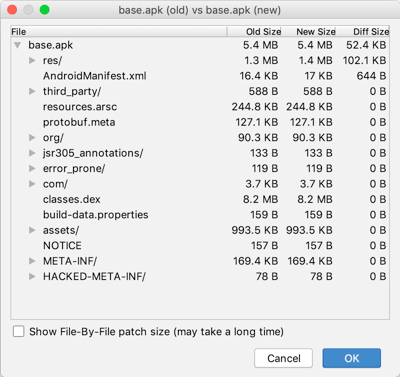
I tried to get the difference between the version generated by bundletool-all-0.8.0.jar, bundletool-all-0.9.0.jar and bundletool-all-0.10.0.jar.
As you can see in the picture, the difference between 8 and 9 is mainly a difference in the resources and in the manifest.
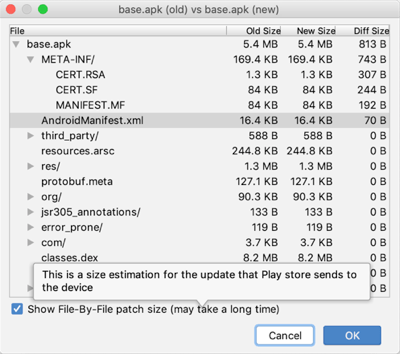
The difference between 9 and 10 is only a manifest difference.
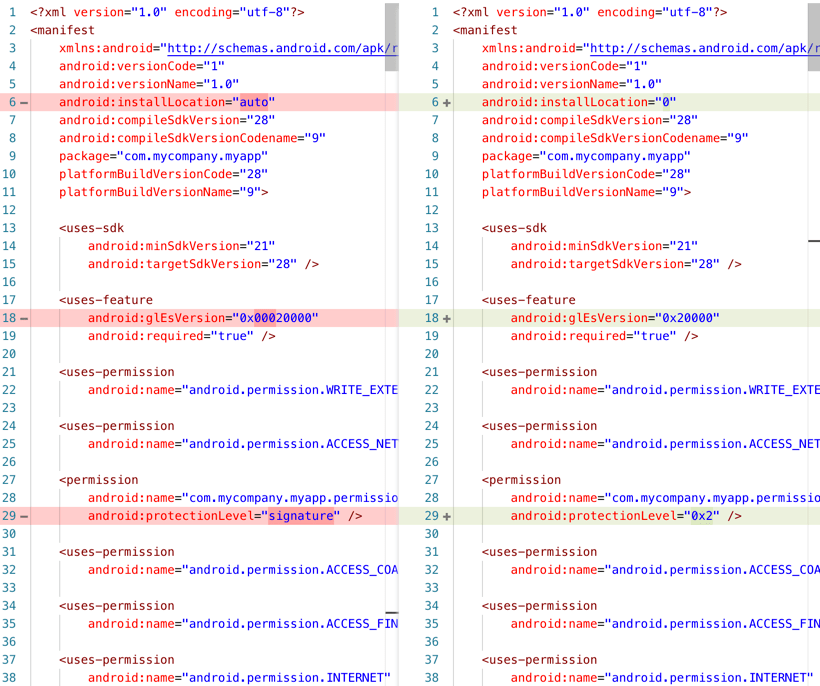
Resources are not the important but I decided to take a look at the manifest and extracted them to compare.
Between 8 and 9 resources nave have been mainly renamed or replaced with integer values.
Between 9 and 10 however we can see that the flag android:extractNativeLibs has its default value changed from false to true.
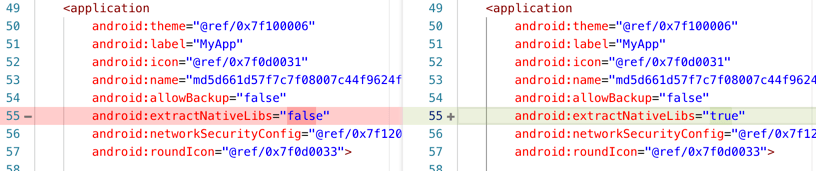
To be safe I tried setting android:extractNativeLibs="false" inside my application manifest and then recompile, redeploy and extracting the whole thing but the property has been overriden by
bundletool back to true.
I rechecked my test project and saw that here the flag was set to false.
Conclusion
Something in my application seem to incur a modification to the android:extractNativeLibs to true instead of false when using bundletool-all-0.10.0.jar.
This modification seems to be the source of the crashes but does not impact Android 5.1.1
My guess is that the error comes from this modification and I have no idea on what to do from there and it may, or may not be related to Xamarin.
johnthiriet
on 7 Jul 2019
I wrote some notes about extractNativeLibs when I implemented app bundles with bundletool 0.8.0 at the time: https://github.com/xamarin/xamarin-android/blob/master/Documentation/guides/app-bundles.md#native-libraries
It appears the logic that determines if native libraries are compressed has changed...
- Used to be: https://github.com/google/bundletool/blob/fe1129820cb263b3fef18ab7e95d80c228c065a1/src/main/java/com/android/tools/build/bundletool/splitters/NativeLibrariesCompressionSplitter.java#L74-L78
- Now it is: https://github.com/google/bundletool/blob/5ac94cb61e949f135c50f6ce52bbb5f00e8e959f/src/main/java/com/android/tools/build/bundletool/splitters/NativeLibrariesCompressionSplitter.java#L75-L86
After reading their code and seeing this isInstallableOnExternalStorage() method, does adding android:installLocation="preferExternal" help?
https://developer.android.com/guide/topics/manifest/manifest-element
I will do some research to figure out what we need to do here. It seems on some devices that the native libraries are being compressed and that causes the crash.
jonathanpeppers
on 8 Jul 2019
@jonathanpeppers I have just tried making the modification but the flag is unfortunately still set to true after deployment.
johnthiriet
on 8 Jul 2019
Hi muhaym, johnthiriet and jonathanpeppers,
I get same problem
*Microsoft VS Profesional 2019 Preview v16.2 Preview 4.0
*Xamarin Android SDK 9.4.0.51
- My .csproj file:
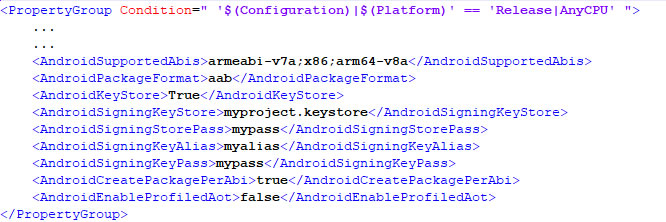
- Then in CMD line I execute:
msbuild myproject.Droid.csproj /t:SignAndroidPackage /p:Configuration=Release - It works right!
- Now I have app.myproject.com-Signed.aab
- So I upload it in playstore, it also works right!
- But when I download from Play Store the App it CRASH immediately (except in Android 5.1, where App not crash so works fine)
- When I extract the .abb file with bundletool it generate the structure with 2 folders: splits and standalones. If I run the APK in standalone folder directly in my Android 8.0, it reproduce exactly the same thing that when I download of playstore. So App is instaled but CRASH when try run.
- Found you some solution for this problem? That seems to be a VS msbuild bug
I will thank you very much for your guidance
 GustavoMx
on 23 Jul 2019
GustavoMx
on 23 Jul 2019
@GustavoMx can you save a copy of the adb logcat output and post it here? It should show the stack trace of the crash.
jonathanpeppers
on 23 Jul 2019
Hi jonathanpeppers, here I attach the log:
logcat.myproject.txt
- For to locate the proyect you can search by app.myproject.com
- app.myproject.com was installed right, but when I run it, it crash
- On the line 1083 I see "Runtime aborting...", seems there is the begin of the problem
GustavoMx
on 23 Jul 2019
- Additionally also attached the last 2 warnings of compilation of the .aab (zero errors)
warning-compile.txt
GustavoMx
on 23 Jul 2019
Hi @jonathanpeppers, I have news, I continue to investigate what happens:
- Now I have generated a new app.myproject.com-Signed.aab with same params in .csproj file
- Then in CMD line I execute:
msbuild myproject.Droid.csproj /t:SignAndroidPackage /p:Configuration=Release - It works right!
- Now I have app.myproject.com-Signed.aab
- Now will try install it locally in my device (without upload to playstore)
- So, I execute:
java -jar bundletool-all-0.10.2.jar build-apks --connected-device --bundle=app.myproject.com-Signed.aab --output=app.apks --ks=.._keytool\myproject.keystore --ks-key-alias=myalias --ks-pass=pass:mypass - It generate a file app.apks, in it file exist a folder split with next 4 files:
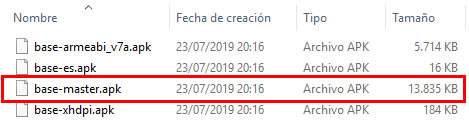
- I copy these 4 files to folder DCIM of my device samsung
- The unique file with works for install is base-master.apk, so I run it
- It installed the App in my device (strange put icon android and not my custom icon)
- When I executed the App, inmmediaty again crashed and app is closed
- I attach log with last 2 warnings when .aab is compiled (zero errors)
warning-compile.txt - I attach adb logcat track when App is executed (and inmmediaty is crashed)
logcat.myproject-2.txt - On logcat.myproject-2.txt see the line 32 (seems start app) and line 170 (seems crashed app)
I will continue doing research, while Iwould appreciate it if you can help me understand what happens. I remind you that if I compile with the APK extension (not .AAB) and install it in the classic way that works perfectly, App not crashed
GustavoMx
on 24 Jul 2019
@GustavoMx I think your issue will be fixed when we merge: https://github.com/xamarin/xamarin-android/pull/3337
Your crash looks similar to the other reports here, and the issue steps from bundletool dynamically choosing if android:extractNativeLibs is true/false depending on the device.
jonathanpeppers
on 24 Jul 2019
@jonathanpeppers I understand, when you think that it will be merge? on next days? and when it happens, what I must to update in my MS VS Profesional 2019 Preview v16.2 Preview 4.0 + Xamarin Android SDK 9.4.0.51 for solve the problem? or I can solve it now modifying something on the librarys?
GustavoMx
on 24 Jul 2019
I updated to MS VS Profesional 2019 Preview v16.3 Preview 1.0 + Xamarin Android SDK 9.5.0.27 , I repeat all the steps, but the problem persists :(
GustavoMx
on 25 Jul 2019
@GustavoMx updating won't help, since we have not merged the fix yet.
If you want to try a workaround for now, you can try setting android:installLocation="internalOnly" in your AndroidManifest.xml: https://developer.android.com/guide/topics/manifest/manifest-element.html#install
We found that this setting influences the value of extractNativeLibs, so this workaround _might_ work for you.
jonathanpeppers
on 25 Jul 2019
Thanks @jonathanpeppers , I recently test you recommendation but when I repeat the steps for local installation device, the problem still persist. I will wait until you do the merge. How I can know when it is ready?
GustavoMx
on 25 Jul 2019
@jonathanpeppers I saw a similar issue while doing a Release build via MSBuild using Visual Studio 2019 (16.2). Forcing installLocation to "internalOnly" was a valid workaround for that as well. I was building as "APK", but not "AAB" format. Just an FYI.
 brgavino
on 26 Jul 2019
brgavino
on 26 Jul 2019
@brgavino, yes, the problem is with abb format. For apk it works right.
GustavoMx
on 27 Jul 2019
@brgavino can you file another issue? That might be something else.
jonathanpeppers
on 27 Jul 2019
Is there any good solution with this? currently creating an apk is also not possible with Aot in the latest VS releases on windows and mac. App bundle is working but crashes on start up for some devices i see in my google playstore pre launch reports
 EmilAlipiev
on 29 Jul 2019
EmilAlipiev
on 29 Jul 2019
He @EmilAlipiev , I get same problem. I understood that we must wait to next version VS + Android SDK for get solution, because dream Xamarin need merge the corrections for solve this bug.
GustavoMx
on 29 Jul 2019
@GustavoMx thats fine but creating apk is also not working in latest releases. we are stuck now how to release our apps.
EmilAlipiev
on 29 Jul 2019
@EmilAlipiev , I haven't perceived the problem with the APK in some versions. Anyway, the Play Store demands AAB from August 2019. It really is a critical problem of VS + Android SDK because it stops the production of hundreds of thousands of developers. I hope this can be solved soon. I understand that the only option is to wait. There is not much information about this problem in networks.
GustavoMx
on 29 Jul 2019
@GustavoMx there is no such requirement. you can still upload apk. only make sure that you have 64bit version which is required starting from august. there is a post in the xamarin forums regarding this.
EmilAlipiev
on 29 Jul 2019
@EmilAlipiev , I will see , thanks by you notice , so AAB is a alert as suggestion , but I think later, or next year, probably will be obbligatory. I will be paying attention to both problems (APK for some devices and AAB problem crash when app open)
GustavoMx
on 29 Jul 2019
Great to see that #3337 was merged !
Thanks a lot to everyone who worked on it !
Any idea on when we will be able to try this in a preview release of Visual Studio for Mac ?
johnthiriet
on 31 Jul 2019
Great work @johnthiriet for narrowing down the issue, and great work @jonathanpeppers for the PR. Lots to learn from all this for me:)
muhaym
on 31 Jul 2019
Many thanks to all who contributed in this thread. Hopefully we will soon have a preview of VS for Win/Mac available with this merger. A hug!
GustavoMx
on 31 Jul 2019
Hi All, I had the problem that i cannot update my app from apk to aab when i want to release it. Google playstore gives me a big warning also that users will not be able to update my app and they have to reinstall it. Does anyone else see this issue?
EmilAlipiev
on 5 Aug 2019
I update successful the aab file but there are an issue that. The app run failed on Android version less than version 9 on Pre-launch App feature.
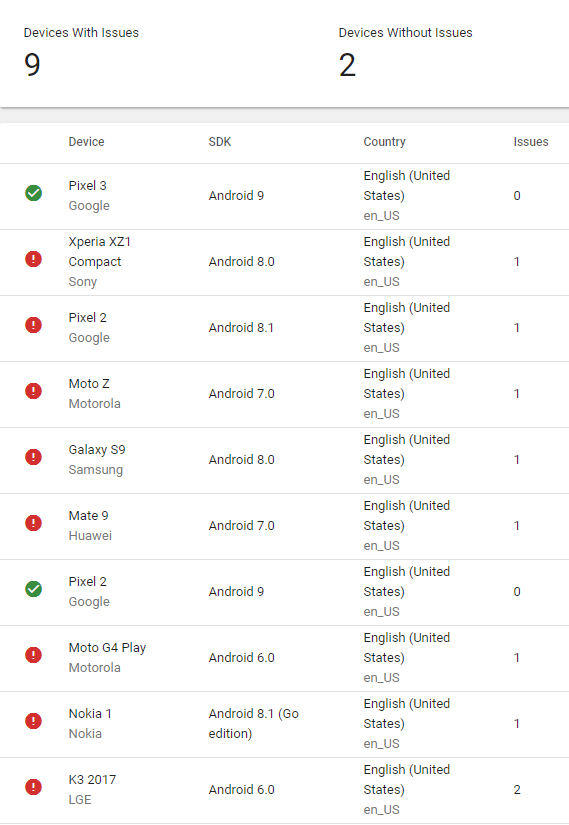
 longhuynh
on 12 Aug 2019
longhuynh
on 12 Aug 2019
Visual Studio 2019 16.3 Preview 2 just shipped yesterday with Xamarin.Android 10.0.0.4 and this fix.
There are also direct downloads:
- https://download.visualstudio.microsoft.com/download/pr/8a466e79-1ee5-4ec8-9651-1bc87a28816f/494e153cbe0307c47f0e3c0ad015d01f/xamarin.android.sdk-10.0.0.4.vsix
- https://download.visualstudio.microsoft.com/download/pr/121fed0f-3f5f-4bf9-a23d-c7d5db62393e/d540c45d40cdf186d2b743c45026b602/xamarin.android-10.0.0.4.pkg
If anyone can try it out, let me know so we can confirm we actually fixed the issue here, thanks!
jonathanpeppers
on 14 Aug 2019
The aab was created and was not signed. Besides, it still dose not show in Archive menu.
If someone have any update, please let me know
longhuynh
on 14 Aug 2019
@longhuynh the UI in the IDEs for App Bundles is not complete yet.
There is some documentation in the release notes for building command-line if you want to try it now: https://docs.microsoft.com/en-us/xamarin/android/release-notes/9/9.4#initial-support-for-android-app-bundle-publishing-format
Xamarin.Android 10.x has some other improvements for App Bundles: https://docs.microsoft.com/en-us/xamarin/android/release-notes/10/10.0#improved-support-for-android-app-bundle-publishing-format
jonathanpeppers
on 14 Aug 2019
@longhuynh the UI in the IDEs for App Bundles is not complete yet.
There is some documentation in the release notes for building command-line if you want to try it now: https://docs.microsoft.com/en-us/xamarin/android/release-notes/9/9.4#initial-support-for-android-app-bundle-publishing-format
Yes. I tried and it was created successful but it failed when run on Pre-launch for all device with version less then 9
longhuynh
on 14 Aug 2019
@longhuynh what version of Xamarin.Android were you using? the fix only came out yesterday.
jonathanpeppers
on 14 Aug 2019
@longhuynh what version of Xamarin.Android were you using? the fix only came out yesterday.
Let me try the new one.
longhuynh
on 14 Aug 2019
@longhuynh the UI in the IDEs for App Bundles is not complete yet.
Is the UI part on the roadmap with a rough ETA?
 pikausp
on 14 Aug 2019
pikausp
on 14 Aug 2019
It still crashed on Android version less than 9 on Pre-launch Feature of Google Console
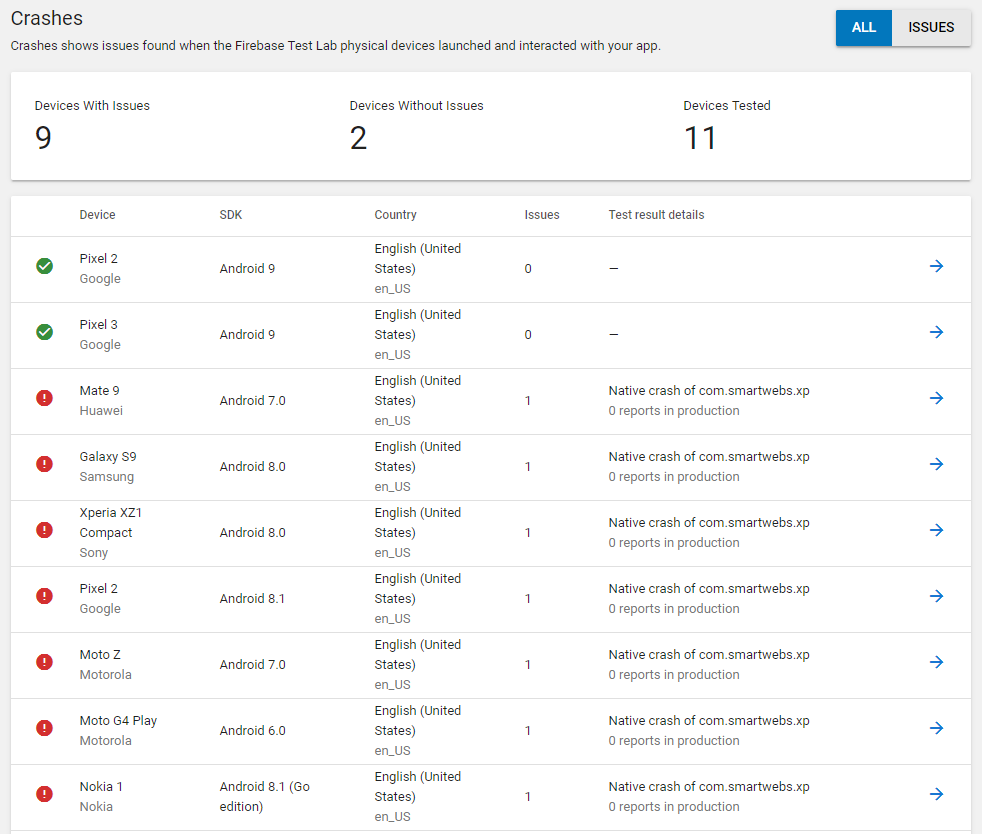
longhuynh
on 15 Aug 2019
Can you get a log of this crash? Does it work locally?
jonathanpeppers
on 15 Aug 2019
Can you get a log of this crash? Does it work locally?
Yes. It work locally.
The log here: https://drive.google.com/open?id=1XZJNpxYH4DE9miPs1v6KlkeoDbwttu2k
longhuynh
on 15 Aug 2019
Can you get a log of this crash? Does it work locally?
Any update @jonathanpeppers
longhuynh
on 19 Aug 2019
@jonathanpeppers we meet again!
Updating my pipelines broke everything, first aapt2 now this!
I really hope my organization approves my request to add your Boots app, i'll have more control over the environment.
 shanranm
on 20 Aug 2019
shanranm
on 20 Aug 2019
@shanranm i think that aapt2 is still broken. i hope that it will be fixed soon.
EmilAlipiev
on 20 Aug 2019
I updated to;
- Microsoft VS Profesional 2019 Preview v16.3 Preview 2.0
- Xamarin Android SDK 10.0.0.4
For my problem now seems that it is working right, but only when I upload it to Play Store as Alpha Tester then later I download App in devide from Play Store. When I try install directly with bundletool it still crash, is strange: - app.myproject.com-Signed.aab
- Then in CMD line I execute:
msbuild myproject.Droid.csproj /t:SignAndroidPackage /p:Configuration=Release - It works right!
- Now I have app.myproject.com-Signed.aab
- I upload it to Play Store, then later when I download it from Play Store in 3 devices it works right (before it crash), the device are: Samsung SM-G570M (Android 8.0), Samsung SM-J110M (Android 5.1) and Google Pixel (Android 9.0)
- But, when I install app.myproject.com-Signed.aab directly in my device, when it run, it crash. STRANGE:
- So, I execute:
java -jar bundletool-all-0.10.2.jar build-apks --connected-device --bundle=app.myproject.com-Signed.aab --output=app.apks --ks=.._keytool\myproject.keystore --ks-key-alias=myalias --ks-pass=pass:mypass - It generate a file app.apks, in it file exist a folder split with next 4 files:
- I copy these 4 files to folder DCIM of my device samsung
- The unique file that works for install is base-master.apk, so I run it
- It installed the App in my device
- When I executed the App, inmmediaty it crashed and app is closed
I attach adb logcat track when App is executed (and inmmediaty is crashed)
logcat-sm-g570m.log - In line 185 say FATAL EXCEPTION: main
If it works when download of Play Store for me is right, but I not understand why when I install it directly with bundletool it crash inmediatly when run app
GustavoMx
on 20 Aug 2019
@GustavoMx I wouldn't try to deploy/install these APK files yourself, use bundletool to install:
bundletool install-apks --apks=app.apks
More docs here:
- https://github.com/xamarin/xamarin-android/blob/master/Documentation/guides/app-bundles.md#deploy-an-apk-set
- https://developer.android.com/studio/command-line/bundletool#deploy_with_bundletool
Alternatively you can do:
msbuild myproject.Droid.csproj /t:Install /p:Configuration=Release
I also wouldn't use AndroidCreatePackagePerAbi=True and AndroidPackageFormat=aab at the same time, but it doesn't look like that is causing a problem for you.
jonathanpeppers
on 20 Aug 2019
@jonathanpeppers we meet again!
Updating my pipelines broke everything, first aapt2 now this!
I really hope my organization approves my request to add yourBootsapp, i'll have more control over the environment.
@shanranm if you are waiting on your org to approve the extension for boots, you might be able to just script it instead as described on the README. The extension is a "nice to have".
jonathanpeppers
on 20 Aug 2019
@jonathanpeppers, I have applied your recommendations and now the direct installation with bundletool works right! The app does not crash when run! thank you very much for the suggestions and the solution.
GustavoMx
on 20 Aug 2019
@shanranm if you are waiting on your org to approve the extension for boots, you might be able to just script it instead as described on the README. The extension is a "nice to have".
@jonathanpeppers I totally missed that!! Just made my pipeline stable!!!
Thanks a bunch
shanranm
on 21 Aug 2019
@longhuynh Are you still having issues? Trying to decide if this is worth trying yet...
 jahmai-ca
on 28 Aug 2019
jahmai-ca
on 28 Aug 2019
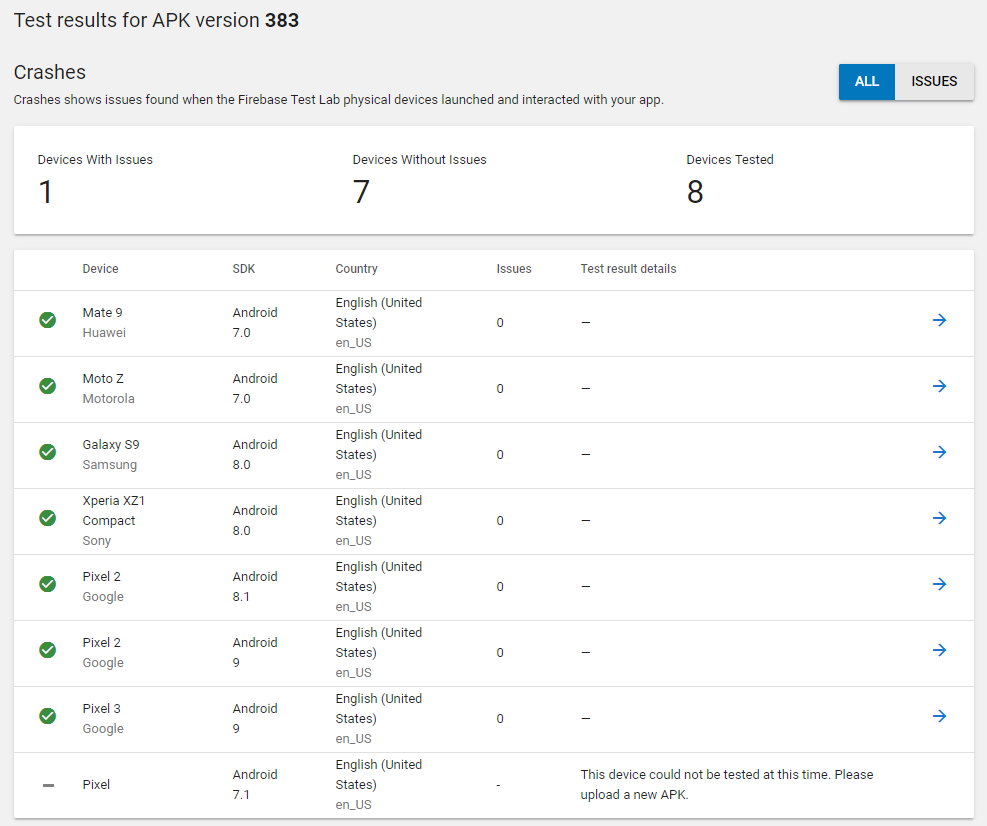
I built by using latest VS for Mac Preview and it works
longhuynh
on 5 Sep 2019
@longhuynh great news!
What version of Xamarin.Android were you using? What is the value of installLocation set in your AndroidManifest.xml? Thanks!
jonathanpeppers
on 5 Sep 2019
@longhuynh great news!
What version of Xamarin.Android were you using? What is the value of
installLocationset in yourAndroidManifest.xml? Thanks!
Version: 10.0.0.4 (Visual Studio Community)
installLocation: preferExternal (I think it auto change, the first time I set auto)
longhuynh
on 5 Sep 2019
Release status update
A new Release version has now been published that includes the fix for this item.
Fix included in Xamarin.Android 10.0.0.43
Fix included on Windows in Visual Studio 2019 version 16.3. To get the new version that includes the fix, check for the latest updates or install the latest version from https://visualstudio.microsoft.com/downloads/.
Fix included on macOS in Visual Studio 2019 for Mac version 8.3. To get the new version that includes the fix, check for the latest updates on the Stable updater channel.
 brendanzagaeski
on 25 Sep 2019
brendanzagaeski
on 25 Sep 2019
Related issues
 sgong-pdftron
·
4Comments
sgong-pdftron
·
4Comments
 Sebastian1989101
·
4Comments
jonpryor
·
3Comments
Sebastian1989101
·
4Comments
jonpryor
·
3Comments
 rusanov-vladimir
·
4Comments
rusanov-vladimir
·
4Comments
 EDMIStephen
·
4Comments
EDMIStephen
·
4Comments
Most helpful comment
Release status update
A new Release version has now been published that includes the fix for this item.
Fix included in Xamarin.Android 10.0.0.43
Fix included on Windows in Visual Studio 2019 version 16.3. To get the new version that includes the fix, check for the latest updates or install the latest version from https://visualstudio.microsoft.com/downloads/.
Fix included on macOS in Visual Studio 2019 for Mac version 8.3. To get the new version that includes the fix, check for the latest updates on the Stable updater channel.