Xamarin-android: Impossible to compile to release mode with AOT,LLVM and different linking options
Steps to Reproduce
I have a customer project under development, all was fine in debug mode, but I'm trying to make a release version, which is faster with smaller apk size, so I want tu use linking option and AOT/LLVM options, but it is impossible for me to make my release version
1) Default debug mode(AOT = false, LLVM = false, Linking = 'None'): all is working perfectly
2) Release mode : AOT = true, LLVM = true, Linking = 'Sdk and User Assemblies'
=>App is crashing at startup on the emulator and on the device
3) Release mode : AOT = true, LLVM = true, Linking = 'None'
No error at compilation, but error when I want to deploy to the emulator
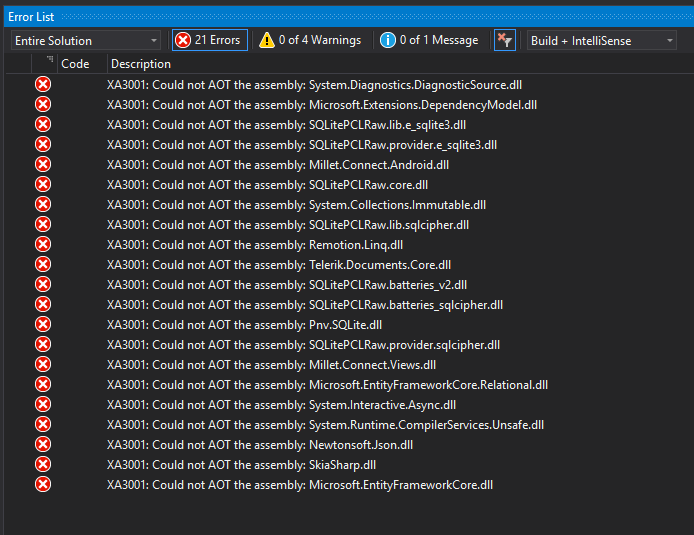
4) Release mode : AOT = true, LLVM = true, Linking = 'Sdk Assemblies Only'
Error at compilation
Severity    Code    Description Project File    Line    Suppression State
Error       The "LinkAssemblies" task failed unexpectedly.
Java.Interop.Tools.Diagnostics.XamarinAndroidException: error XA2006: Could not resolve reference to 'System.Buffers.StandardFormat' (defined in assembly 'Microsoft.Extensions.DependencyModel, Version=3.0.0.0, Culture=neutral, PublicKeyToken=adb9793829ddae60') with scope 'System.Memory, Version=4.0.1.0, Culture=neutral, PublicKeyToken=cc7b13ffcd2ddd51'. When the scope is different from the defining assembly, it usually means that the type is forwarded. ---> Mono.Cecil.ResolutionException: Failed to resolve System.Buffers.StandardFormat
   at Mono.Linker.Steps.MarkStep.HandleUnresolvedType(TypeReference reference)
   at Mono.Linker.Steps.MarkStep.MarkType(TypeReference reference)
   at MonoDroid.Tuner.MonoDroidMarkStep.MarkType(TypeReference reference)
   at Mono.Linker.Steps.MarkStep.MarkField(FieldReference reference)
   at Mono.Linker.Steps.MarkStep.InitializeFields(TypeDefinition type)
   at Mono.Linker.Steps.MarkStep.InitializeType(TypeDefinition type)
   at Mono.Linker.Steps.MarkStep.InitializeAssembly(AssemblyDefinition assembly)
   at Mono.Linker.Steps.MarkStep.Initialize()
   at MonoDroid.Tuner.MonoDroidMarkStep.Process(LinkContext context)
   at Mono.Linker.Pipeline.Process(LinkContext context)
   at MonoDroid.Tuner.Linker.Process(LinkerOptions options, ILogger logger, LinkContext& context)
   at Xamarin.Android.Tasks.LinkAssemblies.Execute(DirectoryAssemblyResolver res)
   --- End of inner exception stack trace ---
   at Java.Interop.Tools.Diagnostics.Diagnostic.Error(Int32 code, Exception innerException, String message, Object[] args)
   at Xamarin.Android.Tasks.LinkAssemblies.Execute(DirectoryAssemblyResolver res)
   at Xamarin.Android.Tasks.LinkAssemblies.Execute()
   at Microsoft.Build.BackEnd.TaskExecutionHost.Microsoft.Build.BackEnd.ITaskExecutionHost.Execute()
   at Microsoft.Build.BackEnd.TaskBuilder.<ExecuteInstantiatedTask>d__26.MoveNext() Customer.Connect_Android
Expected Behavior
Want to make my release project functionning
Actual Behavior
Release mode not functionning with Android options (AOT, LLVM and linking options)
Version Information
VS 2019 16.0.3 OR VS 2019 preview 2, Xamarin Forms Project (latest stable version)
 Tristan-gu
All 12 comments
Disable AOT. I was unable to make it work on VS2019 with AOT enabled. It used to work on VS2017.
 softlion
on 7 May 2019
softlion
on 7 May 2019
FYI, Enable AOT/LLVM will increase your APK size, see https://docs.microsoft.com/en-us/xamarin/android/deploy-test/release-prep/?tabs=windows#aot-compilation
 rofiqsetiawan
on 7 May 2019
rofiqsetiawan
on 7 May 2019
Thanks for the report! I'll recommend to start with scenario number 4:
Release mode : AOT = true, LLVM = true, Linking = 'Sdk Assemblies Only'
(I'll recommend this as the starting place because compiling with Linking = 'None' with AOT can produce very large outputs, and compiling with Linking = 'Sdk and User Assemblies' requires special care to make sure that appropriate linker preserve rules have been added for any uses of reflection in your code or 3rd-party libraries.)
I suspect it might be possible to reproduce the error for scenario 4 by adding just one or a few particular NuGet packages to a new Xamarin.Forms template app. Unfortunately, my first guess of adding Microsoft.Extensions.DependencyModel version 2.1.0 was not sufficient to reproduce the problem locally, so if you might be able to provide one or more of the following additional bits of information, that would be perfect:
- Zip up and attach a small self-contained project that demonstrates the issue.
- Or attach or paste back all of the NuGet package information. In other words, attach or paste back all of the
<PackageReference>elements from the .csproj files in your solution, or if you are using the old packages.config style of package management, attach or paste back the contents of all of the packages.config files. Or collect the binary log from the build that fails for your project when you have "AOT = true, LLVM = true, Linking = 'Sdk Assemblies Only'":
Run the following command in a Developer Command Prompt, adjusting the solution name and
Configurationas appropriate:msbuild -bl:"%USERPROFILE%"\Desktop\AndroidApp1.binlog -t:SignAndroidPackage -p:Configuration=Release AndroidApp1.slnIf you would like to attach the resulting AndroidApp1.binlog from your Desktop directory directly on this issue, you can add it to a .zip archive and then attach it to a new comment. Note that the binary log does contain environment variables, including the Windows user name. So if you prefer, feel free to send a one to one message to me on Gitter, for example using a
/query @brendanzagaeskicommand from within the Xamarin.Android Gitter channel, and we can coordinate on another way to send the file non-publicly. Another option is to use Help > Send Feedback > Report a Problem from within Visual Studio to create an item on Visual Studio Developer Community. Those allow private attachments. Or if you like, you can replay the binary log to a textual log, edit it to remove any sensitive information, and then add that to a .zip archive and attach it directly on this issue instead.
Thanks in advance!
 brendanzagaeski
on 8 May 2019
brendanzagaeski
on 8 May 2019
Hi,
Thank you for your answer.
I found some things after multiple tests on VS 2019 Prev 3.
First, I have reseted my whole release configuration, and deleted bin-obj folder in my xamarin project.
Next to that, I tried to compile with the default linking mode 'Sdk Assemblies Only', and I had this error:
Severity    Code    Description Project File    Line    Suppression State
Error       The "LinkAssemblies" task failed unexpectedly.
Java.Interop.Tools.Diagnostics.XamarinAndroidException: error XA2006: Could not resolve reference to 'System.Buffers.StandardFormat' (defined in assembly 'Microsoft.Extensions.DependencyModel, Version=3.0.0.0, Culture=neutral, PublicKeyToken=adb9793829ddae60') with scope 'System.Memory, Version=4.0.1.0, Culture=neutral, PublicKeyToken=cc7b13ffcd2ddd51'. When the scope is different from the defining assembly, it usually means that the type is forwarded. ---> Mono.Cecil.ResolutionException: Failed to resolve System.Buffers.StandardFormat
   at Mono.Linker.Steps.MarkStep.HandleUnresolvedType(TypeReference reference)
   at Mono.Linker.Steps.MarkStep.MarkType(TypeReference reference)
   at MonoDroid.Tuner.MonoDroidMarkStep.MarkType(TypeReference reference)
   at Mono.Linker.Steps.MarkStep.MarkField(FieldReference reference)
   at Mono.Linker.Steps.MarkStep.InitializeFields(TypeDefinition type)
   at Mono.Linker.Steps.MarkStep.InitializeType(TypeDefinition type)
   at Mono.Linker.Steps.MarkStep.InitializeAssembly(AssemblyDefinition assembly)
   at Mono.Linker.Steps.MarkStep.Initialize()
   at MonoDroid.Tuner.MonoDroidMarkStep.Process(LinkContext context)
   at Mono.Linker.Pipeline.Process(LinkContext context)
   at MonoDroid.Tuner.Linker.Process(LinkerOptions options, ILogger logger, LinkContext& context)
   at Xamarin.Android.Tasks.LinkAssemblies.Execute(DirectoryAssemblyResolver res)
   --- End of inner exception stack trace ---
   at Java.Interop.Tools.Diagnostics.Diagnostic.Error(Int32 code, Exception innerException, String message, Object[] args)
   at Xamarin.Android.Tasks.LinkAssemblies.Execute(DirectoryAssemblyResolver res)
   at Xamarin.Android.Tasks.LinkAssemblies.Execute()
   at Microsoft.Build.BackEnd.TaskExecutionHost.Microsoft.Build.BackEnd.ITaskExecutionHost.Execute()
   at Microsoft.Build.BackEnd.TaskBuilder.<ExecuteInstantiatedTask>d__26.MoveNext() Customer.Connect_Android
I was using EF Core preview dependancies :
- Microsoft.EntityFrameworkCore (>= 3.0.0-preview4.19216.3)
- Microsoft.EntityFrameworkCore.Sqlite (>= 3.0.0-preview4.19216.3)
I changed them to:
- Microsoft.EntityFrameworkCore (>= 2.2.4)
- Microsoft.EntityFrameworkCore.Sqlite (>= 2.2.4)
And compiled with 'AOT = true, LLVM = true, Linking = 'Sdk Assemblies Only'' => compilation and execution were OK
So, I tried next to compile with 'AOT = true, LLVM = true, Linking = 'Sdk and User Assemblies'' => compilation was OK, but the app crashed at startupt with an EF core error.
So, I came back to 'AOT = true, LLVM = true, Linking = 'Sdk Assemblies Only'', and I work with these options for the moment.
Tristan-gu
on 9 May 2019
@softlion @brendanzagaeski is there any reported issue for that? is it known issue? i am not able to use AOT+LLVM together in VS2019 but same project just works fine in VS2017.
 EmilAlipiev
on 27 May 2019
EmilAlipiev
on 27 May 2019
@EmilAlipiev , softlion was seeing two issues with AOT and LLVM Compilation enabled. One was https://github.com/xamarin/xamarin-android/issues/2521, which now has a fix available in Visual Studio 2019 version 16.1. The other issue involves seeing Didn't find class "android.widget.View" errors when running the app with AOT and LLVM Compilation enabled. There is a preliminary discussion of that problem in https://github.com/xamarin/xamarin-android/issues/2966, but it does not yet have a dedicated issue. If by chance you also see that issue, feel free to gather some of the additional information discussed there and attach it to that issue, or even better attach it on a new issue dedicated to that problem. Thanks in advance!
brendanzagaeski
on 29 May 2019
I fixed it by
- creating a multidex,keep. I just copied the one generated when using "proguard", then switched back to r8 with this file in the project as main dex list.
- referencing org.apache.http.legacy.jar, whatever this has to do with the problem. It's a bug in xamarin tooling which does not use the correct android sdk folder and does not find the jar referenced by the aar in the google play nugets - silently failing - generating "class not found" errors in r8.
And using this proguard file
# Support constraint
-dontwarn android.support.constraint.**
-keep class android.support.constraint.** { *; }
-keep interface android.support.constraint.** { *; }
-keep public class android.support.constraint.R$* { *; }

# Support library v7
-dontwarn android.support.v7.widget.**
-keep class android.support.v7.widget.** { *; }

# Support library v4
-dontwarn android.support.v4.widget.Space
-keep class android.support.v4.widget.Space { *; }

# Support design
-dontwarn android.support.design.**
-keep class android.support.design.** { *; }
-keep interface android.support.design.** { *; }
-keep public class android.support.design.R$* { *; }


#==========================
# Facebook Android SDK
#==========================
#https://github.com/facebook/facebook-android-sdk/blob/master/facebook/proguard-project.txt

-keepclassmembers class * implements java.io.Serializable {
    private static final java.io.ObjectStreamField[] serialPersistentFields;
    private void writeObject(java.io.ObjectOutputStream);
    private void readObject(java.io.ObjectInputStream);
    java.lang.Object writeReplace();
    java.lang.Object readResolve();
}

-keepnames class com.facebook.FacebookActivity
-keepnames class com.facebook.CustomTabActivity

-keep class com.facebook.all.All

-keep public class com.android.vending.billing.IInAppBillingService {
    public static com.android.vending.billing.IInAppBillingService asInterface(android.os.IBinder);
    public android.os.Bundle getSkuDetails(int, java.lang.String, java.lang.String, android.os.Bundle);
}

#BM additions
-keep class com.facebook.internal.FacebookInitProvider


#NOTE: does not work in release mode with R8+D8.
#-keep public class com.microsoft.appcenter.distribute.Distribute {
#    public static * setEnabled(boolean);
#}


#==========================
# Google Play services Android SDK
#==========================
#PROGUARD : warning : com.google.android.gms.internal.zzak: can't find referenced method 'void addHeader(java.lang.String,java.lang.String)' in program class com.google.android.gms.internal.zzal [/Users/vsts/agent/2.150.3/work/1/s/Cosmo/Cosmo.Droid/Cosmo.Droid.csproj]
#PROGUARD : warning : com.google.android.gms.internal.zzal: can't find referenced method 'void setURI(java.net.URI)' in program class com.google.android.gms.internal.zzal [/Users/vsts/agent/2.150.3/work/1/s/Cosmo/Cosmo.Droid/Cosmo.Droid.csproj]
-ignorewarnings

-dontwarn sun.misc.Unsafe
-dontwarn org.apache.http.**
-dontwarn android.net.http.AndroidHttpClient

#Not good: compiles fine but crash at runtime:
#???? NoSuchMethodError: no non-static method "Lcom/google/android/gms/auth/api/signin/internal/zzc;.silentSignIn(Lcom/google/android/gms/common/api/GoogleApiClient;)Lcom/google/android/gms/common/api/OptionalPendingResult;"
#???? NoSuchMethodError: no non-static method "Lcom/google/android/gms/internal/zzary;.requestLocationUpdates(Lcom/google/android/gms/common/api/GoogleApiClient;Lcom/google/android/gms/location/LocationRequest;Lcom/google/android/gms/location/LocationListener;Landroid/os/Looper;)Lcom/google/android/gms/common/api/PendingResult;"

-keep,includedescriptorclasses class com.google.android.gms.auth.api.signin.internal.** {*;}

#fix compilation errors
#1>PROGUARD : warning : com.google.android.gms.internal.zzx: can't find referenced method 'void addHeader(java.lang.String,java.lang.String)' in program class com.google.android.gms.internal.zzx$zza
#1>PROGUARD : warning : com.google.android.gms.internal.zzx$zza: can't find referenced method 'void setURI(java.net.URI)' in program class com.google.android.gms.internal.zzx$zza
#-dontwarn com.google.android.gms.internal.zzal

-keep,includedescriptorclasses class com.google.android.gms.common.images.ImageManager {*;}
-keep,includedescriptorclasses class com.google.android.gms.location.** {*;}
-keep,includedescriptorclasses class com.google.android.gms.internal.** {*;}

-keep public class com.google.android.gms.common.api.GoogleApi$zza { public *; }
-keep public class com.google.android.gms.dynamic.IObjectWrapper { public *; }

-keepnames class com.google.android.** implements android.os.Parcelable { public *; }
-keepclassmembers class com.google.android.** implements android.os.Parcelable {
  public static final *** CREATOR;
}

-keep @interface com.google.android.gms.common.annotation.KeepName
-keepnames @com.google.android.gms.common.annotation.KeepName class *
-keepclassmembernames class * {
  @com.google.android.gms.common.annotation.KeepName *;
}

-keep @interface com.google.android.gms.common.util.DynamiteApi
-keep,includedescriptorclasses public @com.google.android.gms.common.util.DynamiteApi class * {
  public <fields>;
  public <methods>;
}

-dontwarn android.security.NetworkSecurityPolicy
@EmilAlipiev , softlion was seeing two issues with AOT and LLVM Compilation enabled. One was #2521, which now has a fix available in Visual Studio 2019 version 16.1. The other issue involves seeing
Didn't find class "android.widget.View"errors when running the app with AOT and LLVM Compilation enabled. There is a preliminary discussion of that problem in #2966, but it does not yet have a dedicated issue. If by chance you also see that issue, feel free to gather some of the additional information discussed there and attach it to that issue, or even better attach it on a new issue dedicated to that problem. Thanks in advance!
You could easily reproduce this issue with @aritchie user dialogs https://github.com/aritchie/userdialogs
Here is issue https://github.com/aritchie/userdialogs/issues/620
Step to reproduce
- Take this project https://github.com/JTOne123/XamFormsMvxTemplate/blob/master/MvxForms.sln and build in Release Mode with LLVM(true), AOT(true) armeabi-v7a (to build, please use this instruction https://github.com/JTOne123/OnePackagePerABI/blob/master/Program.cs (And it should be reproducible with default release build in VS19 as well))
- Run on real Samsung J6 phone (I guess it reproduces at other phones also)
- Press "Tabs mode" button (this button should show Alert)
- App crashed
 JTOne123
on 19 Jun 2019
JTOne123
on 19 Jun 2019
I have the same problem. Unfortunately app landed in Play Store without being tested on Xiaomi Redmi 6A which is very popular in my country and has this very problem.
Full stack trace from crash:
java.lang.ClassNotFoundException: Didn't find class "android.widget.View" on path: DexPathList[[zip file "/data/app/pl.appname.app-KOcg3qKI9OQ4MqXfAIsc7g==/base.apk"],nativeLibraryDirectories=[/data/app/pl.appname.app-KOcg3qKI9OQ4MqXfAIsc7g==/lib/arm, /data/app/pl.appname.app-KOcg3qKI9OQ4MqXfAIsc7g==/base.apk!/lib/armeabi-v7a, /system/lib, /vendor/lib]]
dalvik.system.BaseDexClassLoader.findClass()BaseDexClassLoader.java:125
java.lang.ClassLoader.loadClass()ClassLoader.java:379
java.lang.ClassLoader.loadClass()ClassLoader.java:312
android.view.LayoutInflater.createView()LayoutInflater.java:610
mvvmcross.platforms.android.binding.views.MvxLayoutInflater.n_onCreateView(Native Method)
mvvmcross.platforms.android.binding.views.MvxLayoutInflater.onCreateView()MvxLayoutInflater.java:66
android.view.LayoutInflater.onCreateView()LayoutInflater.java:724
mvvmcross.platforms.android.binding.views.MvxLayoutInflater.n_onCreateView(Native Method)
mvvmcross.platforms.android.binding.views.MvxLayoutInflater.onCreateView()MvxLayoutInflater.java:58
android.view.LayoutInflater.createViewFromTag()LayoutInflater.java:792
android.view.LayoutInflater.createViewFromTag()LayoutInflater.java:734
android.view.LayoutInflater.rInflate()LayoutInflater.java:867
android.view.LayoutInflater.rInflateChildren()LayoutInflater.java:828
android.view.LayoutInflater.rInflate()LayoutInflater.java:870
android.view.LayoutInflater.rInflateChildren()LayoutInflater.java:828
android.view.LayoutInflater.parseInclude()LayoutInflater.java:999
android.view.LayoutInflater.rInflate()LayoutInflater.java:863
android.view.LayoutInflater.rInflateChildren()LayoutInflater.java:828
android.view.LayoutInflater.inflate()LayoutInflater.java:519
android.view.LayoutInflater.inflate()LayoutInflater.java:427
mvvmcross.droid.support.v7.recyclerview.MvxRecyclerAdapter.n_onCreateViewHolder(Native Method)
mvvmcross.droid.support.v7.recyclerview.MvxRecyclerAdapter.onCreateViewHolder()MvxRecyclerAdapter.java:59
android.support.v7.widget.RecyclerView$Adapter.createViewHolder()RecyclerView.java:6519
android.support.v7.widget.RecyclerView$Recycler.tryGetViewHolderForPositionByDeadline()RecyclerView.java:5706
android.support.v7.widget.RecyclerView$Recycler.getViewForPosition()RecyclerView.java:5589
android.support.v7.widget.RecyclerView$Recycler.getViewForPosition()RecyclerView.java:5585
android.support.v7.widget.LinearLayoutManager$LayoutState.next()LinearLayoutManager.java:2231
android.support.v7.widget.LinearLayoutManager.layoutChunk()LinearLayoutManager.java:1558
android.support.v7.widget.LinearLayoutManager.fill()LinearLayoutManager.java:1518
android.support.v7.widget.LinearLayoutManager.onLayoutChildren()LinearLayoutManager.java:610
mvvmcross.droid.support.v7.recyclerview.MvxGuardedLinearLayoutManager.n_onLayoutChildren(Native Method)
mvvmcross.droid.support.v7.recyclerview.MvxGuardedLinearLayoutManager.onLayoutChildren()MvxGuardedLinearLayoutManager.java:45
android.support.v7.widget.RecyclerView.dispatchLayoutStep2()RecyclerView.java:3719
android.support.v7.widget.RecyclerView.dispatchLayout()RecyclerView.java:3436
android.support.v7.widget.RecyclerView.onLayout()RecyclerView.java:3988
android.view.View.layout()View.java:19828
android.view.ViewGroup.layout()ViewGroup.java:6154
android.widget.LinearLayout.setChildFrame()LinearLayout.java:1791
android.widget.LinearLayout.layoutVertical()LinearLayout.java:1635
android.widget.LinearLayout.onLayout()LinearLayout.java:1544
android.view.View.layout()View.java:19828
android.view.ViewGroup.layout()ViewGroup.java:6154
android.widget.RelativeLayout.onLayout()RelativeLayout.java:1083
android.view.View.layout()View.java:19828
android.view.ViewGroup.layout()ViewGroup.java:6154
android.widget.LinearLayout.setChildFrame()LinearLayout.java:1791
android.widget.LinearLayout.layoutVertical()LinearLayout.java:1635
android.widget.LinearLayout.onLayout()LinearLayout.java:1544
android.view.View.layout()View.java:19828
android.view.ViewGroup.layout()ViewGroup.java:6154
android.widget.FrameLayout.layoutChildren()FrameLayout.java:323
android.widget.FrameLayout.onLayout()FrameLayout.java:261
android.view.View.layout()View.java:19828
android.view.ViewGroup.layout()ViewGroup.java:6154
android.widget.RelativeLayout.onLayout()RelativeLayout.java:1083
android.view.View.layout()View.java:19828
android.view.ViewGroup.layout()ViewGroup.java:6154
android.widget.FrameLayout.layoutChildren()FrameLayout.java:323
android.widget.FrameLayout.onLayout()FrameLayout.java:261
android.view.View.layout()View.java:19828
android.view.ViewGroup.layout()ViewGroup.java:6154
android.widget.LinearLayout.setChildFrame()LinearLayout.java:1791
android.widget.LinearLayout.layoutVertical()LinearLayout.java:1635
android.widget.LinearLayout.onLayout()LinearLayout.java:1544
android.view.View.layout()View.java:19828
android.view.ViewGroup.layout()ViewGroup.java:6154
android.widget.FrameLayout.layoutChildren()FrameLayout.java:323
android.widget.FrameLayout.onLayout()FrameLayout.java:261
com.android.internal.policy.DecorView.onLayout()DecorView.java:765
android.view.View.layout()View.java:19828
android.view.ViewGroup.layout()ViewGroup.java:6154
android.view.ViewRootImpl.performLayout()ViewRootImpl.java:2643
android.view.ViewRootImpl.performTraversals()ViewRootImpl.java:2348
android.view.ViewRootImpl.doTraversal()ViewRootImpl.java:1482
android.view.ViewRootImpl$TraversalRunnable.run()ViewRootImpl.java:7124
android.view.Choreographer$CallbackRecord.run()Choreographer.java:1008
android.view.Choreographer.doCallbacks()Choreographer.java:804
android.view.Choreographer.doFrame()Choreographer.java:732
android.view.Choreographer$FrameDisplayEventReceiver.run()Choreographer.java:994
android.os.Handler.handleCallback()Handler.java:794
android.os.Handler.dispatchMessage()Handler.java:99
android.os.Looper.loop()Looper.java:176
android.app.ActivityThread.main()ActivityThread.java:6662
java.lang.reflect.Method.invoke(Native Method)
com.android.internal.os.RuntimeInit$MethodAndArgsCaller.run()RuntimeInit.java:547
com.android.internal.os.ZygoteInit.main()ZygoteInit.java:873
Xamarin caused by: Java.Lang.ClassNotFoundException: Didn't find class "android.widget.View" on path: DexPathList[[zip file "/data/app/pl.appname.app-KOcg3qKI9OQ4MqXfAIsc7g==/base.apk"],nativeLibraryDirectories=[/data/app/pl.appname.app-KOcg3qKI9OQ4MqXfAIsc7g==/lib/arm, /data/app/pl.appname.app-KOcg3qKI9OQ4MqXfAIsc7g==/base.apk!/lib/armeabi-v7a, /system/lib, /vendor/lib]]
Java.Interop.JniEnvironment.InstanceMethods.CallNonvirtualObjectMethod(JniObjectReference instance, JniObjectReference type, JniMethodInfo method, JniArgumentValue* args)
Java.Interop.JniPeerMembers.JniInstanceMethods.InvokeNonvirtualObjectMethod(string encodedMember, IJavaPeerable self, JniArgumentValue* parameters)
Android.Views.LayoutInflater.CreateView(string name, string prefix, IAttributeSet attrs)
at (wrapper managed-to-native) Java.Interop.NativeMethods.java_interop_jnienv_call_nonvirtual_object_method_a(intptr,intptr&,intptr,intptr,intptr,Java.Interop.JniArgumentValue*)
Java.Interop.JniEnvironment.InstanceMethods.CallNonvirtualObjectMethod(JniObjectReference instance, JniObjectReference type, JniMethodInfo method, JniArgumentValue* args)
Java.Interop.JniPeerMembers.JniInstanceMethods.InvokeVirtualObjectMethod(string encodedMember, IJavaPeerable self, JniArgumentValue* parameters)
Android.Views.LayoutInflater.OnCreateView(View parent, string name, IAttributeSet attrs)
MvvmCross.Platforms.Android.Binding.Views.MvxLayoutInflater.Inflate(int resource, ViewGroup root, bool attachToRoot)
at (wrapper managed-to-native) Java.Interop.NativeMethods.java_interop_jnienv_call_nonvirtual_object_method_a(intptr,intptr&,intptr,intptr,intptr,Java.Interop.JniArgumentValue*)
Java.Interop.JniEnvironment.InstanceMethods.CallNonvirtualObjectMethod(JniObjectReference instance, JniObjectReference type, JniMethodInfo method, JniArgumentValue* args)
Java.Interop.JniPeerMembers.JniInstanceMethods.InvokeVirtualObjectMethod(string encodedMember, IJavaPeerable self, JniArgumentValue* parameters)
Android.Views.LayoutInflater.Inflate(int resource, ViewGroup root, bool attachToRoot)
at (wrapper managed-to-native) Java.Interop.NativeMethods.java_interop_jnienv_call_nonvirtual_void_method_a(intptr,intptr&,intptr,intptr,intptr,Java.Interop.JniArgumentValue*)
Java.Interop.JniEnvironment.InstanceMethods.CallNonvirtualVoidMethod(JniObjectReference instance, JniObjectReference type, JniMethodInfo method, JniArgumentValue* args)
Java.Interop.JniPeerMembers.JniInstanceMethods.InvokeVirtualVoidMethod(string encodedMember, IJavaPeerable self, JniArgumentValue* parameters)
Android.Support.V7.Widget.RecyclerView.LayoutManager.OnLayoutChildren(RecyclerView.Recycler recycler, RecyclerView.State state)
--- End of managed Java.Lang.ClassNotFoundException stack trace ---
java.lang.ClassNotFoundException: Didn't find class "android.widget.View" on path: DexPathList[[zip file "/data/app/pl.appname.app-KOcg3qKI9OQ4MqXfAIsc7g==/base.apk"],nativeLibraryDirectories=[/data/app/pl.appname.app-KOcg3qKI9OQ4MqXfAIsc7g==/lib/arm, /data/app/pl.appname.app-KOcg3qKI9OQ4MqXfAIsc7g==/base.apk!/lib/armeabi-v7a, /system/lib, /vendor/lib]]
dalvik.system.BaseDexClassLoader.findClass()BaseDexClassLoader.java:125
java.lang.ClassLoader.loadClass()ClassLoader.java:379
java.lang.ClassLoader.loadClass()ClassLoader.java:312
android.view.LayoutInflater.createView()LayoutInflater.java:610
mvvmcross.platforms.android.binding.views.MvxLayoutInflater.n_onCreateView(Native Method)
mvvmcross.platforms.android.binding.views.MvxLayoutInflater.onCreateView()MvxLayoutInflater.java:66
android.view.LayoutInflater.onCreateView()LayoutInflater.java:724
mvvmcross.platforms.android.binding.views.MvxLayoutInflater.n_onCreateView(Native Method)
mvvmcross.platforms.android.binding.views.MvxLayoutInflater.onCreateView()MvxLayoutInflater.java:58
android.view.LayoutInflater.createViewFromTag()LayoutInflater.java:792
android.view.LayoutInflater.createViewFromTag()LayoutInflater.java:734
android.view.LayoutInflater.rInflate()LayoutInflater.java:867
android.view.LayoutInflater.rInflateChildren()LayoutInflater.java:828
android.view.LayoutInflater.rInflate()LayoutInflater.java:870
android.view.LayoutInflater.rInflateChildren()LayoutInflater.java:828
android.view.LayoutInflater.parseInclude()LayoutInflater.java:999
android.view.LayoutInflater.rInflate()LayoutInflater.java:863
android.view.LayoutInflater.rInflateChildren()LayoutInflater.java:828
android.view.LayoutInflater.inflate()LayoutInflater.java:519
android.view.LayoutInflater.inflate()LayoutInflater.java:427
mvvmcross.droid.support.v7.recyclerview.MvxRecyclerAdapter.n_onCreateViewHolder(Native Method)
mvvmcross.droid.support.v7.recyclerview.MvxRecyclerAdapter.onCreateViewHolder()MvxRecyclerAdapter.java:59
android.support.v7.widget.RecyclerView$Adapter.createViewHolder()RecyclerView.java:6519
android.support.v7.widget.RecyclerView$Recycler.tryGetViewHolderForPositionByDeadline()RecyclerView.java:5706
android.support.v7.widget.RecyclerView$Recycler.getViewForPosition()RecyclerView.java:5589
android.support.v7.widget.RecyclerView$Recycler.getViewForPosition()RecyclerView.java:5585
android.support.v7.widget.LinearLayoutManager$LayoutState.next()LinearLayoutManager.java:2231
android.support.v7.widget.LinearLayoutManager.layoutChunk()LinearLayoutManager.java:1558
android.support.v7.widget.LinearLayoutManager.fill()LinearLayoutManager.java:1518
android.support.v7.widget.LinearLayoutManager.onLayoutChildren()LinearLayoutManager.java:610
mvvmcross.droid.support.v7.recyclerview.MvxGuardedLinearLayoutManager.n_onLayoutChildren(Native Method)
mvvmcross.droid.support.v7.recyclerview.MvxGuardedLinearLayoutManager.onLayoutChildren()MvxGuardedLinearLayoutManager.java:45
android.support.v7.widget.RecyclerView.dispatchLayoutStep2()RecyclerView.java:3719
android.support.v7.widget.RecyclerView.dispatchLayout()RecyclerView.java:3436
android.support.v7.widget.RecyclerView.onLayout()RecyclerView.java:3988
android.view.View.layout()View.java:19828
android.view.ViewGroup.layout()ViewGroup.java:6154
android.widget.LinearLayout.setChildFrame()LinearLayout.java:1791
android.widget.LinearLayout.layoutVertical()LinearLayout.java:1635
android.widget.LinearLayout.onLayout()LinearLayout.java:1544
android.view.View.layout()View.java:19828
android.view.ViewGroup.layout()ViewGroup.java:6154
android.widget.RelativeLayout.onLayout()RelativeLayout.java:1083
android.view.View.layout()View.java:19828
android.view.ViewGroup.layout()ViewGroup.java:6154
android.widget.LinearLayout.setChildFrame()LinearLayout.java:1791
android.widget.LinearLayout.layoutVertical()LinearLayout.java:1635
android.widget.LinearLayout.onLayout()LinearLayout.java:1544
android.view.View.layout()View.java:19828
android.view.ViewGroup.layout()ViewGroup.java:6154
android.widget.FrameLayout.layoutChildren()FrameLayout.java:323
android.widget.FrameLayout.onLayout()FrameLayout.java:261
android.view.View.layout()View.java:19828
android.view.ViewGroup.layout()ViewGroup.java:6154
android.widget.RelativeLayout.onLayout()RelativeLayout.java:1083
android.view.View.layout()View.java:19828
android.view.ViewGroup.layout()ViewGroup.java:6154
android.widget.FrameLayout.layoutChildren()FrameLayout.java:323
android.widget.FrameLayout.onLayout()FrameLayout.java:261
android.view.View.layout()View.java:19828
android.view.ViewGroup.layout()ViewGroup.java:6154
android.widget.LinearLayout.setChildFrame()LinearLayout.java:1791
android.widget.LinearLayout.layoutVertical()LinearLayout.java:1635
android.widget.LinearLayout.onLayout()LinearLayout.java:1544
android.view.View.layout()View.java:19828
android.view.ViewGroup.layout()ViewGroup.java:6154
android.widget.FrameLayout.layoutChildren()FrameLayout.java:323
android.widget.FrameLayout.onLayout()FrameLayout.java:261
com.android.internal.policy.DecorView.onLayout()DecorView.java:765
android.view.View.layout()View.java:19828
android.view.ViewGroup.layout()ViewGroup.java:6154
android.view.ViewRootImpl.performLayout()ViewRootImpl.java:2643
android.view.ViewRootImpl.performTraversals()ViewRootImpl.java:2348
android.view.ViewRootImpl.doTraversal()ViewRootImpl.java:1482
android.view.ViewRootImpl$TraversalRunnable.run()ViewRootImpl.java:7124
android.view.Choreographer$CallbackRecord.run()Choreographer.java:1008
android.view.Choreographer.doCallbacks()Choreographer.java:804
android.view.Choreographer.doFrame()Choreographer.java:732
android.view.Choreographer$FrameDisplayEventReceiver.run()Choreographer.java:994
android.os.Handler.handleCallback()Handler.java:794
android.os.Handler.dispatchMessage()Handler.java:99
android.os.Looper.loop()Looper.java:176
android.app.ActivityThread.main()ActivityThread.java:6662
java.lang.reflect.Method.invoke(Native Method)
com.android.internal.os.RuntimeInit$MethodAndArgsCaller.run()RuntimeInit.java:547
com.android.internal.os.ZygoteInit.main()ZygoteInit.java:873
 orestesgaolin
on 27 Jun 2019
orestesgaolin
on 27 Jun 2019
@orestesgaolin
1) The R8 optimizer is very aggressive and new, so disable it (select "proguard"). All android native libraries are also affected, like support libraries (not androidx, but its not available on xamarin yet).
2) try to add this:
[Preserve(AllMembers=true)] class LinkerInclude
{
  public void Include() {
  _ = new android.widget.View();
  _ = new android.widget.View(null);
  _ = new android.widget.View(null,null);
  _ = new android.widget.View(null,null,0);
  _ = new android.widget.View(null,null,0,0);
  ...
  }
}
JTOne123 commented on Jun 19 https://github.com/xamarin/xamarin-android/issues/3072#issuecomment-503537987
You could easily reproduce this issue with ... user dialogs https://github.com/aritchie/userdialogs
Thanks much for that test case! I was able to reproduce that issue, so I filed it in its own issue: https://github.com/xamarin/xamarin-android/issues/3306. I found that the problem is now resolved for that test case in Visual Studio 2019 version 16.2 Preview 3. As noted there, if any other test cases show a similar problem, please do add a comment on that issue or submit a new issue with additional information so the team can investigate. Thanks!
brendanzagaeski
on 28 Jun 2019
Tristan-gu commented on May 9 https://github.com/xamarin/xamarin-android/issues/3072#issuecomment-490815580
Java.Interop.Tools.Diagnostics.XamarinAndroidException: error XA2006: Could not resolve reference to 'System.Buffers.StandardFormat' (defined in assembly 'Microsoft.Extensions.DependencyModel, Version=3.0.0.0, Culture=neutral, PublicKeyToken=adb9793829ddae60') with scope 'System.Memory, Version=4.0.1.0, Culture=neutral, PublicKeyToken=cc7b13ffcd2ddd51'. When the scope is different from the defining assembly, it usually means that the type is forwarded. ---> Mono.Cecil.ResolutionException: Failed to resolve System.Buffers.StandardFormat
I was using EF Core preview dependancies :
- Microsoft.EntityFrameworkCore (>= 3.0.0-preview4.19216.3)
- Microsoft.EntityFrameworkCore.Sqlite (>= 3.0.0-preview4.19216.3)
Apologies for the slow follow-up on this original symptom, and thanks for the additional information about the EntityFrameworkCore NuGet packages! I was able to reproduce this behavior by adding those versions of the EntityFrameworkCore NuGet package to a new project. The linker error about System.Buffers.StandardFormat happens because the Mono Framework class libraries in Xamarin.Android 9.3.0.22 and earlier do not yet include that type.
In contrast, the new Xamarin.Android SDK version 9.3.0.23 published this week now does include System.Buffers.StandardFormat, and that version allowed me to build the test project with EntityFrameworkCore without any linker errors.
Windows fix published. Xamarin.Android SDK version 9.3.0.23 has now been published as part of Visual Studio 2019 version 16.1.4. Check for the latest updates or install the most recent release from https://visualstudio.microsoft.com/downloads/ to get the fix.
macOS fix published. Xamarin.Android SDK version 9.3.0.23 has also now been released in the Stable updater channel in Visual Studio for Mac. Check for the latest updates or install the most recent release from https://visualstudio.microsoft.com/downloads/ to get the fix.
Thanks again for the report Tristan-gu! I will close this issue for now based on the release of that fix, but if you have any additional issues with scenario number 4 in your project (Release mode : AOT = true, LLVM = true, Linking = 'Sdk Assemblies Only'), please do comment back on this issue or create a new issue with the latest error messages and logs so the team can investigate. Thanks!
brendanzagaeski
on 28 Jun 2019
Related issues
 dominik-weber
·
3Comments
dominik-weber
·
3Comments
 lin-zy1229
·
3Comments
lin-zy1229
·
3Comments
 sgong-pdftron
·
4Comments
sgong-pdftron
·
4Comments
 jonpryor
·
4Comments
jonpryor
·
4Comments
 mathiasnielsen
·
4Comments
mathiasnielsen
·
4Comments