Xamarin-android: Issues around getting D8 and R8 to work with new Contributor Gallery
Steps to Reproduce
- git clone https://github.com/xamarin/Xamarin.Forms
- switch to branch d8_contributorgallery
- try to compile Xamarin.Forms.ContributorGallery.Android.csproj
Just emphasizing that I'm running ContributorGallery and not ControlGallery I'm wanting to create a super scaled down location to run/write code from
See the error
R8 : warning : Missing class: org.apache.http.client.methods.HttpEntityEnclosingRequestBase [H:\github\Xamarin.Forms\Xamarin.Forms.ContributorGallery.Android\Xama
rin.Forms.ContributorGallery.Android.csproj]
R8 : error : Compilation can't be completed because some library classes are missing. [H:\github\Xamarin.Forms\Xamarin.Forms.ContributorGallery.Android\Xamarin.Fo
rms.ContributorGallery.Android.csproj]
After I received this error I tried enabling R8 so the proguard rules would be picked up but then I would get the warning
R8 : warning : The rule `-keep public class *extends java.lang.annotation.Annotation { [H:\github\Xamarin.Forms\Xamarin.Forms.ContributorGallery.Android\Xamarin.F
orms.ContributorGallery.Android.csproj]
    *;
  }` uses extends but actually matches implements.
  Touching "obj\Debug\90\stamp\_CompileToDalvik.stamp".
The app would run but it would crash with
02-04 14:00:54.461 10009-10009/? E/mono: Unhandled Exception:
    Java.Lang.NoSuchMethodError: no non-static method "Landroid/runtime/UncaughtExceptionHandler;.<init>()V"
      at Java.Interop.JniEnvironment+InstanceMethods.GetMethodID (Java.Interop.JniObjectReference type, System.String name, System.String signature) [0x0005b] in <02367bef0d3f4c4a8aaeaded44129550>:0
      at Java.Interop.JniType.GetConstructor (System.String signature) [0x0000c] in <02367bef0d3f4c4a8aaeaded44129550>:0
      at Java.Interop.JniPeerMembers+JniInstanceMethods.GetConstructor (System.String signature) [0x00035] in <02367bef0d3f4c4a8aaeaded44129550>:0
      at Java.Interop.JniPeerMembers+JniInstanceMethods.FinishCreateInstance (System.String constructorSignature, Java.Interop.IJavaPeerable self, Java.Interop.JniArgumentValue* parameters) [0x00036] in <02367bef0d3f4c4a8aaeaded44129550>:0
      at Java.Lang.Object..ctor () [0x00054] in <380befd766654a5abf7aec355a931bdc>:0
      at Android.Runtime.UncaughtExceptionHandler..ctor (Java.Lang.Thread+IUncaughtExceptionHandler defaultHandler) [0x00000] in <380befd766654a5abf7aec355a931bdc>:0
      at Android.Runtime.JNIEnv.Initialize (Android.Runtime.JnienvInitializeArgs* args) [0x002ff] in <380befd766654a5abf7aec355a931bdc>:0
      --- End of managed Java.Lang.NoSuchMethodError stack trace ---
    java.lang.NoSuchMethodError: no non-static method "Landroid/runtime/UncaughtExceptionHandler;.<init>()V"
Expected Behavior
Be able to compile and successfully run the project
Actual Behavior
Various permutations of d8/r8 don't let me compile or run the project
Version Information
Microsoft Visual Studio Enterprise 2019 Int Preview
Version 16.0.0 Preview 3.0 [28531.182.d16.0]
VisualStudio.16.IntPreview/16.0.0-pre.3.0+28531.182.d16.0
Microsoft .NET Framework
Version 4.7.03190

Installed Version: Enterprise

Visual C++ 2019   00435-10000-00000-AA174
Microsoft Visual C++ 2019

Application Insights Tools for Visual Studio Package   9.0.20122.1
Application Insights Tools for Visual Studio

ASP.NET and Web Tools 2019   16.0.12180.44163
ASP.NET and Web Tools 2019

ASP.NET Web Frameworks and Tools 2019   16.0.12180.44163
For additional information, visit https://www.asp.net/

Azure App Service Tools v3.0.0   16.0.12180.44163
Azure App Service Tools v3.0.0

Azure Functions and Web Jobs Tools   16.0.12180.44163
Azure Functions and Web Jobs Tools

C# Tools   3.0.0-beta3-19075-04+e69638b74bb9c1514776fad2becf034c67b92ca1
C# components used in the IDE. Depending on your project type and settings, a different version of the compiler may be used.

Common Azure Tools   1.10
Provides common services for use by Azure Mobile Services and Microsoft Azure Tools.

Extensibility Message Bus   1.1.77 (master@24013d5)
Provides common messaging-based MEF services for loosely coupled Visual Studio extension components communication and integration.

Microsoft Azure Tools   2.9
Microsoft Azure Tools for Microsoft Visual Studio 0x10 - v2.9.0.0

Microsoft Continuous Delivery Tools for Visual Studio   0.4
Simplifying the configuration of Azure DevOps pipelines from within the Visual Studio IDE.

Microsoft JVM Debugger   1.0
Provides support for connecting the Visual Studio debugger to JDWP compatible Java Virtual Machines

Microsoft Library Manager   1.0
Install client-side libraries easily to any web project

Microsoft MI-Based Debugger   1.0
Provides support for connecting Visual Studio to MI compatible debuggers

Microsoft Visual C++ Wizards   1.0
Microsoft Visual C++ Wizards

Microsoft Visual Studio Tools for Containers   1.1
Develop, run, validate your ASP.NET Core applications in the target environment. F5 your application directly into a container with debugging, or CTRL + F5 to edit & refresh your app without having to rebuild the container.

Microsoft Visual Studio VC Package   1.0
Microsoft Visual Studio VC Package

Mono Debugging for Visual Studio   16.0.300 (573eda3)
Support for debugging Mono processes with Visual Studio.

NuGet Package Manager   5.0.0
NuGet Package Manager in Visual Studio. For more information about NuGet, visit http://docs.nuget.org/.

Project System Tools   1.0
Tools for working with C#, VisualBasic, and F# projects.

ProjectServicesPackage Extension   1.0
ProjectServicesPackage Visual Studio Extension Detailed Info

ResourcePackage Extension   1.0
ResourcePackage Visual Studio Extension Detailed Info

ResourcePackage Extension   1.0
ResourcePackage Visual Studio Extension Detailed Info

Snapshot Debugging Extension   1.0
Snapshot Debugging Visual Studio Extension Detailed Info

SQL Server Data Tools   16.0.61901.26130
Microsoft SQL Server Data Tools

TypeScript Tools   16.0.10125.2001
TypeScript Tools for Microsoft Visual Studio

Visual Basic Tools   3.0.0-beta3-19075-04+e69638b74bb9c1514776fad2becf034c67b92ca1
Visual Basic components used in the IDE. Depending on your project type and settings, a different version of the compiler may be used.

Visual F# Tools 10.4 for F# 4.6   16.0.0.0.  Commit Hash: 5f5e68099410f71fc13bb615b9a27abd055da6de.
Microsoft Visual F# Tools 10.4 for F# 4.6

Visual Studio Code Debug Adapter Host Package   1.0
Interop layer for hosting Visual Studio Code debug adapters in Visual Studio

Visual Studio Tools for Containers   1.0
Visual Studio Tools for Containers

VisualStudio.Mac   1.0
Mac Extension for Visual Studio

Xamarin   16.0.0.429 (d16-0@fd19f13e0)
Visual Studio extension to enable development for Xamarin.iOS and Xamarin.Android.

Xamarin Designer   4.17.262 (1c5f3fb78)
Visual Studio extension to enable Xamarin Designer tools in Visual Studio.

Xamarin Templates   16.0.329 (6da3830)
Templates for building iOS, Android, and Windows apps with Xamarin and Xamarin.Forms.

Xamarin.Android SDK   9.1.103.8 (HEAD/9a258c43)
Xamarin.Android Reference Assemblies and MSBuild support.
    Mono: mono/mono/2018-08@23f2024af80
    Java.Interop: xamarin/java.interop/d16-0@c987483
    LibZipSharp: grendello/LibZipSharp/master@44de300
    LibZip: nih-at/libzip/rel-1-5-1@b95cf3f
    MXE: xamarin/mxe/xamarin@b9cbb535
    ProGuard: xamarin/proguard/master@905836d
    SQLite: xamarin/sqlite/3.25.2@4ea4c69
    Xamarin.Android Tools: xamarin/xamarin-android-tools/d16-0@f05c0aa


Xamarin.iOS and Xamarin.Mac SDK   12.6.0.13 (0e98097)
Xamarin.iOS and Xamarin.Mac Reference Assemblies and MSBuild support.
 PureWeen
All 44 comments
The first issue looks potentially related to the Android 6.0 change of apache httpclient removal: https://developer.android.com/about/versions/marshmallow/android-6.0-changes#behavior-apache-http-client in which one of the referenced projects or it's dependencies are still using the old apache http client and there is not a reference to the legacy jar found in Sdk\platforms\android-28\optional
 JonDouglas
on 5 Feb 2019
JonDouglas
on 5 Feb 2019
@PureWeen I was able to use this workaround for Debug builds in your project:
<!--You can also just remove this line, it defaults to true with d8/r8-->
<AndroidEnableDesugar>true</AndroidEnableDesugar>
<AndroidR8ExtraArguments>--lib "C:\Program Files (x86)\Android\android-sdk\platforms\android-28\optional\org.apache.http.legacy.jar"</AndroidR8ExtraArguments>
This seems terrible and ugly... We need to figure out if there is a way to we can decide to supply this legacy jar file by default. I'm afraid there might need to be a new MSBuild property to enable it? 😞
In the Release build, I just added:
<AndroidLinkTool>r8</AndroidLinkTool>
<AndroidR8ExtraArguments>--lib "C:\Program Files (x86)\Android\android-sdk\platforms\android-28\optional\org.apache.http.legacy.jar"</AndroidR8ExtraArguments>
This one worked first try.
One suggestion (to help your build times)
Use <DebugType>portable</DebugType> for both debug & release builds in Xamarin.Android projects. pdbonly or full will require the build to potentially convert symbol files so they work on mono.
 jonathanpeppers
on 6 Feb 2019
jonathanpeppers
on 6 Feb 2019
@jonathanpeppers I think @Redth added support for this in GPS that we can maybe piggyback from?
JonDouglas
on 6 Feb 2019
Well, I'm not sure that MSBuild target in GPS is working anymore:
The target "Proguard" listed in a BeforeTargets attribute at "~\.nuget\packages\xamarin.googleplayservices.basement\60.1142.1\build\MonoAndroid80\Xamarin.GooglePlayServices.Basement.targets (81,147)" does not exist in the project, and will be ignored.
I'll discuss with @Redth, but I think we should fix something in Xamarin.Android here for org.apache.http.legacy.jar so we don't need that target in GPS at all.
jonathanpeppers
on 7 Feb 2019
I have the same problem. Do you have any updated about it ?
 Thanghand
on 8 Apr 2019
Thanghand
on 8 Apr 2019
VS 2019 16.1 will have a lot of fixes for d8/r8. I think that release will be public soon.
I will circle back and test this project again -- I think it should work now.
jonathanpeppers
on 8 Apr 2019
Hi guys, I'm also facing the same issue and I didn't find any workaround to fix it in spite of all the suggestions above.
I tried to create a binding from a custom Android .aar library and when I'm referencing the .dll from my .Droid project I'm having this
Warning: Missing class: org.apache.http.client.methods.HttpEntityEnclosingRequestBase and Compilation can't be completed because some library classes are missing.
Following all the answers above, I added <uses-library android:name="org.apache.http.legacy" android:required="false" /> to my manifest and here is my release .csproj:
d8
r8
True
pdbonly
true
binRelease\
TRACE
prompt
4
1G
Xamarin
false
The problem now, is that in release mode I'm not able to archive and publish my project cause it doesn't build but in debug I don't have this problem thanks to 'Use Shared Mono Runtime' enable. (which is not available on release).
Does anyone have an idea of what I can do except waiting for a new version of VS4Mac?
Thanks
 Kingamattack
on 2 May 2019
Kingamattack
on 2 May 2019
@Kingamattack your issue should be fixed by https://github.com/xamarin/xamarin-android/pull/2736, which is in the VS 2019 16.1 preview if you want to try it.
The simplest workaround is something like I did here. You can add C:\Program Files (x86)\Android\android-sdk\platforms\android-28\optional\org.apache.http.legacy.jar to your project (I just copied the file) with a build action of AndroidExternalJavaLibrary.
jonathanpeppers
on 2 May 2019
Just updated to VS 2019 16.1
Still get the "Compilation can't be completed because some library classes are missing." when d8 ist enabled.
But the workaround of @jonathanpeppers still works.
 jges42
on 23 May 2019
jges42
on 23 May 2019
@jges42 can you open a new issue with a small sample project?
I think the Xamarin.Forms _Contributor_ Gallery is working now on 16.1, but we need to retest before closing this.
jonathanpeppers
on 23 May 2019
It is not fixed in 16.1. Embedding the lib as @jonathanpeppers does work in release mode.
In debug mode, with appcenter distribute referenced and used like this:
Distribute.SetEnabledAsync(false);
It does not work. Setting proguard instead of r8 does workaround the problem.
And yes, my android sdk is not in the standard folder.
 softlion
on 27 May 2019
softlion
on 27 May 2019
So I think @PureWeen's original issue is fixed in 16.1, I can build and run this project in Debug or Release: https://github.com/xamarin/Xamarin.Forms/tree/d8_contributorgallery/Xamarin.Forms.ContributorGallery.Android
@softlion can you file a new issue with what you are running into?
You will need this in your AndroidManifest.xml if your app uses org.apache.http:
<application ...>
<uses-library android:name="org.apache.http.legacy" android:required="false" />
</application>
@jonathanpeppers I am using 16.1.6 and I have this error now which came from nowhere to my project in debug and release modes.
Here is my Build log..
 jrahma
on 22 Jul 2019
jrahma
on 22 Jul 2019
Hmm:
R8 : warning : Missing class: com.google.android.gms.internal.zzbck
Could it also be related to?
C:\Users\jrahm\.nuget\packages\xamarin.googleplayservices.basement\71.1620.0\build\MonoAndroid90\Xamarin.GooglePlayServices.Basement.targets(63,3): warning : Failed to find client_info in google-services.json matching package name: com.jafaria.official
Do you remember what was changed in your project when this happened?
jonathanpeppers
on 23 Jul 2019
That’s the problem 😢 o don’t remember changing anything in the project.. all I did is just coming back from short leave to face this 😢
jrahma
on 23 Jul 2019
D8/R8 is a very aggressive optimizer, like the one used in iOS for years, but is new to the Android ecosystems. Developers are surprised and lots of libaries have to be rewritten or fixed using lots of new proguard rules. That's another reason why Android created AndroidX.
softlion
on 23 Jul 2019
But how can I get around this at this time if my app needs (MediaManager) which requires d8 but at the same time I don’t want to get in the trouble of d8 dilemma? There must some solution of workaround guys 😭
jrahma
on 23 Jul 2019
not sure if updating to latest version of AppIndexing or Firebase packages and it's dependencies caused the problem
jrahma
on 23 Jul 2019
Related to this issue, I deleted the bin and obj folders and tried to Clean the project but getting:
The target "_CleanProcessGoogleServicesJson" does not exist in the project.
jrahma
on 23 Jul 2019
D8/R8 is a very aggressive optimizer
@softlion this project is actually only using r8 because of multi-dex here. No shrinking is being used.
---
not sure if updating to latest version of AppIndexing and it's dependencies caused the problem
@jrahma that sounds like something that would absolutely cause this issue. Does it work if you downgrade?
This message, could be a problem with the NuGet package, you can file issues for that here:
The target "_CleanProcessGoogleServicesJson" does not exist in the project.
jonathanpeppers
on 23 Jul 2019
@softlion this project is actually only using r8 because of multi-dex here. No shrinking is being used.
but I am not using R8 in Debug mode and it still giving this problem when running my project in Debug mode..
When I try to run on Release mode I get this error:
The "LinkAssemblies" task failed unexpectedly.
Java.Interop.Tools.Diagnostics.XamarinAndroidException: error XA2006: Could not resolve reference to 'Firebase.Iid.Zzb' (defined in assembly 'Xamarin.Firebase.Messaging, Version=1.0.0.0, Culture=neutral, PublicKeyToken=null') with scope 'Xamarin.GooglePlayServices.Tasks, Version=1.0.0.0, Culture=neutral, PublicKeyToken=null'. When the scope is different from the defining assembly, it usually means that the type is forwarded. ---> Mono.Cecil.ResolutionException: Failed to resolve Firebase.Iid.Zzb
at Mono.Linker.Steps.MarkStep.HandleUnresolvedType(TypeReference reference)
at Mono.Linker.Steps.MarkStep.MarkType(TypeReference reference)
at MonoDroid.Tuner.MonoDroidMarkStep.MarkType(TypeReference reference)
at Mono.Linker.Steps.MarkStep.MarkType(TypeReference reference)
at MonoDroid.Tuner.MonoDroidMarkStep.MarkType(TypeReference reference)
at Mono.Linker.Steps.MarkStep.MarkType(TypeReference reference)
at MonoDroid.Tuner.MonoDroidMarkStep.MarkType(TypeReference reference)
at Mono.Linker.Steps.MarkStep.InitializeType(TypeDefinition type)
at Mono.Linker.Steps.MarkStep.InitializeAssembly(AssemblyDefinition assembly)
at Mono.Linker.Steps.MarkStep.Initialize()
at MonoDroid.Tuner.MonoDroidMarkStep.Process(LinkContext context)
at Mono.Linker.Pipeline.Process(LinkContext context)
at MonoDroid.Tuner.Linker.Process(LinkerOptions options, ILogger logger, LinkContext& context)
at Xamarin.Android.Tasks.LinkAssemblies.Execute(DirectoryAssemblyResolver res)
--- End of inner exception stack trace ---
at Java.Interop.Tools.Diagnostics.Diagnostic.Error(Int32 code, Exception innerException, String message, Object[] args)
at Xamarin.Android.Tasks.LinkAssemblies.Execute(DirectoryAssemblyResolver res)
at Xamarin.Android.Tasks.LinkAssemblies.Execute()
at Microsoft.Build.BackEnd.TaskExecutionHost.Microsoft.Build.BackEnd.ITaskExecutionHost.Execute()
at Microsoft.Build.BackEnd.TaskBuilder.
@jrahma that sounds like something that would absolutely cause this issue. Does it work if you downgrade?
oh no! downgrade what? Android's nugets are so sophisticated and need to go through a hell of pain if I am going to downgrade... but what to do if no choice :( tell me what to downgrade and I will try..
This message, could be a problem with the NuGet package, you can file issues for that here:
It's not happening often but I will try to reproduce it and post it there
jrahma
on 24 Jul 2019
@jonathanpeppers "The new Android D8 compiler is the default compiler for Dalvik bytecode now. The optimizing compiler R8 is growing on the horizon, so we get a lot of questions how it relates to ProGuard. In this blog, we'll have a closer look."
From https://www.guardsquare.com/en/blog/proguard-and-r8
R8 implies optimization. D8 is only the dex compiler.
To fix all issues, i'm using D8 and Proguard, not R8.
softlion
on 24 Jul 2019
and that's what I am doing but still having this problem
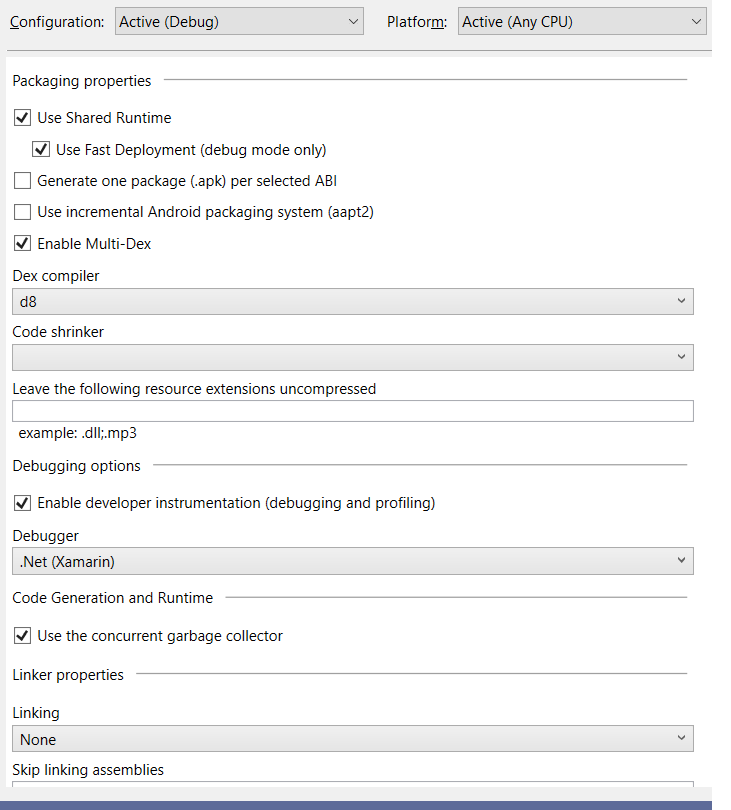
jrahma
on 24 Jul 2019
you have to select a code shrinker, it defaults to R8 !!
softlion
on 24 Jul 2019
@softlion but that's for debut mode? the R8 is already set for Release mode and still the same problem.
jrahma
on 24 Jul 2019
@softlion you should not use a Code Shrinker in Debug mode, it will basically slow down your build for no reason. Release build is where you set it 👍
@jrahma can you post a list of all the NuGet packages you are using? I will try adding them to a project and see what is going on.
jonathanpeppers
on 24 Jul 2019
Here...
jrahma
on 24 Jul 2019
@jonathanpeppers you blog article is clear enough. I never optimize my debug builds of course. there is too much confusion here. https://devblogs.microsoft.com/xamarin/androids-d8-dexer-and-r8-shrinker/
softlion
on 24 Jul 2019
@jrahma I added your NuGet packages to a new project, and I could see what you were hitting.
My only changes to see the issue:
csproj:
    <AndroidDexTool>d8</AndroidDexTool>
    <AndroidEnableMultiDex>true</AndroidEnableMultiDex>
AndroidManifest.xml:
  <uses-library android:name="org.apache.http.legacy" android:required="false" />
</application>
The error I got:
R8 Missing class: com.google.firebase.messaging.FirebaseMessagingService
So then I added Xamarin.Firebase.Messaging from the NuGet package screen, I just picked the latest:
    <PackageReference Include="Xamarin.Firebase.Messaging">
      <Version>71.1740.0</Version>
    </PackageReference>
Then it built fine? Let me know what happens for you.
jonathanpeppers
on 24 Jul 2019
Yes! Yes Yes! It was Terrible time
Don't know the reason why and how it happened but at least it's fixed and it's with you guys to make sure it won't happen with others
Thank you so much @jonathanpeppers
jrahma
on 24 Jul 2019
Example of error I got with one of the projects:
R8 : warning : Missing class: rx.Observable$OnSubscribe
R8 : error : Compilation can't be completed because some library classes are missing.
It would be great to have a way to tell what is referencing the rx.Observable. Could not find a way to add more verbosity to R8 or Xamarin.Android linker
 alexsorokoletov
on 17 Aug 2019
alexsorokoletov
on 17 Aug 2019
Easy to fix in proguard.cfg (also used by R8):
-keep class the.rx.namespace.get.it.from.github.rx.Observable$OnSubscribe
In my current project we are also using r8 in release mode and had to reference the NuGet package Xamarin.GooglePlayServices.Tasks. This then lead to the described error above:
The "LinkAssemblies" task failed unexpectedly.
Java.Interop.Tools.Diagnostics.XamarinAndroidException: error XA2006: Could not resolve reference to 'Firebase.Iid.Zzb' (defined in assembly 'Xamarin.Firebase.Messaging
My first thoughts were that the proguard.cfg is missing a line but nothing seemed to help. The fix was to add the package Xamarin.Firebase.Messaging in the Android platform project. Sometimes it's as easy as to add a NuGet package.
Thanks to @jrahma and to @jonathanpeppers 🎉
 JFMG
on 29 Oct 2019
JFMG
on 29 Oct 2019
hi I get this issue:
R8 : warning : Missing class: com.android.internal.util.Predicate
R8 : error : Compilation can't be completed because some library classes are missing.
any help on this?
 sereoja
on 26 Mar 2020
sereoja
on 26 Mar 2020
I've added
<AndroidDexTool>dx</AndroidDexTool>
to my csproj file and it compiled. The error I was getting was:
Compilation can't be completed because some library classes are missing ...R8
 krisam987
on 26 Mar 2020
krisam987
on 26 Mar 2020
Just a note on this:
<AndroidDexTool>dx</AndroidDexTool>
Definitely use it for now if you need to get your app working ASAP.
But this will only work until ~Feb 2021, Google is deprecating dx: https://android-developers.googleblog.com/2020/02/the-path-to-dx-deprecation.html
jonathanpeppers
on 26 Mar 2020
thx for your responses, unfortunately I can't get this to run.
- If I Set to DX and MultiDex: False I can't build due to this error:
/Library/Frameworks/Mono.framework/External/xbuild/Xamarin/Android/Xamarin.Android.Common.targets(2473,3): error MSB6006: "java" exited with code 2.
Done building target "_CompileToDalvikWithDx" in project "RootName.Android.csproj" -- FAILED.
- If I Set to DEX and MultiDex: true, it builds ok but crushes on Launch:
[thbrothersfarm] Not late-enabling -Xcheck:jni (already on)
[thbrothersfarm] Unknown bits set in runtime_flags: 0x8000
[thbrothersfarm] Unexpected CPU variant for X86 using defaults: x86
[System] ClassLoader referenced unknown path:
[AndroidRuntime] Shutting down VM
[AndroidRuntime] FATAL EXCEPTION: main
[AndroidRuntime] Process: com.xxxxxxxx.xxxxxx, PID: 13719
[AndroidRuntime] java.lang.RuntimeException: Unable to instantiate application androidx.multidex.MultiDexApplication: java.lang.ClassNotFoundException: Didn't find class "androidx.multidex.MultiDexApplication" on path: DexPathList[[],nativeLibraryDirectories=[/data/app/com.xxxx.xxxxx-xxxx==/lib/x86, /data/app/com.xxxxxx.xxxx-xxxxx==/base.apk!/lib/x86, /system/lib, /system/product/lib]]
[AndroidRuntime] at android.app.LoadedApk.makeApplication(LoadedApk.java:1226)
[AndroidRuntime] at android.app.ActivityThread.handleBindApplication(ActivityThread.java:6431)
[AndroidRuntime] at android.app.ActivityThread.access$1300(ActivityThread.java:219)
[AndroidRuntime] at android.app.ActivityThread$H.handleMessage(ActivityThread.java:1859)
[AndroidRuntime] at android.os.Handler.dispatchMessage(Handler.java:107)
[AndroidRuntime] at android.os.Looper.loop(Looper.java:214)
[AndroidRuntime] at android.app.ActivityThread.main(ActivityThread.java:7356)
[AndroidRuntime] at java.lang.reflect.Method.invoke(Native Method)
[AndroidRuntime] at com.android.internal.os.RuntimeInit$MethodAndArgsCaller.run(RuntimeInit.java:492)
[AndroidRuntime] at com.android.internal.os.ZygoteInit.main(ZygoteInit.java:930)
[AndroidRuntime] Caused by: java.lang.ClassNotFoundException: Didn't find class "androidx.multidex.MultiDexApplication" on path: DexPathList[[],nativeLibraryDirectories=[/data/app/com.xxxxxxx.xxxxxxxx-xxxxxx==/lib/x86, /data/app/com.xxxxx.xxxxxxx-xxxxxxx==/base.apk!/lib/x86, /system/lib, /system/product/lib]]
[AndroidRuntime] at dalvik.system.BaseDexClassLoader.findClass(BaseDexClassLoader.java:196)
[AndroidRuntime] at java.lang.ClassLoader.loadClass(ClassLoader.java:379)
[AndroidRuntime] at java.lang.ClassLoader.loadClass(ClassLoader.java:312)
[AndroidRuntime] at android.app.AppComponentFactory.instantiateApplication(AppComponentFactory.java:76)
[AndroidRuntime] at android.app.Instrumentation.newApplication(Instrumentation.java:1148)
[AndroidRuntime] at android.app.LoadedApk.makeApplication(LoadedApk.java:1218)
[AndroidRuntime] ... 9 more
The app worked fine just before the last VS (Mac) Update on March 24th, the settings where MultiDex Enabled and DX: true... but now it has issues. I already spent last couple day trying to figure out a solution and to no avail.
Any suggestions would be greatly apreciated.
sereoja
on 26 Mar 2020
If you're using androidx, you probably _have_ to use d8/r8.
@sereoja you should open a new issue and describe what is happening in your app. We can go from there, thanks!
jonathanpeppers
on 26 Mar 2020
@sereoja It looks like that last Xamarin.Android (version 10.2 included on Visual Studio 16.5.0) breaks the Android build/installation for projects that use multidex. Possible solutions:
- Add proguard configuration file and make sure
<AndroidDexTool>d8</AndroidDexTool>
<AndroidLinkTool>r8</AndroidLinkTool>are in the project - Documentation and Comments on #4437
e.g. proguard.cfg :
-dontwarn com.android.internal.util.Predicate
- Revert to a previous version Xamarin.Android (I didn't try this so not totally sure) - https://github.com/xamarin/xamarin-android#downloads
I'm my case option 1. worked, using dx or any other combination give me errors compiling or installing.
 nll
on 27 Mar 2020
nll
on 27 Mar 2020
Just in case it might help clarify, the change in Xamarin.Android 10.2 shipped in Visual Studio 2019 version 16.5 that is most likely to be relevant to changes in behavior around multidex is D8 enabled by default for all projects.
In particular, note that since D8 is now enabled by default, projects that have multidex enabled will now also automatically use R8:
 brendanzagaeski
on 27 Mar 2020
brendanzagaeski
on 27 Mar 2020
@brendanzagaeski if it can help in any way and to clarify: on a multidex project without code shrinker enabled that compiled and installed fine in the previous version of Visual Studio, now using Visual Studio 2019 version 16.5, changing only the <AndroidDexTool>dx</AndroidDexTool> trying to revert D8 enabled by default for all projects produces the error described in the #4478
nll
on 30 Mar 2020
r8 is needed for multi-dex _or_ code shrinking. If you are using _just_ multi-dex, Xamarin.Android is going to run r8 but not shrink anything.
Unfortunately, r8 also gives errors for any missing Java types it finds. Every case I've seen so far has been a real problem with the app: missing Java classes that would fail at runtime if certain code was called.
It's possible there is a case where something is wrong here, but I've not found one yet. 🤷♂
jonathanpeppers
on 30 Mar 2020
@jonathanpeppers I remember some time ago having problems with the Android Studio run [Instant Run, Android Native, not Xamarin] and it required to define a proguard file on the debug build type otherwise it would fail to install or crash when running, I can remember exactly but I also think that multidex was involved.
In this case the strange part is in the previous Xamarin.Android version everything worked fine, no missing classes, no problem installing... well if there is problem eventually it will be found :rabbit:
nll
on 30 Mar 2020
dx used to be the default, and it doesn't give any errors for missing classes. That is what changed in the latest release as @brendanzagaeski mentioned d8 is the default dex compiler now: https://github.com/xamarin/xamarin-android/issues/2693#issuecomment-604754286
jonathanpeppers
on 30 Mar 2020
Related issues
 jonpryor
·
3Comments
jonpryor
·
3Comments
 lin-zy1229
·
3Comments
jonpryor
·
4Comments
lin-zy1229
·
3Comments
jonpryor
·
4Comments
 Adlbert
·
4Comments
Adlbert
·
4Comments
 KSemenenko
·
3Comments
KSemenenko
·
3Comments
Most helpful comment
@jrahma I added your NuGet packages to a new project, and I could see what you were hitting.
My only changes to see the issue:
csproj:
AndroidManifest.xml:
The error I got:
So then I added Xamarin.Firebase.Messaging from the NuGet package screen, I just picked the latest:
Then it built fine? Let me know what happens for you.