Xamarin-android: Linker Error because of System.String::TrimStart(System.Char)
Steps to Reproduce
- Create a MonoAndroid 8.1 library and in one of the methods use String.TrimStart('#')
- Create an XForms app and take a dependency on the the file from step 1
- Configure the linker to anything but None
- Build the xforms app using VS 15.8.* (this is the version currently on VSTS hosted builds). Still investigating on a VS for Mac repro.
Repro project (from step 2): https://github.com/Azure-Samples/active-directory-xamarin-native-v2
Expected Behavior
It should build;
Actual Behavior
C:\Program Files (x86)\Microsoft Visual Studio\2017\Enterprise\MSBuild\Xamarin\Android\Xamarin.Android.Common.targets(2053,5): Error MSB4018: The "LinkAssemblies" task failed unexpectedly.
Mono.Linker.MarkException: Error processing method: 'Microsoft.Identity.Json.Schema.JsonSchema Microsoft.Identity.Json.Schema.JsonSchemaBuilder::ResolveReferences(Microsoft.Identity.Json.Schema.JsonSchema)' in assembly: 'Microsoft.Identity.Client.dll' ---> Mono.Cecil.ResolutionException: Failed to resolve System.String System.String::TrimStart(System.Char)
at Mono.Linker.Steps.MarkStep.HandleUnresolvedMethod(MethodReference reference)
at Mono.Linker.Steps.MarkStep.MarkMethod(MethodReference reference)
at Mono.Linker.Steps.MarkStep.MarkInstruction(Instruction instruction)
at Mono.Linker.Steps.MarkStep.MarkMethodBody(MethodBody body)
at Mono.Linker.Steps.MarkStep.ProcessMethod(MethodDefinition method)
at Mono.Linker.Steps.MarkStep.ProcessQueue()
--- End of inner exception stack trace ---
at Mono.Linker.Steps.MarkStep.ProcessQueue()
at Mono.Linker.Steps.MarkStep.ProcessPrimaryQueue()
at Mono.Linker.Steps.MarkStep.Process()
Version Information
VisualStudio for Win 15.8.7 (current version of VSTS Hosted 2017)
Will update this issue with version info for VS for MAC
Impact
This is causing many failures in the CI builds of many people. See https://github.com/AzureAD/microsoft-authentication-library-for-dotnet/issues/745
If a linker is not used, a MethodMissingException occurs: https://github.com/AzureAD/microsoft-authentication-library-for-dotnet/issues/744
Please do not close this issue because the latest version of VS is not used. We need to understand the root cause first.
Possible cause
I think that when building the library at step 1, the build will use a reference assembly that has 2 methods:
String.Trim(char) // --> library will be compiled against this
String.Trim(param char[]) // --> the linker / runtime only has access to this method
However the runtime / the linker only has access to String.Trim(param char[]) (maybe from here? https://github.com/mono/mono/blob/master/mcs/class/referencesource/mscorlib/system/string.cs#L1286)
 bgavrilMS
All 11 comments
I have the same problem with build on AppCenter
 SergeBerwert
on 4 Jan 2019
SergeBerwert
on 4 Jan 2019
Same here. Local build with VS 15.9.0 works fine. AppCenter fails.
 LeversonCarlos
on 5 Jan 2019
LeversonCarlos
on 5 Jan 2019
I also have this same problem using the with build pipeline on AppCenter with the Microsoft-hosted agents
https://github.com/Microsoft/azure-pipelines-image-generation/blob/master/images/macos/macos-Readme.md#xamarin
 mikerunnals
on 8 Jan 2019
mikerunnals
on 8 Jan 2019
Is anyone from Xamarin triaging issues?
bgavrilMS
on 10 Jan 2019
i Updated the Microsoft.Identity.Client to 2.7.0. Still we are facing the same issue in VSTS / Devops. But luckily its working properly in VS in Mac. But facing issue in VSTS. Any update on this issue ?
 Abdulbasha
on 23 Jan 2019
Abdulbasha
on 23 Jan 2019
@Abdulbasha - I contacted VSTS - they hope to upgrade the hosted agent images by end of this month. You could use a local VSTS agent until then or an older version of MSAL.
bgavrilMS
on 23 Jan 2019
Hi folks.
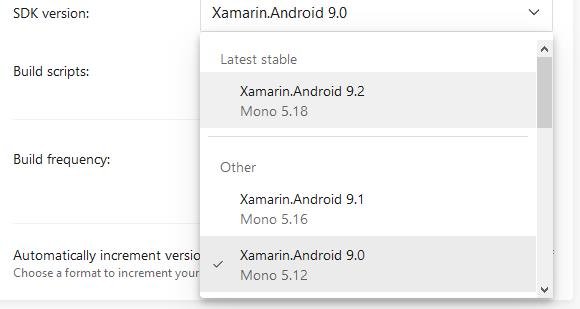
I've managed it to work on appCenter by changing (on build configuration) the SDK Version from Xamarin Android 9.0 to Xamarin Android 9.1 (with uses Mono 5.16). Cant say about Xamarin IOS.
But hope it helps someone else.
LeversonCarlos
on 9 Feb 2019
4-1/2 months no comment from anyone on the Android team... seriously? I have to reiterate the question from @bgavrilMS
Is anyone from Xamarin triaging issues?
cc: @JonDouglas @jonathanpeppers
 dansiegel
on 19 Apr 2019
dansiegel
on 19 Apr 2019
@dansiegel I think the problem here was AppCenter needs to update Xamarin.Android?
From LeversonCarlos:
Same here. Local build with VS 15.9.0 works fine. AppCenter fails.
@bgavrilMS were you able to solve your issue on AppCenter? maybe we can close this?
 jonathanpeppers
on 19 Apr 2019
jonathanpeppers
on 19 Apr 2019
For me it got sorted by picking newer Xamarin Android with newer mono version on AppCenter
 devlead
on 19 Apr 2019
devlead
on 19 Apr 2019
@bgavrilMS let us know if you are still have a problem. Closing for now, thanks!
jonathanpeppers
on 22 Apr 2019
Related issues
 dominik-weber
·
3Comments
dominik-weber
·
3Comments
 joj
·
4Comments
joj
·
4Comments
 jonpryor
·
3Comments
jonpryor
·
3Comments
 Panasjuk
·
4Comments
Panasjuk
·
4Comments
 EDMIStephen
·
4Comments
EDMIStephen
·
4Comments
Most helpful comment
Hi folks.
I've managed it to work on appCenter by changing (on build configuration) the SDK Version from Xamarin Android 9.0 to Xamarin Android 9.1 (with uses Mono 5.16). Cant say about Xamarin IOS.
But hope it helps someone else.