Xamarin-android: Referenced dll's get deleted
Steps to Reproduce
- Create 2 projects, a droid project and a pcl project.
- Add references to the pcl project that are in the output folder.
- Set both projects to output in the same output folder.
- Build the pcl project and then build the droid project.
- Referenced dlls in the pcl project are deleted after building droid the second time.
Expected Behavior
Dlls should not be deleted even if they are in the same output folder.
Actual Behavior
Some dlls are deleted when building droid for the second time.
Version Information
Seem to be Xamarin.Droid 8.1.0.25
In earlier versions this wasnt a problem
Log File
Area: Building
 B1337
B1337
All 24 comments
@B1337 can you provide diagnostic build output for step 4. I suspect that the IncrementalClean target from MSBuild is deleting the files. We might need to get someone from the MSbuild team to look at this issue.
 dellis1972
on 10 Jan 2018
dellis1972
on 10 Jan 2018
I updated VS and with Xamarin.Droid version 8.1.3 the issue is still there.
Here is the output from a test project:
Output Test App.txt
B1337
on 12 Jan 2018
@B1337 are you able to repo the same issue using a normal console application? I have a feeling this is expected behaviour. If you have binaries that you reference directly I would not put those in the output folder. I put those in a different folder called "References" they will be copied into the output as part of the build process.
dellis1972
on 18 Jan 2018
I wasn't able to reproduce this by building iOS or UWP so I don't think a console app will either but I will try it anyway.
B1337
on 19 Jan 2018
After many tries I was unable to reproduce the issue with a normal console app. Where the steps to reproduce are simple the issue should've occurred already.
B1337
on 19 Jan 2018
@B1337 I have been trying to repo this issue using the instructions provided and have been unable too on the latest stable release.
Can you provide a test project which replicates the issue?
dellis1972
on 22 Jan 2018
Edit:
Seemed to be missing some projects.
B1337
on 22 Jan 2018
@B1337 it seems to be misspend Core.csproj?
dellis1972
on 22 Jan 2018
Sorry, here is the complete project.
Also included are droid and iOS.
App1.zip
B1337
on 22 Jan 2018
Thanks, I can now repo the issue. As I suspected the MSBuild IncrementalClean is causing the problem. The Core.dll and a bunch of other files are removed which you can see in the CleanOrphanFilesDeleted ItemGroup. Now I can figure out how to work around this issue.
dellis1972
on 22 Jan 2018
Hi @dellis1972 Cheers for looking in to this. Have you got any suggested workarounds to get a build working on TFS so we can deploy an app to the Play store? I'm guessing it's going to take a few days at least for your fix to trickle through to the hosted build servers
 alexstrong29
on 31 Jan 2018
alexstrong29
on 31 Jan 2018
I guess a work around might be to create a .targets file and import it into your csproj.
The contents of that .targets file would be [1].
then import it via
<Import Project="FixUp.targets" />
[1] https://gist.github.com/dellis1972/84710bdefedf3d3c48760232071f81a4
dellis1972
on 31 Jan 2018
@dellis1972 I have included the FixUp.targets and imported in my .csproj, but nothing has changed. IncrementalClean still deletes my .dll and then the build crashes when it can't load it.
Can you share more details on how to implement the workaround?
I tried importing it like this
<Import Project="..\..\..\Shared\TemporaryAndroidFix.targets" />
Double checked the relative path, it's fine, and there's other targets in that same folder that do get hit.
Then i tried moving the .targets file to the same folder as my .csproj, and referecing just like you indicated, even keeping the same file name as you show
<Import Project="FixUp.targets" />
but still it keeps failing when building through VSTS
Any ideas?
 irreal
on 1 Feb 2018
irreal
on 1 Feb 2018
Milos
Can you post the diagnostic output from the build which included the new
fix targets.
We should be able to search through the output and see why its not being
run.
from the command line you get diagnostic output by adding /v:diag to the
msbuild invocation.
On 1 February 2018 at 11:30, Miloš Spasojević notifications@github.com
wrote:
@dellis1972 https://github.com/dellis1972 I have included the
FixUp.targets and imported in my .csproj, but nothing has changed.
IncrementalClean still deletes my .dll and then the build crashes when it
can't load it.Can you share more details on how to implement the workaround?
I tried importing it like this
Double checked the relative path, it's fine, and there's other targets in
that same folder that do get hit.Then i tried moving the .targets file to the same folder as my .csproj,
and referecing just like you indicated with
but it keeps failing.Any ideas?
—
You are receiving this because you were mentioned.
Reply to this email directly, view it on GitHub
https://github.com/xamarin/xamarin-android/issues/1164#issuecomment-362238670,
or mute the thread
https://github.com/notifications/unsubscribe-auth/AAxeecgiHIZnEueA5_ollg2EO3sAuUAEks5tQaBWgaJpZM4RWHDp
.
dellis1972
on 1 Feb 2018
I also tried to apply the patch without success
 modplug
on 1 Feb 2018
modplug
on 1 Feb 2018
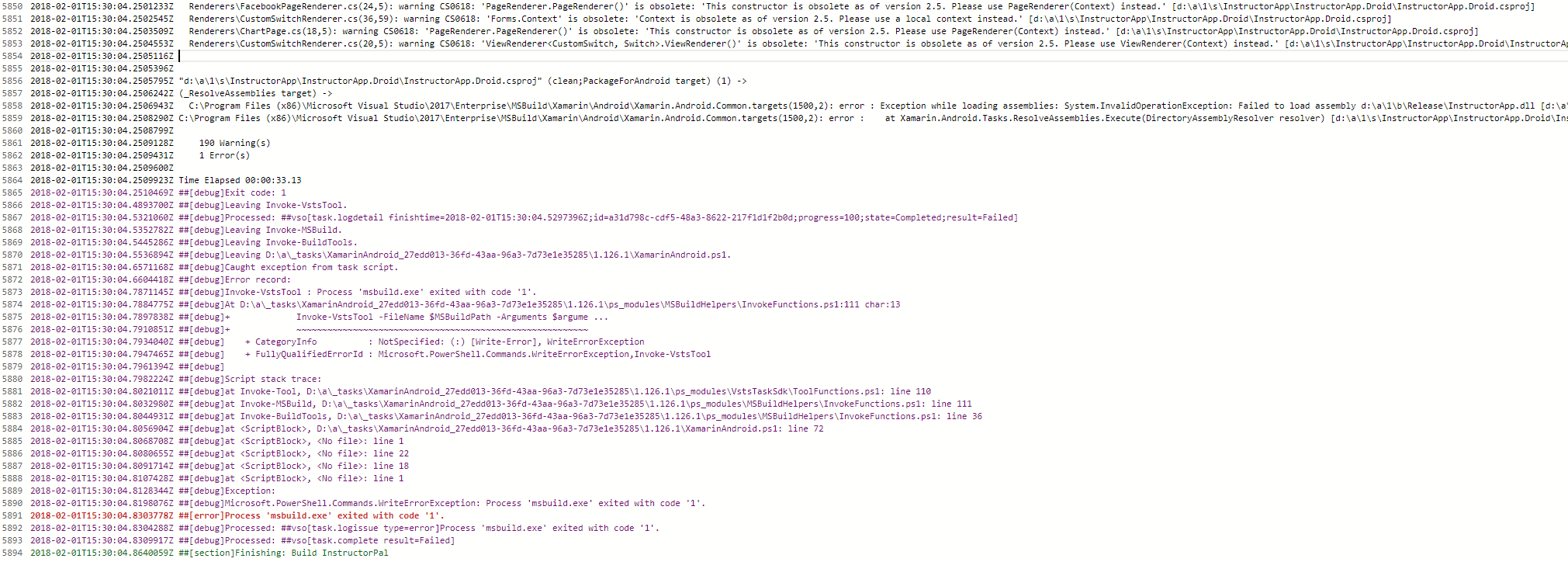
I have also tried the workaround but no luck. Although the error is now different but I can't really make sense of it.
alexstrong29
on 1 Feb 2018
@jonpryor Would you please share details how to apply your mentioned workaround until 15.7 is released?
To work around this problem we just need to tell the
IncrementalCleantarget to ignore any dll in the$(OutDir). Since
we already have a target in place to handle this we can just expand
the list of files it should be ignoring.
 quality-catalyst
on 3 Feb 2018
quality-catalyst
on 3 Feb 2018
Also in the same boat here. My CI/CD is halted at the moment .
 mr-kg
on 5 Feb 2018
mr-kg
on 5 Feb 2018
This workaround doesn't work for me too.
My referenced dlls are still deleted.
I tried to implement it in the minimal repro project I posted initially in bugzilla:
https://bugzilla.xamarin.com/show_bug.cgi?id=61108
Seems the workaround is simply ignored according to the log:
The target "_RegisterAndroidFilesWithFileWrites" listed in a BeforeTargets attribute at "c:\agent_work\5\s\BuildFails\BuildFails\BuildFails.Android\FixUp.targets (2,29)" does not exist in the project, and will be ignored.
@dellis1972 : Would be great if you could implement your workaround in the repro project I uploaded in bugzilla and share with us the result.
 abosquet
on 6 Feb 2018
abosquet
on 6 Feb 2018
@dellis1972 FYI Applying your suggested fix of changing BeforeTargets="IncrementalClean" in the FixUp.targets file worked!

alexstrong29
on 6 Feb 2018
Thank you! Build success! Perhaps update the Gist (https://gist.github.com/dellis1972/84710bdefedf3d3c48760232071f81a4) ?
mr-kg
on 6 Feb 2018
Thanks to your support! Works
 ericbrunner
on 8 Feb 2018
ericbrunner
on 8 Feb 2018
Thanks. Just got my build working again
modplug
on 9 Feb 2018
The gist is updated and works correctly, added this to my csproj:
<Import Project="$(SolutionDir)\FixUp.targets" />
 ghost
on 13 Feb 2018
ghost
on 13 Feb 2018
Related issues
 jamesmontemagno
·
3Comments
jamesmontemagno
·
3Comments
 Panasjuk
·
4Comments
Panasjuk
·
4Comments
 dominik-weber
·
3Comments
dominik-weber
·
3Comments
 sdebruyn
·
3Comments
sdebruyn
·
3Comments
 rubo
·
3Comments
rubo
·
3Comments
Most helpful comment
@jonpryor Would you please share details how to apply your mentioned workaround until 15.7 is released?