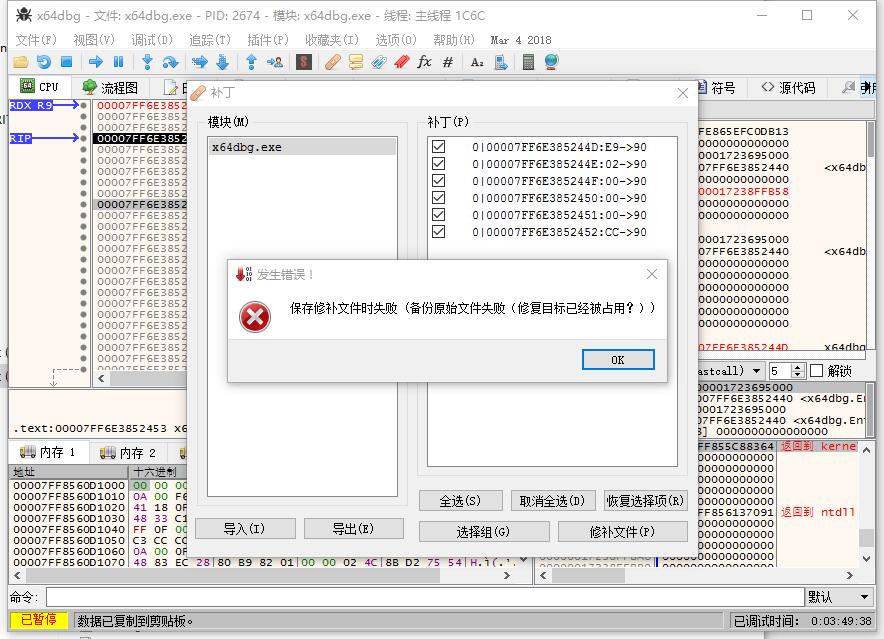
X64dbg: x64DBG can not modify itself's binary file
But I know that olldbg can modify itself's binary file.
 HuntFrank
All 4 comments
Can you elaborate what you want to accomplish here?
 blaquee
on 9 Mar 2018
blaquee
on 9 Mar 2018
I submited the details.
HuntFrank
on 10 Mar 2018
不能保存到原来的文件,只能保存为新文件。
 torusrxxx
on 10 Mar 2018
torusrxxx
on 10 Mar 2018
What do you mean by "modify its binary file"? x64dbg can do this too, here are the steps:
- Copy x64dbg.exe to asdf.exe.
- Run asdf.exe and use it to debug asdf.exe.
- Make your patch, and save it (here comes the genius part)... on top of x64dbg.exe, since that is the exact same file you just copied!
- You now have a modified version of x64dbg and are on your way to riches and glory.
I don't speak Chinese, so I don't know what the error message in your screenshot is saying. But the only way I can interpret this thread is as "why can't I overwrite this executable that is simultaneously running in not in one but two different processes at the same time?". The answer is: you can't, and in this particular case (screenshot above) you double-can't. Every executable image (including drivers and DLLs) is backed by a reference counted kernel section object, whose refcount will only reach zero after process termination/image unload. Until then, you don't get to write to the file, end of story (*).
(*) There are some loopholes if you really want to do it, like starting a thread in heap memory, unmapping the image section and then overwriting the original file. I guess that technically counts, even though you killed the process? I dunno.
 Mattiwatti
on 15 Mar 2018
Mattiwatti
on 15 Mar 2018
Related issues
 10miles
·
5Comments
10miles
·
5Comments
 morsisko
·
3Comments
morsisko
·
3Comments
 jin-x
·
4Comments
Mattiwatti
·
3Comments
blaquee
·
3Comments
jin-x
·
4Comments
Mattiwatti
·
3Comments
blaquee
·
3Comments