Wysiwyg-editor: Can't type text after adding image
Expected behavior.
Adding text after adding image.
Actual behavior.
I not possible to type text after adding image.
Steps to reproduce the problem.
1 . Type text
- Insert Image
- Try to retype text (not working)
- If you click outside editor and try to retype, it's working
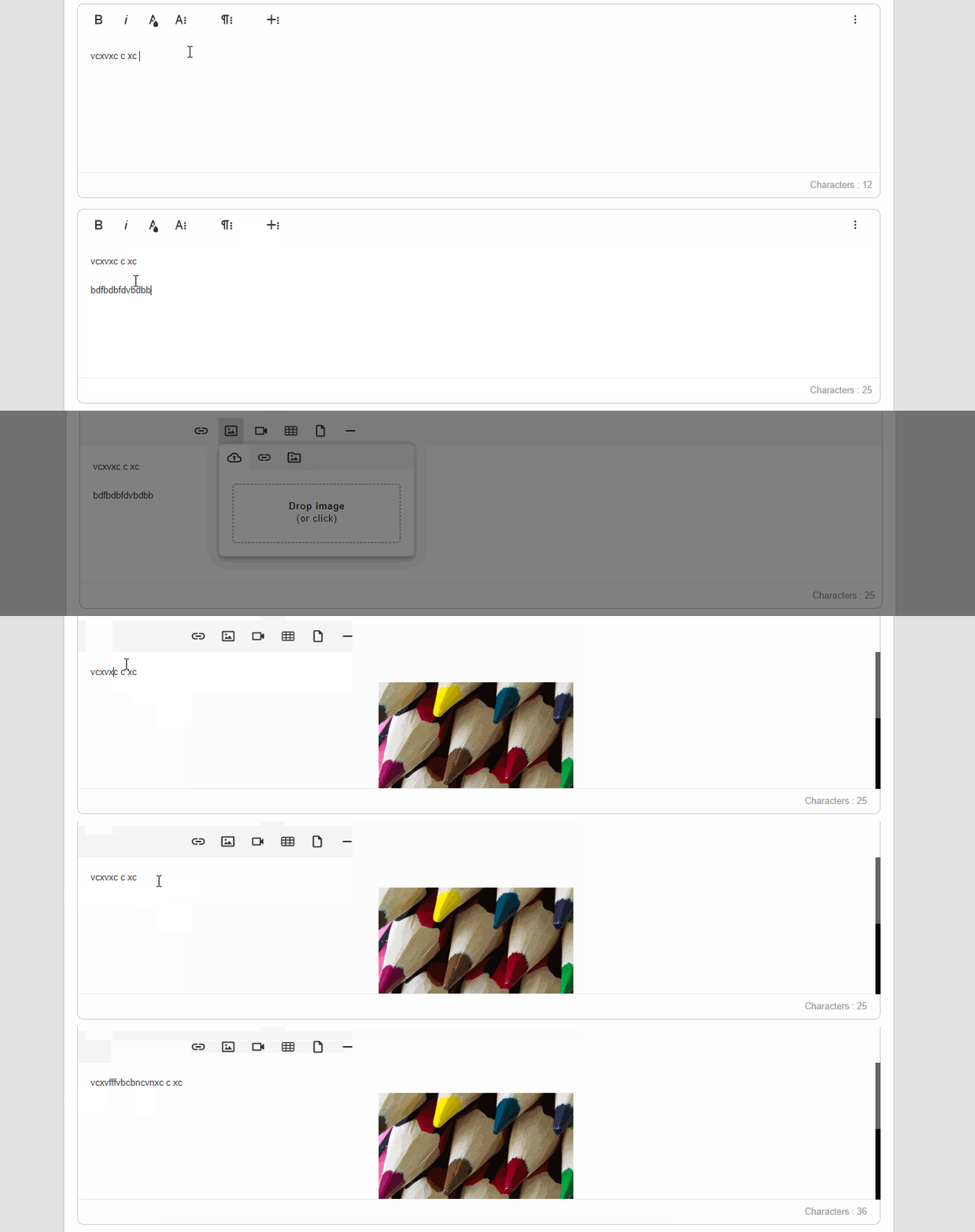
I try to solve the problem with enable imageAddNewLine but it doesn't work.
(like issue #3346 )
Editor version.
froala-editor 3.1.0
angular-froala-wysiwyg 3.1.0
OS.
Windows 10 Enterprise
Browser.
Chrome v.79.0.3945.130
 MahaloBay
All 11 comments
This is a huge issue for us and is preventing us from moving forward with a paid license. Click on an image, click off and try typing. The only thing you can do is press backspace and it deletes the image.
This is also visible in your demos on the Froala website.
 shawnphoffman
on 31 Jan 2020
shawnphoffman
on 31 Jan 2020
I thought of fixing this with imageAddNewLine, but that doesn't seem to do anything.
 rogerfar
on 5 Feb 2020
rogerfar
on 5 Feb 2020
Froala team, please suggest a fix, fast!
 ekalchev
on 8 Feb 2020
ekalchev
on 8 Feb 2020
We reverted image.js to version 3.0.6 as workaround.
ekalchev
on 10 Feb 2020
Looks like it's fixed in their unreleased version since this now works on their website examples. Hopefully we'll see a new release soon.
 brendon
on 13 Mar 2020
brendon
on 13 Mar 2020
We reverted image.js to version 3.0.6 as workaround.
Hi, Can you tell us how to revert the version of image.js?
 sai-velamuri
on 31 Mar 2020
sai-velamuri
on 31 Mar 2020
Still not fixed, is there an ETA on this?
 deanmikan
on 24 May 2020
deanmikan
on 24 May 2020
Can someone on Froala team please respond to the issue about what your plans are about fixing this? I am evaluating Froala for use in my app, but this basic bug will be very annoying to my users, and makes such an otherwise great product unusable. I am, especially, surprised by complete lack of a response from a team member about the issue. I tried the latest version from CDN, and I have the same problem. As @ekalchev said, the version 3.0.6 of image.min.js fixes the issue.
@sai-velamuri you can revert to this version by simply adding:
https://cdnjs.cloudflare.com/ajax/libs/froala-editor/3.0.6/js/plugins/image.min.js
after you load whichever version of Froala you are loading.
I also wanted to add that one cannot enter text by clicking away from the image. But one is able to enter text if one uses right-arrow key to get away from the image after it is inserted. I tried simulating the right arrow key press in the image inserted event, but for some reason, that completely fails.
 curioustolearn
on 6 Jun 2020
curioustolearn
on 6 Jun 2020
Can someone on Froala team please respond to the issue about what your plans are about fixing this? I am evaluating Froala for use in my app, but this basic bug will be very annoying to my users, and makes such an otherwise great product unusable. I am, especially, surprised by complete lack of a response from a team member about the issue. I tried the latest version from CDN, and I have the same problem. As @ekalchev said, the version 3.0.6 of image.min.js fixes the issue.
@sai-velamuri you can revert to this version by simply adding:
https://cdnjs.cloudflare.com/ajax/libs/froala-editor/3.0.6/js/plugins/image.min.js
after you load whichever version of Froala you are loading.I also wanted to add that one cannot enter text by clicking away from the image. But one is able to enter text if one uses right-arrow key to get away from the image after it is inserted. I tried simulating the right arrow key press in the image inserted event, but for some reason, that completely fails.
@curioustolearn Will try that way. Thanks for the information!
sai-velamuri
on 7 Jun 2020
I’ve spoken with the devs and we can expect 3.2 in the near future.
brendon
on 8 Jun 2020
I’ve spoken with the devs and we can expect 3.2 in the near future.
Thanks @brendon. That is good to know.
curioustolearn
on 9 Jun 2020
Related issues
 adilsonb
·
3Comments
adilsonb
·
3Comments
 jmsche
·
3Comments
jmsche
·
3Comments
 thedotedge
·
4Comments
thedotedge
·
4Comments
 archonic
·
4Comments
archonic
·
4Comments
 isubasti
·
4Comments
isubasti
·
4Comments
Most helpful comment
Can someone on Froala team please respond to the issue about what your plans are about fixing this? I am evaluating Froala for use in my app, but this basic bug will be very annoying to my users, and makes such an otherwise great product unusable. I am, especially, surprised by complete lack of a response from a team member about the issue. I tried the latest version from CDN, and I have the same problem. As @ekalchev said, the version 3.0.6 of image.min.js fixes the issue.
@sai-velamuri you can revert to this version by simply adding:
https://cdnjs.cloudflare.com/ajax/libs/froala-editor/3.0.6/js/plugins/image.min.js
after you load whichever version of Froala you are loading.
I also wanted to add that one cannot enter text by clicking away from the image. But one is able to enter text if one uses right-arrow key to get away from the image after it is inserted. I tried simulating the right arrow key press in the image inserted event, but for some reason, that completely fails.