Wysiwyg-editor: Adobe is shutting down the Creative SDK (Aviary) Image Editing UI
Adobe has announced that they will be shutting down the Image Editor UI that is utilized by Froala for image editing and manipulation.
https://creativesdk.zendesk.com/hc/en-us/articles/115004788243
Are there any plans to replace this functionality with something else?
 aarndt
All 46 comments
Yes, we're aware of it and we'll add an alternative.
 stefanneculai
on 23 Oct 2017
stefanneculai
on 23 Oct 2017
@aarndt is there a particular alternative that you would prefer to have for advanced image editing?
 dianaprajescu
on 23 Oct 2017
dianaprajescu
on 23 Oct 2017
Have you identified any good replacement candidate for the Image Editor UI? I'm in a similar position where I have built a plugin for a system that uses it and now I'm trying to find a good replacement. I was hoping Adobe could open source it and let people host the (probably heavy and for them costly) backend components on their own servers now when they are killing it. But that is unlikely to happen.
 inquam
on 5 Nov 2017
inquam
on 5 Nov 2017
@aarndt @inquam we'd probably go with https://www.photoeditorsdk.com/.
stefanneculai
on 6 Nov 2017
@stefanneculai Yea, I saw them too and was thinking about them. But how will you handle their subscription fee? Will every user have to have their own subscription if they want to enable the feature?
inquam
on 6 Nov 2017
@inquam every user would have to handle their own subscription in order to enable this feature.
stefanneculai
on 7 Nov 2017
So let me get this straight Adobe is eliminating the image editor and isn't replacing it with anything else?
 m1is
on 15 Dec 2017
m1is
on 15 Dec 2017
@m1is: Yes, that is correct. For existing production applications support will continue until November 2018. I raised the idea of them making it open source and allow people to host the back end on their own servers (since that is probably what costs a bit for them to keep running). But they seem happy with just letting it die. Perhaps we could get a petition going? :)
inquam
on 15 Dec 2017
So they bought Aviary just to kill it, was a great product, how sad.
m1is
on 15 Dec 2017
@stefanneculai : any idea when support for photoeditorsdk will be worked on?. Currently I can not register for adobe creative SDK. It looks like it closes the door for new comers.
 huyph
on 24 Dec 2017
huyph
on 24 Dec 2017
@huyph we're looking to add it at during January. We're also taking into consideration adding an in-house solution for this as well.
stefanneculai
on 27 Dec 2017
@stefanneculai If you make your own solution I'd love if you open sourced it. It would probably help a lot of people in this position due to Adobe's crap move.
inquam
on 28 Dec 2017
I am in a similar predicament. I came across two image editors-one for Android, the other for iOS-that I think might fit the bill and are free (they use the MIT license). HTH.
 iukpo
on 12 Jan 2018
iukpo
on 12 Jan 2018
These won't help me much since my need is for the web. I can understand if Adobe sees no money in this and only have to pay for servers etc. But just shutting it down after the history of Aviary and not provide any solution or releasing the code as open source is quite crappy to be honest. Especially since I contacted Adobe and asked them about their plans for the image editor and it's future before I started implementing my project and was told they had no plans on removing it or even starting to charge for it.
Then, a few months after I released my thing, they kill it :P
inquam
on 14 Jan 2018
@inquam raise a petition
Have same problem https://adobeio.zendesk.com/hc/en-us/requests/2632
 srghma
on 17 Mar 2018
srghma
on 17 Mar 2018
@BjornMelgaard: I get "The page you were looking for doesn't exist"... Should I put my tinfoil hat on? :)
inquam
on 18 Mar 2018
@inquam seems like its private conversation) the problem is that aviary api keys have stopped working and I have this issue https://github.com/trippo/ResponsiveFilemanager/issues/441.
You have said that you want to raise a petition to opensource aviary, I'm in.
srghma
on 18 Mar 2018
Hi Guys,
Any update on this ? What is the Froala plan to replace Aviary ?
 adrienlamotte
on 8 Apr 2018
adrienlamotte
on 8 Apr 2018
would also be interested to hear an update
 scottybo
on 23 May 2018
scottybo
on 23 May 2018
anyone found a suitable alternative to the web sdk? @scottybo @inquam @srghma
 josh3336
on 5 Sep 2018
josh3336
on 5 Sep 2018
@josh3336 no
srghma
on 7 Sep 2018
We're planning on replacing Adobe Aviary with http://ui.toast.com/tui-image-editor/. An update will come shortly.
stefanneculai
on 10 Sep 2018
@stefanneculai I was about to do the SAME thing in my project. I have tried contacting the developer without luck though. Do you have any idea on how to add the ability to save the file to the server.
- Open file located on server (open url)
- Edit file
- Post/save file on server replacing the existing one
inquam
on 10 Sep 2018
There is a method for opening a file from a specific URL (http://nhnent.github.io/tui.image-editor/latest/ImageEditor.html#loadImageFromURL) and for saving the edited image, we're going to use http://nhnent.github.io/tui.image-editor/latest/ImageEditor.html#toDataURL.
stefanneculai
on 10 Sep 2018
Yea, but I don't think the documentation is very clear.
toDataURL returns a DOMString containing the requested data URI. Sounds a bit diffuse. I would expect for instance the image data encoded somehow so I can post it to for instance a PHP backend. This might be what they mean, but URI doesn't sound like this is what I would get. But if you have had time to test the function, what does it return?
Do you get something like:
"image/png;base64,iVBORw0KGgoAAAANSUhEUgAAADIAAAAyCAIAAAC...."
inquam
on 11 Sep 2018
We haven't got yet to that place, however, taken into consideration the internal methods that we have available in the editor for working with images, we can take any URL and further upload it by using the editor logic. Adobe Aviary works just the same way.
stefanneculai
on 11 Sep 2018
We've just put together a public roadmap with the most popular features. 😍 There you can vote your favorite one, provide feedback or make new suggestions: https://wysiwyg-editor-roadmap.froala.com/public.
stefanneculai
on 18 Sep 2018
It looks like Adobe have changed their mind on retiring Aviary.
There's a migration guide, which says:
"The Web Image Editing component is the first Web component in the Creative SDK and we’ve made great efforts to ensure that migrating from the Aviary SDK to the Adobe Creative SDK is as seamless as possible."
Details:
The homepage also has a fullscreen splash saying it's now a "key component" of Creative SDK.
 ianwantstea
on 18 Sep 2018
ianwantstea
on 18 Sep 2018
@ianwantstea But this is the exact implementation I have made in my project. I even used the desired callbacks instead of deprecated ways and I was told this was going to go away. I have received no other mail saying "hey, we changed our minds". This seems very strange. Not just a bad date on that article?
inquam
on 18 Sep 2018
@inquam the article date could be wrong, I guess. That seems unlikely for Adobe though. The homepage splash screen does also suggest image editing support is being continued. The migration guide is also linked to from this splash screen (you have to scroll down).
Other resources suggest it's retiring:
I'm confused by what they're doing.
ianwantstea
on 18 Sep 2018
I'll contact them and ask them to explain
inquam
on 18 Sep 2018
It is not clear if they will keep it or not. Anyway, we're going to implement Toast UI - it is good to have from where to choose. :)
stefanneculai
on 19 Sep 2018
I've tried to contact them, including msg'ing some of the product managers on Twitter, but haven't had a reply yet.
ianwantstea
on 24 Sep 2018
@ianwantstea, do you have any feedback from Creative SDK's team?
 vitozev
on 31 Oct 2018
vitozev
on 31 Oct 2018
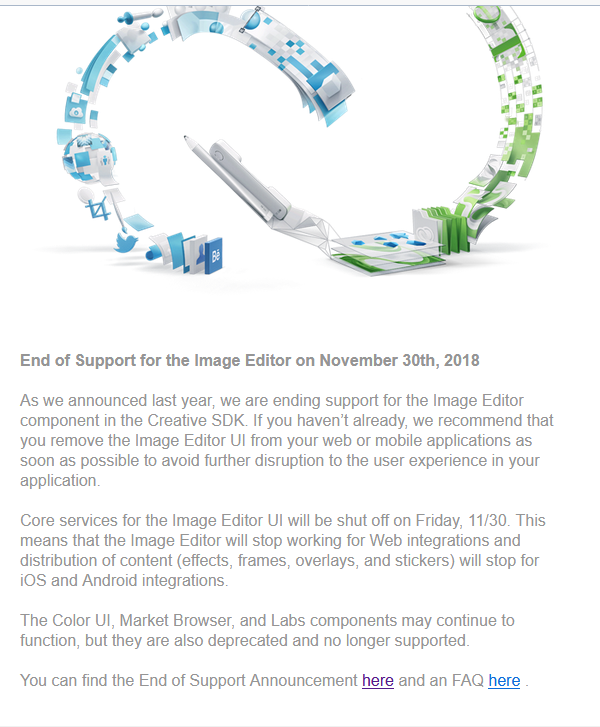
Unfortunately, that was it :)
vitozev
on 1 Nov 2018
@kvitozev We're just in time with a replacement: https://github.com/froala/wysiwyg-editor/commit/79120fef0721fe5094184e27ed023906323e10b1. 😄
stefanneculai
on 1 Nov 2018
Out of curiosity, was anyone in this thread able to get a clear confirmation that Adobe no longer maintains an embeddable web-based image editor?
 atrauzzi
on 7 Jan 2019
atrauzzi
on 7 Jan 2019
@atrauzzi I think they made a blog post in December 2018.
 T-vK
on 12 Jan 2019
T-vK
on 12 Jan 2019
Do you have a link to it? Everything I've found so far seems kind of vague.
atrauzzi
on 12 Jan 2019
T-vK
on 12 Jan 2019
If you read carefully, you'll see there's no mention of the web-based SDK. This only mentions android and ios. There are still mentions today in live adobe documentation about the web based editor.
That's exactly what I'm talking about. While I can obviously glean it isn't something I should probably want to use at this rate, it would be nice to have it clear.
atrauzzi
on 12 Jan 2019
"the Photo Editor by Aviary" does in my opinion include the web-based one. I'm pretty sure it's discontinued. Most aviary domains are down and they even canceled the API key I used.
But I don't know... I just didn't wanna bother trying to keep that thing alive. ToastUI's image editor seems like the better choice anyway because it doesn't rely on third party servers.
T-vK
on 12 Jan 2019
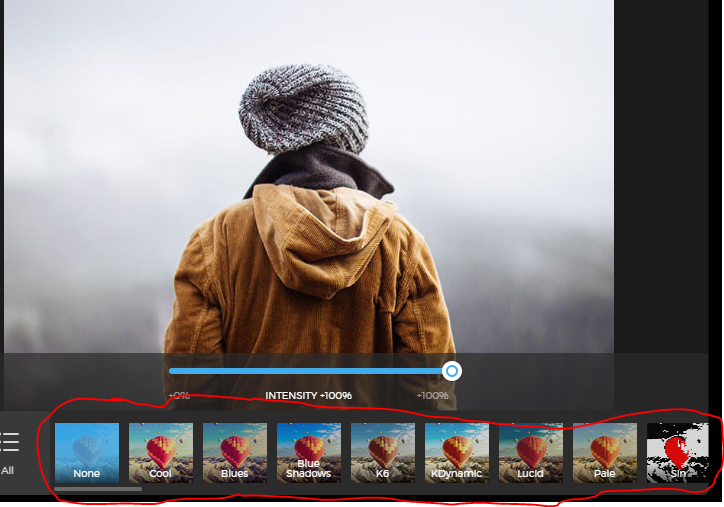
My app mainly needs a photo editor with built in, Instagram-like filters. That's a must for me. Are there any Filter presets available for ToastUI?
Furthermore, is there a way to save your filter edits?
 kaanuki
on 16 Jan 2019
kaanuki
on 16 Jan 2019
I don't know what Instagram-like filters are, but you can check out a demo of ToastUI's Image Editor on their website: http://ui.toast.com/tui-image-editor/
And you can of course save your edited images or send them where ever you want using ajax.
T-vK
on 16 Jan 2019
Instagram-like filters / 'Preset Filters' are filter settings that you can apply anytime, without having to manually adjust the filter settings every time (See example). Preset Filters were made popular by Instagram. Is it possible to SAVE FILTER SETTINGS themselves? ( I'm not referring to 'edited images' with the filters applied to them)
kaanuki
on 16 Jan 2019
Not by default, but you could add that functionality using the API. You can use hasFilter to find out what filter settings are currently being used to save them. And using applyFilter you could apply a set of filter settings.
T-vK
on 17 Jan 2019
Related issues
 kikeso77
·
3Comments
kikeso77
·
3Comments
 DerekJDev
·
3Comments
DerekJDev
·
3Comments
 archonic
·
4Comments
archonic
·
4Comments
 Krisell
·
3Comments
Krisell
·
3Comments
 studiotemple
·
3Comments
studiotemple
·
3Comments
Most helpful comment
Hi Guys,
Any update on this ? What is the Froala plan to replace Aviary ?