Wysiwyg-editor: imageUpload set to false still uploads image to i.froala.com
Expected behavior.
Using the imageUpload option set to false, uploading an image by URL will add the image to the editor and use the provided image URL as the source.
Actual behavior.
The image is added to the editor, but it is still uploaded to https://i.froala.com and doesn't use the URL you provided as the source.
Steps to reproduce the problem.
https://codepen.io/anon/pen/NaeZoQ
- Click the image button
- Enter https://i.imgur.com/g3D5jNz.jpg into the field
- Click Insert
- Right click the inserted image and hit Inspect
- The image's
srcattribute is a https://i.froala.com URL, not the original https://i.imgur.com URL.
OS.
Windows 10 64bit
Browser.
Chrome 61.0.3163.100
 bcanseco
All 6 comments
@bcanseco please make sure you're using editor version 2.7.0.
 stefanneculai
on 19 Oct 2017
stefanneculai
on 19 Oct 2017
@stefanneculai It works in 2.7.0, just wanted to give you a heads up that it's not working with the js from the top of the master branch.
bcanseco
on 19 Oct 2017
We'll check.
stefanneculai
on 19 Oct 2017
@bcanseco just tested the master branch and all is good. I believe you did something wrong.
stefanneculai
on 23 Oct 2017
@stefanneculai I just tried 2.7.4 with imageUpload false and it is still posting to i.froala and attempting to upload.


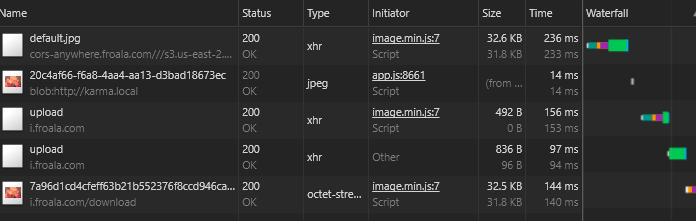
 jackley
on 5 Jan 2018
jackley
on 5 Jan 2018
@bcanseco @jackley please turn off https://www.froala.com/wysiwyg-editor/docs/options#imageUploadRemoteUrls.
stefanneculai
on 8 Jan 2018
Related issues
 isubasti
·
4Comments
isubasti
·
4Comments
 jmsche
·
3Comments
jmsche
·
3Comments
 bnjmnfnk
·
4Comments
bnjmnfnk
·
4Comments
 archonic
·
4Comments
archonic
·
4Comments
 adilsonb
·
3Comments
adilsonb
·
3Comments