Wsl: Cannot upgrade to version 2 even when Virtual Machine Platform is enabled
I have enabled the VirtualMachinePlatform as instructed, but I am still unable to upgrade my distribution to version 2:
PS C:\WINDOWS\system32> Enable-WindowsOptionalFeature -Online -FeatureName VirtualMachinePlatform


Path          :
Online        : True
RestartNeeded : False


PS C:\WINDOWS\system32> wsl --set-version Ubuntu 2
Conversion in progress, this may take a few minutes...
For information on key differences with WSL 2 please visit https://aka.ms/wsl2
Please enable the Virtual Machine Platform Windows feature.
PS C:\WINDOWS\system32> wsl --list --verbose
  NAME      STATE           VERSION
* Ubuntu    Stopped         1
Document Details
⚠ Do not edit this section. It is required for docs.microsoft.com ➟ GitHub issue linking.
- ID: b19a43be-b16a-d903-b69d-75dffce6c329
- Version Independent ID: f9d4a118-1251-8d6b-43f5-2e64808dc527
- Content: Install WSL 2
- Content Source: WSL/wsl2-install.md
- Product: windows-subsystem-for-linux
- GitHub Login: @mscraigloewen
- Microsoft Alias: mscraigloewen
 iggyvolz
All 83 comments
Reboot After enable-Windows feature ?
 LaurentLienhard
on 13 Jun 2019
LaurentLienhard
on 13 Jun 2019
I'm facing the same issue, even after reboot
 janjiss
on 13 Jun 2019
janjiss
on 13 Jun 2019
Same issue here. It could be that Virtual Machine Platform cannot be installed on Windows 10 Home Insider Preview, making this a Pro only feature. I hope that is not the case.
 greywulf
on 13 Jun 2019
greywulf
on 13 Jun 2019
Same issue, "Virtual Machine Platform" is checked on Features Panel, but still print "Please enable the Virtual Machine Platform Windows feature." .
 matthieugauthier
on 13 Jun 2019
matthieugauthier
on 13 Jun 2019
Same issue, and I installed Windows 10 Pro Insider Preview.
 wrvsrx
on 13 Jun 2019
wrvsrx
on 13 Jun 2019
I solved it on my PC.
Virtual Machine Platform needs "Virtualization"(or other similar options) option set to "Enabled" in UEFI. But if you open it with Powershell, system won't check if "Virtualization" option is set to enabled.
So setting the option in UEFI may solve this problem(at least it works on my PC).
wrvsrx
on 13 Jun 2019
Enabling virtualization appears to be working on my system; I can't believe I didn't think of doing that. The error message and/or docs should be updated to reflect that you need virtualization on as well.
iggyvolz
on 13 Jun 2019
Good suggestion, I will update the error message and documentation.
 benhillis
on 13 Jun 2019
benhillis
on 13 Jun 2019
I am attempting to install WSL 2 on Parallels Desktop 14 Home Edition, but it seems the enabling virtualization feature (Parallels calls it Nested Virtualization) has been moved to the Pro edition only.
Is there another way to enable virtualization or am I out of luck while using Home Edition? I apologize if there is a simple fix for this, I am new to Windows.
 dmserrano
on 13 Jun 2019
dmserrano
on 13 Jun 2019
I hit same issue, hadn't realized a BIOS upgrade had turned off VT - thanks.
@microsoft if the conversion command exits immediately it show an error message that VT is not enabled....
 scyto
on 14 Jun 2019
scyto
on 14 Jun 2019
i mean it should show an error
scyto
on 14 Jun 2019
I had the same issue due to virtualization being disabled in BIOS.
Before the fix, Bash shell command uname says it's running Linux 4.4. I guess that's what the MS system call emulator call itself.
In Powershell, the conversion command...
wsl --set-version Ubuntu 2
...should print "Conversion complete."
It did take a few minutes.
PS C:\WINDOWS\system32> wsl -l -v
NAME STATE VERSION
- Ubuntu Stopped 2
After the fix, the real Linux kernel is running in a VM, so the kernel's uname version is 4.19 :
bob@craterlake:~$ uname -a
Linux craterlake 4.19.43-microsoft-standard #1 SMP Mon May 20 19:35:22 UTC 2019 x86_64 x86_64 x86_64 GNU/Linux
(note: craterlake is just the name of my PC)
Apparently this kernel was compiled over lunch on May 20 :-)
 rweaver6
on 15 Jun 2019
rweaver6
on 15 Jun 2019
"Please enable the Virtual Machine Platform Windows feature." same problem for me too. Did anyone get any easy fix?
 MdMaksudulHossain
on 17 Jun 2019
MdMaksudulHossain
on 17 Jun 2019
I fix it by launching both commands in an admin terminal. Use another session cause error message appear.
matthieugauthier
on 18 Jun 2019
Even with virtualization enabled in the BIOS and those two features enabled via Powershell, I still get this error:
Installing, this may take a few minutes...
WslRegisterDistribution failed with error: 0x80370109
Error: 0x80370109 The operation timed out because a response was not received from the virtual machine or container.
 albertowar
on 18 Jun 2019
albertowar
on 18 Jun 2019
the same issue under Surface Book 2 .
i can't find the VT option and then to enable it in UEFI panel of Surface Book 2 .
so , anybody else have solutions ?
thx
 shibowe
on 19 Jun 2019
shibowe
on 19 Jun 2019
Hello all,
My laptop is Lenovo G40.
- I had to change the windows version to 1903 (OSbuild 18917) to complete
the installation (can check your version by typing winver). - I had to go to the Windows Update Assistant for the version update and
changed the insider setting to "fast" to get the build upgrade the next
day. 3. After enabling virtual machine environment through PowerShell
(admin), it still showed "virtualization not enabled". For lenovo G40,
after shutdown, I used novo button to go to bios set up and enable intel
virtualization. (doesn't show the UEFI option through windows 10).
Then all the commands worked and it's showing wsl version 2.
One more question: when is the windows terminal going to be available? Can
I use that now? I am a beginner.
On Tue, Jun 18, 2019 at 9:35 PM Shibo Wei notifications@github.com wrote:
the same issue under Surface Book 2 .
i can't find the VT option and then to enable it in UEFI panel of Surface
Book 2 .
so , anybody else have solutions ?
thx—
You are receiving this because you commented.
Reply to this email directly, view it on GitHub
https://github.com/MicrosoftDocs/WSL/issues/404?email_source=notifications&email_token=ALRMMUIT6BVREWXZSXTBFZ3P3GLQZA5CNFSM4HXVV6YKYY3PNVWWK3TUL52HS4DFVREXG43VMVBW63LNMVXHJKTDN5WW2ZLOORPWSZGODYAQCGI#issuecomment-503382297,
or mute the thread
https://github.com/notifications/unsubscribe-auth/ALRMMUM764P2WG4Q7NGY5EDP3GLQZANCNFSM4HXVV6YA
.
MdMaksudulHossain
on 19 Jun 2019
Is WSL 2 available on the recently released Windows Server 18917 SAC (core edition) ISO? I've already enabled VirtualMachinePlatform feature and rebooted. CPU has virtualization extensions enabled. Yet, wsl is not a valid command. I did install Microsoft-Windows-Subsystem-Linux but this appears to be v1.
 tristanbarcelon
on 19 Jun 2019
tristanbarcelon
on 19 Jun 2019
Unable to execute WSL commands as the flags --set-version and --list --verbose are unknown
i tried to upgrade to WSL2 right after finishing the system upgrade to Version 10.0.18362 Build 18362
 blkwtch
on 20 Jun 2019
blkwtch
on 20 Jun 2019
@blkwtch 18362 is still less than 18917 and wsl v2 requires 18917 or newer. In addition, documentation fails to mention that to get WSL, you also need to enable this feature: Microsoft-Windows-Subsystem-Linux in addition to VirtualMachinePlatform just for WSL to be a valid command.
tristanbarcelon
on 20 Jun 2019
@tristanbarcelon the WSL 2 install docs have been updated to include build number required and that you need WSL installed with a link of how to do so.
This thread is for the specific issue of seeing the error 'Please enable the virtual machine platform' when it is already enabled, and we're working on resolving that error. If you have other questions, or issues, I'd ask that you please open a new issue so we can address them there. Thanks for your help!
 craigloewen-msft
on 20 Jun 2019
craigloewen-msft
on 20 Jun 2019
@tristanbarcelon
The here link has the content for that, though i agree having the command in the main install doc would make things easier @mscraigloewen. I suspect @tristanbarcelon didn't read that / follow the here - maybe adding the command to the doc would make more sense than linking out.
Please note that you'll need to be running Windows 10 build 18917 or higher to use WSL 2, and that you will need to have WSL already installed (you can find instructions to do so here).
scyto
on 20 Jun 2019
@mscraigloewen , sorry didn't mean to cross post. I did follow WSL 2 install docs posted and nowhere does it state that WSL (v1) must already be installed. Once WSL v1 was installed, everything does work. When VirtualMachinePlatform is being enabled via DISM, is DISM checking to see whether virtualization features are enabled before proceeding? It didn't seem to. In my situation, I installed Windows 10 18917 on a VM but I had forgotten to enable virtualization features first before attempting to install WSL 1/2. It required me to delete, recreate the vm, run Set-VMProcessor -VMName 'vmname' -ExposeVirtualizationExtensions $true -Force, and re-install Windows 10 18917 or newer before re-attempting WSL 2 installation.
tristanbarcelon
on 20 Jun 2019
@scyto I've added the command to enable WSL to the troubleshooting section of the install page to make it clearer for users running into a similar issue.
@tristanbarcelon no I don't believe DISM does check for that.
I believe the sidebar conversation's are now resolved, so please for any further questions or comments that aren't related to the original issue I'd request that you open a new issue and we can continue the discussion there rather than cluttering notifications of users watching this specific issue.
craigloewen-msft
on 20 Jun 2019
Left some tips for installing Windows in VM.
I installed Windows 10 in VMware Workstation, and the build version is 18922.
At the first time, I face the same issue. However, just like @wrvsrx said, I managed to turn on the virtualization on the CPU, so I used the following procedure performing on VMware Workstation:
- Turn off the guest Windows.
- Click on the upper tab and select the "VM" .
- Click on the "Setting".
- Stay in "Hardware" tab.
- Click the "Processors" Device.
- Check the "Virtualization Intel VT-x/EPT or AMD-V/RVI".
- Boot the guest and upgrade the WSL again.
After that, I successfully upgrade my WSL to version 2. Thanks for all you comments.
 titaneric
on 23 Jun 2019
titaneric
on 23 Jun 2019
I have checked that virtualization is enabled I'm still getting errors:
0xc03a001a - operation could not be completed due to a virtual disk system limitation.
or
Error: 0x80370109 The operation timed out because a response was not received from the virtual machine or container.
depending on how I try and get Ubuntu to update to wsl 2
Edit: I got it working:
I manually changed the folder properties of the directory where Ubuntu is installed and disabled encryption and compression in the advanced settings tab of the folder attributes.
 Radio-Broadcast
on 26 Jun 2019
Radio-Broadcast
on 26 Jun 2019
Hello all,
I upgraded to new windows 10 for using wsl2. I am now running into a lot of
troubles.
My microsoft store is no longer working. It says you are not connected
to the internet, although wifi is connected, I can browse, download
everything.Now even better: my WSL, WSL2 stopped working altogether. If I run
bash.exe, it says "A device attached to the system is not functioning.".
Nothing is attached. What happened, no clue.
Does anyone have any suggestions for me? I feel like this is the dumbest
thing I have done ever.
Regards
[image: Mailtrack]
https://mailtrack.io?utm_source=gmail&utm_medium=signature&utm_campaign=signaturevirality5&
Sender
notified by
Mailtrack
https://mailtrack.io?utm_source=gmail&utm_medium=signature&utm_campaign=signaturevirality5&
06/26/19,
06:17:01 PM
On Tue, Jun 25, 2019 at 7:41 PM Radio-Broadcast notifications@github.com
wrote:
I have checked that virtualization is enabled I'm still getting errors:
0xc03a001a - operation could not be completed due to a virtual disk system
limitation.
or
Error: 0x80370109 The operation timed out because a response was not
received from the virtual machine or container.depending on how I try and get Ubuntu to update to wsl 2
—
You are receiving this because you commented.
Reply to this email directly, view it on GitHub
https://github.com/MicrosoftDocs/WSL/issues/404?email_source=notifications&email_token=ALRMMUNPBKEW4ZIEFAPE5CTP4K3NDA5CNFSM4HXVV6YKYY3PNVWWK3TUL52HS4DFVREXG43VMVBW63LNMVXHJKTDN5WW2ZLOORPWSZGODYR7JBY#issuecomment-505672839,
or mute the thread
https://github.com/notifications/unsubscribe-auth/ALRMMUOGQIAS5MDE2KGH4HTP4K3NDANCNFSM4HXVV6YA
.
MdMaksudulHossain
on 27 Jun 2019
As described in #436 I was getting 0x80370102 and as suggested by @mscraigloewen I enabled virtualization in the horrid HP / AM BIOS.
But then ended up in a weird state where the store throught Ubuntu was installed and let me launch it but wsl said nothing was available. In case this was due to Ubuntu being installed as old WSL I uninstalled and re installed but install now fails with 0x80073D05
I tried re enabling the Platform and WSL but they were happy and said no reset needed.
So now I'm stuck :)
 SteveALee
on 28 Jun 2019
SteveALee
on 28 Jun 2019
So I did another restart anyway and it did someththing. Now all errors have gone away. Lovely and fast now too :)
And with the new terminal I feel like I've finally got a Bash environment I've been wanting since windows 3.1 :).
You might like to add 0x80370102 to the error already listed for enable virtualisation in BIOS.
SteveALee
on 28 Jun 2019
@SteveALee added!
craigloewen-msft
on 28 Jun 2019
Windows Home 18922 Build. I am getting below error.
system32 $ wsl --set-version WLinux 2
Conversion in progress, this may take a few minutes...
For information on key differences with WSL 2 please visit https://aka.ms/wsl2
Unspecified error
 rsrini7
on 29 Jun 2019
rsrini7
on 29 Jun 2019
There are a set of fixes coming out in the next Windows Insiders build that will address many of the issues in this thread. Once that is released please install the new build and try again!
craigloewen-msft
on 1 Jul 2019
I have followed on instructions in the document and followed the FAQ. I have Windows insider version 18932 and I am still facing this issue
0xc03a001a - operation could not be completed due to a virtual disk system limitation.
or
Error: 0x80370109 The operation timed out because a response was not received from the virtual machine or container.
@mscraigloewen What is the insider build version that you expect would address these issues?
 AliAskari
on 5 Jul 2019
AliAskari
on 5 Jul 2019
I have followed on instructions in the document and followed the FAQ. I have Windows insider version 18932 and I am still facing this issue
0xc03a001a - operation could not be completed due to a virtual disk system limitation. or Error: 0x80370109 The operation timed out because a response was not received from the virtual machine or container.@mscraigloewen What is the insider build version that you expect would address these issues?
Same issue, build 18932.1000 190628-1650
 taoyichen
on 5 Jul 2019
taoyichen
on 5 Jul 2019
@AliAskari Got it working!. I remembered reading that WSL 2 requires hyper-v. So I enabled hyper-v and container. Reboot. And Things worked.
taoyichen
on 5 Jul 2019
@AliAskari a new Insiders build will be released in the future that will address some of these installation issues. For your issue specifically I'd recommend double checking in your BIOS that virtualization is enabled, and that your Virtual Machine Platform component is enabled.
craigloewen-msft
on 5 Jul 2019
Windows Insider build : 18932
WLinux migrated to wsl2. Post migration dockerd not starting.
time="2019-07-06T12:35:24.385197200+05:30" level=warning msg="Running modprobe bridge br_netfilter failed with message: modprobe: ERROR: ../libkmod/libkmod.c:586 kmod_search_moddep() could not open moddep file '/lib/modules/4.19.43-microsoft-standard/modules.dep.bin'nmodprobe: WARNING: Module bridge not found in directory /lib/modules/4.19.43-microsoft-standardnmodprobe: ERROR: ../libkmod/libkmod.c:586 kmod_search_moddep() could not open moddep file '/lib/modules/4.19.43-microsoft-standard/modules.dep.bin'nmodprobe: WARNING: Module br_netfilter not found in directory /lib/modules/4.19.43-microsoft-standardn, error: exit status 1"
time="2019-07-06T12:35:24.386495900+05:30" level=warning msg="Running modprobe nf_nat failed with message: modprobe: ERROR: ../libkmod/libkmod.c:586 kmod_search_moddep() could not open moddep file '/lib/modules/4.19.43-microsoft-standard/modules.dep.bin'\nmodprobe: WARNING: Module nf_nat not found in directory /lib/modules/4.19.43-microsoft-standard, error: exit status 1"
time="2019-07-06T12:35:24.387748100+05:30" level=warning msg="Running modprobe xt_conntrack failed with message: modprobe: ERROR: ../libkmod/libkmod.c:586 kmod_search_moddep() could not open moddep file '/lib/modules/4.19.43-microsoft-standard/modules.dep.bin'\nmodprobe: WARNING: Module xt_conntrack not found in directory /lib/modules/4.19.43-microsoft-standard, error: exit status 1"
time="2019-07-06T12:35:24.410128900+05:30" level=info msg="stopping event stream following graceful shutdown" error="
time="2019-07-06T12:35:24.410615600+05:30" level=info msg="stopping event stream following graceful shutdown" error="context canceled" module=libcontainerd namespace=plugins.moby
time="2019-07-06T12:35:24.410643100+05:30" level=info msg="stopping healthcheck following graceful shutdown" module=libcontainerd
time="2019-07-06T12:35:24.411191200+05:30" level=info msg="pickfirstBalancer: HandleSubConnStateChange: 0xc420644480, TRANSIENT_FAILURE" module=grpc
time="2019-07-06T12:35:24.411214100+05:30" level=info msg="pickfirstBalancer: HandleSubConnStateChange: 0xc420644480, CONNECTING" module=grpc
Error starting daemon: Error initializing network controller: error obtaining controller instance: failed to create NAT chain DOCKER: iptables failed: iptables --wait -t nat -N DOCKER: iptables v1.8.2 (nf_tables): CHAIN_ADD failed (No such file or directory): chain PREROUTING
rsrini7
on 6 Jul 2019
@rsrini7 please open a new issue inside of the WSL Github repo for that issue. This thread is for installation problems related to the Virtual Machine platform component.
craigloewen-msft
on 8 Jul 2019
Thanks @mscraigloewen
But Same issue found : https://github.com/microsoft/WSL/issues/4165
rsrini7
on 10 Jul 2019
Are you talking about a nested virtualization setup?
I had the same issue. Virtualization is enabled in this BIOS.
But I also had trouble setting up docker for windows in a (nested) Hyper-V VM.
Basically my setup is: Win 10 (1903) host running a Win 10 (insider fast ring) VM attempting to run WSL 2. If your host is also Hyper-V you may want to do this:
- Stop your Win 10 Insider Guest VM
- Open up an administrative Powershell
- Run
Set-VMProcessor -VMName win10insider -ExposeVirtualizationExtensions $true
Not sure if you want to add this to the documentation or if it is considered general knowledge for this specific setup.
 naymore
on 12 Jul 2019
naymore
on 12 Jul 2019
wsl --set-version (no valid command).
I'm part of Windows Inside Program with "Release Preview" active, but in my Windows Update don´t appear the Build 18917. How I can fix this problem to install WSL 2 ?
 eshernan
on 12 Jul 2019
eshernan
on 12 Jul 2019
@eshernan, you may choose the "fast preview" in order to get the latest update.
My host computer get at least Build 18936 version whilst turning on the fast ring.
titaneric
on 13 Jul 2019
This is still happening for me. I've check BIOS to ensure that virtualization is enabled. I've also disabled Virtual Machine Platform and Windows Subsystem for Linux and re-enabled them. When I first tried this a few weeks ago it worked for me and I used WSL 2 for a while. I had to install VirtualBox for something and it didn't work initially. I converted back to WSL 1 I remember having to change a setting or two but I can remember what I did. I have since uninstalled VirtualBox and followed the WSL 2 steps. No luck.
UPDATE- I tried again, disabling then re-enabling Virtual Machine Platform and Windows Subsystem for Linux, this time without the Windows Hypervisor platform. I think I enabled that thinking it was needed.
 MichaelE919
on 17 Jul 2019
MichaelE919
on 17 Jul 2019
I'm also experiencing difficulties to enable WSL2 at all given the instructions in the documentation.
I have the exact same output as the OP: Virtual Machine Platform Windows feature is enabled, the conversion starts then finally ask to enable Virtual Machine Platform Windows.
Has anyone tried to make it work in virtualization case with a KVM hypervisor?
I clearly don't expect to find the documentation on how to proceed on Microsoft docs site but I'd be delighted to have a set of prerequisites for WSL2 activation (as well as more fine grained error message when it cannot be enabled)
Additional info:
I'm running a guest Win10Pro insider 18941 (fast ring) under KVM on a Linux host. Host is setup to allow nested virtualization (
nested=Yforkvm_intelmodule) in case it would be needed (and given the comments here I guess it is). The guest CPU hasvmxfeature enabled (to support virtualization) and, if it makes any difference, it has its own SATA controller + dedicated disk and graphical adapter.Task manager, tab Performance does not display
Virtualization: Enabled(and I guess it should to have WSL2 working?)
I suppose my failure to activate WSL2 is linked to this particular setup. Can anyone advise?
 lgosselin
on 22 Jul 2019
lgosselin
on 22 Jul 2019
I'm also experiencing difficulties to enable WSL2 at all given the instructions in the documentation.
I have the exact same output as the OP: Virtual Machine Platform Windows feature is enabled, the conversion starts then finally ask to enable Virtual Machine Platform Windows.Has anyone tried to make it work in virtualization case with a KVM hypervisor?
I clearly don't expect to find the documentation on how to proceed on Microsoft docs site but I'd be delighted to have a set of prerequisites for WSL2 activation (as well as more fine grained error message when it cannot be enabled)
Additional info:
- I'm running a guest Win10Pro insider 18941 (fast ring) under KVM on a Linux host. Host is setup to allow nested virtualization (
nested=Yforkvm_intelmodule) in case it would be needed (and given the comments here I guess it is). The guest CPU hasvmxfeature enabled (to support virtualization) and, if it makes any difference, it has its own SATA controller + dedicated disk and graphical adapter.- Task manager, tab Performance does not display
Virtualization: Enabled(and I guess it should to have WSL2 working?)I suppose my failure to activate WSL2 is linked to this particular setup. Can anyone advise?
I'm in the same boat, only my VM is on vmware ESX 5. I enabled nested virtualization for Android Studio emulator support months ago, a recent update removed the Virtualization: Enabled from Task Manager, likely inaccurate.
 ciarancourtney
on 22 Jul 2019
ciarancourtney
on 22 Jul 2019
For everyone experiencing install related issues please update to the latest Windows Insider Build: 18945, we've added in fixes to the install process.
You can read more about the overall changes in this build here and the WSL specific ones here. Thanks!
craigloewen-msft
on 26 Jul 2019
Thanks. Once updated my windows its rollback to 18932.
Tried multiple times but all failed.
rsrini7
on 27 Jul 2019
I have checked that virtualization is enabled I'm still getting errors:
0xc03a001a - operation could not be completed due to a virtual disk system limitation.
or
Error: 0x80370109 The operation timed out because a response was not received from the virtual machine or container.depending on how I try and get Ubuntu to update to wsl 2
Edit: I got it working:
I manually changed the folder properties of the directory where Ubuntu is installed and disabled encryption and compression in the advanced settings tab of the folder attributes.
I can confirm that this worked for me. Thank you
 mhcassiem
on 27 Jul 2019
mhcassiem
on 27 Jul 2019
Whenever I try to type bash in cmd or wsl in Powershell it says: "A device
connected to the system is not functioning" after I activate the windows
subsystem in Linux. Nothing is connected to the laptop.
Can anyone help me?
[image: Mailtrack]
https://mailtrack.io?utm_source=gmail&utm_medium=signature&utm_campaign=signaturevirality5&
Sender
notified by
Mailtrack
https://mailtrack.io?utm_source=gmail&utm_medium=signature&utm_campaign=signaturevirality5&
07/27/19,
09:07:06 PM
On Sat, Jul 27, 2019 at 11:49 AM mhcassiem notifications@github.com wrote:
I have checked that virtualization is enabled I'm still getting errors:
0xc03a001a - operation could not be completed due to a virtual disk system
limitation.
or
Error: 0x80370109 The operation timed out because a response was not
received from the virtual machine or container.depending on how I try and get Ubuntu to update to wsl 2
Edit: I got it working:
I manually changed the folder properties of the directory where Ubuntu is
installed and disabled encryption and compression in the advanced settings
tab of the folder attributes.I can confirm that this worked for me. Thank you
—
You are receiving this because you commented.
Reply to this email directly, view it on GitHub
https://github.com/MicrosoftDocs/WSL/issues/404?email_source=notifications&email_token=ALRMMUJ7VKOI5ETUPMKHUODQBR4ABA5CNFSM4HXVV6YKYY3PNVWWK3TUL52HS4DFVREXG43VMVBW63LNMVXHJKTDN5WW2ZLOORPWSZGOD26O3FY#issuecomment-515698071,
or mute the thread
https://github.com/notifications/unsubscribe-auth/ALRMMUN4746GRS3ORVVIANLQBR4ABANCNFSM4HXVV6YA
.
MdMaksudulHossain
on 28 Jul 2019
@MdMaksudulHossain please check out this issue on our WSL repo page, it might help you out.
craigloewen-msft
on 28 Jul 2019
Well, in my case, two to three insider versions ago, I was happy to see WSL-2 working on my VM in VMWare Workstation Pro and with Docker client loaded in WSL-2.
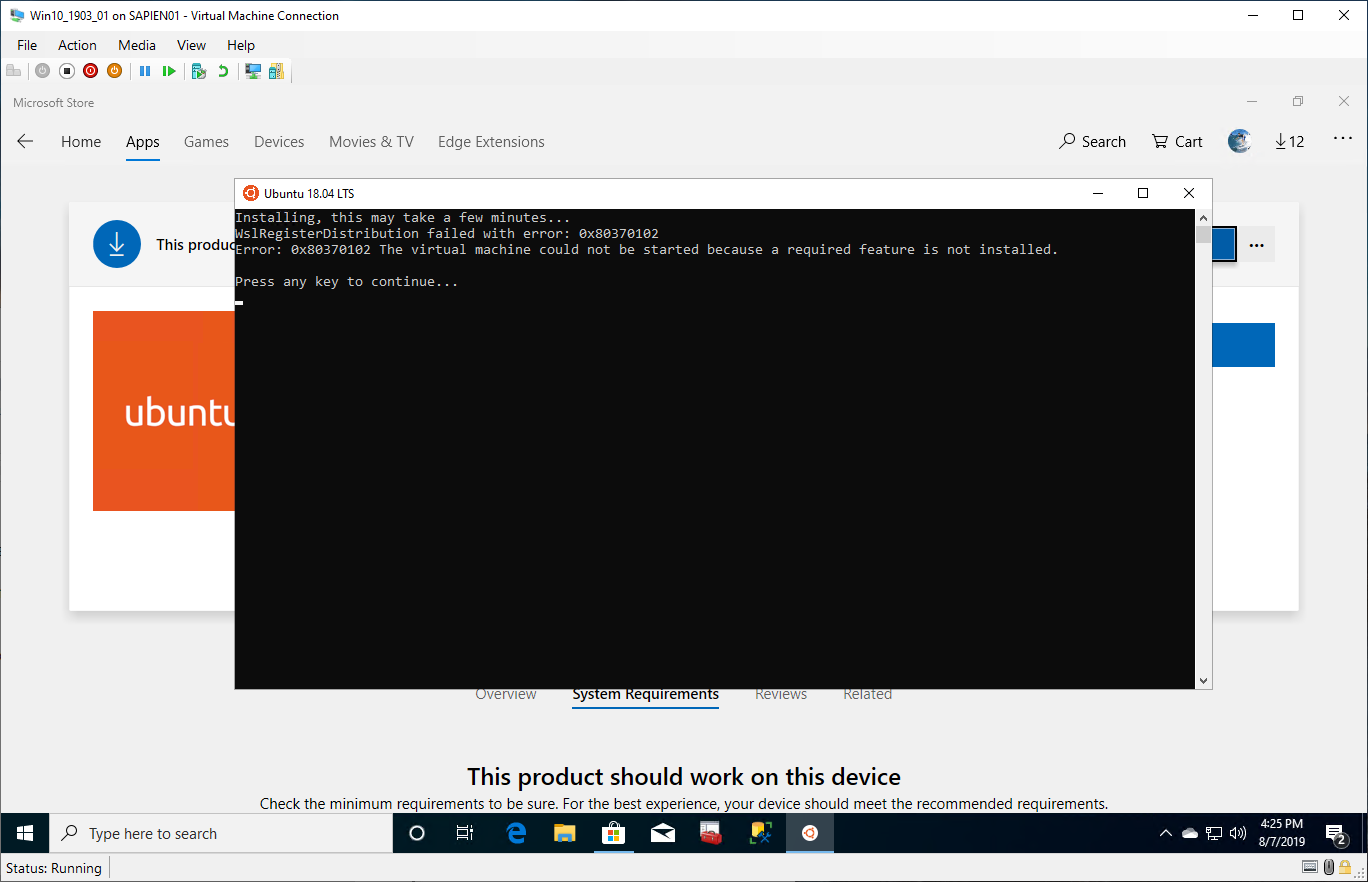
Now, I change my environment to use Hyper-V in my Windows 10 production client machine, then installed Window 10 Insider to Build 18950... and, I can't even install WSL-1.
Getting the error message: (Ubuntu 18.04)
Error: 0x80370102 The virtual machine could not be started because a required feature is not installed.
No matter what I do. I remove all components and reinstalled them back. I'm on a dead end!
I'm upgrading now to Windows 10 Insider Build 18956 and pray to see if something will work.

 MaximoTrinidad
on 7 Aug 2019
MaximoTrinidad
on 7 Aug 2019
Hi, everyone. if you make sure the "Virtual Machine Platform", "Hyper-V", "Windows Subsystem for Linux" is checked on your Windows Features. and trun on the "CPU Virtualization" on your BIOS.
when you run the upgrade cmd "wsl --set-version
you can check the "Hyper-V vmcompute services"(spelled correctly? my win10 is Chinese language.) is running?
i try to start the service , and got some error like "cat't start the Hyper-V ...., error code 1503?".
and, i follow this guide to fix this problem. (https://social.technet.microsoft.com/Forums/en-US/ee5b1d6b-09e2-49f3-a52c-820aafc316f9/hyperv-doesnt-work-after-upgrade-to-windows-10-1809?forum=win10itprovirt&prof=required)
finally, i try to run "wsl --set-version
hope can help someone?
 abner-w
on 3 Sep 2019
abner-w
on 3 Sep 2019
I cannot upgrade to WSL 2, because this is when I try to use wsl --set-version Ubuntu 2:
Invalid command line option: --set-version
I can't seem to be able to do anything about it.
 Polda18
on 8 Sep 2019
Polda18
on 8 Sep 2019
Just to clarify, I installed WSL 1 first, then enabled Virtual Machine feature. Both followed by machine reboot.
And yet this is what it shows to me:
https://ctrlv.cz/FcrS
Polda18
on 8 Sep 2019
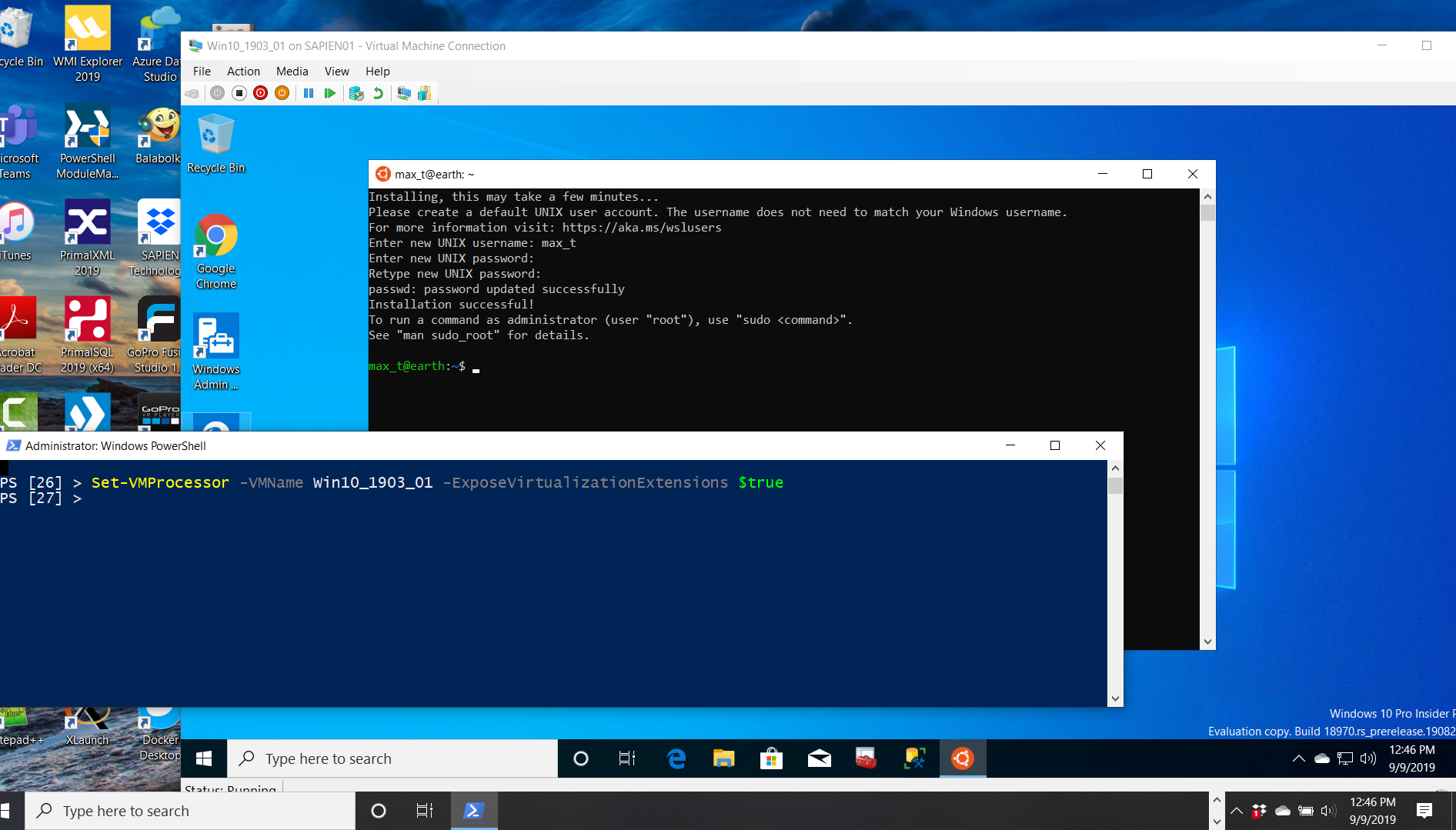
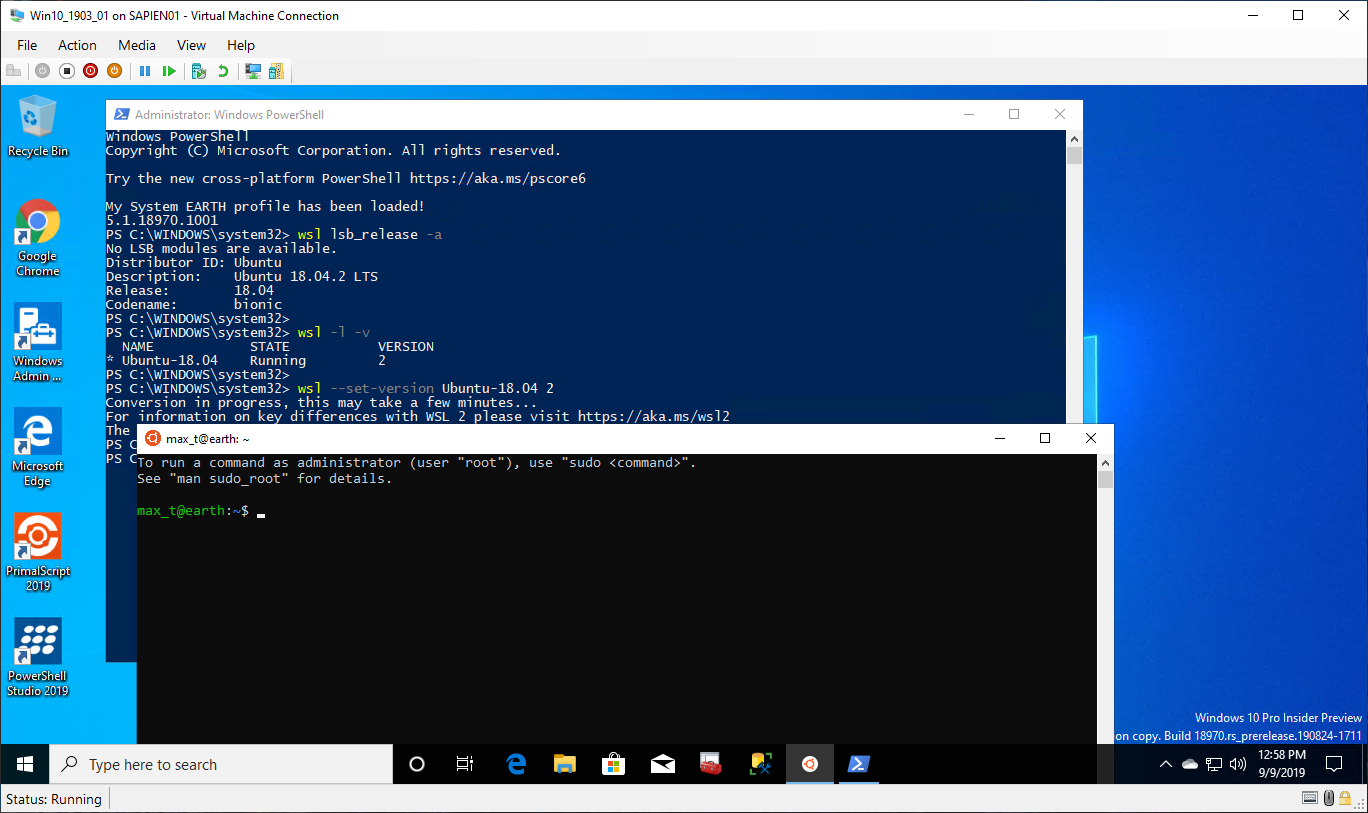
My Issue was resolved!!
If running Windows 10 Insider as a guest Hyper-V, then the solution provider by @naymore solved my issue.
Executing in PowerShell the command in the Hyper-V host machine: (VM need to be stopped)
## - To be executed on the Hyper-V host machine:
Set-VMProcessor -VMName [GuestVMName] -ExposeVirtualizationExtensions $true
This resolved my issue "error: 0x80370102 the virtual machine could not be started because a required feature is not installed."
The error message is misleading as the features were already installed.
 mxtrinidad
on 9 Sep 2019
mxtrinidad
on 9 Sep 2019
@Polda18 please check your Windows version and makes sure you're using build 18917 or higher.
I'm closing this issue out since we have made many fixes to the install process, if you have more issues please open them on the WSL repo: https://github.com/microsoft/wsl
craigloewen-msft
on 10 Sep 2019
Also, note: upgrading to WSL2 this way will break VirtualBox and probably other virtualization engines. WSL2 is no longer a lightweight compatibility system... instead it's a full VM, with all the mount issues, etc of VM's.
 earonesty
on 4 Nov 2019
earonesty
on 4 Nov 2019
I have virtualization enabled in Bios and still getting this error, what is happening?
 danielsballes
on 28 Nov 2019
danielsballes
on 28 Nov 2019
Hi @danielsballes you can double check if virtualization is enabled by going to Task Manager->Performance and looking at the CPU tab.
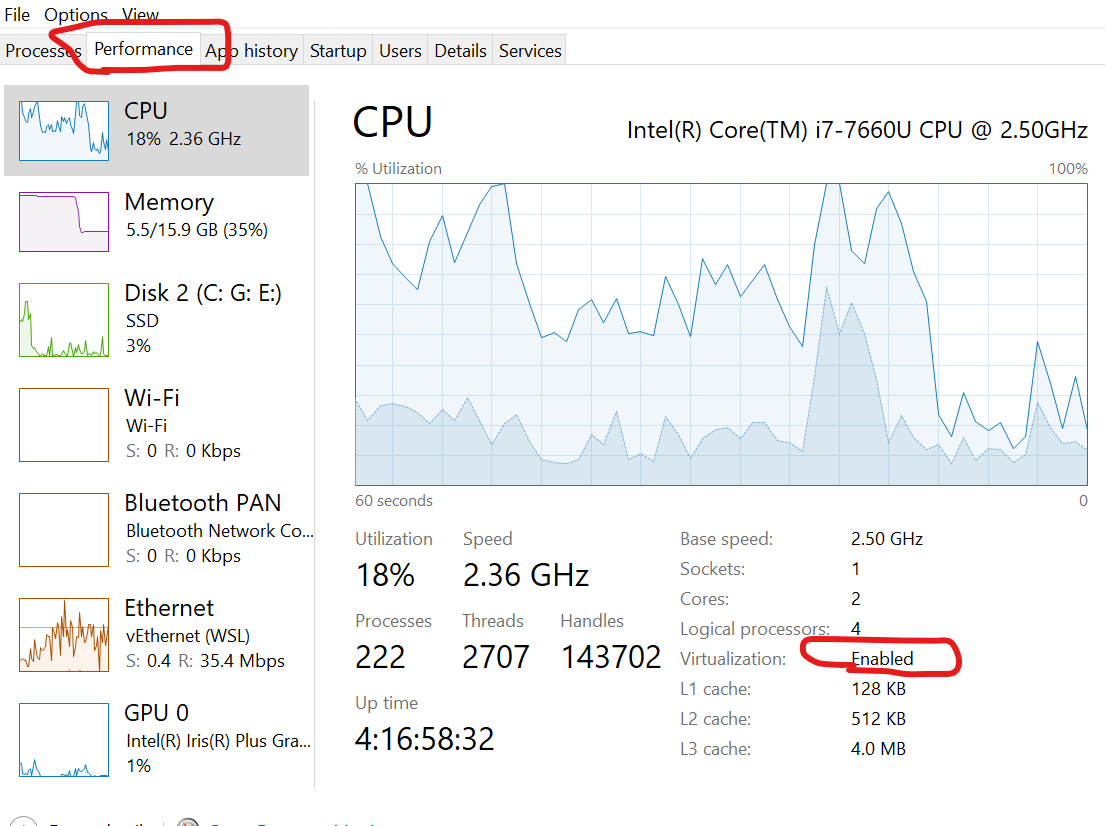
Then please make sure the 'Virtual Machine Platform' optional component is enabled.
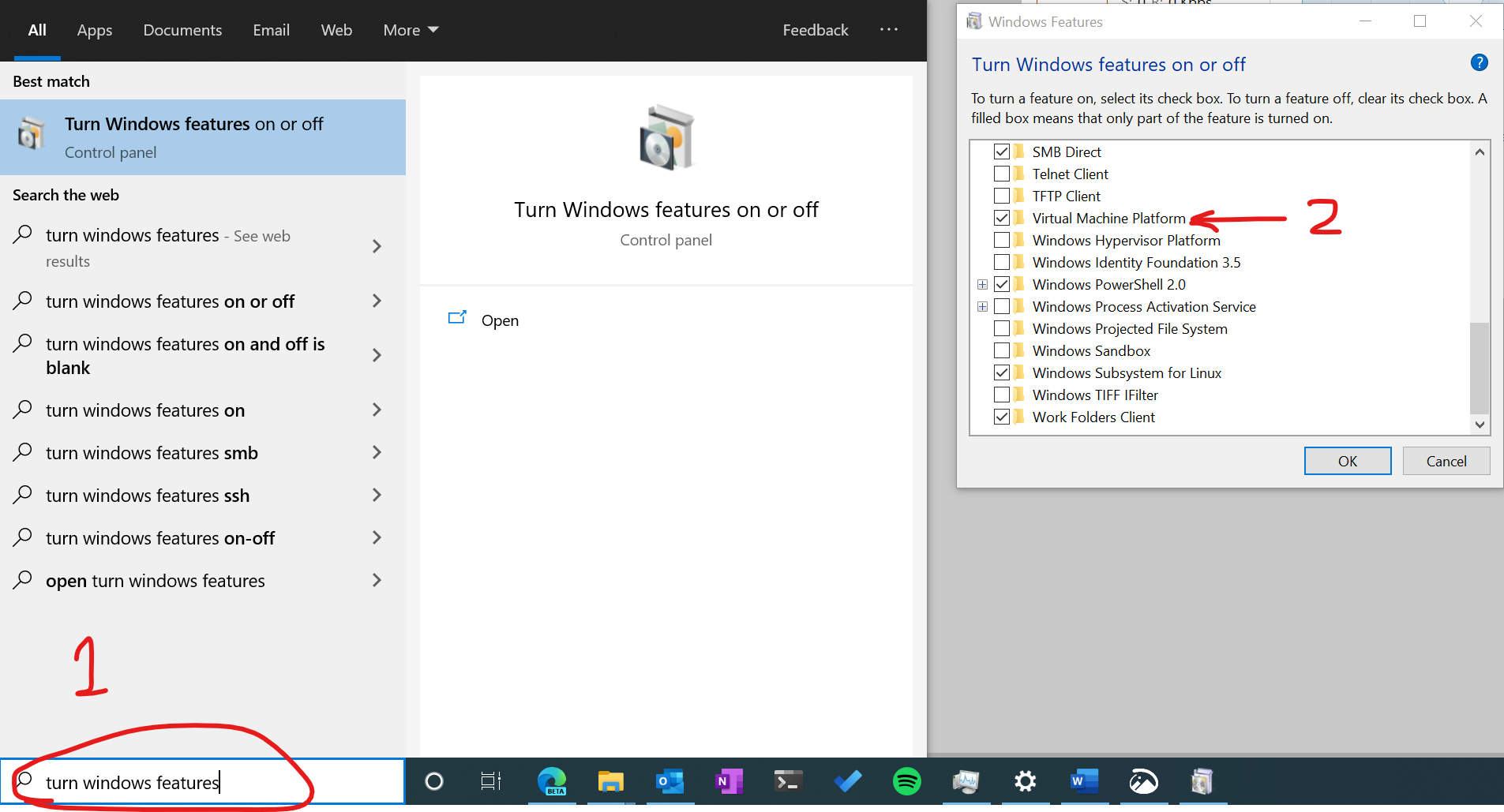
If you're still receiving errors after that please open an issue on the WSL Github repo
(This one is for the documentation only). Thanks!
craigloewen-msft
on 2 Dec 2019
I tried all of the recommendations given above but in the end, I had to run this command in powershell then restart the computer to get the WSL2 working again.
bcdedit /set hypervisorlaunchtype auto start
 hrai
on 24 Dec 2019
hrai
on 24 Dec 2019
After running bcdedit /set hypervisorlaunchtype auto start as described above my windows fails to boot. Had to run bcdedit /set hypervisorlaunchtype off to undo.
 kunzig940
on 16 Apr 2020
kunzig940
on 16 Apr 2020
Uninstalling Windows Subsystem for Linux Update and then reinstalling it fixed the problem without requiring a reboot. I verified that WSL 1 was working by installing a second WSL Linux Ubuntu 18.04 from the MS Store that worked fine while the WSL 2 upgraded Linux for Ubuntu from the MS Store complained about upgrading the kernel. I tried all the other stuff in this thread but WSL 2 was previously working fine. Also these 2 commands in a Admin Console are a lifesaver and fix the MS Store not working and other weird broken Windows stuff. I ran them before uninstalling and then reinstall WSL and Virtual Machine Platform.
sfc /scannow
dism /online /cleanup-image /restorehealth
 freegnu
on 17 Apr 2020
freegnu
on 17 Apr 2020
I've turned on slow ring of Insider Preview program,

checked that virtualization is enabled

Windows subsystem for Linux and Virtual Machine Platform components are also installed

And even more, yesterday I played in vagrant with VirtualBox virtual machine and all went fine. WSL1 also worked for me, but with WSL2 I have this

WSL1, as mentioned before, is also broken, so instead of having new feature I've lost existing. Can you help me?
P.S. Info from CPU-Z

 luminiscence
on 1 May 2020
luminiscence
on 1 May 2020
Hi all,
Whenever I try to use sudo apt-get update && sudo apt-get upgrade
it shows the following error:
Temporary failure resolving 'archive.ubuntu.com'
Can anyone please share some thoughts?
Md Maksudul Hossain
Graduate Research Assistant
On Fri, May 1, 2020 at 2:02 AM luminiscence notifications@github.com
wrote:
I've turned on slow ring of Insider Preview program,
[image: image]
https://user-images.githubusercontent.com/15375180/80788559-a2812180-8bb3-11ea-9bfd-459ccb842744.png
Checked that virtualization is enabled
[image: image]
https://user-images.githubusercontent.com/15375180/80788465-65b52a80-8bb3-11ea-9961-3d2e1687f1b5.png
Windows subsystem for Linux and Virtual Machine Platform components are
also installed
[image: image]
https://user-images.githubusercontent.com/15375180/80788634-e1af7280-8bb3-11ea-9ff7-1466dc38f95b.png
And even more, yesterday I played with vagrant with VirtualBox virtual
machine and all went fine. WSL1 also worked for me, but with WSL2 I have
this
[image: image]
https://user-images.githubusercontent.com/15375180/80788744-26d3a480-8bb4-11ea-8633-9928978ec812.png
and have no idea what I can do to fix it. WSL1, as mentioned before, is
also broken, so instead of having new feature I've lost existing. Can you
help me?—
You are receiving this because you were mentioned.
Reply to this email directly, view it on GitHub
https://github.com/MicrosoftDocs/WSL/issues/404#issuecomment-622277010,
or unsubscribe
https://github.com/notifications/unsubscribe-auth/ALRMMUNMWORMJAWX6FHFUXTRPJXY3ANCNFSM4HXVV6YA
.
MdMaksudulHossain
on 1 May 2020
I've turned on slow ring of Insider Preview program,
checked that virtualization is enabled
Windows subsystem for Linux and Virtual Machine Platform components are also installed
And even more, yesterday I played in vagrant with VirtualBox virtual machine and all went fine. WSL1 also worked for me, but with WSL2 I have this
WSL1, as mentioned before, is also broken, so instead of having new feature I've lost existing. Can you help me?
P.S. Info from CPU-Z
WSL 2 isn't available in non-Preview until update 2004.
freegnu
on 12 May 2020
I have checked that virtualization is enabled I'm still getting errors:
0xc03a001a - operation could not be completed due to a virtual disk system limitation.
or
Error: 0x80370109 The operation timed out because a response was not received from the virtual machine or container.depending on how I try and get Ubuntu to update to wsl 2
Edit: I got it working:
I manually changed the folder properties of the directory where Ubuntu is installed and disabled encryption and compression in the advanced settings tab of the folder attributes.
worked for me, uncompressed AppData\Local\Packages\CanonicalGroupLimited.UbuntuonWindows...
 rstefek
on 15 May 2020
rstefek
on 15 May 2020
@freegnu same problem on 2004..
 birdmanmandbir
on 3 Jun 2020
birdmanmandbir
on 3 Jun 2020
@freegnu same problem on 2004..
The same happening here.
Almost giving up on use WSL. The support seems pretty bad.
 flaprano
on 5 Jun 2020
flaprano
on 5 Jun 2020
@flaprano You can try solutions in this issue: wsl-#5328
birdmanmandbir
on 5 Jun 2020
hello so wsl 1 doesn`t even work.
im also on windows 2004
 NicTanghe
on 5 Jun 2020
NicTanghe
on 5 Jun 2020
Yes! There was a link to update the WSL 2 Kernel:
https://aka.ms/wsl2kernel
In my case, I had to run it twice, and everything is working.

MaximoTrinidad
on 5 Jun 2020
I am attempting to install WSL 2 on Parallels Desktop 14 Home Edition, but it seems the enabling virtualization feature (Parallels calls it Nested Virtualization) has been moved to the Pro edition only.
Is there another way to enable virtualization or am I out of luck while using Home Edition? I apologize if there is a simple fix for this, I am new to Windows.
Yeah, same here, needed some help to resolve this
 Vishnu05
on 19 Jun 2020
Vishnu05
on 19 Jun 2020
the version 2 upgrade worked after I enabled intel virtualization technology in BIOS>advance,
if you can't find what I'm talking about or where's the option ill be glad to take pictures of the bios
good luck everybody and have a beautiful day
 Robinzon100
on 27 Jul 2020
Robinzon100
on 27 Jul 2020
I find the final solution when nothing else gets Windows 10 to behave as it
should. Run the upgrade after downloading the Windows 10 installer/upgrader
from Microsoft. Make sure the installer is for the same version of Windows
10 as you have installed AKA 2004 at this point in time. Fixes all major
problems immediately without having to reinstall or recreate your account,
settings, and apps but doesn't prevent the bit rot from settling in again
over time.
On Sun, Jul 26, 2020 at 11:41 PM Robinzon notifications@github.com wrote:
the version 2 upgrade worked after I enabled intel virtualization
technology in BIOS>advance,
if you can't find what I'm talking about or where's the option ill be glad
to take pictures of the biosgood luck everybody and have a beautiful day
—
You are receiving this because you were mentioned.
Reply to this email directly, view it on GitHub
https://github.com/MicrosoftDocs/WSL/issues/404#issuecomment-664102567,
or unsubscribe
https://github.com/notifications/unsubscribe-auth/AACPOFGPJTYZP7VDZYNMKH3R5TZORANCNFSM4HXVV6YA
.
freegnu
on 27 Jul 2020
Hello,
When I try to sudo apt-get update or upgrade, it shows the follows error:
Temporary failure resolving 'archive.ubuntu.com'
Mine is wsl2 and I am using Ubuntu 20.04.1 LTS. ping is not working either.
It says "ping: google.com: Temporary failure in name resolution"
It was working fine before. I have tried a few solutions e.g. changing
nameserver in /etc/resolv.conf, removing this file. Can anyone help me,
please?
On Fri, May 1, 2020, 3:03 AM Maksudul Hossain Jewel jewelmaksud@gmail.com
wrote:
Hi all,
Whenever I try to use sudo apt-get update && sudo apt-get upgrade
it shows the following error:
Temporary failure resolving 'archive.ubuntu.com'Can anyone please share some thoughts?
Md Maksudul Hossain
Graduate Research Assistant
On Fri, May 1, 2020 at 2:02 AM luminiscence notifications@github.com
wrote:I've turned on slow ring of Insider Preview program,
[image: image]
https://user-images.githubusercontent.com/15375180/80788559-a2812180-8bb3-11ea-9bfd-459ccb842744.png
Checked that virtualization is enabled
[image: image]
https://user-images.githubusercontent.com/15375180/80788465-65b52a80-8bb3-11ea-9961-3d2e1687f1b5.png
Windows subsystem for Linux and Virtual Machine Platform components are
also installed
[image: image]
https://user-images.githubusercontent.com/15375180/80788634-e1af7280-8bb3-11ea-9ff7-1466dc38f95b.png
And even more, yesterday I played with vagrant with VirtualBox virtual
machine and all went fine. WSL1 also worked for me, but with WSL2 I have
this
[image: image]
https://user-images.githubusercontent.com/15375180/80788744-26d3a480-8bb4-11ea-8633-9928978ec812.png
and have no idea what I can do to fix it. WSL1, as mentioned before, is
also broken, so instead of having new feature I've lost existing. Can you
help me?—
You are receiving this because you were mentioned.
Reply to this email directly, view it on GitHub
https://github.com/MicrosoftDocs/WSL/issues/404#issuecomment-622277010,
or unsubscribe
https://github.com/notifications/unsubscribe-auth/ALRMMUNMWORMJAWX6FHFUXTRPJXY3ANCNFSM4HXVV6YA
.
MdMaksudulHossain
on 12 Aug 2020
@MdMaksudulHossain assuming you don't have fundamental connectivity issue try this https://github.com/microsoft/WSL/issues/5256#issuecomment-667751572
scyto
on 12 Aug 2020
Dear altruists,
I installed chocolatey, fluent terminal, zsh, Oh My ZSH yesterday to get
some new experience. It was all going well. I could run both windows
terminal and fluent terminal. Today WSL is no longer launching. I have
tried wsl, bash, windows terminal, ubuntu terminal everything. All of them
just show a cursor on a blank screen, nothing really starts. What could
possibly go wrong?
Best regards,
Maksud
On Tue, Aug 11, 2020 at 6:23 PM scyto notifications@github.com wrote:
@MdMaksudulHossain https://github.com/MdMaksudulHossain assuming you
don't have fundamental connectivity issue try this microsoft/WSL#5256
(comment)
https://github.com/microsoft/WSL/issues/5256#issuecomment-667751572—
You are receiving this because you were mentioned.
Reply to this email directly, view it on GitHub
https://github.com/MicrosoftDocs/WSL/issues/404#issuecomment-672352245,
or unsubscribe
https://github.com/notifications/unsubscribe-auth/ALRMMUJQQR6EZM2JCRRDOKTSAHHGDANCNFSM4HXVV6YA
.
MdMaksudulHossain
on 2 Sep 2020
I had this happen on Windows Terminal. I had upgraded my bios and the CPU
virtualization was off by default in the bios.
On Wed, Sep 2, 2020 at 2:50 PM MdMaksudulHossain notifications@github.com
wrote:
Dear altruists,
I installed chocolatey, fluent terminal, zsh, Oh My ZSH yesterday to get
some new experience. It was all going well. I could run both windows
terminal and fluent terminal. Today WSL is no longer launching. I have
tried wsl, bash, windows terminal, ubuntu terminal everything. All of them
just show a cursor on a blank screen, nothing really starts. What could
possibly go wrong?Best regards,
MaksudOn Tue, Aug 11, 2020 at 6:23 PM scyto notifications@github.com wrote:
@MdMaksudulHossain https://github.com/MdMaksudulHossain assuming you
don't have fundamental connectivity issue try this microsoft/WSL#5256
(comment)
https://github.com/microsoft/WSL/issues/5256#issuecomment-667751572—
You are receiving this because you were mentioned.
Reply to this email directly, view it on GitHub
<https://github.com/MicrosoftDocs/WSL/issues/404#issuecomment-672352245
,
or unsubscribe
<
https://github.com/notifications/unsubscribe-auth/ALRMMUJQQR6EZM2JCRRDOKTSAHHGDANCNFSM4HXVV6YA.
—
You are receiving this because you were mentioned.
Reply to this email directly, view it on GitHub
https://github.com/MicrosoftDocs/WSL/issues/404#issuecomment-685930382,
or unsubscribe
https://github.com/notifications/unsubscribe-auth/AACPOFDXQHSPJQS2OCOC5QTSD2HY7ANCNFSM4HXVV6YA
.
freegnu
on 6 Sep 2020
I have AMD processor, same problem
 RenanZX
on 16 Oct 2020
RenanZX
on 16 Oct 2020
Yes! There was a link to update the WSL 2 Kernel:
https://aka.ms/wsl2kernelIn my case, I had to run it twice, and everything is working.
Reinstalling the WSL2 kernel fixed the issue for me
Thanks
 shmuli9
on 1 Nov 2020
shmuli9
on 1 Nov 2020
I have enabled the VirtualMachinePlatform as instructed, but I am still unable to upgrade my distribution to version 2:
PS C:\WINDOWS\system32> Enable-WindowsOptionalFeature -Online -FeatureName VirtualMachinePlatform


Path          :
Online        : True
RestartNeeded : False


PS C:\WINDOWS\system32> wsl --set-version Ubuntu 2
Conversion in progress, this may take a few minutes...
For information on key differences with WSL 2 please visit https://aka.ms/wsl2
Please enable the Virtual Machine Platform Windows feature.
PS C:\WINDOWS\system32> wsl --list --verbose
  NAME      STATE           VERSION
* Ubuntu    Stopped         1
Document Details
⚠ _Do not edit this section. It is required for docs.microsoft.com ➟ GitHub issue linking._
- ID: b19a43be-b16a-d903-b69d-75dffce6c329
- Version Independent ID: f9d4a118-1251-8d6b-43f5-2e64808dc527
- Content: Install WSL 2
- Content Source: WSL/wsl2-install.md
- Product: windows-subsystem-for-linux
- GitHub Login: @mscraigloewen
- Microsoft Alias: mscraigloewen
I've turned on slow ring of Insider Preview program,
checked that virtualization is enabled
Windows subsystem for Linux and Virtual Machine Platform components are also installed
And even more, yesterday I played in vagrant with VirtualBox virtual machine and all went fine. WSL1 also worked for me, but with WSL2 I have this
WSL1, as mentioned before, is also broken, so instead of having new feature I've lost existing. Can you help me?
P.S. Info from CPU-Z
WSL 2 isn't available in non-Preview until update 2004.
Are you using a virtual machine? if yes you need to enable nested virtualization. In my case, i am using parallel and i faced the same issue. After enabling nested virtualization, WSL2 WORKED.
Follow the steps on this link or if you are using VMware or Virtualbox nested virtualization is bundled with the VM by default
https://patrickwu.space/2020/02/14/wsl-on-mac/
 codepolariz
on 28 Nov 2020
codepolariz
on 28 Nov 2020
After running
bcdedit /set hypervisorlaunchtype auto startas described above my windows fails to boot. Had to runbcdedit /set hypervisorlaunchtype offto undo.
This also caused my machine not to boot. Trying to undo by running the other command didn't work in safe mode's command prompt. I'm stuck in a failed Win10 boot loop :(
Buyer beware
 f3ndot
on 6 Dec 2020
f3ndot
on 6 Dec 2020
Try running Dism.exe /online /Cleanup-Image /StartComponentCleanup & dism
/online /cleanup-image /restorehealth & sfc /scannow
freegnu
on 7 Dec 2020
Related issues
 RafneQ
·
8Comments
RafneQ
·
8Comments
 thesmart
·
6Comments
thesmart
·
6Comments
 aoxiangwu
·
5Comments
aoxiangwu
·
5Comments
 CeciAc
·
5Comments
CeciAc
·
5Comments
 SetTrend
·
4Comments
SetTrend
·
4Comments
Most helpful comment
I tried all of the recommendations given above but in the end, I had to run this command in powershell then restart the computer to get the WSL2 working again.
bcdedit /set hypervisorlaunchtype auto start