Wsl: Feature name Microsoft-Windows-Subsystem-Linux is unknown
I get this error when I try to run the command. Any ideas how to fix this?
PS C:WINDOWSsystem32> Enable-WindowsOptionalFeature -Online -FeatureName Microsoft-Windows-Subsystem-Linux
Enable-WindowsOptionalFeature : Feature name Microsoft-Windows-Subsystem-Linux is unknown.
At line:1 char:1
- Enable-WindowsOptionalFeature -Online -FeatureName Microsoft-Windows- ...
~~~~~~~~~~~~~~~~~
- CategoryInfo : NotSpecified: (:) [Enable-WindowsOptionalFeature], COMException
- FullyQualifiedErrorId : Microsoft.Dism.Commands.EnableWindowsOptionalFeatureCommand
Document Details
⚠ Do not edit this section. It is required for docs.microsoft.com ➟ GitHub issue linking.
- ID: f2668f02-b96f-7f16-6fc5-950a1e5f86b9
- Version Independent ID: 75f3a2fb-99bd-0161-28ba-5c86e917f4d5
- Content: Install the Linux Subsystem on Windows 10
- Content Source: WSL/install-win10.md
- Service: windows-subsystem-for-linux
- Product: windows-subsystem-for-linux
- GitHub Login: @scooley
- Microsoft Alias: scooley
 mbloem-Steelcase
All 39 comments
Are you running Windows 10 x64 Creators Update Home, Pro, or Enterprise (non-LTSB SKU) or later?
 bitcrazed
on 17 Jul 2018
bitcrazed
on 17 Jul 2018
Hello,
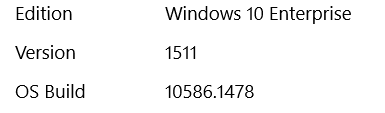
Here’s what version of Windows I’m using:
[cid:[email protected]]
Best,
Michael
--
Michael Bloem, PhD | Consulting Analyst | Advanced Analytics | Steelcase.com | 650.762.5636
From: Rich Turner [mailto:[email protected]]
Sent: Tuesday, July 17, 2018 1:26 PM
To: MicrosoftDocs/WSL WSL@noreply.github.com
Cc: Bloem, Michael MBLOEM@steelcase.com; Author author@noreply.github.com
Subject: Re: [MicrosoftDocs/WSL] Feature name Microsoft-Windows-Subsystem-Linux is unknown (#226)
Are you running Windows 10 x64 Creators Update Home, Pro, or Enterprise (non-LTSB SKU) or later?
—
You are receiving this because you authored the thread.
Reply to this email directly, view it on GitHubhttps://github.com/MicrosoftDocs/WSL/issues/226#issuecomment-405661446, or mute the threadhttps://github.com/notifications/unsubscribe-auth/ANJTTlMiikAq9a1ovYBs1eXXt54b4b6Jks5uHh4tgaJpZM4VMHZd.
mbloem-Steelcase
on 19 Jul 2018
@mbloem-Steelcase - don't think images attached to emails survive conversion into GitHub comments - could you either apply your image to the message above, or type the version number? Thanks.
bitcrazed
on 19 Jul 2018
Hi I've added the content you requested above - any thoughts on how I should proceed?
mbloem-Steelcase
on 26 Jul 2018
1511? That's Threshold 2 - which was released in Nov 2015 ... and is no longer supported!!
Is there a reason you're not running a current and supported version of Win10?
You can't enable WSL on 1511 because _it's not in 1511_ - WSL was first introduced in April 2016, as a beta feature in Insiders builds released in the lead-up to Win10 1609 (Anniversary Update). WSL has received HUGE updates with each subsequent release, dramatically improving its ability to run ever more Linux tools and binaries.
- Windows 10 Creators Update: What’s new in Bash/WSL & Windows Console
- What’s new in WSL in Windows 10 Fall Creators Update
- And many of the other posts on our blog: https://blogs.msdn.microsoft.com/commandline
The current latest, supported version of WSL is available in Win10 1803 (Spring 2018 Update), and the next major Win10 release later this year will include yet more improvements and fixes.
If you're going to run WSL, we _STRONGLY_ encourage you to run the latest version of Windows that you can in order to get the best experience.
bitcrazed
on 27 Jul 2018
Thanks!
Asking my IT department about upgrading Windows now...
mbloem-Steelcase
on 27 Jul 2018
Hi, I have exactly the same command written as @mbloem-Steelcase but I'm running on windows 10 (familial) x64 and with the 1803 version. Can someone help me?
Thanks!
 Crozon29
on 7 Aug 2018
Crozon29
on 7 Aug 2018
@Crozon29 - are you running Windows 10 LTSB?
Please reply with the (suitably redacted) output of running systeminfo from a PowerShell/Cmd prompt.
bitcrazed
on 7 Aug 2018
Hi @bitcrazed I don't really know, when I run "gwmi win32_operatingsystem | select OperatingSystemSKU" it says 101 so I don't think so.
I actually managed to run : Enable-WindowsOptionalFeature -Online -FeatureName Microsoft-Windows-Subsystem-Linux tonight after several attempts but I don't have the possibility to restart my computer as said in the development to follow.
I have in output:
Path:
Online: True
RestartNeeded: False
Thank you for your help and sorry as you can see I am a beginner in this kind of stuff!
Crozon29
on 8 Aug 2018
@Crozon29 gwmi win32_operatingsystem|select Version would be more useful ;)
My guess (based on the number of times I've gotten it wrong myself) is that when this failed in the past, you may have omitted the -Online argument.
You must be sure to reboot your computer after enabling WSL though: WSL needs to start-up very early in the Windows bootup sequence, before any 3rd party code is loaded, to ensure a solid "chain of trust". Once enabled, you should be able to download and install your chosen distro(s) from the Windows Store.
bitcrazed
on 8 Aug 2018
@bitcrazed Thank you for the command.
Unfortunately I used the command " Enable-WindowsOptionalFeature -Online -FeatureName Microsoft-Windows-Subsystem-Linux " without omitting the -Online but it doesn't work.
It's to put in the Bash command (found on the search bar and runned as an admin)?
Crozon29
on 10 Aug 2018
Hi all,
I got following message, any recommendation what to do next:
Enable-WindowsOptionalFeature : The requested operation requires elevation.
At line:1 char:1
- Enable-WindowsOptionalFeature -Online -FeatureName Microsoft-Windows- ...
~~~~~~~~~~~~~~~~~
- CategoryInfo : NotSpecified: (:) [Enable-WindowsOptionalFeature], COMException
- FullyQualifiedErrorId : Microsoft.Dism.Commands.EnableWindowsOptionalFeatureCommand
 AMKUM78
on 15 Aug 2018
AMKUM78
on 15 Aug 2018
Sorry: the answer is to run PowerShell as admin - it does not run by default even if you are the admin - https://superuser.com/questions/1168451/how-can-i-provide-elevation-to-an-operation
AMKUM78
on 15 Aug 2018
I got the same error
Enable-WindowsOptionalFeature : Feature name Microsoft-Windows-Subsystem-Linux is unknown.
At line:1 char:1
+ Enable-WindowsOptionalFeature -Online -FeatureName Microsoft-Windows- ...
+ ~~~~~~~~~~~~~~~~~~~~~~~~~~~~~~~~~~~~~~~~~~~~~~~~~~~~~~~~~~~~~~~~~~~~~
    + CategoryInfo          : NotSpecified: (:) [Enable-WindowsOptionalFeature], COMException
    + FullyQualifiedErrorId : Microsoft.Dism.Commands.EnableWindowsOptionalFeatureCommand
I'm running on Windows Server 2016 Datacenter 64-bit (10.0, Build 14393) (14393.rs1_release.170602-2252)
 hoangpx
on 24 Sep 2018
hoangpx
on 24 Sep 2018
@hoangpx As per the post announcing WSL on Windows Server:
Windows Subsystem for Linux arrived in Windows Server Insider Build 16237
You'll need to update your Server to a more recent build to access WSL.
bitcrazed
on 24 Sep 2018
Closing this issue: For anyone else who see's this error, note that you need to be running:
- Windows 10 x64 build 14316 or later (note - LTSB builds do not currently support WSL)
- Windows Server build 16237 or later
For the best WSL experience, we encourage you to run the most recent build of Windows that you can since WSL has improved CONSIDERABLY since its early releases.
bitcrazed
on 24 Sep 2018
Closing this issue: For anyone else who see's this error, note that you need to be running:
- Windows 10 x64 build 14316 or later (note - LTSB builds do not currently support WSL)
- Windows Server build 16237 or later
For the best WSL experience, we encourage you to run the most recent build of Windows that you can since WSL has improved CONSIDERABLY since its early releases.
hello. i have a same problem.
I use 17763 insider prew build. And could not turn on case sensitive feature
 hiperriper
on 15 Oct 2018
hiperriper
on 15 Oct 2018
Same issue on Windows 10 Pro 10.0.17134. WSL is missing in "turn windows features on and off" as well as getting the error as in the OP message.
 juso
on 25 Oct 2018
juso
on 25 Oct 2018
@Juso - Are you running Windows 10 LTSB?
bitcrazed
on 25 Oct 2018
@bitcrazed - no, it's not LTSB to my understand
PS C:\> gwmi win32_operatingsystem | select OperatingSystemSKU

OperatingSystemSKU
------------------
                48
and value at HKEY_LOCAL_MACHINESOFTWAREMicrosoftWindows NTCurrentVersionProductName is Windows 10 Pro
juso
on 1 Nov 2018
Same problem here !
 Adarshreddyash
on 14 Jun 2019
Adarshreddyash
on 14 Jun 2019
Same issues here:
> Enable-WindowsOptionalFeature -Online -FeatureName Microsoft-Windows-Subsystem-Linux Enable-WindowsOptionalFeature : Der Featurename "Microsoft-Windows-Subsystem-Linux" istOperatingSystemSKU
48
unbekannt.
>
 cmprima
on 5 Jul 2019
cmprima
on 5 Jul 2019
Same here also
 baselbj
on 15 Jul 2019
baselbj
on 15 Jul 2019
Having similar issue in
Windows 10 Pro, Version 1903. OS build: 18362.295
Enable-WindowsOptionalFeature : Feature name Mircrosoft-Windows-Subsystem-Linux is unknown.
At line:1 char:1
+ Enable-WindowsOptionalFeature -online -FeatureName Mircrosoft-Windows ...
+ ~~~~~~~~~~~~~~~~~~~~~~~~~~~~~~~~~~~~~~~~~~~~~~~~~~~~~~~~~~~~~~~~~~~~~
    + CategoryInfo          : NotSpecified: (:) [Enable-WindowsOptionalFeature], COMException
    + FullyQualifiedErrorId : Microsoft.Dism.Commands.EnableWindowsOptionalFeatureCommand
 eNipu
on 21 Aug 2019
eNipu
on 21 Aug 2019
@eNipu could you try using the GUI approach to install WSL? Open the start menu and search for Turn Windows Features On or Off and then check the Windows Subsystem for Linux option.
If that doesn't work please open an issue on our WSL Github repo: https://github.com/microsoft/wsl/issues and we will help you out there.
 craigloewen-msft
on 21 Aug 2019
craigloewen-msft
on 21 Aug 2019
@eNipu could you try using the GUI approach to install WSL? Open the start menu and search for
Turn Windows Features On or Offand then check theWindows Subsystem for Linuxoption.If that doesn't work please open an issue on our WSL Github repo: https://github.com/microsoft/wsl/issues and we will help you out there.
Fixed the problem for GUI. Thanks !
eNipu
on 23 Aug 2019
Windows Subsystem for Linux is not listed in the turn windows On or Off dialogue box
 jerrycaffe
on 2 Dec 2019
jerrycaffe
on 2 Dec 2019
@eNipu - just spotted that you're trying to install Mircrosoft-Windows-Subsystem-Linux ... which is mis-spelled.
Please run the following from an elevated PowerShell Console/Terminal:
Enable-WindowsOptionalFeature -Online -FeatureNameMicrosoft-Windows-Subsystem-Linux
bitcrazed
on 2 Dec 2019
@jerrycaffe What build/SKU of Windows are you running?
bitcrazed
on 2 Dec 2019
Hey I have the problem, too, this is what happens when I run systeminfo
Host Name:                 ALIENMACHINE
OS Name:                   Microsoft Windows 10 Pro
OS Version:                10.0.19041 N/A Build 19041
OS Manufacturer:           Microsoft Corporation
OS Configuration:          Standalone Workstation
OS Build Type:             Multiprocessor Free
Registered Owner:          N/A
Registered Organization:   N/A
Product ID:                00331-10000-00001-AA033
Original Install Date:     3/27/2020, 6:29:23 AM
System Boot Time:          4/15/2020, 1:07:57 AM
System Manufacturer:       Hewlett-Packard
System Model:              HP ProBook 6450b
System Type:               X86-based PC
Processor(s):              1 Processor(s) Installed.
                           [01]: x64 Family 6 Model 37 Stepping 5 GenuineIntel ~2400 Mhz
BIOS Version:              Hewlett-Packard 68CDE Ver. F.03, 10/4/2010
Windows Directory:         C:\WINDOWS
System Directory:          C:\WINDOWS\system32
Boot Device:               \Device\HarddiskVolume1
System Locale:             en-us;English (United States)
Input Locale:              en-gb;English (United Kingdom)
Time Zone:                 (UTC+02:00) Cairo
Total Physical Memory:     2,991 MB
Available Physical Memory: 257 MB
Virtual Memory: Max Size:  12,207 MB
Virtual Memory: Available: 6,009 MB
Virtual Memory: In Use:    6,198 MB
Page File Location(s):     C:\pagefile.sys
Domain:                    WORKGROUP
Logon Server:              \\ALIENMACHINE
Hotfix(s):                 4 Hotfix(s) Installed.
                           [01]: KB4534170
                           [02]: KB4537759
                           [03]: KB4545706
                           [04]: KB4541738
Network Card(s):           2 NIC(s) Installed.
                           [01]: Intel(R) 82577LC Gigabit Network Connection
                                 Connection Name: Ethernet
                                 Status:          Media disconnected
                           [02]: Broadcom 4313 802.11b/g/n
                                 Connection Name: Wi-Fi
                                 DHCP Enabled:    Yes
                                 DHCP Server:     192.168.8.1
                                 IP address(es)
                                 [01]: 192.168.8.113
                                 [02]: fe80::d193:1076:4f7a:d19b
                                 [03]: fd90:2bd2:2993:7200:75cc:2e41:d01a:2e0c
                                 [04]: fd90:2bd2:2993:7200:d193:1076:4f7a:d19b
Hyper-V Requirements:      VM Monitor Mode Extensions: Yes
                           Virtualization Enabled In Firmware: No
                           Second Level Address Translation: Yes
                           Data Execution Prevention Available: Yes
 vixalien
on 15 Apr 2020
vixalien
on 15 Apr 2020
Having this same issue, I am running LTSC in Bootcamp:
```Enable-WindowsOptionalFeature -Online -FeatureName Microsoft-Windows-Subsystem-Linux
PS C:Windowssystem32> Enable-WindowsOptionalFeature -Online -FeatureName Microsoft-Windows-Subsystem-Linux
Enable-WindowsOptionalFeature : Feature name Microsoft-Windows-Subsystem-Linux is unknown.
PS C:Windowssystem32> gwmi win32_operatingsystem|select Version
Version
10.0.17763
 sambragg
on 24 Apr 2020
sambragg
on 24 Apr 2020
@sambragg According to the LTSC page, you're not running LTSC:
LTSC release | Equivalent SAC release | Availability date
-- | -- | --
Windows 10 Enterprise 2015 LTSC | Windows 10, Version 1507 | 7/29/2015
Windows 10 Enterprise 2016 LTSC | Windows 10, Version 1607 | 8/2/2016
Windows 10 Enterprise 2019 LTSC | Windows 10, Version 1809 | 11/13/2018
17763 was the fall 2018 Win10 release.
If you copy this: Get-WindowsOptionalFeature -Online -FeatureName Microsoft-Windows-Subsystem-Linux, and paste it into an ELEVATED Terminal, you should see something like the following:

If not, please follow @craigloewen-msft's instructions above.
bitcrazed
on 24 Apr 2020
@bitcrazed I'm having a similar issue... running Server 2106 latest build:

I know using this guide is possible becasue I've used this guide before, but something seems to be broken
https://docs.microsoft.com/en-us/windows/wsl/install-on-server
 gibsonjc1
on 25 Apr 2020
gibsonjc1
on 25 Apr 2020
@gibsonjc1 - Windows Server 2016 was released before WSL was first released (fall 2017).
bitcrazed
on 25 Apr 2020
PS C:WINDOWSsystem32> dism.exe /online /enable-feature /featurename:Microsoft-Windows-Subsystem-Linux /all /norestart
__Deployment Image Servicing and Management tool
Version: 10.0.19041.329
Image Version: 10.0.19041.329
Error: 0x800f080c
Feature name Microsoft-Windows-Subsystem-Linux is unknown.
A Windows feature name was not recognized.
Use the /Get-Features option to find the name of the feature in the image and try the command again.
The DISM log file can be found at C:WINDOWSLogsDISMdism.log__
My windows version is:
Version 2004 (OS Build 19041.329)
 allencarvallo
on 10 Jun 2020
allencarvallo
on 10 Jun 2020
@allencarvallo can you try using the GUI method? Instructions are here at this video.
craigloewen-msft
on 10 Jun 2020
Sir
But in turn on/off windows features, the box for Windows Subsystem for
Linux was not there
On Thu, Jun 11, 2020 at 2:17 AM Craig Loewen notifications@github.com
wrote:
@allencarvallo https://github.com/allencarvallo can you try using the
GUI method? Instructions are here at this video
https://youtu.be/MrZolfGm8Zk?t=531.—
You are receiving this because you were mentioned.
Reply to this email directly, view it on GitHub
https://github.com/MicrosoftDocs/WSL/issues/226#issuecomment-642249108,
or unsubscribe
https://github.com/notifications/unsubscribe-auth/AMXTOZWYN6UWFYGJFY5V7P3RV7WNTANCNFSM4FJQOZOQ
.
allencarvallo
on 11 Jun 2020
I think we'd need more info to solve the problem then. Could you please open an issue on the official WSL repo here describing your problem?
Thanks!
craigloewen-msft
on 11 Jun 2020
@eNipu could you try using the GUI approach to install WSL? Open the start menu and search for
Turn Windows Features On or Offand then check theWindows Subsystem for Linuxoption.If that doesn't work please open an issue on our WSL Github repo: https://github.com/microsoft/wsl/issues and we will help you out there.
i don't have Windows Subsystem for Linux option there
 madhakun
on 30 Oct 2020
madhakun
on 30 Oct 2020
Related issues
 MedAnd
·
6Comments
MedAnd
·
6Comments
 mattgif
·
6Comments
mattgif
·
6Comments
 skycommand
·
7Comments
skycommand
·
7Comments
 sferich888
·
3Comments
sferich888
·
3Comments
 RafneQ
·
8Comments
RafneQ
·
8Comments
Most helpful comment
I got the same error
I'm running on Windows Server 2016 Datacenter 64-bit (10.0, Build 14393) (14393.rs1_release.170602-2252)