Is this feature request related specifically to tooling in Visual Studio (e.g. XAML Designer, Code editing, etc...)? No
Currently, the only way I know how to fullscreen my wpf application is:
WindowStyle=None and WindowState=Maximized (and Topmost=True, though this is just needed to make sure it's above everything else).
One tricky thing that can arise, custom window chrome. If I set WindowStyle=None to enable my custom window chrome, then maximizing my application will fullscreen it instead, causing me to have to write complicated code to track the task bar's location and height, and then add some kind of negative bottom margin or something like that.
Ideally, windows would be able to IsFullscreen = true, and that wouldn't just be WindowStyle.None + WindowState.Maximized to avoid the custom chrome issue.
 ajbadaj
All 8 comments
On a related note, setting things to fullscreen as described above results in a performance loss, which I reported here:
https://github.com/dotnet/wpf/issues/3626
This feature could be implemented in a way to fix that.
ajbadaj
on 10 Oct 2020
Thanks, @ajbadaj.
 ryalanms
on 16 Oct 2020
ryalanms
on 16 Oct 2020
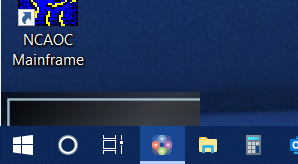
I would also like to add an additional issue. When using a custom window chrome, and disabling taskbar visibility, an artifact will appear at the bottom left of the screen directly above the taskbar if the application is minimized. I have attached an image of this behavior.
 joshman1019
on 22 Oct 2020
joshman1019
on 22 Oct 2020
Additional Issue - Can't Fake Maximize
One issue that really drives home the need for this, taskbar gets sent to back when an app is fullscreened in this manner.
Backstory
I'm trying to manually avoid the taskbar with my WindowStyle=None application when I want to maximize (but not fullscreen) the app. To do this I'm simply adding a margin, and since my app allows transparency you can see through to the taskbar.
Issue
So, the issue I'm noticing when doing this is that there must be some kind of "put taskbar to bottom" logic going on, because other applications can be seen covering the taskbar. In my screenshot, it's a bit hard to make out, but you can see the Explorer app covering the taskbar.
The taskbar fixes itself when my app is restored.

_Sorry I forgot about this (Joshman's comment reminded me, though not sure it's the same issue...)._
ajbadaj
on 30 Oct 2020
@ajbadaj this may help you out a bit. I corrected this issue in an application with a custom window chrome, and it seemed to get fairly close.
In the Window's constructor, I set:
            MaxHeight = SystemParameters.VirtualScreenHeight - 10;
            MaxWidth = SystemParameters.VirtualScreenWidth - 10;
The "10" seems to compensate for the unseen edges of the screen that seem to be fairly typical. You can adjust that value to work for your application. But at least there is some workaround.
joshman1019
on 30 Oct 2020
Hey @joshman1019 - thanks for your suggestion!
So my issue isn't that I can't avoid the taskbar, I can calculate the modifications to make to my window (though I think maxheight might be interesting to try). By the way, I think that -10 magic number is to compensate for the window chrome (resizing & titlebar).
Essentially I'm doing what you're suggesting though in a different way.
As you probably saw in my followup screenshot, there are even side-effects of doing so (the taskbar being sent to back). It just seems a clunky experience that Microsoft would choose to hook into WindowStyle.None as the signifier for fullscreen when that is used for custom chrome.
ajbadaj
on 30 Oct 2020
I was thinking today @ryalanms (and any other microsoft person following this thread) another option might be for windows to add a WindowStyle.CustomChrome and not fullscreen in that scenario when the window is maximized, then when I want to fullscreen, I could simply change my window's WindowStyle to be WindowStyle.None first.
Ideally, through inside channels, Microsoft could setup or expose APIs that allowed a true fullscreen and a WindowState.Fullscreen addition - but in lieu of that, I think the above would be a close second. If I don't have to fake maximize then I should be able to avoid all related problems, like taskbar being sent to back.
ajbadaj
on 30 Oct 2020
@ajbadaj thanks! In the case of my application, the VirtualScreenHeight and width property, that the MaxHeight and MaxWidth are set to, excludes the taskbar area. And so when I set those properties the maximized window fit between the top of the screen and the taskbar without any other modification. If we can work out any other method that might work better, that would be great though. This felt a bit hacky.
joshman1019
on 30 Oct 2020
Related issues
 jasonliaocn
·
35Comments
jasonliaocn
·
35Comments
 koangel
·
30Comments
koangel
·
30Comments
 bignis
·
24Comments
bignis
·
24Comments
 jorisvergeer
·
67Comments
jorisvergeer
·
67Comments
 Jogge
·
25Comments
Jogge
·
25Comments