Wpf: Performance degradation when using Spell Checker
- .NET Framework 4.8
- Windows version: 2004 (OS Build 19041.450) (yes, it includes KB4562899)
- Does the bug reproduce also in WPF for .NET Framework 4.8?: Yes
Is this bug related specifically to tooling in Visual Studio (e.g. XAML Designer, Code editing, etc...)? No
Problem description:
Application freezes for a few seconds when typing text into a TextBox with SpellChecker enabled.
For example, when I do Ctrl-V with a following snippet from the clipboard:

Text includes apostrophes before and after code snippet (I work with markdown text).
I took the snippet from your codebase, but it does not matter what is inside apostrophes.
Actual behavior:
After Ctrl-V application freezes for a few seconds and I cannot type further text.
I also observe sporadic delays when text contains words in apostrophes.
When I pause application, stacktrace points (multiple times) to the code added in 751153802c4e4d06484743c351266c9831ade85d
 NdrClientCall2 Unknown
 ObjectStublessClient   C++
 _ObjectStubless@0  Unknown
 589966ef() Unknown
 [Frames below may be incorrect and/or missing, native debugger attempting to walk managed call stack]  Unknown
 589966ef() Unknown
 [Managed to Native Transition]
 System.Windows.Documents.MsSpellCheckLib.Extensions.ToList Unknown
 System.Windows.Documents.MsSpellCheckLib.SpellChecker.ComprehensiveCheckImpl   Unknown
 System.Windows.Documents.MsSpellCheckLib.SpellChecker.ComprehensiveCheckImplWithRetries.AnonymousMethod__0 Unknown
 System.Windows.Documents.MsSpellCheckLib.RetryHelper.TryExecuteFunction<System.__Canon>    Unknown
 System.Windows.Documents.MsSpellCheckLib.SpellChecker.ComprehensiveCheckImplWithRetries    Unknown
 System.Windows.Documents.WinRTSpellerInteropExtensions.ComprehensiveGetTokens  Unknown
 System.Windows.Documents.WinRTSpellerInterop.SpellerSentence.Segments.get  Unknown
 System.Windows.Documents.WinRTSpellerInterop.EnumTextSegments  Unknown
 System.Windows.Documents.Speller.SearchForWordBreaks   Unknown
 System.Windows.Documents.Speller.ExpandToWordBreakAndContext   Unknown
 System.Windows.Documents.Speller.ScanRange Unknown
 System.Windows.Documents.Speller.OnIdle    Unknown
I'm not sure if it makes many different COM calls or there is a single COM call inside OnIdle which takes too long.
I'm not sure if it is somehow caused by my environment. Please let me know if you need extra details.
Any workaround is appreciated.
Expected behavior:
Text typing does not have delays.
Minimal repro:
It 100% reproduces on a WPF sample application in Visual Studio 2017/2019.
I can attach a full example, but I think this XAML is enough because the rest is auto-generated code.
<Window x:Class="WpfApp1.MainWindow"
        xmlns="http://schemas.microsoft.com/winfx/2006/xaml/presentation"
        xmlns:x="http://schemas.microsoft.com/winfx/2006/xaml"
        xmlns:d="http://schemas.microsoft.com/expression/blend/2008"
        xmlns:mc="http://schemas.openxmlformats.org/markup-compatibility/2006"
        xmlns:local="clr-namespace:WpfApp1"
        mc:Ignorable="d"
        Title="MainWindow" Height="450" Width="800">
   <Grid>
      <TextBox x:Name="textBox" TextWrapping="Wrap" Text="TextBox"
               AcceptsReturn="True" HorizontalScrollBarVisibility="Auto" VerticalScrollBarVisibility="Auto" SpellCheck.IsEnabled="True"/>
   </Grid>
</Window>
 denis-adamchuk
All 13 comments
A similar issue was reported to our customer service last week. Several customers complained about performance degredation and micro-freezes when typing into a WPF-RichTextBox. Beside custom logic that's being executed on every key stroke in said RichtTextBoxe (for IntelliSense and other things) there ist also spell-checking enabled. The same performance degradation occured when pasting text (Strg+V).
Disabling the spell checker did improve the typing-performance - but not as much as needed.
After investigating the issue we could pinpoint the performance degradation and micro-freezes were caused by a patch that was delivered via windows 10 automatic update:
https://support.microsoft.com/en-us/help/4569751/kb4569751-cumulative-update-for-net-framework
Uninstalling the KB4569751 eliminated the performance degradation.
I'm aware that this is a patch for the full .NET Framework 4.8 but maybe the cause of effect for this performance degradation is similar to the one mentioned above.
 peter-top
on 25 Aug 2020
peter-top
on 25 Aug 2020
Thank you for a comment, @peter-top.
My users complain on this issue too.
I'm developing an open-source tool... and WPF TextBox is the only free TextBox control with a built-in spell checker that I've found so I would be really happy to find a workaround...
KB4569751 looks similar to KB4562899 that I mentioned in my description.
The former seems to be targeted for Win10 1909 and the latter is for Win10 2004.
denis-adamchuk
on 25 Aug 2020
We are experiencing slowness now as well on our tool that uses a WPF TextBox for spell checking.
 RevitArkitek
on 3 Sep 2020
RevitArkitek
on 3 Sep 2020
We're seeing the same multi-second lag between typing a key on the keyboard and seeing it appear on the screen in a simple application containing a WPF TextBox. The specific situations:
- After pasting in text with spelling errors, say, Lorem Ipsum. _Not if the text doesn't have misspellings._
- With SpellCheck enabled. _Not if disabled._
- On Windows 10. _Not if Windows 7._
 garzooma
on 21 Sep 2020
garzooma
on 21 Sep 2020
I am seeing this as well, which makes my application almost unusable. Since nothing changed in the application, it seems like it was recent Windows updates that caused it.
 jessekingf
on 21 Sep 2020
jessekingf
on 21 Sep 2020
I did a bunch more trials and came up with a much simple scenario for demonstrating the issue:
1.) You just need a single misspelled word, not a whole section of misspelled text.
2.) Not just any misspelled word works. I found one that causes the problem from the Lorem Ipsum text. But a random series of letters doesn’t work.
3.) There needs to be two lines, with a period at the end of the first line.
I also created a video demonstrating the problem, which I posted to YouTube: https://youtu.be/ndVBaN07Gf0
garzooma
on 22 Sep 2020
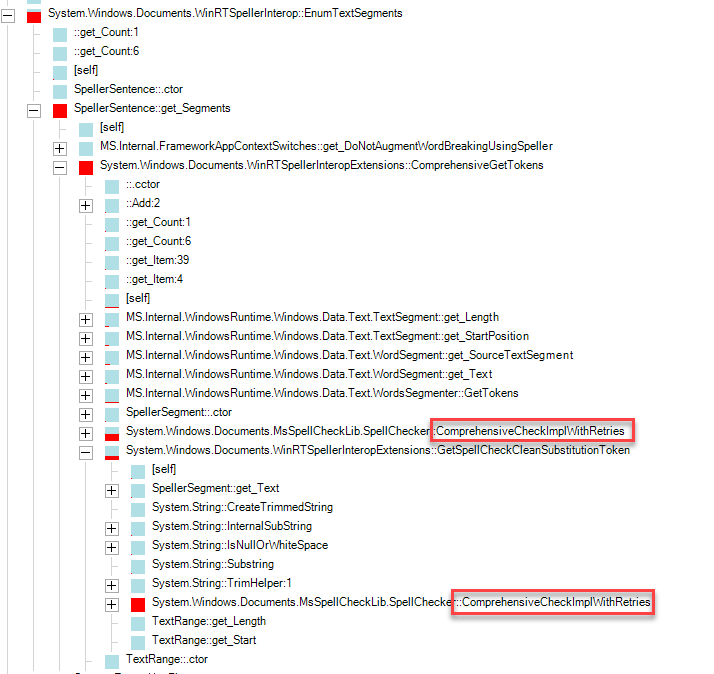
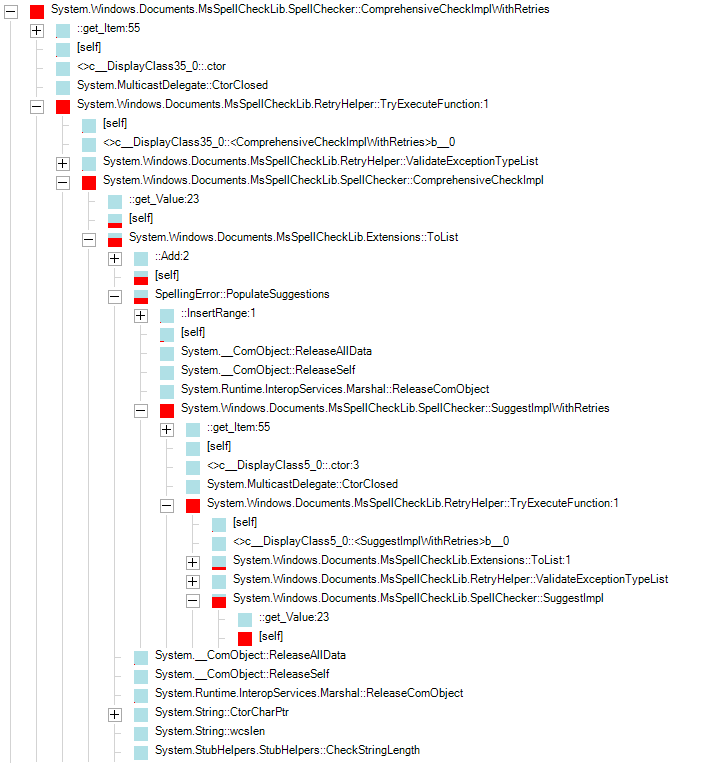
In our application, the update made our spellchecking area of our code 3000% slower than it had been. Customers are frustrated and demanding a fix. I have tried the review the code changes made by https://github.com/dotnet/wpf/pull/2871 and https://github.com/dotnet/wpf/pull/3092, but am not familiar with the code to really see the problem.
I have also profiled the code and found that most of the time is spent in System.Windows.Documents.MsSpelCheckLib.SpellChecker.ComprephensiveCheckImplWithRetries, which was called both directly and indirectly by System.Windows.Documents.WinRTSpellerInteropExtensions.ComprehensiveGetTokens
 JesikaDG
on 29 Sep 2020
JesikaDG
on 29 Sep 2020
I think that applications where spell-checking is extremely important (e.g. commercial ones) may consider using NetSpell library by analogy with how GitExtensions did, see https://github.com/gitextensions/gitextensions/tree/master/GitUI/SpellChecker
I don't have a feeling that Microsoft gives a high priority to this issue.
denis-adamchuk
on 30 Sep 2020
We spoke with Microsoft, and they gave us an undocumented switch to set in app.config:
<runtime>
    <AppContextSwitchOverrides value="Switch.System.Windows.Controls.DoNotAugmentWordBreakingUsingSpeller=true"/>
</runtime>
It seems to make the problem go away for us. I'd be interested to know what it shows in @JesikaDG's profiling.
garzooma
on 2 Oct 2020
@garzooma This configuration trick works like a charm for me, spell checking is no longer slow. Thank you.
denis-adamchuk
on 3 Oct 2020
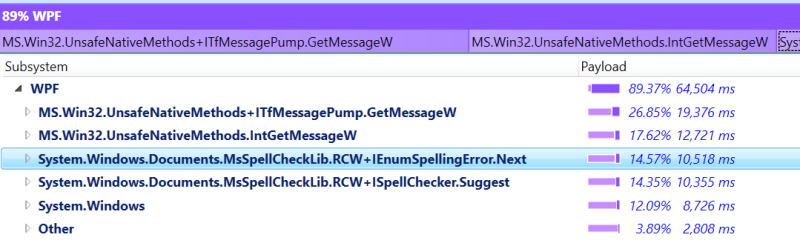
I'm also experiencing slow behavior in a TextBox where spell check is enabled (not loading, slow typing). Disabling spellcheck gets rid of the issue. I noticed this after updating to .NET 5 (5.0.100) but I'm unsure if that was the cause or not. I especially notice if I begin deleting text out of the text box. Not sure how to apply this fix (or if it applies) to WPF on .NET Core. Also of note, once a period is entered into the TextBox is begins to heavily lag and consume more CPU.
 blakepell
on 16 Nov 2020
blakepell
on 16 Nov 2020
If you don't want to mess around with a config file, add this code after InitializeComponent:
AppContext.SetSwitch(@"Switch.System.Windows.Controls.DoNotAugmentWordBreakingUsingSpeller", true);
RevitArkitek
on 16 Nov 2020
@RevitArkitek Thank you for the suggestion. I just tried the AppContext.SetSwitch On .NET 5 and it still lags heavily when typing once a period, comma, semi-colon kind of character is in the box.
blakepell
on 16 Nov 2020
Related issues
 Jogge
·
25Comments
Jogge
·
25Comments
 hez2010
·
21Comments
hez2010
·
21Comments
 olivegamestudio
·
70Comments
olivegamestudio
·
70Comments
 bignis
·
24Comments
bignis
·
24Comments
 JeroMiya
·
33Comments
JeroMiya
·
33Comments
Most helpful comment
We spoke with Microsoft, and they gave us an undocumented switch to set in app.config:
It seems to make the problem go away for us. I'd be interested to know what it shows in @JesikaDG's profiling.