Wpf: Updating to 16.4 from 16.3.x causes build issues with WPF project file.
When building a WPF project the following error is shown, this built fine in the last 16.3.x version that was released.
C:\Program Filesdotnet\sdk\3.1.100\Sdks\Microsoft.NET.Sdk.WindowsDesktop\targets\Microsoft.WinFX.targets(225,9): error MC1000: Unknown build error, 'Could not find assembly 'mscorlib, Version=2.0.5.0, Culture=neutral, PublicKeyToken=7cec85d7bea7798e'. Either explicitly load this assembly using a method such as LoadFromAssemblyPath() or use a MetadataAssemblyResolver that returns a valid assembly.'
The project file:
<Project Sdk="Microsoft.NET.Sdk.WindowsDesktop">

  <PropertyGroup>
    <OutputType>Library</OutputType>
    <TargetFramework>net461</TargetFramework>
    <UseWPF>true</UseWPF>
    <Platforms>x86</Platforms>
    <GeneratePackageOnBuild>false</GeneratePackageOnBuild>
    <Version>1.0.0</Version>
    <Description></Description>
    <FileVersion>1.0.0.0</FileVersion>
    <AssemblyVersion>1.0.0.0</AssemblyVersion>
    <ApplicationIcon />
    <StartupObject />
  </PropertyGroup>

</Project>
 olivegamestudio
All 70 comments
Same issue here
<Project Sdk="Microsoft.NET.Sdk.WindowsDesktop">
<PropertyGroup>
<TargetFramework>net472</TargetFramework>
<UseWPF>true</UseWPF>
<FileVersion>0.0.0.9999</FileVersion>
<AssemblyVersion>0.0.0.9999</AssemblyVersion>
</PropertyGroup>
Workaround:
Because only sdk 3.1.100 is installed after the update, I installed "dotnet-sdk-3.0.101-win-x64" and added a global.json with 3.0.101 to the project root. Now at least it compiles again (but with 3.0)
 zplan
on 4 Dec 2019
zplan
on 4 Dec 2019
Yes i added the following global.json alongside my solution:
{
"sdk": {
"version": "3.0.100"
}
}
But this is hopefully not the solution we have to accept...
zplan
on 4 Dec 2019
<TargetFramework>net461</TargetFramework>
<TargetFramework>net472</TargetFramework>
C:\Program Filesdotnet\sdk\3.1.100\Sdks\Microsoft.NET.Sdk.WindowsDesktop\targets\Microsoft.WinFX.targets(225,9): error MC1000: Unknown build error, 'Could not find assembly 'mscorlib, Version=2.0.5.0, Culture=neutral, PublicKeyToken=7cec85d7bea7798e'. Either explicitly load this assembly using a method such as LoadFromAssemblyPath() or use a MetadataAssemblyResolver that returns a valid assembly.'
Microsoft.WinFX.targets(225,9) is MarkupCompilePass1; When building a project for TargetFrameowrk=net472, it usually resolves mscorlib to a path like this:
Input: Assembly Reference file: 'C:\Program Files (x86)\Reference Assemblies\Microsoft\Framework.NETFramework\v4.7.2\mscorlib.dll'.
@olivegamestudio, @zplan, are you sure that .NET 4.6.1 and .NET 4.7.2 targeting packs are installed for you respectively?

 vatsan-madhavan
on 4 Dec 2019
vatsan-madhavan
on 4 Dec 2019
Because only sdk 3.1.100 is installed after the update, I installed "dotnet-sdk-3.0.101-win-x64" and added a global.json with 3.0.101 to the project root
@livarcocc, @nguerrera, @chabiss, is it expected that 3.0.100 or 3.0.101 SDK vanishes when upgrading from Dev16.3.x --> Dev16.4?
vatsan-madhavan
on 4 Dec 2019
Yes double-checked. When I change my target to 471 it compiles okay. Seems that the latest update has made that the minimum .NET version? Unfortunately, I can't target 471 and need 461. But this all worked under the last 16.3 update, it's only broke since updating to 16.4.
olivegamestudio
on 4 Dec 2019
Yes, beginning with VS 16.3, VS will only "root" the one SDK it comes with. If VS installed an SDK and you upgrade to a VS that brings a newer SDK, it will remove the older SDK and add the newer one. There is ref counting so that if you install an SDK standalone, it will never be uninstalled by VS. VS gets one ref count and the standalone install gets another. If you have scenarios where you need multiple SDKs, you have to install the other ones standalone.
This came after a TON of feedback against leaving SDKs behind from VS upgrades.
I am advocating that the global.json default policy should allow roll forward to any newer version by default. You now have control over the roll forward, but the default is very restrictive and will only roll across the xx in A.B.Cxx if the matching version is not found.
cc @KathleenDollard
 nguerrera
on 4 Dec 2019
nguerrera
on 4 Dec 2019
Im having the same issue. This is currently blocking my work. I checked VS Installer and I have all required targetting packs and NetCore SDK 3.1
What is the proposed solution / workaround or is it possible to rollback a Visual Studio update?
 njannink
on 4 Dec 2019
njannink
on 4 Dec 2019
Installing the 3.0.101 SDK and using global.json to force it, is a viable workaround that does not require rolling back all of VS, while we look at the issue and work on fixing it.
nguerrera
on 4 Dec 2019
It would be very helpful if someone who is hitting this could provide a binlog with the failure.
nguerrera
on 5 Dec 2019
See the attached project.
I could reproduce it with an almost plain WPF project and a reference to Unit v4.0.1. I know, this is a very old version but for legacy reason I have to stick to this version. Before the VS 16.4 update it was no problem to build the project with this reference.
<Project Sdk="Microsoft.NET.Sdk.WindowsDesktop">
<PropertyGroup>
<TargetFramework>net472</TargetFramework>
<RootNamespace>Test</RootNamespace>
<AssemblyName>Test</AssemblyName>
<OutputType>WinExe</OutputType>
<UseWPF>true</UseWPF>
<FileVersion>0.0.0.9999</FileVersion>
<AssemblyVersion>0.0.0.9999</AssemblyVersion>
</PropertyGroup>
<ItemGroup>
<PackageReference Include="Unity" Version="4.0.1" />
</ItemGroup>
</Project>
I had the same problem too. I fixed it, as mentioned above, by installing the .NET Core 3.0.101 SDK and adding a global.json file. However, why do I have to install a .NET Core SDK if my project isn't targetting .NET core at all?
 pieterphilippaerts
on 6 Dec 2019
pieterphilippaerts
on 6 Dec 2019
@pieterphilippaerts
However, why do I have to install a .NET Core SDK if my project isn't targetting .NET core at all?
From my experience, that's because you are using the new "SDK-style" projects, which by definition use the .NET Core SDK/build system. When using the old ".NET Framework" project files, it will work fine.
 siegfriedpammer
on 13 Dec 2019
siegfriedpammer
on 13 Dec 2019
From my experience, that's because you are using the new "SDK-style" projects, which by definition use the .NET Core SDK/build system. When using the old ".NET Framework" project files, it will work fine.
That makes sense, Siegfried! I am indeed using the new style projects...
pieterphilippaerts
on 13 Dec 2019
From my experience, that's because you are using the new "SDK-style" projects, which by definition use the .NET Core SDK/build system. When using the old ".NET Framework" project files, it will work fine.
That makes sense, Siegfried! I am indeed using the new style projects...
Me as well. But I will NEVER go back to the old csproj style : )
zplan
on 13 Dec 2019
I have a WPF project targeting net451 and net472 but using the Microsoft.NET.Sdk.WindowsDesktop SDK using the new csproj format. In VS 16.3.9 it was working, after upgrading to 16.4.1 I have the same issue. Could not find System.Core 2.0.5.0
I have all the targeting pack installed.
<Project Sdk="Microsoft.NET.Sdk.WindowsDesktop">
<PropertyGroup>
<OutputType>WinExe</OutputType>
<TargetFrameworks>net451;net472</TargetFrameworks>
<LangVersion>latest</LangVersion>
<UseWPF>true</UseWPF>
</PropertyGroup>
If I remove net451 everything works. I can build for 472 successfully, Did you raise the minimum framework version or something? We have both because we always build two versions for customers who don't have an up-to-date framework on their computers.
 Dunge
on 16 Dec 2019
Dunge
on 16 Dec 2019
I have net40 WPF project with Microsoft.Bcl.Async (important, refers on mscorlib 2.0.5.0). Builds successfully in VS 16.3, but fails in 16.4.
 ds1709
on 19 Dec 2019
ds1709
on 19 Dec 2019
We were going to update our open source project to use 2019 & .NET Core 3.0 but because of this issue, this is blocking us from proceeding forward with the upgrade.
The workaround of installing older SDK and using global.json is no-go for us because while that would have worked for AppVeyor (our build server), it would not be something we can have our contributor manually download & install as I understand that the specific SDK version cannot be downloaded & installed as part of the Visual Studio build. This is quite unfortunate.
 bclothier
on 22 Dec 2019
bclothier
on 22 Dec 2019
What is the state of this issue: Can we expect a VS update which solves this or what is the plan?
Thanks for more info.
zplan
on 17 Jan 2020
My VB WPF control libraries have the same problem.
Minimal log
C:\Program Files\dotnet\sdk\3.1.101\Sdks\Microsoft.NET.Sdk.WindowsDesktop\targets\Microsoft.WinFX.targets(225,9): error MC1000: Unknown build error, 'Could not find assembly 'mscorlib, Version=0.0.0.0, Culture=neutral, PublicKeyToken=null'. Either explicitly load this assembly using a method such as LoadFromAssemblyPath() or use a MetadataAssemblyResolver that returns a valid assembly.'
The log of failed build task
1> Microsoft (R) Build Task 'MarkupCompilePass1' Version '4.800.119.60507'.
1> Copyright (C) Microsoft Corporation 2005. All rights reserved.
1>
1> Current project directory is 'D:\WPF_Borderless_Window\TempCompileLib\'.
1> Analysis Result : 'All'.
1> Recompiled XAML file : 'D:\WPF_Borderless_Window\TempCompileLib\Themes\Generic.xaml'.
1> Recompiled XAML file : 'D:\WPF_Borderless_Window\TempCompileLib\UserControl1.xaml'.
1> Started the markup compilation.
1> OutputType is 'library'.
1> Input: Assembly Reference file: 'C:\Program Files (x86)\Reference Assemblies\Microsoft\Framework\.NETFramework\v4.6.1\PresentationCore.dll'.
1> Input: Assembly Reference file: 'C:\Program Files (x86)\Reference Assemblies\Microsoft\Framework\.NETFramework\v4.6.1\PresentationFramework.dll'.
1> Input: Assembly Reference file: 'C:\Program Files (x86)\Reference Assemblies\Microsoft\Framework\.NETFramework\v4.6.1\System.Core.dll'.
1> Input: Assembly Reference file: 'C:\Program Files (x86)\Reference Assemblies\Microsoft\Framework\.NETFramework\v4.6.1\System.Data.dll'.
1> Input: Assembly Reference file: 'C:\Program Files (x86)\Reference Assemblies\Microsoft\Framework\.NETFramework\v4.6.1\System.dll'.
1> Input: Assembly Reference file: 'C:\Program Files (x86)\Reference Assemblies\Microsoft\Framework\.NETFramework\v4.6.1\System.Drawing.dll'.
1> Input: Assembly Reference file: 'C:\Program Files (x86)\Reference Assemblies\Microsoft\Framework\.NETFramework\v4.6.1\System.IO.Compression.FileSystem.dll'.
1> Input: Assembly Reference file: 'C:\Program Files (x86)\Reference Assemblies\Microsoft\Framework\.NETFramework\v4.6.1\System.Numerics.dll'.
1> Input: Assembly Reference file: 'C:\Program Files (x86)\Reference Assemblies\Microsoft\Framework\.NETFramework\v4.6.1\System.Runtime.Serialization.dll'.
1> Input: Assembly Reference file: 'C:\Program Files (x86)\Reference Assemblies\Microsoft\Framework\.NETFramework\v4.6.1\System.Windows.Controls.Ribbon.dll'.
1> Input: Assembly Reference file: 'C:\Program Files (x86)\Reference Assemblies\Microsoft\Framework\.NETFramework\v4.6.1\System.Xaml.dll'.
1> Input: Assembly Reference file: 'C:\Program Files (x86)\Reference Assemblies\Microsoft\Framework\.NETFramework\v4.6.1\System.Xml.dll'.
1> Input: Assembly Reference file: 'C:\Program Files (x86)\Reference Assemblies\Microsoft\Framework\.NETFramework\v4.6.1\System.Xml.Linq.dll'.
1> Input: Assembly Reference file: 'C:\Program Files (x86)\Reference Assemblies\Microsoft\Framework\.NETFramework\v4.6.1\UIAutomationClient.dll'.
1> Input: Assembly Reference file: 'C:\Program Files (x86)\Reference Assemblies\Microsoft\Framework\.NETFramework\v4.6.1\UIAutomationClientsideProviders.dll'.
1> Input: Assembly Reference file: 'C:\Program Files (x86)\Reference Assemblies\Microsoft\Framework\.NETFramework\v4.6.1\UIAutomationProvider.dll'.
1> Input: Assembly Reference file: 'C:\Program Files (x86)\Reference Assemblies\Microsoft\Framework\.NETFramework\v4.6.1\UIAutomationTypes.dll'.
1> Input: Assembly Reference file: 'C:\Program Files (x86)\Reference Assemblies\Microsoft\Framework\.NETFramework\v4.6.1\WindowsBase.dll'.
1> C:\Program Files\dotnet\sdk\3.1.101\Sdks\Microsoft.NET.Sdk.WindowsDesktop\targets\Microsoft.WinFX.targets(225,9): error MC1000: Unknown build error, 'Could not find assembly 'mscorlib, Version=0.0.0.0, Culture=neutral, PublicKeyToken=null'. Either explicitly load this assembly using a method such as LoadFromAssemblyPath() or use a MetadataAssemblyResolver that returns a valid assembly.'
1> Output Property: _RequireMCPass2ForMainAssembly=False
1> Output Property: _RequireMCPass2ForSatelliteAssemblyOnly=False
1> Output Item(s): FileWrites=
1> Done executing task "MarkupCompilePass1" -- FAILED.
1>Done building target "MarkupCompilePass1" in project "TempCompileLib.vbproj" -- FAILED.
I solved this issue by adding reference to "mscorlib" in my project.
<Project Sdk="Microsoft.NET.Sdk.WindowsDesktop">
<PropertyGroup>
<RootNamespace>CompileNetFxWpfWithNetCore31Sdk</RootNamespace>
<TargetFrameworks>netcoreapp3.1;net461</TargetFrameworks>
<UseWPF>true</UseWPF>
</PropertyGroup>
<ItemGroup>
<Reference Include="mscorlib" Condition="'$(TargetFramework)' == 'net461'"/>
</ItemGroup>
</Project>
 Nukepayload2
on 22 Jan 2020
Nukepayload2
on 22 Jan 2020
What is the state of this issue: Can we expect a VS update which solves this or what is the plan?
Thanks for more info.
https://github.com/dotnet/corefx/pull/42768 fixes this, which is targeted for 3.1.2 milestone.
We release updates at approx. 1-2 month cadence (.NET Core Roadmap]).
Note that the last update (3.1.1) was released on Jan 14, 2020, and we hope to release this fix in the following update to .NET Core 3.1 (unless, of course, something unexpected results in a change of plans).
vatsan-madhavan
on 22 Jan 2020
@vatsan-madhavan
Does https://github.com/dotnet/corefx/pull/42768 apply to VB projects? It fixes https://github.com/dotnet/runtime/issues/730 , and https://github.com/dotnet/runtime/issues/730 was fixed in .NET 5 https://github.com/dotnet/corefx/pull/40581 . But this problem is reproducible when building VB WPF projects with .NET Core SDK 5.0.100-alpha.1.20064.2.
Nukepayload2
on 23 Jan 2020
@vatsan-madhavan maybe it is possible to release this earlier? or is there a preview version?
 jogibear9988
on 29 Jan 2020
jogibear9988
on 29 Jan 2020
@leecow Can we share a better timeline for when we'll ship https://github.com/dotnet/corefx/pull/42768?
vatsan-madhavan
on 30 Jan 2020
@Nukepayload2
- .NET Core 3.0/3.1 SDK's do not support VB on WindowsDesktop.
- Building .NET Framework targets using the SDK Style projects are primarily support for migration scenarios only - it is not intended as a new-feature for .NET Framework development.
Since migration to .NET Core 3.1 is not fully enabled for VB projects, we do not recommend building VB based WindowsDesktop (i.e, WPF or WinForms) projects using SDK style projects on .NET Core 3.x.
vatsan-madhavan
on 30 Jan 2020
This fix is in 3.1.2 which is scheduled to release 2/18. Obviously things can happen between here and there to impact the final date but, that's the target.
 leecow
on 30 Jan 2020
leecow
on 30 Jan 2020
I was eagerly waiting for this fix, but it's not working?
I have this defined in global.json:
{
"msbuild-sdks": {
"MSBuild.Sdk.Extras": "2.0.54"
},
"sdk": {
"version": "3.1.102"
}
}
Still getting this error:
3>------ Rebuild All started: Project: MyProject, Configuration: Debug Any CPU ------
3>Build started 18-2-2020 22:09:50.
3>Target _ComputeTargetFrameworkItems:
3>Target Clean:
3> Target CoreClean:
3> Deleting file "C:\Source\MyProject\src\MyProject\obj\Debug\net462\MyProject.csprojAssemblyReference.cache".
3> Deleting file "C:\Source\MyProject\src\MyProject\obj\Debug\net462\MyProject.exe.config".
3> Target _GetProjectReferenceTargetFrameworkProperties:
3>Target DispatchToInnerBuilds:
3> Target ResolveProjectReferences:
3> Target _WriteAppConfigWithSupportedRuntime:
3> Skipping target "_WriteAppConfigWithSupportedRuntime" because all output files are up-to-date with respect to the input files.
3> Target MarkupCompilePass1:
3> C:\Program Files\dotnet\sdk\3.1.102\Sdks\Microsoft.NET.Sdk.WindowsDesktop\targets\Microsoft.WinFX.targets(225,9): error MC1000: Unknown build error, 'Could not find assembly 'mscorlib, Version=2.0.5.0, Culture=neutral, PublicKeyToken=7cec85d7bea7798e'. Either explicitly load this assembly using a method such as LoadFromAssemblyPath() or use a MetadataAssemblyResolver that returns a valid assembly.'
3> Done building target "MarkupCompilePass1" in project "MyProject.csproj" -- FAILED.
3>
3> Done building project "MyProject.csproj" -- FAILED.
3>
3>Build FAILED.
Note that this happens to some projects, not all of them. I am still trying to figure out when exactly this is happening.
 GeertvanHorrik
on 18 Feb 2020
GeertvanHorrik
on 18 Feb 2020
Still have the same issue on 3.1.2 :-(
[build-up, build]: C:\Program Files\dotnet\sdk\3.1.102\Sdks\Microsoft.NET.Sdk.WindowsDesktop\targets\Microsoft.WinFX.targets(225,9): error MC1000: Неизвестная ошибка сборки, "Could not find assembly 'mscorlib, Version=2.0.5.0, Culture=neutral, PublicKeyToken=7cec85d7bea7798e'. Either explicitly load this assembly using a method such as LoadFromAssemblyPath() or use a MetadataAssemblyResolver that returns a valid assembly." [D:\Projects\Work\Git\Sungero\Common\src\Controls\Controls.csproj]
 git-heavy
on 18 Feb 2020
git-heavy
on 18 Feb 2020
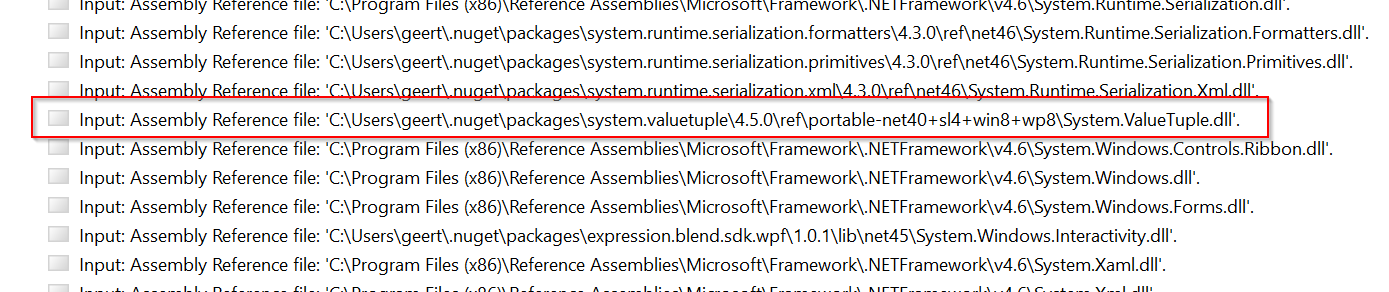
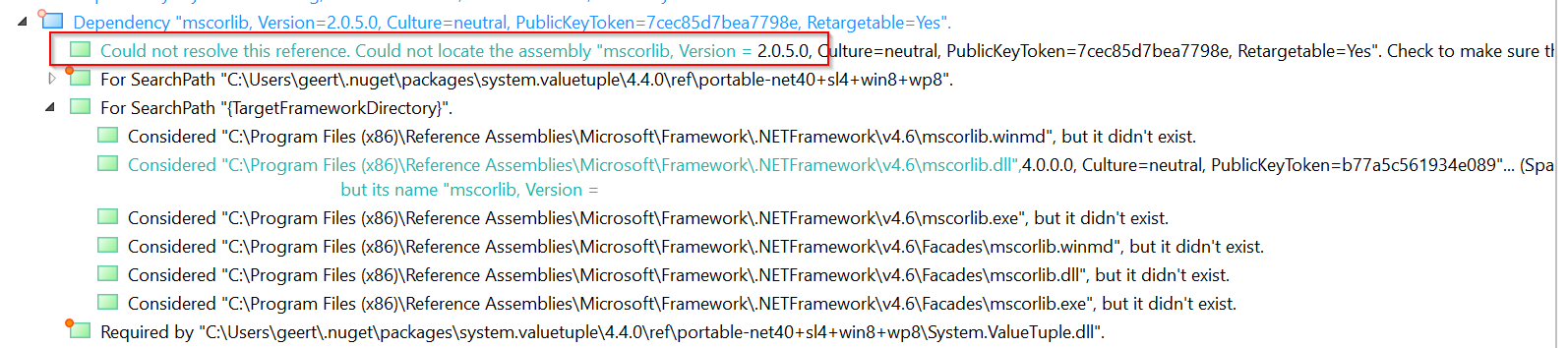
Did some more investigation, I think this is the culprit (System.ValueTuple):
GeertvanHorrik
on 18 Feb 2020
A regular .NET project (not using xaml compilation) can handle this correctly, so I think it's fixable for WPF. Will try to come up with a temporary fix because we can't wait another month on a potential fix.
GeertvanHorrik
on 19 Feb 2020
I've compiled and generated a binlog of the same csproj with both 3.0 and 3.1. Trying to list the differences here:
3.0: Assembly = PresentationBuildTasks, Version=4.0.0.0, Culture=neutral, PublicKeyToken=31bf3856ad364e35
3.1: Assembly = C:\Program Filesdotnet\sdk\3.1.102\Sdks\Microsoft.NET.Sdk.WindowsDesktop\tools\net472\PresentationBuildTasks.dll
3.0: Microsoft (R) Build Task 'MarkupCompilePass1' Version '4.8.3752.0 built by: NET48REL1'.
3.1: Microsoft (R) Build Task 'MarkupCompilePass1' Version '4.800.120.6604'.
GeertvanHorrik
on 19 Feb 2020
Still have the same issue on 3.1.2 :-(
[build-up, build]: C:\Program Files\dotnet\sdk\3.1.102\Sdks\Microsoft.NET.Sdk.WindowsDesktop\targets\Microsoft.WinFX.targets(225,9): error MC1000: Неизвестная ошибка сборки, "Could not find assembly 'mscorlib, Version=2.0.5.0, Culture=neutral, PublicKeyToken=7cec85d7bea7798e'. Either explicitly load this assembly using a method such as LoadFromAssemblyPath() or use a MetadataAssemblyResolver that returns a valid assembly."
Same issue here, still, with 3.1.2.
Please try to fix this asap because it seems this is a showstopper for many of use.
zplan
on 24 Feb 2020
Did some more investigation, I think this is the culprit (System.ValueTuple):
See also dotnet/sdk#3770
 rstm-sf
on 24 Feb 2020
rstm-sf
on 24 Feb 2020
Still have the same issue on 3.1.2 :-(
[build-up, build]: C:\Program Files\dotnet\sdk\3.1.102\Sdks\Microsoft.NET.Sdk.WindowsDesktop\targets\Microsoft.WinFX.targets(225,9): error MC1000: Неизвестная ошибка сборки, "Could not find assembly 'mscorlib, Version=2.0.5.0, Culture=neutral, PublicKeyToken=7cec85d7bea7798e'. Either explicitly load this assembly using a method such as LoadFromAssemblyPath() or use a MetadataAssemblyResolver that returns a valid assembly."Same issue here, still, with 3.1.2.
Please try to fix this asap because it seems this is a showstopper for many of use.
Just to remind, you can workaround by copy pasting the content tof C:\Program Filesdotnet\sdk\3.0.101\Sdks\Microsoft.NET.Sdk.WindowsDesktop\targets
in the new version.
 elparasite
on 25 Feb 2020
elparasite
on 25 Feb 2020
@zplan, @elparasite, can you share a repro project that shows your error ?
Something small/self-contained that picks out the essential characteristics of the project that is affected by this bug would be nice. Chances are good that the NuGet references are the key.
/cc @rladuca, @nguerrera
vatsan-madhavan
on 26 Feb 2020
@vatsan-madhavan : I did this already long time ago. see my comment on Dec 6, 2019
zplan
on 26 Feb 2020
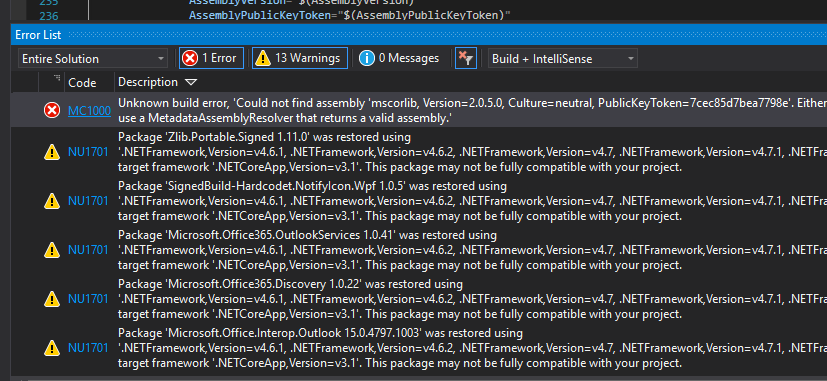
@vatsan-madhavan I got the same issue When I migrate my WPF app from .NET Framework 4.6 to .NET Core 3.1, is there any workaround found or do we have to wait till the next release? (I am using VS 16.5)
 nirzaf
on 27 Feb 2020
nirzaf
on 27 Feb 2020
https://github.com/dotnet/wpf/issues/2274#issuecomment-590783681
this workaround is not correct. the issue still exist in the all of .net core sdks
 matanyos
on 27 Feb 2020
matanyos
on 27 Feb 2020
Oh Damn, Such a frustrating moment, didn't expect such a scenario from Microsoft Development Platform... Please try to fix this issue and release asap
nirzaf
on 28 Feb 2020
This has us blocked from updating to the WindowsDesktop sdk project format.
 CoreyKaylor
on 28 Feb 2020
CoreyKaylor
on 28 Feb 2020
@ericstj please update us on this issue, the new sdk still has the same problem and the workaround suggested also not working
matanyos
on 2 Mar 2020
The fix shipped it System.Reflection.MetadataLoadContext 4.7.1 but this wasn't picked up in the WindowsDesktop SDK. I believe @vatsan-madhavan is working on getting that fixed.
If you wanted to try a workaround you could download https://www.nuget.org/packages/System.Reflection.MetadataLoadContext/4.7.1
And copy the DLL from lib\netstandard2.0\System.Reflection.MetadataLoadContext.dll to
C:\Program Filesdotnet\sdk\
C:\Program Filesdotnet\sdk\
Striking out workaround as it doesn't work on .NETFramework.
 ericstj
on 2 Mar 2020
ericstj
on 2 Mar 2020
@ericstj that workaround results in the following for me.
Microsoft.WinFx.targets(225, 9): [MC1000] Unknown build error, 'Could not load file or assembly 'System.Reflection.MetadataLoadContext, Version=4.0.1.0, Culture=neutral, PublicKeyToken=cc7b13ffcd2ddd51'. The system cannot find the file specified.'
I see, that would happen in .NETFramework since the task DLL hasn't been rebuilt against the new version. You wouldn't see that from dotnet build, but we need both to work. Its probably best to wait for a fix.
ericstj
on 2 Mar 2020
No worries, easy enough to fix back to how it was. FWIW, I also tried dotnet build from powershell and the same error occurred.
CoreyKaylor
on 2 Mar 2020
This is ridiculous. This problem exists already three month, and still not fixed! Awsome! I can't develop net4 project. And there's no any workaround. Can you fix it ASAP?
{ "sdk": { "version": "3.0.100" } }
doesn't work, just getting new error
Unknown build error, 'Could not find assembly 'System.Core, Version=2.0.5.0, Culture=neutral, PublicKeyToken=7cec85d7bea7798e'. Either explicitly load this assembly using a method such as LoadFromAssemblyPath() or use a MetadataAssemblyResolver that returns a valid assembly.'
Updating to 3.1.2... still not works.
ds1709
on 6 Mar 2020
@ds1709 as started before, you should use 3.0.101 until this is fixed in 3.1.x:
{ "sdk": { "version": "3.0.101" } }
GeertvanHorrik
on 7 Mar 2020
@ds1709 as started before, you should use 3.0.101 until this is fixed in 3.1.x:
{ "sdk": { "version": "3.0.101" } }
I'm building WinForms application with WPF ElementHost. And after creating global.json i got another error
Unknown build error, 'Could not load type 'System.Drawing.BitmapSuffixInSatelliteAssemblyAttribute' from assembly 'System.Drawing, Version=4.0.0.0 ...
As long as we are limited to 3.0 as sdk version, we are not able to use .NET Core 3.1 as target framework for applications (e.g. for having mixed mode assembly support).
Is this the case or do I get something wrong?
 MichaeIDietrich
on 7 Mar 2020
MichaeIDietrich
on 7 Mar 2020
Ok, after some research I found, what problem is in PresentationBuildTasks.dll assembly. I desided to debug it to find the problem. Clonned repository, build it and... It works without any problem. So, my question is: what's the point to hold the fix, why can't you just release it?
Assumes, I should use this localy builden assembly for a while.
ds1709
on 8 Mar 2020
Are there any news on this?
3.1.2 didn't fix it, is using 3.0.101 with global.json the only workaround?
Isn't 3+ months quite a long time to have a severe bug like this go unfixed?
 kopfsick
on 16 Mar 2020
kopfsick
on 16 Mar 2020
Are there any news on this?
3.1.2 didn't fix it, is using 3.0.101 with global.json the only workaround?
Isn't 3+ months quite a long time to have a severe bug like this go unfixed?
We already moved to python for development platform, Microsoft really keeps on disappointing as a development platform, python is amazing in fixing bugs ASAP
nirzaf
on 16 Mar 2020
+1 for not working on 3.1.2
 zmj
on 19 Mar 2020
zmj
on 19 Mar 2020
Please give us some information here. We are completely stuck and cannot move from .NET Framework to .NET Core, since we need .NET Core 3.1 features to make this transition.
.NET Core 3.1.200 still produces the same error and .NET Core 3.0 is out of support and prevents us from using .NET Core 3.1 features.
What is the plan behind? We do not get any feedback.
Shall we wait for .NET 5? (in fact latest .NET 5 preview fixed this issue for us)
 czdietrich
on 19 Mar 2020
czdietrich
on 19 Mar 2020
I want to join to the others. Please move on! At least give us a little piece of information... Is it ongoing? Won't be fixed?
3.1 is LTS :/ (?)
 AdamVasPrezi
on 19 Mar 2020
AdamVasPrezi
on 19 Mar 2020
There is a fix queued for this in the next update (3.1.3) which should be available shortly.
I also want to offer some context on the delay, which is a failure on our end. The problem and the solution turned out to be a bit nuanced and hard to track down.
We did fix this in 3.1.2 as part of https://github.com/dotnet/corefx/pull/42768 or so we thought.
To understand what _really_ happened, you have to understand how a .NET Core SDK is put together, where the fix had to be made, and how the fix makes its way from point-of-fix to point-of-consumption.
The point of fix-consumption
The WindowsDesktop SDK, the one that is referred to in WPF and WinForms projects by the line <Project SDK="Microsoft.NET.Sdk.WindowsDesktop">, is a set of build tools, properties and targets. Typically, it can be found under $env:ProgramFiles\dotnet\sdk\3.1.102\Sdks\Microsoft.NET.Sdk.WindowsDesktop or a similar path.
The fix was needed in System.Reflection.MetadataLoadContext.dll carried by the tools bundled with this SDK.
    DOTNET\SDK\3.1.102\SDKS\MICROSOFT.NET.SDK.WINDOWSDESKTOP\TOOLS\NET472
        |   PresentationBuildTasks.dll
        |   System.Collections.Immutable.dll
        |   System.Memory.dll
        |   System.Numerics.Vectors.dll
        |   System.Reflection.Metadata.dll
        |   System.Reflection.MetadataLoadContext.dll     <------- Needs a Fix
        |   System.Runtime.CompilerServices.Unsafe.dll
Aside: These DLL's exist to support
PresentationBuildTasks.dll, which is a set of MSBuild Tasks used to support Markup Compilation. The copy of these common DLLs have to be bundled with it to ensure that the assembly can be loaded reliably within MSBuild.
Where is the fix made?
System.Reflection.MetadataLoadContext.dll is a core library built out of dotnet/corefx (which has since been migrated to dotnet/runtime in .NET 5). It was fixed as part of https://github.com/dotnet/corefx/pull/42768
How do fixes 'move' from one repository to another in the .NET Core build process?
To explain this, I want to share a snapshot of how various repositories are interconnected.

dotnet/wpf consumes updates from dotnet/corefx by propagating version updates via dotnet/core-setup -> dotnet/winforms.
It can be observed in the flow-diagram above that dotnet/wpf also propagates its own version updates _into_ dotnet/core-setup (through dotnet-wpf-int).
This sets up a perpetual cycle of builds, like this:
-> dotnet\wpf -> dotnet-wpf-int -> dotnet/core-setup -> dotnet/winforms -> dotnet/wpf ->
This perpetual cycle was not a serious problem during active product development of .NET Core 3.0/3.1 - we create a _lot_ of builds, builds take a lot of time to complete, and the overall progress tends to be relatively slow.
But once the product stabilized and switched to _servicing_, this perpetual-build engine couldn't be allowed to continue. To break this cycle, the edge from dotnet/core-setup -> dotnet/winforms had been disabled (which can also been seen in the flow-diagram).
We have only created a handful of servicing builds since .NET Core 3.1 was announced (we are just about to release 3.1.3), and we didn't take this change into account. More importantly, we failed to _grasp_ the implications for Microsoft.NET.Sdk.WindowsDesktop and put one and one together.
What this change (the disablement of the edge from dotnet/core-setup -> dotnet/winforms) meant was that updates from dotnet/corefx wouldn't _flow_ seamlessly into dotnet/wpf.
Aside: This has already been improved/remedied in
master/.NET 5 repos. With the introduction ofdotnet/windowsdesktopas a separate place to buildMicrosoft.WindowsDesktop.App, WinForms and WPF repos no longer have a need to _flow_ their versions intodotnet/core-setup(which has since been superseded by dotnet/runtime) directly. This eliminates the cycle in the build process.
What happened ?
The above _flow_ process works fine for the vast majority of scenarios. The all-up product construction (Mirosoft.WindowsDesktop.App shared framework) happens in dotnet/core-setup, where the right bits are usually integrated together. dotnet/wpf (or dotnet/winforms) not receiving the _latest_ versions from dotnet/corefx simply means that these repos build against _slightly older_ _reference assemblies_ - except in the case of Microsoft.NET.Sdk.WindowsDesktop construction. In the latter case, dotnet/wpf is where the "product" is assembled, and when it needed the _latest_ _runtime_ binaries, it only had access to a slightly older version that lacked the right fixes.
- During the construction of .NET Core 3.1.2, the fix was built successfully out of
dotnet/corefx, but never made its way back todotnet/wpf - We failed to catch it in testing WPF
- We had handed over the issue to
dotnet/corefxas a runtime bug, and failed to add a test-case for validation. Our private validations seems to pass since we were working with, well, privates.
- We had handed over the issue to
By the time we understood the full scope of what happened and how, 3.1.3 was almost ready and it was looking like the fix may not make it into the schedule. We decided to delay 3.1.3 a bit and rebuild it to take the fix into it anyway. Ultimately, this was all that was needed - https://github.com/dotnet/wpf/pull/2670 (well, followed by an across-the-board rebuild, resetting the progress we had made in 3.1.3 so far across the board, retesting, etc.).
/cc @rladuca
vatsan-madhavan
on 19 Mar 2020
Fantastic response @vatsan-madhavan , thanks for this honest evaluation / retrospective. We are looking forward to this 3.1.3 release and will provide feedback immediately once it has been released (but now have full confidence it's fixed!).
we are just about to release 3.1.3
Can you shed some light on the ETA or is it too early to tell?
Again, thanks for the response and hopefully this ticket can be closed soon.
GeertvanHorrik
on 20 Mar 2020
Can you shed some light on the ETA or is it too early to tell?
@GeertvanHorrik as things stand, we are hoping for for 24/03/2020 (assuming that factors outside our control do not change this plan, of course 😄).
vatsan-madhavan
on 20 Mar 2020
To clarify, as a part of Visual Studio 16.5 update?
bclothier
on 24 Mar 2020
.NET Core Runtime/SDK installers are also available separately, so you don't have to wait for a VS update if you don't want to. (Assuming the fix "being in 3.1.3" means its fixed in the SDK and not in VS)
 weltkante
on 24 Mar 2020
vatsan-madhavan
on 25 Mar 2020
weltkante
on 24 Mar 2020
vatsan-madhavan
on 25 Mar 2020
I can confirm this has been fixed in 3.1.103, great work, thanks!
GeertvanHorrik
on 25 Mar 2020
Closing as this is now fixed.
vatsan-madhavan
on 14 Apr 2020
Using Visual Studio 16.6, migrating WPF app to target .netcore3.1(.300). Cannot compile with error below:
Error MC1000 Unknown build error, 'Could not find assembly 'System.Web, Version=4.0.0.0, Culture=neutral, PublicKeyToken=b03f5f7f11d50a3a'. Either explicitly load this assembly using a method such as LoadFromAssemblyPath() or use a MetadataAssemblyResolver that returns a valid assembly.' MyApp C:\Program Filesdotnet\sdk\3.1.300\SdksMicrosoft.NET.Sdk.WindowsDesktop\targets\Microsoft.WinFX.targets 225
Is this the same issue? I seem to have most current .netcore (3.1.300) and VS16.6.0.
Any suggestions how to get compiled?
 Kerfluffel
on 28 May 2020
Kerfluffel
on 28 May 2020
Still, No Fixes Microsoft is working on this issue slower than windows 10, Better you migrate to Java
nirzaf
on 29 May 2020
@Kerfluffel no this is not the same issue, I suspect System.Web is not part of .NET Core (probably discontinued), so this error would be expected.
weltkante
on 29 May 2020
This looks to have regressed with 3.1.400 (16.7 release)
 MatthewSteeples
on 6 Aug 2020
MatthewSteeples
on 6 Aug 2020
Same here. All WPF projects that reference DevExpress WPF libraries started failing to build after updating from 3.1.302 to 3.1.400:
C:\Program Filesdotnet\sdk\3.1.400\SdksMicrosoft.NET.Sdk.WindowsDesktop\targetsMicrosoft.WinFX.targets(225,9): error
MC1000: Unknown build error, 'Could not find assembly 'mscorlib, Version=2.0.5.0, Culture=neutral, PublicKeyToken=7cec
85d7bea7798e'. Either explicitly load this assembly using a method such as LoadFromAssemblyPath() or use a MetadataAsse
mblyResolver that returns a valid assembly.'
 jnm2
on 7 Aug 2020
jnm2
on 7 Aug 2020
With .NET Core 3.1.400, Visual Studio 16.7 and targeting net48, I've got the same error compiling from VS or from the command line.
C:\Program Files\dotnet\sdk\3.1.400\Sdks\Microsoft.NET.Sdk.WindowsDesktop\targets\Microsoft.WinFX.targets(225,9): error MC1000: Erreur de build inconnue, 'Could not find assembly 'mscorlib, Version=2.0.5.0, Culture=neutral, PublicKeyToken=7cec85d7bea7798e'. Either explicitly load this assembly using a method such as LoadFromAssemblyPath() or use a MetadataAssemblyResolver that returns a valid assembly.'
 MatthiasLaroche
on 10 Aug 2020
MatthiasLaroche
on 10 Aug 2020
An open issue where this is being tracked is https://github.com/dotnet/wpf/issues/3312.
jnm2
on 10 Aug 2020
Related issues
 bugproof
·
3Comments
bugproof
·
3Comments
 h82258652
·
3Comments
h82258652
·
3Comments
 clairernovotny
·
3Comments
clairernovotny
·
3Comments
 guytp
·
3Comments
guytp
·
3Comments
 stevenbrix
·
3Comments
stevenbrix
·
3Comments
Most helpful comment
There is a fix queued for this in the next update (3.1.3) which should be available shortly.
I also want to offer some context on the delay, which is a failure on our end. The problem and the solution turned out to be a bit nuanced and hard to track down.
We did fix this in 3.1.2 as part of https://github.com/dotnet/corefx/pull/42768 or so we thought.
To understand what _really_ happened, you have to understand how a .NET Core SDK is put together, where the fix had to be made, and how the fix makes its way from point-of-fix to point-of-consumption.
The point of fix-consumption
The WindowsDesktop SDK, the one that is referred to in WPF and WinForms projects by the line
<Project SDK="Microsoft.NET.Sdk.WindowsDesktop">, is a set of build tools, properties and targets. Typically, it can be found under$env:ProgramFiles\dotnet\sdk\3.1.102\Sdks\Microsoft.NET.Sdk.WindowsDesktopor a similar path.The fix was needed in
System.Reflection.MetadataLoadContext.dllcarried by the tools bundled with this SDK.Where is the fix made?
System.Reflection.MetadataLoadContext.dllis a core library built out of dotnet/corefx (which has since been migrated to dotnet/runtime in .NET 5). It was fixed as part of https://github.com/dotnet/corefx/pull/42768How do fixes 'move' from one repository to another in the .NET Core build process?
To explain this, I want to share a snapshot of how various repositories are interconnected.
dotnet/wpfconsumes updates fromdotnet/corefxby propagating version updates viadotnet/core-setup->dotnet/winforms.It can be observed in the flow-diagram above that
dotnet/wpfalso propagates its own version updates _into_dotnet/core-setup(throughdotnet-wpf-int).This sets up a perpetual cycle of builds, like this:
->
dotnet\wpf->dotnet-wpf-int->dotnet/core-setup->dotnet/winforms->dotnet/wpf->This perpetual cycle was not a serious problem during active product development of .NET Core 3.0/3.1 - we create a _lot_ of builds, builds take a lot of time to complete, and the overall progress tends to be relatively slow.
But once the product stabilized and switched to _servicing_, this perpetual-build engine couldn't be allowed to continue. To break this cycle, the edge from
dotnet/core-setup->dotnet/winformshad been disabled (which can also been seen in the flow-diagram).We have only created a handful of servicing builds since .NET Core 3.1 was announced (we are just about to release 3.1.3), and we didn't take this change into account. More importantly, we failed to _grasp_ the implications for
Microsoft.NET.Sdk.WindowsDesktopand put one and one together.What this change (the disablement of the edge from
dotnet/core-setup->dotnet/winforms) meant was that updates fromdotnet/corefxwouldn't _flow_ seamlessly intodotnet/wpf.What happened ?
The above _flow_ process works fine for the vast majority of scenarios. The all-up product construction (
Mirosoft.WindowsDesktop.Appshared framework) happens indotnet/core-setup, where the right bits are usually integrated together.dotnet/wpf(ordotnet/winforms) not receiving the _latest_ versions fromdotnet/corefxsimply means that these repos build against _slightly older_ _reference assemblies_ - except in the case ofMicrosoft.NET.Sdk.WindowsDesktopconstruction. In the latter case,dotnet/wpfis where the "product" is assembled, and when it needed the _latest_ _runtime_ binaries, it only had access to a slightly older version that lacked the right fixes.dotnet/corefx, but never made its way back todotnet/wpfdotnet/corefxas a runtime bug, and failed to add a test-case for validation. Our private validations seems to pass since we were working with, well, privates.By the time we understood the full scope of what happened and how, 3.1.3 was almost ready and it was looking like the fix may not make it into the schedule. We decided to delay 3.1.3 a bit and rebuild it to take the fix into it anyway. Ultimately, this was all that was needed - https://github.com/dotnet/wpf/pull/2670 (well, followed by an across-the-board rebuild, resetting the progress we had made in 3.1.3 so far across the board, retesting, etc.).
/cc @rladuca