Wpf: STATUS_ILLEGAL_INSTRUCTION exception in win-x86 wpfgfx_cor3.dll running on x64 Win Server 2012 R2
Hi I have the same issue
Problem signature:
Problem Event Name: APPCRASH
Application Name: RocketM.exe
Application Version: 2.0.0.0
Application Timestamp: 5d7bb0cb
Fault Module Name: wpfgfx_cor3.dll
Fault Module Version: 4.800.19.46238
Fault Module Timestamp: 5d7ab8ec
Exception Code: c000001d
Exception Offset: 00158e19
OS Version: 6.3.9600.2.0.0.272.7
Locale ID: 5129
Additional Information 1: 5861
Additional Information 2: 5861822e1919d7c014bbb064c64908b2
Additional Information 3: 6fbe
Additional Information 4: 6fbe6bde2701766d81cbca0597a5fa35
Read our privacy statement online:
http://go.microsoft.com/fwlink/?linkid=280262
If the online privacy statement is not available, please read our privacy statement offline:
C:\Windows\system32\en-US\erofflps.txt
OS is

app is x86
_Originally posted by @thudugala in https://github.com/dotnet/wpf/issues/2057#issuecomment-559595015_
 vatsan-madhavan
All 44 comments
/cc @thudugala FYI
vatsan-madhavan
on 28 Nov 2019
@vatsan-madhavan This only happens in our internal server. It works in our cloud server (also Windows Server 2012 R2 Standard). Windows update are up to date. in both servers.
 thudugala
on 28 Nov 2019
thudugala
on 28 Nov 2019
If you can generate a crash dump and share it here, that could help us.
https://docs.microsoft.com/en-us/windows/win32/wer/collecting-user-mode-dumps
vatsan-madhavan
on 29 Nov 2019
Will do next Monday 👍
thudugala
on 29 Nov 2019
crash dump as requested
thudugala
on 1 Dec 2019
Any plan to release a fix for this ?
thudugala
on 3 Dec 2019
Any plan to release a fix for this ?
After we figure out whats wrong 😁. From what I can tell so far, this may be not be within the power of WPF team alone to solve, but if we find that there is something _reasonable_ we can do, then we will try.
--
This is the crash stack I see:
[0x0]   wpfgfx_cor3!_ftoui3 + 0x9
[0x1]   wpfgfx_cor3!CDisplaySet::ReadDefaultDisplaySettings + 0x107
[0x2]   wpfgfx_cor3!CDisplaySet::Init + 0xbd
[0x3]   wpfgfx_cor3!CDisplayManager::CreateNewDisplaySet + 0xbc
[0x4]   wpfgfx_cor3!CDisplayManager::DangerousGetLatestDisplaySet + 0xb9
[0x5]   wpfgfx_cor3!CMILFactory::GetCurrentDisplaySet + 0x73
[0x6]   wpfgfx_cor3!CMILFactory::UpdateDisplayState + 0x57
[0x7]   wpfgfx_cor3!CComposition::ProcessComposition + 0x52
[0x8]   wpfgfx_cor3!CComposition::Compose + 0x41
[0x9]   wpfgfx_cor3!CPartitionThread::RenderPartition + 0x31
[0xa]   wpfgfx_cor3!CPartitionThread::Run + 0x57
[0xb]   wpfgfx_cor3!CPartitionThread::ThreadMain + 0x4c
[0xc]   kernel32!BaseThreadInitThunk + 0x24
[0xd]   ntdll!__RtlUserThreadStart + 0x2f
[0xe]   ntdll!_RtlUserThreadStart + 0x1b
I'm guessing that _ftoi3 may be a compiler generated or possibly coming from a compiler supplied library. This is what I'm seeing in its disassembled definition:
    wpfgfx_cor3!_ftoui3:
6e6d8e10 833d54cd726e06   cmp     dword ptr [wpfgfx_cor3!__isa_available (6e72cd54)], 6
6e6d8e17 7c07             jl      wpfgfx_cor3!_ftoui3+0x10 (6e6d8e20)
6e6d8e19 62f17e0878c0     vcvttss2usi eax, xmm0
6e6d8e1f c3               ret
6e6d8e20 660f7ec0         movd    eax, xmm0
6e6d8e24 d1e0             shl     eax, 1
6e6d8e26 721b             jb      wpfgfx_cor3!_ftoui3+0x33 (6e6d8e43)
6e6d8e28 3d0000009e       cmp     eax, 9E000000h
6e6d8e2d 7305             jae     wpfgfx_cor3!_ftoui3+0x24 (6e6d8e34)
6e6d8e2f f30f2cc0         cvttss2si eax, xmm0
6e6d8e33 c3               ret
6e6d8e34 3d0000009f       cmp     eax, 9F000000h
6e6d8e39 730f             jae     wpfgfx_cor3!_ftoui3+0x3a (6e6d8e4a)
6e6d8e3b c1e007           shl     eax, 7
6e6d8e3e 0fbae81f         bts     eax, 1Fh
6e6d8e42 c3               ret
6e6d8e43 3d0000007f       cmp     eax, 7F000000h
6e6d8e48 72e5             jb      wpfgfx_cor3!_ftoui3+0x1f (6e6d8e2f)
6e6d8e4a f30f2c0d202f706e cvttss2si ecx, dword ptr [wpfgfx_cor3!_NaN (6e702f20)]
6e6d8e52 f5               cmc
6e6d8e53 1bc0             sbb     eax, eax
6e6d8e55 c3               ret
The crash is happening on vcvttss2usi. I found at least one other reference to vcvttss2usi crash on Xeon processors - see https://developercommunity.visualstudio.com/content/problem/832044/vcvttss2usi-crash-at-server-cpu.html.
@thudugala, Do you have all relevant updates installed on the OS, esp. any Intel microcode updates that may be needed?
@tgani-msft, can you help take a peek at this (or perhaps redirect to someone apt) ? It looks like (a) this issue has been (minimally) known in the ecosystem and to us and (b) it _seems to have been_ solved on some OS versions (like Windows Server 2016).
Is there something that can be done to solve this on Windows Server 2012 R2 + Xeon ? BTW, if you have trouble with symbols, please let me know - I can help build some private symbols that you can force windbg to load using .reload /f /i
vatsan-madhavan
on 4 Dec 2019
@vatsan-madhavan
Yes I think all updates are installed.


app works in below PC

app does not work in below PC
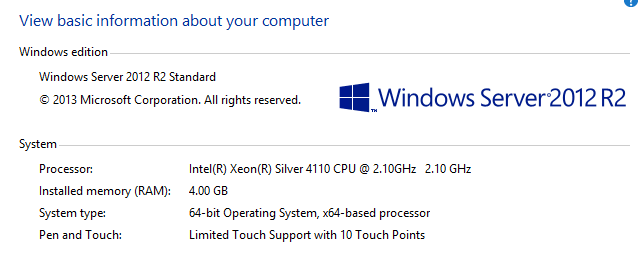
only difference (I think) is
app works in : Intel(R) Xeon(R) CPU E5-2620
app does not work in: Intel(R) Xeon(R) Silver 4110
thudugala
on 4 Dec 2019
app works in : Intel(R) Xeon(R) CPU E5-2620
app does not work in: Intel(R) Xeon(R) Silver 4110
Good to know.
At this point, we need some guidance from a C++ compiler expert (@tgani-msft).
vatsan-madhavan
on 4 Dec 2019
@thudugala the instructions before the offending instruction are like this from CRT code:
        cmp       __isa_available, __ISA_AVAILABLE_AVX512
        jl        _ftoui3_default       ; If VCVTTSS2USI instruction not available

        vcvttss2usi eax, xmm0
So, it could be that the variable __isa_available variable is lying if the instruction is not supported. This variable is set in vcruntime.dll startup code in the function __isa_available_init(). I would set a breakpoint there and step through the function on the failing machine to see why it's failing. This function uses the result of the CPUID instruction so it's hard to see why this is failing.
Is this happening on just 1 machine or can you repro it on other machines as well?
 tgani-msft
on 5 Dec 2019
tgani-msft
on 5 Dec 2019
/cc @stwish-msft
tgani-msft
on 5 Dec 2019
@tgani-msft @stwish-msft Can we built a targeted test app that @thudugala can build and run on the offending machine to generate useful debug logs/output for us?
Otherwise doing what you suggest may require someone to (a) installing debugging tools on a server and (b) know to use something like windbg to debug disassembly and get us the right information. Possible assuming their policies would allow this sort of flexibility, but I worry that its error prone and not within the comfort-zone of everyone.
vatsan-madhavan
on 5 Dec 2019
Added @stwish-msft from the libs team who can help more.
tgani-msft
on 5 Dec 2019
@tgani-msft Can we built a targeted test app that @thudugala can build and run on the offending machine to generate useful debug logs/output for us?
Otherwise doing what you suggest may require someone to (a) installing debugging tools on a server and (b) know to use something like windbg to debug disassembly and get us the right information. Possible assuming their policies would allow this sort of flexibility, but I worry that its error prone and not within the comfort-zone of everyone.
I doubt very much that the libs team has the kind of logging this would require but @stwish-msft should be able to tell us more.
tgani-msft
on 5 Dec 2019
I doubt very much that the libs team has the kind of logging this would require
https://docs.microsoft.com/en-us/cpp/intrinsics/cpuid-cpuidex?redirectedfrom=MSDN&view=vs-2019 seems to have a sample that can detect supported proc. features, including AVX512* extensions. Could this be of any help as a quick tool to run on the seemingly-bad server?
vatsan-madhavan
on 5 Dec 2019
Thanks @tgani-msft . This is actually a compiler intrinsic with a support function inside the library. I will find an owner in the compiler team to look at this.
 stwish-msft
on 6 Dec 2019
stwish-msft
on 6 Dec 2019
This is an issue with detecting AVX-512 support that only happens with a CPU supporting AVX-512 and an operating system that does not. It has been fixed in VS2019 version 16.4. The original detection code checked for CPU support of AVX-512 instructions, but didn't check OS support of AVX-512 state. Although the affected instruction does not access AVX-512 state, OS support is still needed to enable the instruction to execute correctly. It would be possible to work around this issue by either limiting __isa_available to 5, or linking in the 16.2 version of ftol3.obj, but it would probably be better to simply update to 16.4.
 jpmorgan-atMS
on 6 Dec 2019
jpmorgan-atMS
on 6 Dec 2019
@jpmorgan-atMS I'm using VS2019 16.4. will get you exact details next Monday.
thudugala
on 6 Dec 2019
The fix is only in the last preview and final release of 16.4. Earlier preview releases still have the issue.
jpmorgan-atMS
on 6 Dec 2019
@jpmorgan-atMS Thanks will let you know once I built using 16.4
thudugala
on 6 Dec 2019
The fix is only in the last preview and final release of 16.4. Earlier preview releases still have the issue.
@thudugala you probably can't fix this yourself. wpfgfx_cor3.dll calls into __isa_available, so that's what needs to be rebuilt with 16.4 RTM toolset.
I started https://github.com/dotnet/wpf/pull/2282 to keep the codebase in good health in general, but it looks we may want to do it to fix your problem as well.
We can not change to building with an older toolset unfortunately, so moving to 16.4 is only path WPF can realistically take.
@jpmorgan-atMS can @thudugala verify that the 16.4 toolset works (vs. pre 16.4 fails) as expected by leveraging the detection sample at https://docs.microsoft.com/en-us/cpp/intrinsics/cpuid-cpuidex?redirectedfrom=MSDN&view=vs-2019 ?
vatsan-madhavan
on 6 Dec 2019
@vatsan-madhavan that detection sample doesn't actually help, because what matters is the setting of ___isa_available_, and the sample doesn't show that. You can create a test that simply prints the value of ___isa_available_ and then converts a volatile floating-point variable to unsigned integer. On affected platforms the uncorrected version should print "6" and crash, while the fixed code will print "5" and not crash. With Windows 10 on the same type of machine it should print "6" and not crash with either version.
jpmorgan-atMS
on 6 Dec 2019
You can create a test that simply prints the value of ___isa_available_ and then converts a volatile floating-point variable to unsigned intege
Can you help us build a small sample for this?
vatsan-madhavan
on 6 Dec 2019
#include <stdio.h>
int __isa_available;
volatile double source;
int main(int argc, char **argv)
{
   printf("__isa_available = %d\n", __isa_available);
   unsigned retval = source;
   puts("pass");
   return retval;
}
@vatsan-madhavan and @jpmorgan-atMS
I'm using vs 16.4.0

please check crash dump RocketM.exe.6868.dmp.7z in https://github.com/thudugala/RocketM/tree/master/crashdumps
Still app crash.
Do I need to use vs 16.5 Preview 1 ?
thudugala
on 8 Dec 2019
@vatsan-madhavan and @jpmorgan-atMS
when I run the sample app I get the below error

ConsoleApplication1.exe - System Error
The program can't start because ucrtbased.dll is missing from your computer. Try reinstalling the program to fix this problem.
OK
thudugala
on 8 Dec 2019
@thudugala I don't know why ucrtbased.dll is missing from your computer. This is the universal C runtime library that is part of Windows 10, but it should be installed with VS2019 on other systems. You might look at this StackOverflow thread to learn more: https://stackoverflow.com/questions/33743493/why-visual-studio-2015-cant-run-exe-file-ucrtbased-dll
jpmorgan-atMS
on 9 Dec 2019
@jpmorgan-atMS I'm getting the error when Run the app on bad server (2012 R2)
thudugala
on 9 Dec 2019
I'm assuming that you are not building on that machine. Did you copy the ucrtbased.dll from your build machine?
jpmorgan-atMS
on 9 Dec 2019
@thudugala https://gist.github.com/vatsan-madhavan/e3e89536c43ec35245ee0f9d0b86af5b has a project configuration for the sample that can link to vcruntime and ucrt statically.
When I run it, these are the only modules that get loaded:

I won't recommend running apps statically linked to ucrt in production (we like ucrt to be dynamic libraries so we can service them,esp. with security updates), but this is a good way to build a test app. It's a bit tricky to get the right configuration and requires a bunch of linker flags - you can check them out in the AdditionalDependencies and AdditionalOptions in the <Link> section in the project.
BTW .NET Core 3 requires UCRT as well (https://github.com/dotnet/docs/issues/16181) - which means that you'll have to figure out how to get UCRT onto the target system now or later.
vatsan-madhavan
on 9 Dec 2019
Hi when I copied the ucrtbased.dll. the console app works.

thudugala
on 9 Dec 2019
Also .Net Core 3.1 x86 console apps work in the server. Only .Net Core 3.1 WPF app is not working.
thudugala
on 9 Dec 2019
@vatsan-madhavan Download link does not work for "All supported x64-based versions of Windows Server 2012 R2" 😞. Any suggestions ?
https://support.microsoft.com/en-us/help/2999226/update-for-universal-c-runtime-in-windows
http://www.microsoft.com/downloads/details.aspx?familyid=d3edacc7-425a-4cc5-b5f2-512e0682e88e
thudugala
on 9 Dec 2019
@vatsan-madhavan
UCRT is available in the server

thudugala
on 9 Dec 2019
@thudugala would you please modify the code you are testing like this and try again:
#include <stdio.h>
extern "C" int __isa_available;
volatile double source;
int main(int argc, char** argv)
{
    printf("__isa_available = %d\n", __isa_available);
    unsigned retval = source;
    puts("pass");
    return retval;
}
The key difference is the addition of extern "C" to int __isa_available, which changes how it is linked. Now it will correctly print 5 and then succeed; or print 6 followed by a crash.
vatsan-madhavan
on 9 Dec 2019
when I copied the ucrtbased.dll. the console app works.
UCRT is available in the server
After copying ucrtbased.dll, CheckNetCorePrereqs will probably report that you have UCRT 😄
vatsan-madhavan
on 9 Dec 2019
@vatsan-madhavan

thudugala
on 10 Dec 2019
@vatsan-madhavan I copied the ucrtbased.dll to folder where my WPF app is. But it did not work.
also it already had similar name dll call ucrtbase.dll
thudugala
on 10 Dec 2019
@vatsan-madhavan
To summarise the issue again.
Server: Windows 2012 R2
.Net: Core 3.1
App does not work when:
- WPF / x86
App does work when:
- WPF / x64
- Console / x86
- Console / x64
thudugala
on 10 Dec 2019
Download link does not work for "All supported x64-based versions of Windows Server 2012 R2" 😞. Any suggestions ?
https://support.microsoft.com/en-us/help/2999226/update-for-universal-c-runtime-in-windowshttp://www.microsoft.com/downloads/details.aspx?familyid=d3edacc7-425a-4cc5-b5f2-512e0682e88e
I have reported the problem to someone in the Windows Servicing team and this is being followed up.
In the meantime, any other download of UCRT ought to work. For e.g., Update for Windows Server 2012 R2 (KB2999226) seems to work ok.
vatsan-madhavan
on 10 Dec 2019
👍
vatsan-madhavan
on 10 Dec 2019
@vatsan-madhavan
After Update for Windows Server 2012 R2 (KB2999226) update I do not need copy ucrtbased.dll
.Net: Core 3.1 / WPF / x86 app still doe not work.
thudugala
on 10 Dec 2019
@thudugala Are you unblocked yet, and if so can we close out this issue?
I do not need copy ucrtbased.dll .Net: Core 3.1 / WPF / x86 app still doe not work.
it's not clear what you are describing. If your are still dealing with the same issue, can you please explain ? And if you have a new problem, let's try to understand what's going on.
vatsan-madhavan
on 2 Apr 2020
@vatsan-madhavan Please close this issue. We down graded to net48 for now. I do not see the close button to close this issue.
thudugala
on 2 Apr 2020
Related issues
 clairernovotny
·
3Comments
clairernovotny
·
3Comments
 lindexi
·
3Comments
lindexi
·
3Comments
 h82258652
·
3Comments
h82258652
·
3Comments
 juepiezhongren
·
3Comments
juepiezhongren
·
3Comments
 Normandy
·
3Comments
Normandy
·
3Comments
Most helpful comment
This is an issue with detecting AVX-512 support that only happens with a CPU supporting AVX-512 and an operating system that does not. It has been fixed in VS2019 version 16.4. The original detection code checked for CPU support of AVX-512 instructions, but didn't check OS support of AVX-512 state. Although the affected instruction does not access AVX-512 state, OS support is still needed to enable the instruction to execute correctly. It would be possible to work around this issue by either limiting __isa_available to 5, or linking in the 16.2 version of ftol3.obj, but it would probably be better to simply update to 16.4.