Wpf: XamlParseException after updating to 16.2.5
_This issue has been moved from a ticket on Developer Community._
After updating to VS 2019 v16.2.5, I started getting XamlParseExceptions in areas where they have never occurred before (It's happening in Debug mode only). If I run the application with Ctrl + F5, the application runs normally without error, but certain windows will not even launch when in debug mode.
The error is bubbling from the InitializeComponent() in where XAML files exist with Styles that are set in the XAML. I have one rather simple WPF user control and the following line triggers the error:
<Rectangle Style="{DynamicResource Search-text-field-style}" Grid.ColumnSpan="3"></Rectangle>
If I comment out that line, it runs as expected, but this was not an issue prior to updating to 16.2.5.
This is a WPF application with a target framework of .NET 4.6.
Please advice,
Matt
Original Comments
(no comments)
Original Solutions
(no solutions)
 vsfeedback
All 7 comments
Possibly markup extension. Matt, could you attach a simple repro?
 fabiant3-zz
on 17 Sep 2019
fabiant3-zz
on 17 Sep 2019
I extracted the usercontrol and resources file into it's own little project and got no error. Yesterday, I closed and reopened Visual Studio and the error went away. When I logged back in this morning, Visual Studio was still open and I started getting the same error again. If I restart Visual Studio the error stops again.
 mdeterra
on 18 Sep 2019
mdeterra
on 18 Sep 2019
... (It's happening in Debug mode only). If I run the application with Ctrl + F5 ...
Something called "Debug mode" does not exist, there are _debug builds_ and _debuggers_, both of which contribute different things to debugging. Just hitting Ctrl + F5 instead of F5 doesn't change your application, so if you had been doing a debug build you'll still be running a debug build, just with no _debugger_ attached. What you describe sounds like you are observing some side effects of the WPF debugger being attached to the process.
If you can't provide a repro scenario like requested above, some suggestions to further narrow this down on your side, if you like to:
- What happens if you resume execution with F5 when the debugger breaks on
XamlParseException, will the application exit due to an uncaught exception? Maybe your debugger is just configured to break on exceptions and you can resume just fine? If you can't resume, maybe share the exception content including stack trace? - Another thing you can try to do is add a message box early in your application, run with Ctrl + F5 and let it wait in the message box, then _attach_ the debugger to the already running application. If without attaching the debugger everything works, but with attaching the debugger not, then its probably the debuggers fault.
 weltkante
on 18 Sep 2019
weltkante
on 18 Sep 2019
By "Debug Mode", I meant pressing F5 with the debugger attached.
I can get the same thing to happen over and over. If I run Visual Studio immediately after opening it for the first time, I have no issue. If I press F5 to start a second debugging session I hit this error every time. If I uncheck the box to not catch this type of exception, I stay within my application and the exception is not caught, however, since it occurs in InitializeComponent() when launching a new window, the new window will not open so I'm stuck on the main screen of my application, unable to open new windows.
It definitely seems related to the debugger attached to the application and seems like something is running that is not being cleaned up properly within Visual Studio unless I completely close VS and restart it.
mdeterra
on 18 Sep 2019
@mdeterra - Is Enable UI Debugging Tools for XAML checked or unchecked?
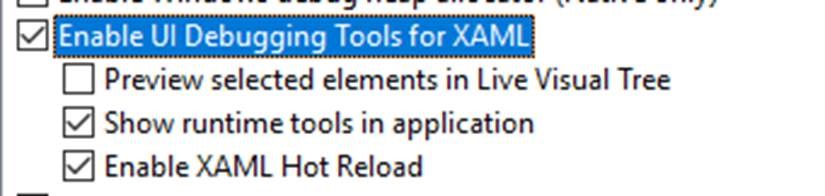
fabiant3-zz
on 18 Sep 2019
It was checked. Unchecking resolves the issue. I'll disable for now and re-enable if I hear that the issue has been resolved. Thank you!
mdeterra
on 18 Sep 2019
Glad to hear you are unblocked. I'm following up with the corresponding team to have this issue tracked and looked into. Thanks again for the issue report.
fabiant3-zz
on 18 Sep 2019
Related issues
 LinkTsang
·
3Comments
LinkTsang
·
3Comments
 h82258652
·
3Comments
h82258652
·
3Comments
 skanvk15
·
3Comments
skanvk15
·
3Comments
 poke
·
3Comments
poke
·
3Comments
 Normandy
·
3Comments
Normandy
·
3Comments