Wpf: Regression: Scrollbar is too big in preview 2
This is in .NET Core 3 preview 2. The default width/size/scale for the scrollbar has regressed. It was correct in preview 1.

 clairernovotny
All 16 comments
Looks like other elements aren't sized correctly as well (drop down square on the right):

clairernovotny
on 9 Feb 2019
I'm just experiencing the same issue. Is there a known workaround for this ?
Thanks.
 TanukiSharp
on 9 Feb 2019
TanukiSharp
on 9 Feb 2019
@onovotny and @TanukiSharp, are you still experiencing this issue? I noticed this a while ago, but I'm now thinking this might have been an issue with Insider build of Windows I was on. My latest Insider build and 1809 machines look normal.
 stevenbrix
on 26 Feb 2019
stevenbrix
on 26 Feb 2019
Yes. I'm not running an insider build. I'm seeing it even with 3.0.100-preview4-010515
clairernovotny
on 26 Feb 2019
Although I've not personally seen the giant scrollbars in @onovotny's original post, I have noticed for quite some time that the WPF scrollbars, even when regularly sized, are still noticeably wider than the Windows Forms or Win32 equivalents. This happens despite the fact that I've reviewed the default theme XAML for the Aero2 theme, and I have found there that the scrollbar width is still set equal to the value of SystemParameters.ScrollWidth. I'm not certain how this can happen, as I thought that an explicitly set width measured in pixels overrides automatically generated metrics. Other themes (such as PresentationTheme.Aero) don't have this problem.
 wjk
on 26 Feb 2019
wjk
on 26 Feb 2019
FWIW, I'm on a system with 200% display scaling.
clairernovotny
on 26 Feb 2019
This is what I have:
- .NET Core 3 3.0.100-preview4-010523
- Microsoft.WindowsDesktop.App 3.0.0-preview4-27422-21
- Windows 10 19H1 build 18836
- 200% scaling
- Nuget Package Explorer 5.0.198+0d56f54642
And this is what I'm seeing on the 200% monitor:
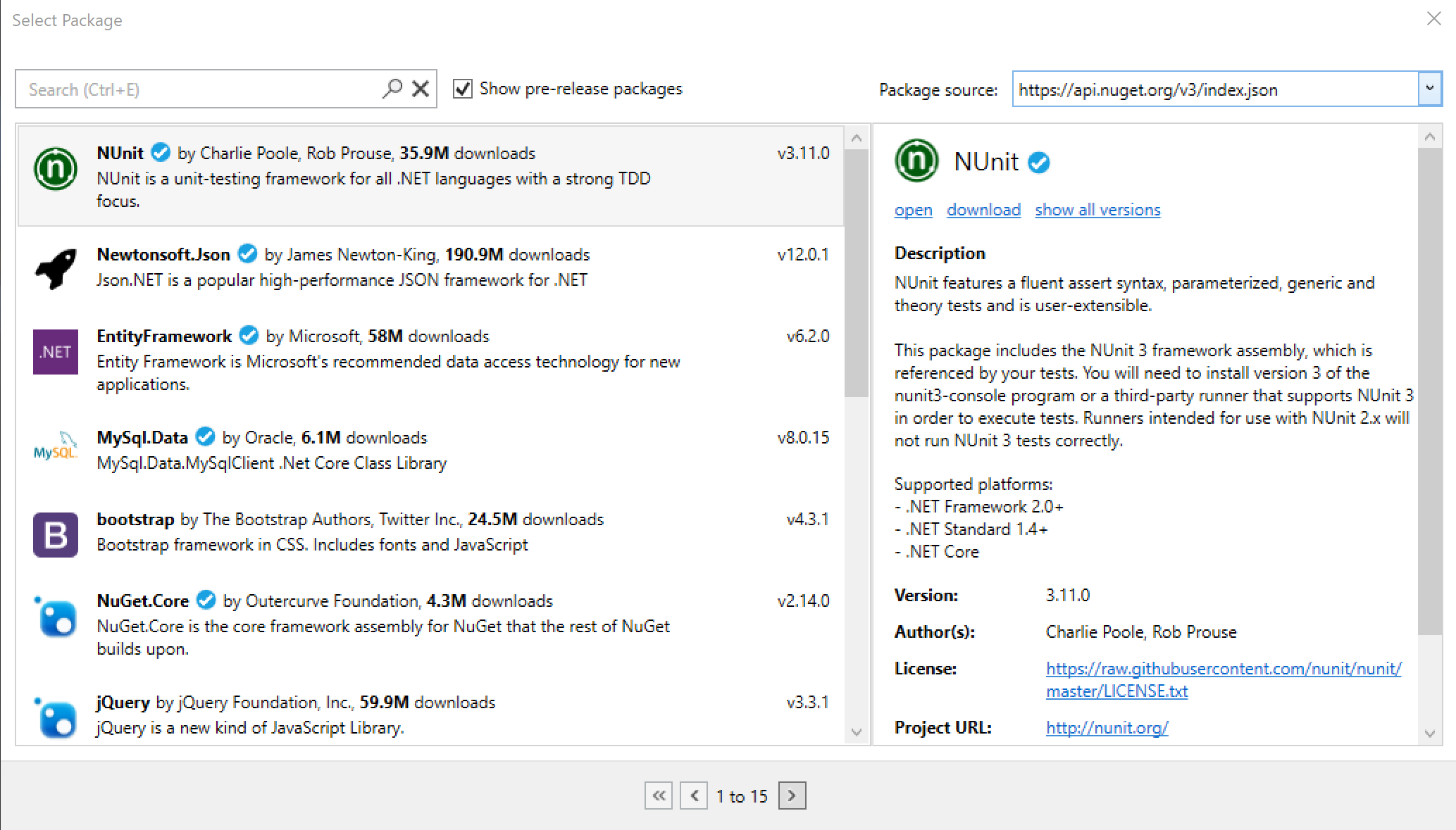
Then I figured I'd change the scale-factor of the _primary_ monitor and see what happens (I have 4 monitors at various scale factors), so I set the primary's scale factor to 200% and _voila!_ - we have a repro!
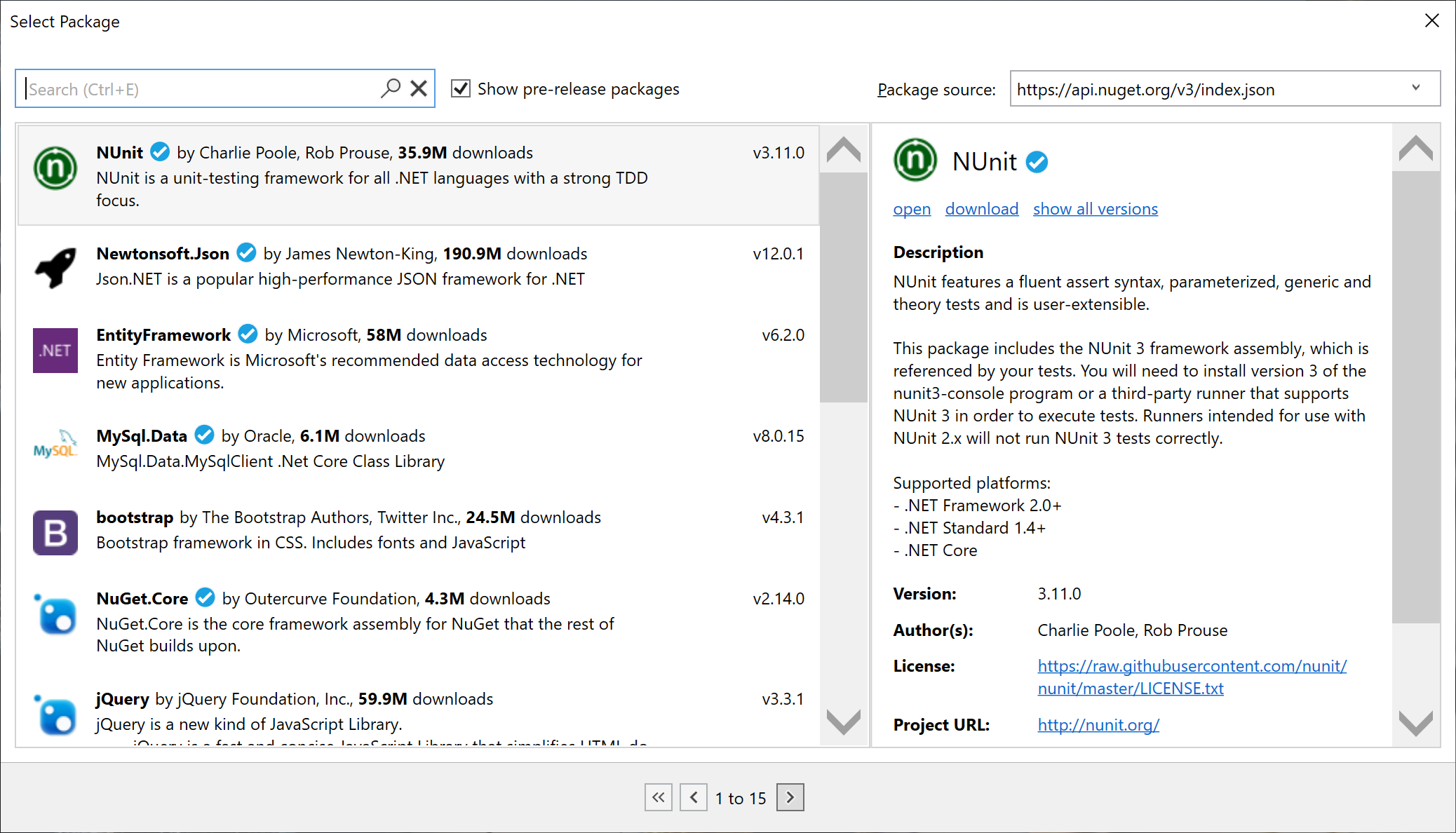
 vatsan-madhavan
on 26 Feb 2019
vatsan-madhavan
on 26 Feb 2019
We refactored PresentationCore - which used to be built by linking a C# _netmodule_ and a C++/CLI _obj_ - into two separate assemblies. Now, it is built as PresentationCore.dll (only C#) and DirectWriteForwarder.dll (only C++/CLI) - and no more dependence on _netmodules_ in our builds.
DirectWriteForwarder.dll's module initializer has this call (not exactly this code - I'm simplifying):
SetProcessDpiAware()
Before, when PresentationCoreand DirectWriteForwarderused to be a single module, the call to SetProcessDpiAware used to be made as part of PresentationCore's module-initializer.
Now, after the assembly refactoring, PresentationCoredoesn't have a module-level initializer - it's just a C# assembly.
When an application starts loading and in turn, Xaml parsing starts and sizes are measured, the scrollbar measurement looks up SystemParameters for relevant information, which in turn depends on the _System DPI_.
At this point, we haven't had a reason to load DirectWriteForwarder.dll - i.e., the process hasn't declared its intent to be a _System DPI Aware_ application as yet. When we query the system for the _System DPI_ value, we get back 96 - the OS treats us as if we are an _DPI unaware_ application (which more or less means 96 shows up in a lot of places when we query for DPI related information!) - and things go wrong from here onwards (esp. because shortly henceforth, DirectWriteForwarder does load, and declares the process to be _System DPI Aware_)
We need to figure out a way to ensure that DirectWriteForwarder loads prior to PresentationCore.
/cc @rladuca, @sambent
vatsan-madhavan
on 26 Feb 2019
Not sure how ugly it is, but there's a way you can get a Module Initializer into PresentationCore:
https://www.nuget.org/packages/InjectModuleInitializer/
http://einaregilsson.com/module-initializers-in-csharp/
It's supported at the IL level, just not exposed in C# or VB.
clairernovotny
on 26 Feb 2019
Thanks for the tip - will look into those!
vatsan-madhavan
on 26 Feb 2019
Fody can do it as well:
clairernovotny
on 26 Feb 2019
@onovotny I looked at InjectModuleInitializer, and it does not look "ugly" at all. IMHO, we should use it instead of Fody. While Fody is very powerful, it is also fairly messy and difficult to extend. I also think that full-on Fody is overkill for this specific use-case.
Also, another question. How would placing high DPI awareness elements in the app's SxS manifest affect this process? I usually place the high-DPI settings in the manifest XML as a matter of course. Would that have any negative effect on this or similar bugs? Or would it actually serve to patch the problem while a proper fix is being implemented? From what @vatsan-madhavan said, I would expect that adding the manifest code would cause Windows to use the proper DPI settings from before the Main method is called. Thanks!
wjk
on 26 Feb 2019
What's the status here. Using 3.0.100-preview4-010963, I'm now seeing this:
Note the menu bar is too small, the menu is zoomed and the common tasks is half the size it should be

clairernovotny
on 26 Mar 2019
Found a workaround - adding this to the app.manifest works (though I think it should be fixed to do the right thing without it). Fixes both the scrollbar and menu/sizing:
  <!-- Indicates that the application is DPI-aware and will not be automatically scaled by Windows at higher
       DPIs. Windows Presentation Foundation (WPF) applications are automatically DPI-aware and do not need
       to opt in. Windows Forms applications targeting .NET Framework 4.6 that opt into this setting, should
       also set the 'EnableWindowsFormsHighDpiAutoResizing' setting to 'true' in their app.config. -->

  <application xmlns="urn:schemas-microsoft-com:asm.v3">
    <windowsSettings>
      <!-- Per Monitor V1 [OS >= Windows 8.1]
         Values: False, True, Per-monitor, True/PM -->
      <dpiAware xmlns="http://schemas.microsoft.com/SMI/2005/WindowsSettings">
        true/PM
      </dpiAware>
      <!-- Per Monitor V1 [OS >= Windows 10 Anniversary Update (1607, 10.0.14393, Redstone 1)]
         Values: Unaware, System, PerMonitor -->
      <!-- Per Monitor V2 [OS >= Windows 10 Creators Update (1703, 10.0.15063, Redstone 2)]
         Value: PerMonitorV2 -->
      <dpiAwareness xmlns="http://schemas.microsoft.com/SMI/2016/WindowsSettings">
        PerMonitorV2, PerMonitor
      </dpiAwareness>
    </windowsSettings>
  </application>
Orens workaround has no effect for me. I'm running preview 5 on a Notebook with 150% scale.
 MichaelRumpler
on 9 May 2019
MichaelRumpler
on 9 May 2019
Just an update here, we're getting to a fix for this. We have something working fairly well so far (see the pcoreil branch) and we're testing things out with our internal repos to make sure it solves the issues.
Right now, it seems the module constructors are all working well and our DPI awareness is properly set (sans manifest). There is more work to do with testing and getting this ready for PR, but it shouldn't be much longer.
 rladuca
on 22 May 2019
rladuca
on 22 May 2019
Related issues
 TobiasSekan
·
3Comments
TobiasSekan
·
3Comments
 skanvk15
·
3Comments
skanvk15
·
3Comments
 LinkTsang
·
3Comments
LinkTsang
·
3Comments
 Pzixel
·
3Comments
Pzixel
·
3Comments
 juepiezhongren
·
3Comments
juepiezhongren
·
3Comments
Most helpful comment
Found a workaround - adding this to the app.manifest works (though I think it should be fixed to do the right thing without it). Fixes both the scrollbar and menu/sizing: