Wpf: Make WPF on .net core always have an exposed entrypoint?
Copied from https://github.com/dotnet/core/issues/2045
AFAIK App.Xaml hide the entry-point in WPF .
Could the template of WPF always has the public static void Main() entry-point (Do not generate a entrypoint for App.Xaml)?
C#
public static void Main(string[] args)
{
    var app = new MyApp.App();
    //app.InitializeComponent();  call this in App's constructor
    app.Run();
}
this will let developer know how Xaml app start, and customize app start easily (control start as command line app or UI app).
 John0King
All 9 comments
I'm almost always specifying my own Main and forwarding it to App.Main when its ready to do so, because I need setup before the Dispatcher is constructed (the App constructor is already too late because the base class constructor runs before my code) and I also want exception handling to diagnose startup problems. Having Main it in template code instead of generated code would be welcome, but of course its just convenience and not blocking anything.
 weltkante
on 19 Dec 2018
weltkante
on 19 Dec 2018
In most applications I worked at we didn't have a custom entry point, but I see there are some reasons like the ones @weltkante mentioned.
But still, I think I would keep it as is. I think most applications don't need a custom main method.
If you want your own custom main method: You can change the Build Action of the App.xaml file from ApplicationDefinition to Page, then no Main method will be generated and you can create your own custom Program.cs file. I would keep the default in the template: No Program.cs file and generate Main-method from App.xaml.
But what could be useful in WPF is a simple compiler symbol like UWP has to disable the generated Main method. It's called DISABLE_XAML_GENERATED_MAIN. Then you don't have to change the build action of the App.xaml file, but you can just use that symbol. I would align it with UWP and generate this symbol in WPF as well:
#if !DISABLE_XAML_GENERATED_MAIN
    /// <summary>
    /// Program class
    /// </summary>
    public static class Program
    {
        [global::System.CodeDom.Compiler.GeneratedCodeAttribute("Microsoft.Windows.UI.Xaml.Build.Tasks"," 10.0.17.0")]
        [global::System.Diagnostics.DebuggerNonUserCodeAttribute()]
        static void Main(string[] args)
        {
            global::Windows.UI.Xaml.Application.Start((p) => new App());
        }
    }
#endif
But I would keep the default template without Program.cs file, as most applications don't need to modify it.
 thomasclaudiushuber
on 19 Dec 2018
thomasclaudiushuber
on 19 Dec 2018
I would keep the default in the template: No Program.cs file and generate Main-method from App.xaml.
There do not need a Program.cs , put the entry-pint in App.Xaml.cs is also an option (just do not put it in App.Xaml.g.cs that user can not control) , and for SDK style msbuild project, there no need to make a difference between App.Xaml and Other.Xaml
John0King
on 19 Dec 2018
@thomasclaudiushuber I never had to change the build action (and I don't know if that wouldn't introduce other unwanted side effects). I usually just add my own Main and then specify in the project settings which Main is the right one. As said, it would just make setting up new projects more convenient if Main was in the template.
weltkante
on 19 Dec 2018
and for SDK style msbuild project, there no need to make a difference between App.Xaml and Other.Xaml
@John0King I think we need that difference, because without it would break all existing WPF applications where the Main method is generated.
just do not put it in App.Xaml.g.cs that user can not control
You can control it with the build action. Select the App.xaml file in the Solution Explorer, open up the Properties, change the Build Action from ApplicationDefinition to Page. Done. No Main method is generated anymore and you can write your custom one. If you get a compiler symbol like in UWP, you can even control it with that instead of changing the build action.
@weltkante In WPF it actually works pretty straight forward. Change the Build Action in the Properties of the App.xaml from ApplicationDefinition to Page, and it will generate the same g.cs/i.g.cs like before, just without Main. Then you don't have to select a Main method like you do today. In UWP on the other side, changing the Build Action has some side effects, as the ApplicationDefinition Build action seems to include more than just generating the Main method. I think that was the reason why a compiler symbol was introduced in UWP.
As said, it would just make setting up new projects more convenient if Main was in the template.
Yes, I see this point if you're a user that regularly puts custom logic into the Main method before the app starts up. My projects were not like yours. From dozens of bigger WPF projects, I had only 1 where I put custom stuff in the Main method. That's why I think I don't want to have something there that I need only in edge cases. :) But I get your point, yes. It also wouldn't hurt if it's there. But it would mean that this way is not aligned anymore to the other XAML platforms.
@John0King @weltkante Maybe this could also be an option for the tooling. Right-click WPF project in Solution explorer and get a context menu entry like "Put Main-method into Program.cs file", and it will adjust everything behind the scenes.
thomasclaudiushuber
on 19 Dec 2018
I love all the discussion here! The hard thing about these types of discussions is that everyone is right :)
But I get your point, yes. It also wouldn't hurt if it's there. But it would mean that this way is not aligned anymore to the other XAML platforms.
To me, this is the key takeaway. I totally agree it wouldn't hurt, but whatever we decide to do should have the same solution for WPF and UWP.
 stevenbrix
on 4 Apr 2019
stevenbrix
on 4 Apr 2019
I think we need that difference, because without it would break all existing WPF applications where the Main method is generated.
I think for this problem,
a) vs can have a new menu , convert to .net core , that take care of this
b) or , making the App.Xaml still generate entrypoint only when that can not find an entrypoint in the project, and the new template always expose the entrypoint on App.Xaml.cs
personally I would prefer plan A , so for xaml , we do not need a xaml target like ApplicationDefinition , Page, like razor , do not need write anything in csproj file.
John0King
on 30 Sep 2019
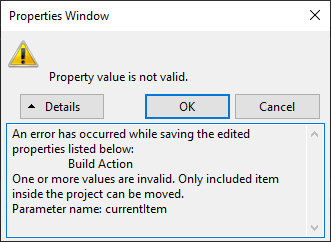
@thomasclaudiushuber, It does not appear possible to change the App.xaml build action to "Page" given the new csproj format. At least not in Visual Studio's Properties window. Any ideas?
An error has occurred while saving the edited properties listed below:
Build Action
One or more values are invalid. Only included item inside the project can be moved.
Parameter name: currentItem
 JVimes
on 31 Jan 2020
JVimes
on 31 Jan 2020
@JVimes: Here is what you should do create a custom Main method in .NET Core: https://blog.magnusmontin.net/2020/01/31/custom-entry-point-wpf-net-core/
Instead of changing the Build Action you should add a <StartupObject> element to the project file as explained in the blog post.
 mgnsm
on 31 Jan 2020
mgnsm
on 31 Jan 2020
Related issues
 JamesBlack2
·
38Comments
JamesBlack2
·
38Comments
 hez2010
·
21Comments
hez2010
·
21Comments
 the-black-wolf
·
24Comments
the-black-wolf
·
24Comments
 bignis
·
24Comments
bignis
·
24Comments
 wli3
·
34Comments
wli3
·
34Comments
Most helpful comment
@JVimes: Here is what you should do create a custom Main method in .NET Core: https://blog.magnusmontin.net/2020/01/31/custom-entry-point-wpf-net-core/
Instead of changing the Build Action you should add a
<StartupObject>element to the project file as explained in the blog post.