Wp-rocket: Contact form 7 froms stop working if dependency scripts are deferred after their latest update
Before submitting an issue please check that you’ve completed the following steps:
- [x] Made sure you’re on the latest version
- [x] Used the search feature to ensure that the bug hasn’t been reported before
Describe the bug
Contact Form 7 latest update added more dependencies to core WordPress JS libraries.
The form stops working if some of the libraries are deferred.
To Reproduce
Steps to reproduce the behavior:
- Enable CF7, create a form, add it to a page
- Enable WP Rocket JS deferring
- Check the page where the form was added for the browser console errors
Expected behavior
CF7 should work out of the box even if our deferring is working.
The following scripts need to be excluded from defering:
/wp-includes/js/dist/(.*).js
Screenshots

Additional context
Contact form 7 has 5M+ installs.
Backlog Grooming (for WP Media dev team use only)
- [ ] Reproduce the problem
- [ ] Identify the root cause
- [ ] Scope a solution
- [ ] Estimate the effort
 DahmaniAdame
All 36 comments
Related tickets:
https://secure.helpscout.net/conversation/1437159796/242644/
https://secure.helpscout.net/conversation/1437431153/242713/
DahmaniAdame
on 27 Feb 2021
Related: https://secure.helpscout.net/conversation/1437701881/242861/
but the mentioned files for the workaround are not present. Still checking this.
 NataliaDrause
on 28 Feb 2021
NataliaDrause
on 28 Feb 2021
@wp-media/productrocket
I think we have two options here to be able to groom ( I gave them a try on weekend and those are my thoughts to be validated ):-
- We can exclude the pattern
wp-includes/js/dist/(.*).jsfrom being deferred as those files are libraries that for sure their functions would be called in the page itself. - As I noticed, all those files inside
distdirectory is called usingwp.(except for_inside i18n) so we can defer all inline scripts which contains those patterns like what we do with jquery scripts by enclose them inDOMContentLoadedevent listener.
What do you think?
 engahmeds3ed
on 1 Mar 2021
engahmeds3ed
on 1 Mar 2021
This seems related to #2850 and:
https://github.com/wp-media/wp-rocket/issues/2318
Solution no 2, assuming that other scripts are not using wp., is better since 1 will flag those files as render-blocking on PageSpeed Insights.
 vmanthos
on 1 Mar 2021
vmanthos
on 1 Mar 2021
@vmanthos @engahmeds3ed Can we be sure that solution no 2 will work 100% of the time and it can't trigger another issue?
I agree with @vmanthos that solution no 1 isn't the way to go for us as it will flag these files as render-blocking and result in a worse PSI grade.
 GeekPress
on 1 Mar 2021
GeekPress
on 1 Mar 2021
@vmanthos I forgot an important point. Until the JS files are located in the footer, they aren't considered as render-blocking!
You can try your self, put a JS file on the header with no defer, it will be reported as render-blocking on PSI. Put the same JS file in the footer without defer attribute, this JS won't be reported anymore as render-blocking on PSI.
GeekPress
on 1 Mar 2021
@GeekPress If u mean putting those files in footer, I think this will lead to the same results as those files (functions/classes inside them) are used inside inline scripts so we will need to move those inlines also, is this what you mean here?
engahmeds3ed
on 1 Mar 2021
@engahmeds3ed These files are already loaded into the footer.
GeekPress
on 1 Mar 2021
@GeekPress Nice catch!
I've tried that with Contact Form 7 on my test site, and PSI didn't flag the files.
Related tickets
https://secure.helpscout.net/conversation/1438795814/243070
https://secure.helpscout.net/conversation/1439134214/243130
https://secure.helpscout.net/conversation/1438701667/243053
https://secure.helpscout.net/conversation/1438623587/243038
vmanthos
on 1 Mar 2021
So option 1 is valid ? or we need to give option 2 a try?
engahmeds3ed
on 1 Mar 2021
Option 1 is valid but maybe without the regex to exclude all /dist/ files.
Based on the latest SG Optimizer version to fix this problem, we can exclude only these 3 scripts:
https://plugins.trac.wordpress.org/changeset/2481447/sg-cachepress/trunk/core/Front_End_Optimization/Front_End_Optimization.php
GeekPress
on 1 Mar 2021
@GeekPress after testing that locally, the following is the final list of files to be excluded from deferring
'/wp-includes/js/dist/vendor/lodash(.min)?.js',
'/wp-includes/js/dist/api-fetch(.min)?.js',
'/wp-includes/js/dist/i18n(.min)?.js',
'/wp-includes/js/dist/vendor/wp-polyfill(.min)?.js',
'/wp-includes/js/dist/url(.min)?.js',
please check the following line
'api-fetch.js' => array('dependencies' => array('wp-i18n', 'wp-polyfill', 'wp-url'),
so I added url.js to the list als lodash.js is already there on SG code.
I will create PR now directly.
engahmeds3ed
on 1 Mar 2021
Related: https://secure.helpscout.net/conversation/1438422069/242990?folderId=3864740
To confirm a comment above:
Until the JS files are located in the footer, they aren't considered as render-blocking!
I checked on one customer's site and the scripts were not mentioned as render-blocking when excluded from deferring.
NataliaDrause
on 1 Mar 2021
@engahmeds3ed Thanks for the info. Let's go with that approach :)
GeekPress
on 1 Mar 2021
Does this also solve the problem where the form stops working after 12-24 hours?
JavaScript was only half the problem with the CF7 update. The second problem is that the form will stop working after a period of time, due to the use of "nonces". Of course this can be solved by caching the entire website every 12-24 hours but that will degrade the value of an external cache like CloudFlare and CloudFlare Argo, making them somewhat useless.
 PCAviation
on 5 Mar 2021
PCAviation
on 5 Mar 2021
@PCAviation the fix is specific to the new dependencies that CF7 is using. We will start to automatically exclude them.
We can't unfortunately do anything about the nonce needing to be renewed periodically. It's up to the CF7 developers to secure their form in a way that is compatible with page caching.
The only workaround is to renew the cache at an interval that is compatible with the nonce lifecycle using our Cache Lifespan feature.
DahmaniAdame
on 5 Mar 2021
@PCAviation the fix is specific to the new dependencies that CF7 is using. We will start to automatically exclude them.
We can't unfortunately do anything about the nonce needing to be renewed periodically. It's up to the CF7 developers to secure their form in a way that is compatible with page caching.
The only workaround is to renew the cache at an interval that is compatible with the nonce lifecycle using our Cache Lifespan feature.
Yes, I know. I'm simply pointing this out for future reference because a lot of people dealing with the CF7 plugin don't know that "JavaScript was only half the problem with the CF7 update".
I was also under the impression that JS minification also does not work with CF7. I had to disable BOTH JS "minification" and "deferring" to get CF7 to work. Do you know if that's the case?
PCAviation
on 6 Mar 2021
I don't know why but wp-rocket team is taking decisions without taking into consideration that excluding such JS files from deferring are making a good impact on the pagespeed score. Taking the shortcut of just excluding rather than combining it in correct sequence is just a big lapse on the wp-rocket side. Many sites which I have optimized in past which were using contact-form-7 has observed a drop in mobile pagespeed score by 20-25 points after this latest update. Kindly revert this change and find the correct way of deferring these JS files in the correct sequence.
 akkiverma
on 10 Mar 2021
akkiverma
on 10 Mar 2021
I don't know why but wp-rocket team is taking decisions without taking into consideration that excluding such JS files from deferring are making a good impact on the pagespeed score. Taking the shortcut of just excluding rather than combining it in correct sequence is just a big lapse on the wp-rocket side. Many sites which I have optimized in past which were using contact-form-7 has observed a drop in mobile pagespeed score by 20-25 points after this latest update. Kindly revert this change and find the correct way of deferring these JS files in the correct sequence.
This affects all Wordpress caching plugins not just WP-Rocket. The fault is with the author of the CF7.
PCAviation
on 10 Mar 2021
then people can get rid of contact-form-7, rather than wp-rocket deciding to slow down thousands of sites to fix a very minor issue. And NO, it doesn't affect every cache plugin, Litespeed JS deferring does way better. Not only the pagespeed score has dropped, but the time to interact with the page has also increased and in some cases, LCP also increased. Well done!
akkiverma
on 10 Mar 2021
@GeekPress Nice catch!
I've tried that with Contact Form 7 on my test site, and PSI didn't flag the files.Related tickets
https://secure.helpscout.net/conversation/1438795814/243070
https://secure.helpscout.net/conversation/1439134214/243130
https://secure.helpscout.net/conversation/1438701667/243053
https://secure.helpscout.net/conversation/1438623587/243038
Those files become the part of critical render path. It shows up in the pagespeed tests!
akkiverma
on 10 Mar 2021
then people can get rid of contact-form-7, rather than wp-rocket deciding to slow down thousands of sites to fix a very minor issue. And NO, it doesn't affect every cache plugin, Litespeed JS deferring does way better. Not only the pagespeed score has dropped, but the time to interact with the page has also increased and in some cases, LCP also increased. Well done!
The CF7 use of "nonces" also means the cache has to be refreshed every 24 hours or the form stops working. The only other alternative is only re-cache that single page every 24-hours or turn off caching on that page.
PCAviation
on 11 Mar 2021
Exclude contact form page from caching. Simple!
akkiverma
on 11 Mar 2021
It still won't justify the blunder the wp-rocket team did with excluding JS decision.
akkiverma
on 11 Mar 2021
I don't know why but wp-rocket team is taking decisions without taking into consideration that excluding such JS files from deferring are making a good impact on the pagespeed score.
@akkiverma These files aren't render-blocking at all as they are loading from the footer, and not the header as I mentioned here:
https://github.com/wp-media/wp-rocket/issues/3625#issuecomment-787847496
And it has been validated by someone else of our team:
https://github.com/wp-media/wp-rocket/issues/3625#issuecomment-787853885
You can be sure each time we are taking a decision, we are sure about the impact it could have on PSI grade and loading time.
GeekPress
on 12 Mar 2021
I am talking about, those files gets added to critical render path, those are not render-blocking but still load in parallel, hence that affects the pagespeed score greatly as the JS start executing as soon as it loads. This needs to be changed!
akkiverma
on 12 Mar 2021
It doesn't affect your PSI at all as they are loaded from the footer...
GeekPress
on 12 Mar 2021
It has affected already the PSI score, by 20-25 for mobile, no change for desktop. I am a speed expert and no one can tell better than me!
akkiverma
on 12 Mar 2021
Sorry, I forgot we aren't « speed experts » too...
GeekPress
on 12 Mar 2021
This is my full-time work and many sites using wp-rocket with contact form 7 have mobile scores dropped already. I have re-fixed them by charging again! Thanks to your blunder, I made some extra money out of it! haha
akkiverma
on 12 Mar 2021
I am sure you're a speed expert too, just wondering how you missed out on the part of the critical render path or the dropped PSI scores!
akkiverma
on 12 Mar 2021
As I said, JS files in the footer aren't render-blocking.
Take this video as you want:
https://share.getcloudapp.com/X6u9P0Rr
GeekPress
on 12 Mar 2021
The things you're trying to show in the video, the JS files are not the same as what is added by the contact form 7.
Do you want to take a bet? I would show you that those JS added by contact form 7 affects the PSI score of mobile. PSI score dropped after you excluded those files in the latest update of wp-rocket. This is why my clients contacted me back to check what went wrong after the plugin update. Why the PSI score dropped. Otherwise, why would I even bother!
I don't monitor the changelog of any plugin, of what is being updated and whatnot. And again I am saying, those files become the part of critical rendering path yet not is render-blocking:
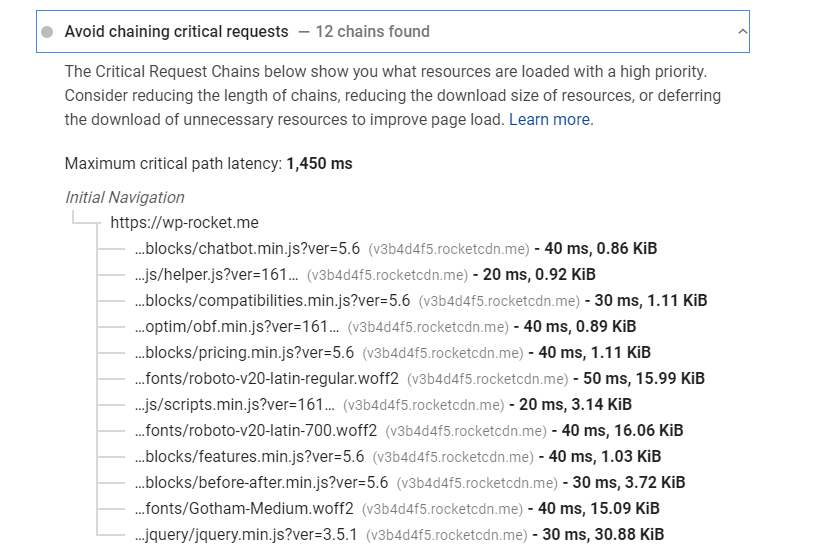
Please understand what JS gets loaded, starts executing immediately, leading to an increase of time to interact and some effect on FID too and hence the drop in page speed score.
akkiverma
on 12 Mar 2021
Hey guys and specially @GeekPress , thanks a lot for the best caching plugin : )
I also noticed about this change recently and contacted support team and they confirmed this is a new change in wp rocket.
So, for example this is before updating to latest version of the plugin:
https://gtmetrix.com/reports/www.angrybbq.com/mJysMHp4/
Now it's changed to:
https://gtmetrix.com/reports/www.angrybbq.com/yRcr0X7z/
On homepage, there isn't any contact form at all, so why excluding these assets somewhere the contact form is not using at all.
Do you think, you can provide any other solution for this?
Thanks again
 amiremami
on 13 Mar 2021
amiremami
on 13 Mar 2021
On homepage, there isn't any contact form at all, so why excluding these assets somewhere the contact form is not using at all.
It's worth mentioning that CF7 is loading around 7 script files, even, if the form is not present on the page.
 piotrbak
on 15 Mar 2021
piotrbak
on 15 Mar 2021
@akkiverma I've just done some tests on multiple websites, and I got the exact same result. Whatever the JS files include the defer attribute or not doesn't impact the PSI grade until these files are inserted in the footer.
If you have different behavior, you have a different configuration.
The defer attribute change only one thing, the priority is set to low with defer and medium without. But as the JS files should be the latest files to load, it doesn't change in any way the loading order.
Thanks for trying to share your point, but I think we are going nowhere here.
then people can get rid of contact-form-7, rather than wp-rocket deciding to slow down thousands of sites to fix a very minor issue.
A quick clarification about that.
In any case, automatically excluding these files from Defer JS is the only solution we can provide. The problem should be fixed on Contact Form 7...
On our side, we don't want to break customer's websites. It's also our responsibility. If we don't exclude these files from being deferred, it will break the website. This isn't acceptable.
@amiremami Thanks for your feedback. You are using the outdated GT Metrix report. And indeed, on this one GT Metrix is checking if script tags contain the defer attribute. But it's the old report... And you should be focused on the new one which is using Lighthouse metrics (same as Google PageSpeed).
GeekPress
on 17 Mar 2021
Related issues
 Screenfeed
·
5Comments
vmanthos
·
5Comments
vmanthos
·
5Comments
Screenfeed
·
5Comments
vmanthos
·
5Comments
vmanthos
·
5Comments
 webtrainingwheels
·
5Comments
webtrainingwheels
·
5Comments
 crystinutzaa
·
4Comments
crystinutzaa
·
4Comments