Wp-rocket: Remove “Safe Mode for jQuery” option
What are we proposing to do?
Currently, “Load JavaScript deferred” option in the File Optimization tab of WP Rocket includes a sub-option, “Safe Mode for jQuery (recommended)”. With this update, we propose to remove this sub-option.

Why are we doing this?
This update will be part of making WP Rocket simpler and easier to configure and use.
As per Mixpanel data, almost all users (98%) with “Load JavaScript deferred” option have enabled the “Safe Mode for jQuery” sub-option. The UI isn’t adding value to many users and can be confusing for novice users. Removing it will make WP Rocket easier to configure.
The reason why we need this option is because jQuery references in in-line JavaScript will need the jQuery file to be not deferred. With this enhancement, we will be delaying inline JS and this feature will no longer be needed and the jQuery file can be deferred.
Since inline JS is delayed with this enhancement, more JavaScript execution will be delayed and this should mean that the website is interactive faster (i.e. time to interactive is lower). This will reflect in better user experience and better ranks on PageSpeed insights.
Benchmark Tests
Test website: http://mega.wp-rocket.me/
Test method: Tests were done first with “Safe Mode for jQuery” enabled and then with it disabled. The website was repeated on PageSpeed thrice with each setting. Combine JS was enabled for all these tests.
Average PageSpeed score. With Safe Mode for jQuery enabled = 68, disabled = 78
This test doesn’t account for delayed inline JS. That should only improve the scores.
New Test with 3.8-alpha1
Test page: http://mega.wp-rocket.me/no-defer-js
Left: WP Rocket config: 3.7.6, Load JS defer and safe mode for jQuery enabled. JS minification and combination disabled
Right: WP Rocket config: 3.8-alpah1. Load JS deferred enabled. jQuery not excluded from defer.

PageSpeed scores are better^
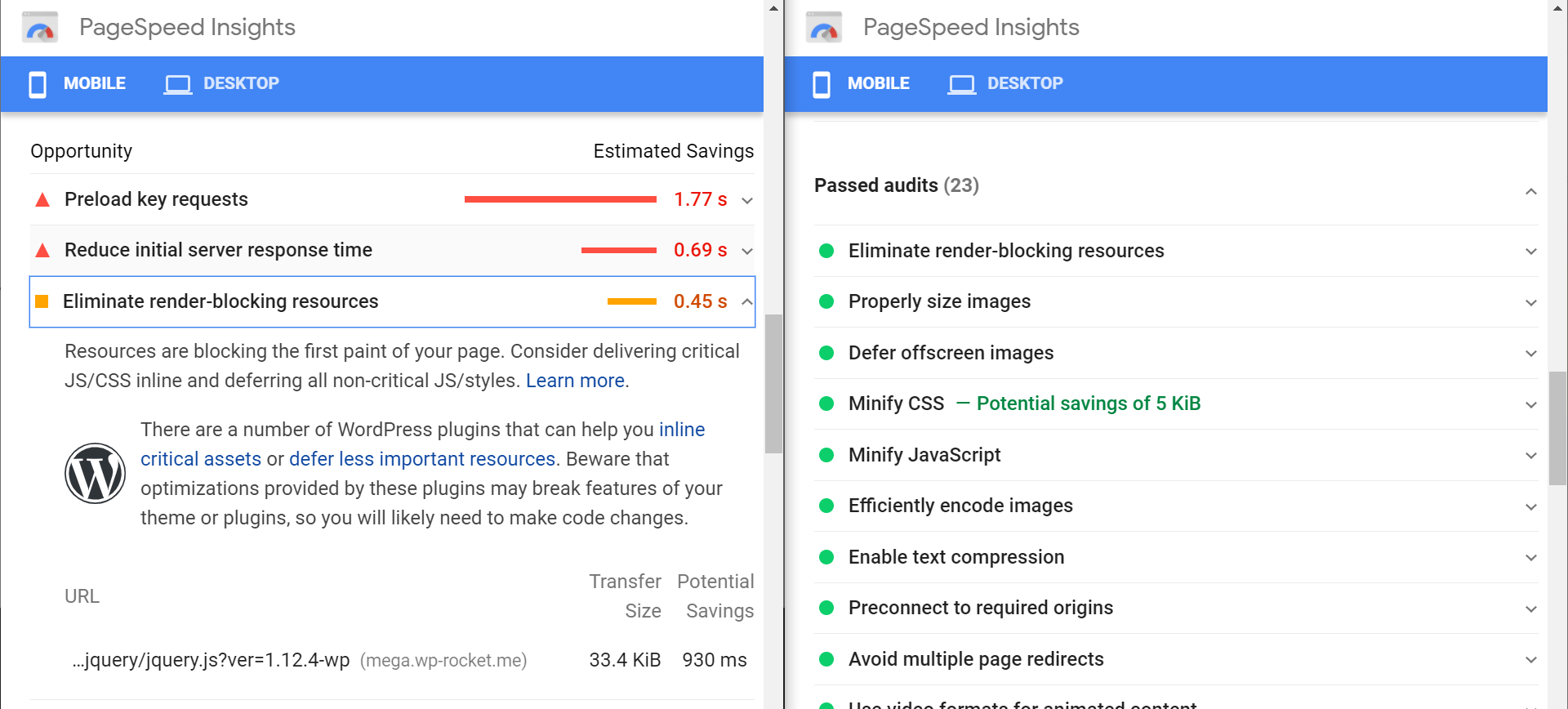
jQuery file is no longer recommended^
User expectations and experience. How will we do this feature?
This update will be completely transparent to users. The UI will simply disappear on update and everything will be handled automatically in the background.
During the QA process, some changes were made to how the change would affect existing users and new users. Details are available here: https://github.com/wp-media/wp-rocket/pull/3366#issuecomment-735850052
Technical Specs
By wrapping all jQuery inline scripts into a DOMContentLoaded event, we will be able to get rid of Safe Mode for jQuery options.
Some code example here with jQuery deferred: https://playcode.io/679488/
To know which inline scripts contain a jQuery inline script, we will detect them by checking these patterns:
jQuery
jQuery.
$.(
$(
Notes:
There are two methods used in the above example. One where the inline JS is converted to base64 code and then deferred. Second where inline JS is wrapped into “window.addEventListener('DOMContentLoaded', function()”.
The second approach essentially delays inline JS and can give better performance. This is the one we hope to use.
For comparison, “LightSpeed Cache” has the option to use the second approach. Check Page Optimization > JS Settings tab > Load inline JS
Other specifications:
If inline JS contains keywords to be delayed using our “Delay JavaScript execution” feature, these scripts can be excluded.
If inline JS contains the pattern “DOMContentLoaded” or “document.write”, these scripts will be skipped.
If jQuery is excluded from JavaScript defer, then we can skip the entire process. This will be similar to how “Safe Mode for jQuery” worked. This can act as a backup plan if our update doesn’t suit some websites.
With the UI that will be added for file exclusions, excluding the jQuery file from JS defer will be easy for our users. If they see a “jQuery not defined” error in spite of our mechanisms, they can simply exclude the jQuery file (based on our documentation) and all can go back to normal.
Risks
About 60% of our users will be impacted by this update, so we need to roll this out with a major version release to take advantage of our staggered release.
Acceptance Criteria
The UI for “Safe Mode for jQuery” is removed after the update.
jQuery is added to the combined JS file.
Inline JS is delayed and there are no console errors.
If inline JS contains keywords to be delayed using our “Delay JavaScript execution” feature, these scripts are to be excluded from the delay.
If inline JS contains the pattern “DOMContentLoaded” or “document.write”, these scripts will be excluded from the process.
If jQuery is excluded from JavaScript defer, the inline scripts are not delayed.
Documentation and Translations
The following documentation needs to be updated:
 GeekPress
All 8 comments
Link to feature: https://wp-media.productboard.com/feature-board/planning/features/5722864
Created by: @arunbasillal
GeekPress
on 13 Nov 2020
Backend modifications
1. Update class WP_Rocket\Engine\Admin\Settings\Page and remove defer_all_js_safe
https://github.com/wp-media/wp-rocket/blob/3b8b2d7debc83641045f9af82baa08b14e41daed/inc/Engine/Admin/Settings/Page.php#L804-L816
2. Remove defer_all_js_safe from upgrader.php
https://github.com/wp-media/wp-rocket/blob/3b8b2d7debc83641045f9af82baa08b14e41daed/inc/admin/upgrader.php#L187
3. Modify Settings.php and remove defer_all_js_safe
https://github.com/wp-media/wp-rocket/blob/3b8b2d7debc83641045f9af82baa08b14e41daed/inc/Engine/Admin/Settings/Settings.php#L225-L232
4. Revisit get_jquery_urls() function and the use of it. I think this function and the use of it needs to be totally removed and deprecated.
https://github.com/wp-media/wp-rocket/blob/3b8b2d7debc83641045f9af82baa08b14e41daed/inc/Engine/Optimization/Minify/JS/AbstractJSOptimization.php#L52-L56
https://github.com/wp-media/wp-rocket/blob/3b8b2d7debc83641045f9af82baa08b14e41daed/inc/Engine/Optimization/Minify/JS/AbstractJSOptimization.php#L161
https://github.com/wp-media/wp-rocket/blob/3b8b2d7debc83641045f9af82baa08b14e41daed/inc/Engine/Optimization/Minify/JS/Combine.php#L65
https://github.com/wp-media/wp-rocket/blob/3b8b2d7debc83641045f9af82baa08b14e41daed/inc/Engine/Optimization/Minify/JS/Combine.php#L32
https://github.com/wp-media/wp-rocket/blob/3b8b2d7debc83641045f9af82baa08b14e41daed/inc/Engine/Optimization/Minify/JS/Combine.php#L179-L184
5. Remove defer_all_js_safe from Data Support
https://github.com/wp-media/wp-rocket/blob/3b8b2d7debc83641045f9af82baa08b14e41daed/inc/Engine/Support/Data.php#L27
6. Remove jQuery from get_rocket_exclude_defer_js()
https://github.com/wp-media/wp-rocket/blob/3b8b2d7debc83641045f9af82baa08b14e41daed/inc/functions/options.php#L452-L464
7. Revisit all fixtures and tests which contain: defer_all_js_safe
- https://github.com/wp-media/wp-rocket/blob/3b8b2d7debc83641045f9af82baa08b14e41daed/tests/Fixtures/inc/admin/rocketFirstInstall.php#L23
- https://github.com/wp-media/wp-rocket/blob/3b8b2d7debc83641045f9af82baa08b14e41daed/tests/Fixtures/inc/Engine/Optimization/Minify/JS/Combine/combine.php#L56 + all 7 other use of
defer_all_js_safe - https://github.com/wp-media/wp-rocket/blob/3b8b2d7debc83641045f9af82baa08b14e41daed/tests/Fixtures/inc/Engine/Optimization/Minify/JS/Subscriber/process.php#L11 + all other occurences of
defer_all_js_safe - https://github.com/wp-media/wp-rocket/blob/3b8b2d7debc83641045f9af82baa08b14e41daed/tests/Fixtures/inc/Engine/Support/Data/getSupportData.php#L25
- https://github.com/wp-media/wp-rocket/blob/3b8b2d7debc83641045f9af82baa08b14e41daed/tests/Integration/inc/Engine/Optimization/Minify/JS/Subscriber/process.php#L32 + all other occurences of
defer_all_js_safe - https://github.com/wp-media/wp-rocket/blob/3b8b2d7debc83641045f9af82baa08b14e41daed/tests/Integration/inc/functions/getRocketExcludeDeferJs.php#L24
- https://github.com/wp-media/wp-rocket/blob/3b8b2d7debc83641045f9af82baa08b14e41daed/tests/Unit/inc/Engine/Optimization/Minify/JS/Combine/optimize.php#L66-L68
Frontend modifications
1. Move /inc/front/deferred-js.php into the new structure /inc/Engine/Optimization/DeferJs
https://github.com/wp-media/wp-rocket/blob/3b8b2d7debc83641045f9af82baa08b14e41daed/inc/front/deferred-js.php#L14
Create the files and functionality for:
- Create the file:
/inc/Engine/Optimization/DeferJs/Subscriber.php - Modify the file and share the Defer JS Subscriber :
/inc/Engine/Optimization/ServiceProvider.php - Modify the functionality inside
rocket_defer_js()function and split it in 2. Handle first the scripts with src and the second part will handle the inline scripts.
- External scripts will maintain the current functionality.
- Inline scripts will need much more functionality:
a. Check if there is jQuery code inside ($(,$.(,jQuery.,jQuery- and other variations 😄 ) - if it does not contain will be skipped.
b. Check if inline JS contains the pattern “DOMContentLoaded” or “document.write”, these scripts will be skipped.
c. Check if jQuery is excluded from JavaScript defer, the inline scripts are not delayed. (https://github.com/wp-media/wp-rocket/issues/3233) - if it contains it will be skipped
d. If all condition pass, then the current code needs to be wrapped inside:
  window.addEventListener('DOMContentLoaded', function() {
        // Add inline JS
  });
- Deprecate the function:
rocket_defer_js() Write tests (unit & integration )
Make sure that the new code pass the acceptance criteria:
Acceptance Criteria
The UI for “Safe Mode for jQuery” is removed after the update.

jQuery is added to the combined JS file.

Inline JS is delayed and there are no console errors.

If inline JS contains keywords to be delayed using our “Delay JavaScript execution” feature, these scripts are to be excluded from the delay.

If inline JS contains the pattern “DOMContentLoaded” or “document.write”, these scripts will be excluded from the process.

If jQuery is excluded from JavaScript defer, the inline scripts are not delayed.
 crystinutzaa
on 16 Nov 2020
crystinutzaa
on 16 Nov 2020
@wp-media/php I think this one needs to be done after this https://github.com/wp-media/wp-rocket/issues/3233 is finalized and merged. What do you think?
crystinutzaa
on 16 Nov 2020
Yes indeed, we need to complete it first before doing this one, as there is a lot of overlap.
 Tabrisrp
on 16 Nov 2020
Tabrisrp
on 16 Nov 2020
If we had this setting disabled before the update, will it remain disabled after the update for existing installs?
 gevcen
on 18 Nov 2020
gevcen
on 18 Nov 2020
If we had this setting disabled before the update, will it remain disabled after the update for existing installs?
It's not going to be just a removal from the UI, it's also going to change how WP Rocket handles inline JS especially ones that use jQuery in it.
 arunbasillal
on 23 Nov 2020
arunbasillal
on 23 Nov 2020
Disabling this option the sliders of the "revslider" plugin are not shown, 3 jquery errors appear
 Camilo517
on 23 Nov 2020
Camilo517
on 23 Nov 2020
Disabling this option the sliders of the "revslider" plugin are not shown, 3 jquery errors appear
@Camilo517 The feature will do more than simply disabling the option. Don't worry yet. 👍
arunbasillal
on 23 Nov 2020
Related issues
 Screenfeed
·
5Comments
arunbasillal
·
4Comments
Screenfeed
·
5Comments
arunbasillal
·
4Comments
 webtrainingwheels
·
5Comments
webtrainingwheels
·
5Comments
 jbma
·
5Comments
jbma
·
5Comments
 vmanthos
·
5Comments
vmanthos
·
5Comments
Most helpful comment
@Camilo517 The feature will do more than simply disabling the option. Don't worry yet. 👍