Wp-rocket: Combine CSS/JS increase cache/min size when versioning contains variable strings/timestamps
Before submitting an issue please check that you’ve completed the following steps:
- Made sure you’re on the latest version ✅
- Used the search feature to ensure that the bug hasn’t been reported before ✅
Describe the bug
When combining CSS/JavaScript files that use a timestamp as their version, e.g.
https://www.example.com/wp-content/plugins/web-directory-pro-v2/assets/css/frontend.css?ver=1600668548
a different combined CSS/JavaScript file is created because of the way we currently handle the combined file's creation.
That can lead to an increased size of the /cache/min/ folder.
We use a hash of the files that are to be combined:
https://github.com/wp-media/wp-rocket/blob/10a5ab2606759dd82d2a4c89732d6ef76ea4120d/inc/Engine/Optimization/Minify/CSS/Combine.php#L188
If the version of a file is different, even though the content is the same, the hash will be different, and a new combined file will be created because this conditional isn't evaluating to true:
https://github.com/wp-media/wp-rocket/blob/10a5ab2606759dd82d2a4c89732d6ef76ea4120d/inc/Engine/Optimization/Minify/CSS/Combine.php#L193
UPDATE
Upon further investigation, this is an issue related to the fact that in 3.7 we are using the URLs of files including their version:
//www.example.com/wp-content/themes/visionclimax/style.css?ver=1601532890
In 3.6.4 we used to use their file path without the version:
/home/www.example.com/public_html/wp-content/themes/twentytwenty/style.css
To Reproduce
Steps to reproduce the behavior:
- Make sure you are using WP Rocket 3.7.
- Add timestamp versioning to a CSS/JS file.
- Enable CSS/JS combination.
- Visit different pages or preload cache.
- A different CSS/JS combined file will be created for each page.
Expected behavior
Avoid the increase of the cache/min size increase when timestamp versioning is used.
Additional context
Currently, handling this involves excluding the culprit files from CSS/JS combination.
Screenshots

Related tickets
- https://secure.helpscout.net/conversation/1279890356/194227/
- https://secure.helpscout.net/conversation/1268568522/190972/
Backlog Grooming (for WP Media dev team use only)
- [x] Reproduce the problem
- [x] Identify the root cause
- [x] Scope a solution
- [x] Estimate the effort
 vmanthos
All 16 comments
@vmanthos Any idea why the query string would be a time stamp? If there is no specific need, it sounds like the specific developer didn't use the query string correctly. We could notify them and get this fixed at their end.
 arunbasillal
on 21 Sep 2020
arunbasillal
on 21 Sep 2020
I think they are misusing it as a cache-busting mechanism.
Customers realize the issue once their quota is consumed, and that can bring their site down.
If we can tackle this on our side, we'll:
- Have fewer tickets about this and happier customers. 😊
- We'll skip the "communicate with developers" part, which is not always possible or it's not working every time.
vmanthos
on 21 Sep 2020
Thanks Vasilis. Sorry to bother you again, one more question please. Do we see this happen with many plugins? Or just this one and few like this.
Fixing the root cause rather than patching it at our end will be better for humanity as a whole ;)
Also lesser code to maintain in the long term.
arunbasillal
on 21 Sep 2020
I have seen a few, although they are not as many as the ones caused by the inline JavaScript feature.
I'm with you about the humanity part, but as far as the customer is concerned, the issue is caused by WP Rocket, and the support is called to pull the chestnuts out of the fire. 😅
If fixing this is complicated, then we'll have to live with what we have. 😊
vmanthos
on 21 Sep 2020
@vmanthos Thanks for your feedback. Not fixing it is not an option and I agree, from the customer point of view it's created by WP Rocket.
Let's send this to grooming to see what kind of effort is needed for this one. Maybe the dev team will also have other ideas to resolve this.
arunbasillal
on 21 Sep 2020
Related ticket: https://secure.helpscout.net/conversation/1289989587/196880/
vmanthos
on 24 Sep 2020
vmanthos
on 24 Sep 2020
Another case here:
https://secure.helpscout.net/conversation/1282752535/194994?folderId=2683093
 alfonso100
on 26 Sep 2020
vmanthos
on 29 Sep 2020
alfonso100
on 26 Sep 2020
vmanthos
on 29 Sep 2020
Related ticket: https://secure.helpscout.net/conversation/1293632176/197848
vmanthos
on 29 Sep 2020
https://secure.helpscout.net/conversation/1256231507/187253?folderId=377611
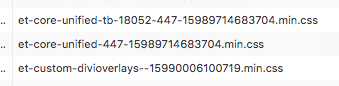
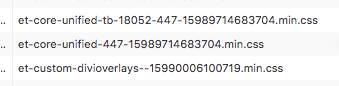
In this case they (seems to be the Divi Toolbox plugin) are encoding the version into the filename like this:
 webtrainingwheels
on 29 Sep 2020
webtrainingwheels
on 29 Sep 2020
another CSS case here:
https://secure.helpscout.net/conversation/1295805286/198408/
In this case, is not a timestamp but a different random string passed as a file version number:
/wp-content/plugins/..../filename.css?ver=1686529919
alfonso100
on 30 Sep 2020
Reproduce the problem
Reproduced on local installation
Identify the root cause
When creating the combined filename, we use the URLs including the query string. When the query string contains random/constantly updating value, it's creating new files for the same content.
Scope a solution
During the parse() methods call, strip the query string early from the currently processed url, using strtok( $style['url'], '?' )
Estimate the effort
Effort [XS]
 Tabrisrp
on 5 Oct 2020
Tabrisrp
on 5 Oct 2020
Related ticket: https://secure.helpscout.net/conversation/1300174100/199629/
vmanthos
on 6 Oct 2020
webtrainingwheels
on 14 Oct 2020
Related ticket: https://secure.helpscout.net/conversation/1308669776/202288/
vmanthos
on 19 Oct 2020
Related issues
 piotrbak
·
4Comments
arunbasillal
·
4Comments
webtrainingwheels
·
5Comments
webtrainingwheels
·
5Comments
vmanthos
·
5Comments
piotrbak
·
4Comments
arunbasillal
·
4Comments
webtrainingwheels
·
5Comments
webtrainingwheels
·
5Comments
vmanthos
·
5Comments
Most helpful comment
I have seen a few, although they are not as many as the ones caused by the inline JavaScript feature.
I'm with you about the
humanitypart, but as far as the customer is concerned, the issue is caused by WP Rocket, and the support is called to pull the chestnuts out of the fire. 😅If fixing this is complicated, then we'll have to live with what we have. 😊