Wp-rocket: WP Smush's lazyload breaks WP Rocket's <iframe> lazyload
In WP Smush version 3.4.0, they introduced iframe lazy loading. When that is enabled along with WP Rocket's iframe lazyload feature, the iframe isn't displayed.
We have a compatibility feature where we disable our own lazyload feature for images when we detect WP Smush's lazyload:
We don't do that for iframe lazyload. We may have to extend our compatibility code to include this.
Related ticket: https://secure.helpscout.net/conversation/1056062225/141011?folderId=2135277
Steps to Reproduce:
- Install WP Smush (3.4.0 or later) - https://wordpress.org/plugins/wp-smushit/
- Add an iframe to a page.
- Enable LazyLoad for iframe in WP Smush and WP Rocket.
- Visit the page with the iframe. The iframe will now not be displayed.
- Disable WP Rocket's LazyLoad for iframe.
- Visit the page with the iframe. The iframe should be visible now.
Backlog Grooming
- [x] Reproduce the problem
- [x] Identify the root cause
- [x] Scope a solution
- [x] Estimate the effort
 vmanthos
All 20 comments
 arunbasillal
on 21 Jan 2020
arunbasillal
on 21 Jan 2020
Reproduce the issue ✅
Reproduced on my local test site
Identify the root cause ✅
When Smush lazyload is enabled, it automatically includes iframe by default. If WP Rocket lazyload for iframes is enabled too, it's causing a double lazyload and breaking the output.
Scope a solution ✅
We can automatically disable WP Rocket lazyload for iframe when:
- Smush lazyload is enabled (_wp-smush-settings_ option)
- AND the iframe setting is enabled (it's stored in a different option, _wp-smush-lazy_load_)
This would be an extension of the existing compatibility code for Smush.
Estimate the effort
Effort: [S]
Effort: [M]
Code chances are relatively low effort. I can see difficulties going in if we want to test integration on the settings page output because we currently don't have an easy way to do that.
 Tabrisrp
on 28 Feb 2020
Tabrisrp
on 28 Feb 2020
@hellofromtonya will need your input for the integration testing part
Tabrisrp
on 28 Feb 2020
@Tabrisrp The WP Smush plugin sets 2 options as you identified above. In the integration test, we want to check the behavior of the following:
- test _should_ not deactivate rocket lazyload _when_ Smush lazyload is not enable and iframe setting is not enabled
- test _should_ not deactivate rocket lazyload _when_ Smush lazyload is enabled and iframe setting is not enabled
- test _should_ not deactivate rocket lazyload _when_ Smush lazyload is not enabled and iframe setting is enabled
- test _should_ deactivate rocket lazyload _when_ Smush lazyload is enabled and iframe setting is enabled
For each of these test scenarios, do the following:
- Turn
lazyloadsetting on. - Set the WP Smush option conditions
- Then get the
lazyloadoption and check if it's in the correct state.
What happens here?
When you update the option for the WP Smush plugin, the Smush_Subscriber is already hooked (registered) into the 'update_option_wp-smush-settings' event. Right? So the Smush_Subscriber::maybe_deactivate_rocket_lazyload() callback should automatically fire and run.
 hellofromtonya
on 2 Mar 2020
hellofromtonya
on 2 Mar 2020
What about the other event, i.e. 'activate_wp-smushit/wp-smush.php'? How do we test that?
For that one, you'll need to do a little set up work first:
- Pull the instance of
Smush_Subscriberfrom the container. - Register its callback:
add_filter( 'activate_wp-smushit/wp-smush.php', [ $subscriber, 'maybe_deactivate_rocket_lazyload' ] );
- Then repeat the above test scenarios.
- At
tearDown()unregisterremove_filter()the callback from that event as cleanup.
hellofromtonya
on 2 Mar 2020
I can see difficulties going in if we want to test integration on the settings page output because we currently don't have an easy way to do that.
@Tabrisrp For this one, start with the events that the callback is registered to. In this case, it's registered to when the option is updated. Therefore, we don't need to trigger a settings page save event. Rather, we want to update the option in the database. That should fire the event which invokes the Smush_Subscriber callback.
What do you think?
hellofromtonya
on 2 Mar 2020
I was mostly concerned about this part: 'rocket_maybe_disable_lazyload_helper' => 'is_smush_lazyload_active'
Depending on the return, it's indirectly changing the UI display of the settings page. Do we want to test that? If yes, how?
Tabrisrp
on 2 Mar 2020
@Tabrisrp I see. You're right that we don't have e2e tests yet to validate the Settings page and actions with the UI. But for the integration test itself, we can fire the filter event with the different plugin values we expect as the test data and see what we get back from the callback.
hellofromtonya
on 3 Mar 2020
We're going to support multisite if possible, which requires to partially rewrite the existing.
Moving to Effort [M].
 Screenfeed
on 3 Mar 2020
Screenfeed
on 3 Mar 2020
Since we decided to revisit the existing, I need to know one thing.
So, Smush has a setting to enable/disable formats to lazyload. The list is: .jpeg, .png, .gif, .svg, and iframes. We decided to disable WPR’s lazyload for iframes if the iframes "format" is enabled in Smush, but what about the image formats?
So far we disable WPR’s images lazyload if Smush’s lazyload is enabled, whichever formats are enabled. I think we should disable WPR’s images lazyload if Smush’s lazyload is enabled AND at least one image format is enabled. What do you think?
Screenfeed
on 4 Mar 2020
@arunbasillal and @Tabrisrp What do you think 👆?
hellofromtonya
on 4 Mar 2020
@arunbasillal, @Tabrisrp, @crystinutzaa
Also, maybe we can improve the messages displayed under the settings, saying which plugins/themes are disabling lazyload.
Right now it's a bit messy:
- there is a red generic message talking about Autoptimize and/or Smush,
- another smaller one under the setting for images, about Avada,
- and nothing under the setting about for iframes (while it will be disabled by Autoptimize).
So this is what I gathered based on the current code:
- Avada has lazyload for images only.
- Autoptimize has lazyload for images and iframes.
- Smush has lazyload for images and iframes.
Can anyone confirm my assumption about Avada and Autoptimize? (if you know, I'll dig otherwise)
So this is what it looks like after "fixing" all messages (only Smush is enabled here):
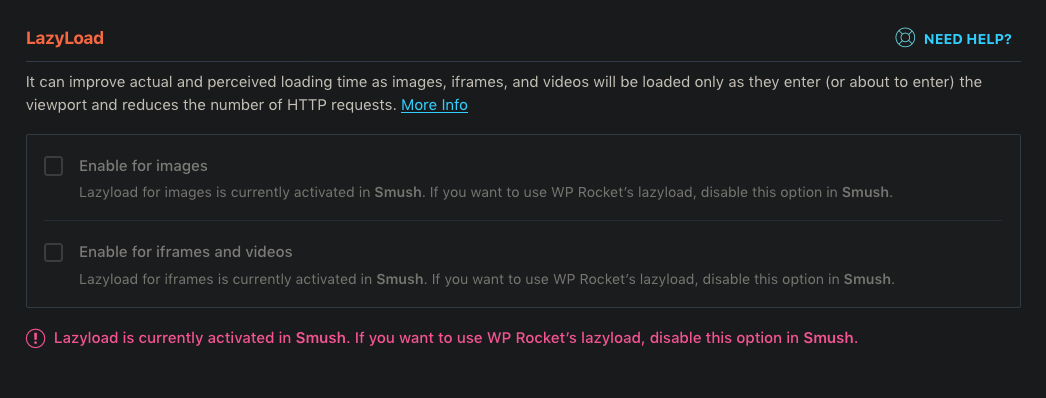
The two small messages can display different names, and the red one lists all the things listed in the two small ones.
Don't you think the red one is too much? Or do you have ideas for displaying these messages?
Screenfeed
on 4 Mar 2020
So far we disable WPR’s images lazyload if Smush’s lazyload is enabled, whichever formats are enabled. I think we should disable WPR’s images lazyload if Smush’s lazyload is enabled AND at least one image format is enabled. What do you think?
I agree, that makes more sense, else we're at a risk of the user not having lazyload at all.
UI considerations
I agree it's messy to have the same information in multiple places right now, normalizing that could be nice. We will need input from the support team too I think.
I double-checked for Autoptimize, and in fact currently it only handles lazyload for images, not iframes. We were more cautious than need be when we implemented that compatibility.
For Avada it's images only too.
Tabrisrp
on 4 Mar 2020
Thanks Remy for your feedback.
Another screen with Autoptimize lazyloading images and Smush lazyloading iframes, so you can better see what is happening now:
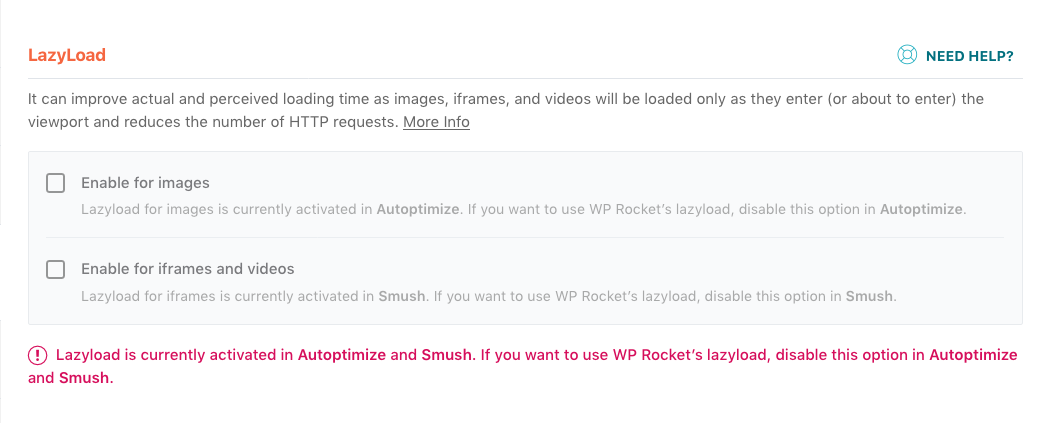
Screenfeed
on 4 Mar 2020
When we did the compatibility for WP Smush, I scoped it and we planned to disable LazyLoad for images and keep LazyLoad for iframes. This was nice because we were only disabling what that was needed and users could use our LazyLoad for iframes while using LazyLoad for images from WP Smush.
But thinking back, if we had disabled it for both images and iframes at that point, we wouldn't have had this issue or this whole discussion. Things would have been much easier because it would be already done.
Think about it from users perspective:
- LazyLoad for images in itself is more or less the same no matter which plugin does it.
- Why would a user want to use LazyLoad for images on a different plugin and only use LazyLoad for iframes from WP Rocket? Isn't that a lot of extra code and processing? (Remy can correct me, but if they use LazyLoad from two sources, wouldn't they be loading extra JS in the front end?)
- The reason why we disable our option automatically is to prevent issues.
My opinion is to keep this simple and disable both of our LazyLoad when we detect an external LazyLoad plugin.
@GeekPress What do you think?
arunbasillal
on 9 Mar 2020
I discussed this with Jonathan today. We agreed that it's simpler for us to simply disable our entire LazyLoad when we detect another LazyLoad plugin.
However, there is a problem for the end user.
- Say a user has LazyLoad for images and iframe active on WP Rocket
- The user enables LazyLoad for iframe in WP Smush
- If we disable entire LazyLoad from our end, the user will have no LazyLoad for images
Since this is not nice for the user, lets stick to the current plan to go the extra mile and disable it selectively on WP Rocket.
Regarding the UI change, I will consult with Lucy and make a plan. It's most likely going to need some rework. Is that planned for in the scope of this issue @Tabrisrp / @Screenfeed ?
arunbasillal
on 10 Mar 2020
@arunbasillal It is planned for 3.5.1 so I guess there was no plan for a UI rework.
On my side, the functionality works and, if I remember correctly, the only things that are missing are tests.
Screenfeed
on 11 Mar 2020
@arunbasillal Right now it's not planned as part of the effort. When the UI changes are ready, ping us to groom and discuss. Thanks.
Plan:
@Screenfeed will finish up the PR work without the UI changes. Then we'll get it through QA. Once we have the UI changes, then we can plan out that work.
hellofromtonya
on 11 Mar 2020
Thanks @hellofromtonya and @Screenfeed
We will in fact plan the UI change as a separate enhancement and work on it for a future sprint.
arunbasillal
on 11 Mar 2020
Acceptance Criteria
- Enable LazyLoad for iframe and images in WP Rocket.
- Enable LazyLoad for iframe (only) in WP Smush.
- Make sure LazyLoad for iframe (only) in WP Rocket is disabled and the option is greyed out. User shouldn't be able to activate this option.
- Enable LazyLoad for images in WP Smush (the option lets you choose image formats, choose at least one format).
- Make sure LazyLoad for images is disabled in WP Rocket and the option is greyed out.
What if
Couldn't think of any edge cases here. It's pretty straight forward.
arunbasillal
on 18 Mar 2020
Related issues
Tabrisrp
·
4Comments
 aniatanasova
·
5Comments
aniatanasova
·
5Comments
 leurdo
·
4Comments
leurdo
·
4Comments
 NataliaDrause
·
4Comments
Tabrisrp
·
5Comments
NataliaDrause
·
4Comments
Tabrisrp
·
5Comments