Wp-rocket: ExpiresDefault browser cache issue
Some customers have complained that they had to clear their browser cache to see new content.
The issue seems to happen when the cache is served from process.php, after it's been cached in the browser.
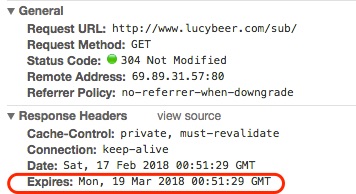
What's happening is that this rule takes effect:
ExpiresDefault "access plus 1 month"
Instead of the normal HTML expires of 0.
A solution could be to modify our ExpiresDefault to access plus 0 seconds if that doesn't have some other negative impact.
This has worked in cases where it's been applied on customer sites.
Or maybe set some different headers directly in process.php?
For reference, this is how it looks when served from htaccess:
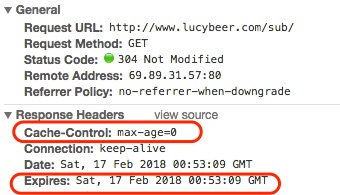
Sample ticket: https://secure.helpscout.net/conversation/508500671/58042?folderId=377611
When testing, remember to uncheck "disable cache" in dev tools!
 webtrainingwheels
All 13 comments
Related ticket: https://secure.helpscout.net/conversation/509339863/58151?folderId=1724284
@Tabrisrp Since we have explicit rules for all the file types that we know of (and we can possibly add more explicit rules as we discover more file types), would it be a good idea to get rid of the default rule from the .htaccess?
# Perhaps better to whitelist expires rules? Perhaps.
ExpiresDefault                          "access plus 1 month"
Another related ticket: https://secure.helpscout.net/conversation/496865206/56682/?folderId=273766
 arunbasillal
on 20 Feb 2018
arunbasillal
on 20 Feb 2018
@webtrainingwheels Hey Lucy, the hacky fix packaged into a helper plugin - https://www.dropbox.com/s/cjv2sridevnqxcq/wp-rocket-helper-htaccess-override-expires-headers.zip?dl=0
Until we have a more permanent and elegant solution.
Here is the diff: https://www.diffchecker.com/jh2Ui0fP
arunbasillal
on 21 Feb 2018
Unconfirmed, but possibly related:
- https://secure.helpscout.net/conversation/536368514/61809?folderId=1724284
- https://secure.helpscout.net/conversation/538106593/62042/?folderId=1724284
- https://secure.helpscout.net/conversation/562780800/65571?folderId=1724284
Related and confirmed:
arunbasillal
on 9 Mar 2018
Adding an explanation as to what MIGHT be happening here (on the surface).
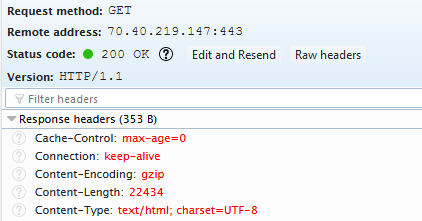
Response headers on initial load (or hard refresh) have Content-Type: text/html and our expires header ExpiresByType text/html "access plus 0 seconds" is valid as you can see here:
On a simple refresh, Content-Type is missing and our default expires header ExpiresDefault "access plus 1 month" i.e. 259,2000 seconds is used as you can see here:
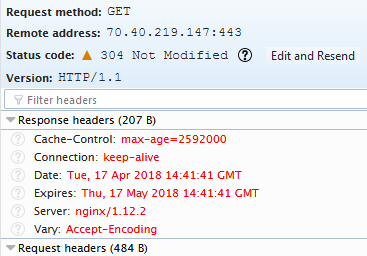
While the response is still 304, how the browser handles it MAY vary from browser to browser apparently (this could explain why it shows up on certain mobile browsers). Client-controlled Behavior - https://www.w3.org/Protocols/rfc2616/rfc2616-sec13.html#sec13.1.6
A client's request MAY specify the maximum age it is willing to accept of an unvalidated response; specifying a value of zero forces the cache(s) to revalidate all responses. A client MAY also specify the minimum time remaining before a response expires. Both of these options increase constraints on the behavior of caches, and so cannot further relax the cache's approximation of semantic transparency.
A Solution?
The helper plugin from here removes the ExpiresDefault and everything works as expected.
arunbasillal
on 17 Apr 2018
While the solution seems to work, we have no idea of the impact of it on a larger scale.
We also have no idea of the actual root cause of the issue, as for a big majority of the users the current configuration works correctly.
Before implementing it in the plugin, we need to understand why and in what cases it is happening, and make sure it doesn't impact the users for which it works currently.
 Tabrisrp
on 9 Aug 2018
Tabrisrp
on 9 Aug 2018
Agree that research is needed.
As for the root cause, I believe it's related to when we added last-modified headers in process.php. BTW I'm not suggesting we remove those because I think they're beneficial, but for me that's the starting point for debugging.
webtrainingwheels
on 9 Aug 2018
Did some more reading on this matter and it turns out that it is required that a 304 response to not have a content-type.
Here is the response we send: https://github.com/wp-media/wp-rocket/blob/16c3c20bd861276ffb36a1e721ab2d3f4efd710f/inc/front/process.php#L345-L350
As per this doc: https://tools.ietf.org/html/rfc7232#section-4.1
The server generating a 304 response MUST generate any of the following header fields that would have been sent in a 200 (OK) response to the same request: Cache-Control, Content-Location, Date, ETag, Expires, and Vary.
Doesn't it mean that we should be sending a Cache-Control header? I think that would solve the issue.
Related discussion:
arunbasillal
on 10 Aug 2018
 WordPresseur
on 21 Aug 2018
WordPresseur
on 21 Aug 2018
Another related ticket:
https://secure.helpscout.net/conversation/653567573/78612/
 vmanthos
on 31 Aug 2018
vmanthos
on 31 Aug 2018
Another ticket here:
https://secure.helpscout.net/conversation/660815262/79757?folderId=2135277
vmanthos
on 11 Sep 2018
Just sharing some thoughts and notes. Had a discussion about this with JB and Jared.
- The solution based on this doc and this comment seems like you need to send a expiry header for 304 response.
- Since the 304 is for HTML file, the expiry time would be zero.
- We already set zero expiry time via .htaccess so this is not something new that we would be introducing.
- So the risk is minimal.
- The segment of users who are not using .htaccess redirects and always get the cache served via process.php are the only ones affected as well.
arunbasillal
on 18 Sep 2018
Another related ticket:
https://secure.helpscout.net/conversation/672021255/81223?folderId=2135277
vmanthos
on 5 Oct 2018
I have been doing some final research on this matter to figure out what is the best combination of of headers to send.
I think the best is to do two headers.
Cache-Control: no-cache, must-revalidateExpireswith immediate expiry time in GMT
Some good reference is here: https://devcenter.heroku.com/articles/increasing-application-performance-with-http-cache-headers#http-cache-headers
arunbasillal
on 7 Nov 2018
Related issues
webtrainingwheels
·
5Comments
 piotrbak
·
4Comments
piotrbak
·
4Comments
 NataliaDrause
·
4Comments
vmanthos
·
5Comments
Tabrisrp
·
5Comments
NataliaDrause
·
4Comments
vmanthos
·
5Comments
Tabrisrp
·
5Comments
Most helpful comment
@webtrainingwheels Hey Lucy, the hacky fix packaged into a helper plugin - https://www.dropbox.com/s/cjv2sridevnqxcq/wp-rocket-helper-htaccess-override-expires-headers.zip?dl=0
Until we have a more permanent and elegant solution.
Here is the diff: https://www.diffchecker.com/jh2Ui0fP