Wp-rocket: Add composer.json and integrate with Packagist
Hi there,
great that the code of WP Rocket has been open sourced!
Are there any plans to add a (minimalistic) composer.json file, and also integrate the repository with Packagist?
Or in other words, is there anything that speaks against doing so?
Having WP Rocket available via Packagist would make it easier to use it for WordPress projects that are completely managed via Composer.
I can provide a pull request for the composer.json file, if desired.
Cheers,
Thorsten
 tfrommen
All 25 comments
Hi,
We got quite a good number of requests to make the plugin available through composer, for now it's not possible because you can't download the plugin without being logged-in to your account.
But it's definitely something we want to make happen!
 Tabrisrp
on 24 Jul 2017
Tabrisrp
on 24 Jul 2017
Not exactly sure what you mean by this
you can't download the plugin without being logged-in to your account.
but you can use it with Composer already. It's just that you have to define the full package in your composer.json file, like so:
{
  "require": {
    "wp-media/wp-rocket": "^2.10.0"
  },
  "repositories": [
    {
      "type": "package",
      "package": {
        "name": "wp-media/wp-rocket",
        "version": "2.10.6",
        "source": {
          "url": "https://github.com/wp-media/wp-rocket",
          "type": "git",
          "reference": "v2.10.6"
        }
      }
    }
  ]
}
However, this is far from ideal as it is rather verbose as well as not dynamic.
tfrommen
on 24 Jul 2017
If you do that you'll have to modify the plugin files, because the GitHub version doesn't contain your licence data nor the correct URL for the license validation
Tabrisrp
on 24 Jul 2017
Both could be provided by the user through environment variables or even WordPress settings.
 dnaber-de
on 24 Jul 2017
dnaber-de
on 24 Jul 2017
As far as I understand, in the "final" version there's a file named licence-data.php which contains WP_ROCKET_KEY and WP_ROCKET_EMAIL config.
That file could be generated on-the-fly on by a simple script run on composer update/install and the values for key and email could be set in the composer.json.
This would not be done by _you_ (you would just ship the script for people to use), but by an advanced user that want to use Composer & WP Rocket would be allowed to do that.
Other users would not completely be affected and could continue to use the plugin as usual.
For example, assuming the following (user) composer.json snippet:
{
    "extra": {
        "wp-rocket": {
              "WP_ROCKET_KEY": "xxxx",
              "WP_ROCKET_EMAIL": "[email protected]"
       }
    },
    "scripts": {
        "wprocket": "Rocket_License_Data_Creator::create",
        "post-install-cmd": "@wprocket",
        "post-update-cmd": "@wprocket"
    },
}
The generation script would be something like the following (completely untested)
class Rocket_License_Data_Creator {

    private $key;
    private $email;

    public static function create( Composer\Script\Event $event ) {
        $extra = $event->getComposer()->getPackage()->getExtra();
        $io    = $event->getIO();
        if (
            empty( $extra[ 'wp-rocket' ] )
            || empty( $extra[ 'wp-rocket' ][ 'WP_ROCKET_KEY' ] )
            || empty( $extra[ 'wp-rocket' ][ 'WP_ROCKET_EMAIL' ] )
        ) {
            $io->write( 'WP Rocket do nothing' );
            return;
        }
        $key  = $extra[ 'wp-rocket' ][ 'WP_ROCKET_KEY' ];
        $mail = $extra[ 'wp-rocket' ][ 'WP_ROCKET_EMAIL' ];
        $instance    = new static( $key, $mail );
        $target_path = $instance->discover_wp_rocket_path( $event->getComposer() );
        if ( $target_path && file_exists( "{$target_path}/plugin-data.php" ) ) {
            $io->write( 'WP Rocket plugin-data.php file exist.' );
            return;
        } elseif ( ! $target_path ) {
            $io->writeError( 'Could not determine WP Rocket path.' );
            return;
        }
        $instance->write_file( "{$target_path}/plugin-data.php", $io );
    }

    /**
     * @param string $key
     * @param string $email
     */
    public function __construct( $key, $email ) {
        $this->key   = $key;
        $this->email = $email;
    }

    /**
     * @param string                  $target_path
     * @param Composer\IO\IOInterface $io
     */
    public function write_file( $target_path, Composer\IO\IOInterface $io ) {
        $content = strtr(
            $this->template(),
            array( '{{KEY}}' => $this->key, '{{EMAIL}}' => $this->email )
            );
        file_put_contents( $target_path, $content )
            ? $io->write( 'WP Rocket plugin-data.php created successfully.' )
            : $io->writeError( "Error writing WP Rocket plugin-data.php." );

    }

    /**
     * @return string
     */
    private function template() {
        $content = <<<PHP
<?php
defined( 'ABSPATH' ) or die( 'Cheatin\' uh?' );
if ( ! defined( 'WP_ROCKET_KEY' ) ) {
    define( 'WP_ROCKET_KEY', '{{KEY}}');
}
if ( ! defined( 'WP_ROCKET_EMAIL' ) ) {
    define( 'WP_ROCKET_EMAIL', '{{EMAIL}}' );
}
PHP;
        return $content;
    }

    /**
     * @param Composer\Composer $composer
     *
     * @return string
     */
    private function discover_wp_rocket_path( Composer\Composer $composer ) {
                if ( $composer->getPackage()->getName() === 'wp-media/wp-rocket' ) {
            return getcwd();
        }
        $repo_manager = $composer->getRepositoryManager();
        $packages =$repo_manager->getLocalRepository()->getPackages();
        foreach ( $packages as $package ) {
            if ( $package->getName() === 'wp-media/wp-rocket' ) {
                $installation_manager = $composer->getInstallationManager();
                return $installation_manager->getInstallPath( $package );
            }
        }
        return '';
    }
}
Of course, this assumes the class above being autoloadable via Composer, which should not be big deal using "classmap" config on your side, which works with WP naming code style.
 gmazzap
on 24 Jul 2017
gmazzap
on 24 Jul 2017
Thank you for all the insights we're definitely open for pull requests to integrate a solution for composer
Tabrisrp
on 25 Jul 2017
A composer.json file has been added in the branch-2.11 currently in development.
You can see it here: https://github.com/wp-media/wp-rocket/blob/branch-2.11/composer.json
If you have any feedback on it, let me know, it's still a work in progress
Tabrisrp
on 13 Oct 2017
Is this now ready for use through composer?
Otherwise this is a deal breaker :)
 rayrutjes
on 18 Dec 2017
rayrutjes
on 18 Dec 2017
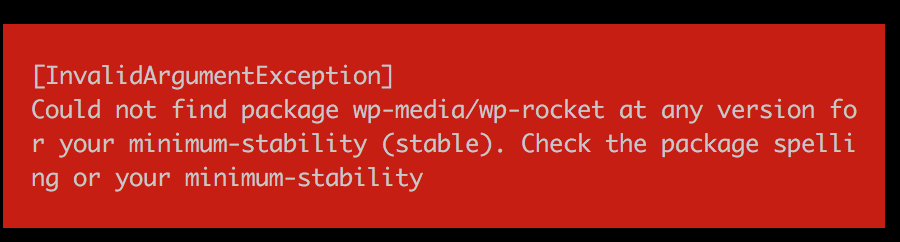
Package is not yet on packagist. Any chance you put it there?
rayrutjes
on 18 Dec 2017
I worked around the issue by doing:
"repositories": [
        {
            "type": "composer",
            "url": "https://wpackagist.org"
        },
        {
            "type": "vcs",
            "url": "https://github.com/wp-media/wp-rocket"
        }
    ],
"require": {
  "wp-media/wp-rocket": "^2.11"
}
Now I would highly appreciate the explanation about where to add license key and everything.
Possible from wp-config?
rayrutjes
on 18 Dec 2017
What's the state of this?
As @rayrutjes said above, it is possible to enter license information in wp-config?
Moreover, I see an issue. You are always requiring Composer autoload (https://github.com/wp-media/wp-rocket/blob/master/wp-rocket.php#L177).
This is problematic when someone uses Composer to install the whole website and not the single plugin, in facts, in that case the autoload is loaded at website level and there's no need to load it again and it can cause issues expecially if any of the dependencies uses files autoload directive.
You could solve this quite easily by conditionally loading the autoload if it has not been loaded already.
Best way would be to have a separate file that contains all the defines you have in main plugin file and load that via Composer autoload files directive only if the constants are not defined yet.
gmazzap
on 2 Jan 2018
@Tabrisrp
Is this just working out of the box? Is licensing being handled automatically? You should add a documentation article explaining how to install WP Rocket with Composer.
 Jeppeskovsgaard
on 26 Jan 2018
Jeppeskovsgaard
on 26 Jan 2018
Confirm that this cause an issue when you use composer to install whole webiste
Fatal` error: require(): Failed opening required '/home/mysite/web/app/plugins/wp-rocket/vendor/autoload.php' (include_path='.:/usr/share/pear:/usr/share/php') in /home/mysite/web/app/plugins/wp-rocket/wp-rocket.php on line 177
 krombox
on 10 Feb 2018
krombox
on 10 Feb 2018
@krombox +1. I use my own composer scripts to deploy Wordpress (but not plugins); this makes an absolute mess of everything (as in: yay, my entire site 500s).
 infovore
on 23 Feb 2018
infovore
on 23 Feb 2018
Plugin is now on packagist: https://packagist.org/packages/wp-media/wp-rocket
@krombox @infovore: This should be fixed by PR #759, that will be included in 2.11.7
@gmazzap @rayrutjes: You can define the license constants in wp-config.php yes, but there is also a change to be made in wp-rocket.php file. You need to set the value of WP_ROCKET_WEB_MAIN to https://wp-rocket.me, so the license validation can work after installation.
Tabrisrp
on 27 Feb 2018
@Tabrisrp Are there any plans to allow WP_ROCKET_WEB_MAIN to be defined in wp-config.php in future? (i.e. by wrapping it in a !defined('WP_ROCKET_WEB_MAIN ') check).
Alternatively, is there any reason why this is not just defined in the repository?
At the moment, this is a bit of a blocker to using composer to install wp-rocket.
 braders
on 20 Mar 2018
braders
on 20 Mar 2018
What's the status on this? Seems like an easy change (and there are pull requests waiting that incorporate it). Lack of Composer support is the only thing stopping us from deploying WP Rocket across our servers.
 smilingpeanut
on 11 Sep 2018
smilingpeanut
on 11 Sep 2018
What's the status on this? Seems like an easy change (and there are pull requests waiting that incorporate it). Lack of Composer support is the only thing stopping us from deploying WP Rocket across our servers.
Same here!
 koendoit
on 25 Sep 2018
koendoit
on 25 Sep 2018
My PR https://github.com/wp-media/wp-rocket/pull/681 would fix both the autoloader issue (fixed in #759) and also this issue...
gmazzap
on 26 Sep 2018
WP_ROCKET_WEB_MAIN will be correctly defined to our website URL starting from 3.2.
With that , there should not be any remaining issue using WP Rocket with composer, as long as you define manually your WP_ROCKET_KEY and WP_ROCKET_EMAIL constants in wp-config.php
Tabrisrp
on 5 Oct 2018
When is the release date set for 3.2? In addition, you'll want to update the README with exact instructions on what constants can be set via wp-config.php (less friction on getting up and running).
 tulbox
on 9 Oct 2018
tulbox
on 9 Oct 2018
We are considering this plugin for our WordPress sites also, and although there seems to be Composer support now, it would be extremely helpful if you had a guide or wiki on how to install this plugin via composer (from both a marketing and technical perspective). Luckily I was able to find this issue to inform me that Composer support is "kind of" available.
 rreynier
on 18 Oct 2018
rreynier
on 18 Oct 2018
When 3.2 is merged into the master, the main readme will also be updated with instructions for using the plugin with composer.
Tabrisrp
on 18 Oct 2018
When 3.2 is merged into the master, the main readme will also be updated with instructions for using the plugin with composer.
@Tabrisrp
I've actually tried the install via composer but it seems a wrong version of a dependency in the package.
Your requirements could not be resolved to an installable set of packages.

  Problem 1
    - Installation request for wp-media/wp-rocket 3.2.5 -> satisfiable by wp-media/wp-rocket[v3.2.5].
    - wp-media/wp-rocket v3.2.5 requires a5hleyrich/wp-background-processing 1.3 -> no matching package found.
 bweiler-marketingflotte
on 13 Feb 2019
bweiler-marketingflotte
on 13 Feb 2019
Because a5hleyrich/wp-background-processing does not exist in version 1.3 https://github.com/A5hleyRich/wp-background-processing/releases this line https://github.com/wp-media/wp-rocket/blob/master/composer.json#L35 should be something like 1.* or 1.0.*.
gmazzap
on 13 Feb 2019
Related issues
 vmanthos
·
5Comments
vmanthos
·
5Comments
 maximejobin
·
4Comments
maximejobin
·
4Comments
 NataliaDrause
·
4Comments
NataliaDrause
·
4Comments
 leurdo
·
4Comments
vmanthos
·
5Comments
leurdo
·
4Comments
vmanthos
·
5Comments
Most helpful comment
Because
a5hleyrich/wp-background-processingdoes not exist in version 1.3 https://github.com/A5hleyRich/wp-background-processing/releases this line https://github.com/wp-media/wp-rocket/blob/master/composer.json#L35 should be something like1.*or1.0.*.