Wp-graphql: Proposal for WPGraphQL Dashboard Settings Pages
I was wondering if it wouldn't be nice to have an Admin-Page for WPGraphQl for Settings, Status and other functionality, similar to WooCommerce.
Not sure if it is something that could be in an extra plugin or rather should be in core. I'd be happy about discussions.
Here are some features I can think of right now, please add some more in the comments:
- Status Page
- Check compatibility of Plugin versions (Would need some sort of interface in all plugins to be able to check)
- Check for requirements (are there any like Memory Limit etc. ?)
- Verify GraphQL endpoint
- PHP and Environment Info, Installed Plugins working with WPGraphQL (Gotta Register plugin as WPGraphQL plugin somehow)
- Way to export all this Info for Issues and debugging
- Settings Page
- API for WPGraphQL Plugins to add Tabs for their own Settings
- WPGraphQL Cors Settings
- WPGraphQL Persisted Queries Settings
- WooGraphQL: Define JWT Secret
- WPGraphQL JWT Authentication: Define Secret, Change Auth Token expiration
- API for WPGraphQL Plugins to add Tabs for their own Settings
- Include into core:
- WPGraphiQL (default: enabled)
- WPInsights (default: disabled)
- Extension Page (Plugin)
- To install WPGraphQL Extensions (Plugins)
- General Considerations:
- Settings should be properly hookable/filterable allowing plugins to extend the setting pages for their needs.
- Settings should be accessible
Let the discussion begin 😄
 henrikwirth
All 24 comments
@henrikwirth , I 100% agree. @jasonbahl and I have been talking about this recently. We actually need to build something similar for WPGatsby using React so we were thinking it'd be really cool to build some kind of utility for creating React powered options pages. Jason is working on adding a new debug message API in WPGQL for things that aren't necessarily errors but that consumers need to know about and we thought it'd be great to have an admin page where you could view those messages too (for ex for duplicate registered fields). We also need a way to toggle wp-graphiql requests to be authed or unauthed so that users don't need a second gql client to see what their users queries will return.
I love the idea of a compatibility page. I think there should be a function extensions call to register which version of WPGQL they support. So to start out the page would probably be full of unknowns, but this would prevent needing to store compatibility data about extensions within WPGQL.
 TylerBarnes
on 2 Aug 2020
TylerBarnes
on 2 Aug 2020
@TylerBarnes @henrikwirth @jasonbahl I'd like to recommend an "Extensions page" for quick installation of common WPGraphQL extensions as well.
 kidunot89
on 3 Aug 2020
kidunot89
on 3 Aug 2020
@henrikwirth as @TylerBarnes mentioned, we've been talking a lot about this. I think it's going to be more and more needed. I've really wanted to avoid having a settings UI, but I think having one will be more worth it than not having one.
Here's some things we need to consider:
- Settings should be properly hookable/filterable allowing plugins to extend the setting pages for their needs.
- Settings should be accessible
I think we can probably start with a non-React based solution to get something working sooner than later, then come back and build a UI for it that works with WPGraphQL Queries and Mutations, but there's a lot of added nuance to going that approach, where there are already existing setting solutions for "classic" WordPress settings pages.
We're currently using this class (https://github.com/tareq1988/wordpress-settings-api-class) in WPGatsby, and it might make sense to start with the same thing (or similar) for WPGraphQL settings, then iterate from there?
 jasonbahl
on 3 Aug 2020
jasonbahl
on 3 Aug 2020
I have been very seriously thinking about adding GraphiQL to WPGraphQL core for a long time, and I think it's the right choice, especially if we have a settings page where you can configure things like turning it on/off completely, restricting to certain capabilities, etc.
jasonbahl
on 3 Aug 2020
@TylerBarnes mentioned, it might make sense to go the React way directly to make it easier maintainable in the long run. I'd agree with it, but setting it up properly would need some proper discussion. I'm happy to dive into it a little and see if we can come up with something that I can make a draft out of. (Hopefully I my broken index finger doesn't stop me too long from coding :D)
henrikwirth
on 3 Aug 2020
Maybe we can just reuse the components of WordPress, that WooCommerce is using too.
henrikwirth
on 6 Aug 2020
@henrikwirth ya, perhaps.
I'm not super familiar with how WooCommerce is using them.
One thing that is important to me is having easy ways to filter this stuff so 3rd party plugins can add/extend things somewhat easily.
Like if we had a settings page that had a list of fields, I'd want a plugin to be able to add a field fairly easily.
With a "standard" settings page we can offer an API like (totally made up pseudo code):
register_graphql_settings_field( 'general-settings', [
        'label' => __( 'My new field', 'text-domain' ),
        'description' => __( 'Description for what the input of the field will affect', 'text-domain' ),
        'type' => 'text',
        'default_value' => '',
        'placeholder' =>
        'validation' => function( $input ) {
           // something that can return true if it passes or return some validation message if it doesn't validate
        },
        'sanitize_on_save' => function( $input ) {
          // do something with the input on save
        },
] );
This type of API would allow for fields to be added to a field group and when clicking "Save" the input would be included in the $_POST and then things like the validate and sanitize callbacks can be executed when the form is submitted.
This also allows to tap into the existing solutions for translations for things like field labels, etc.
Having an API like this could still work with a React solution, but there will be more steps involved to do it well, I think.
I personally think to make it the most extendable, we would want many types of fields available so that plugins would be able to register new setting groups and setting fields via a server side API and only in rare cases (such as coming up with fully custom field types) have to write any JS.
We could have a similar API as above, and that translates into a GraphQL Schema, and our settings page could have a query like so (also very pseudo code):
{
  graphqlSettingsGroups( settingsPage: 'General' ) {
      nodes {
          name
          description
          fields {
              __typename
              label
              description
              ...on Input {
                 defaultValue
                 placeHolder
              }
              ...on MultiSelect {
                  choices {
                     key
                     value
                   }
                   default
              }
           }
      }
  }
}
These fragments could be defined in their own Field Type Components, such as (also very pseudo code):
components/MultiSelect.js
# imports...

export fragment = gql`
fragment MultiSelectFields on MultiSelect {
   choices {
     key
     value
    }
   default
}
`;

export default const MultiSelect = ({ choices, default }) => {
   <Select choices={choices} default={default} value={onChange() => { // do whatever } } />
}
Or something like that.
Then the query to get all fields could be filterable to include the fragments:
{
  graphqlSettingsGroups( settingsPage: 'General' ) {
      nodes {
          name
          description
          fields {
              __typename
              label
              description
              ${ImportedFragmentNames}
           }
      }
  }
}
${ImportedFragments}
That way we could allow new Types of fields to be defined and their fragments could be imported and used in the query to fetch fields and render a UI.
Then, on the flip side we'd need to handle mutations. When a form is saved, we'd need to submit the inputs to a GraphQL mutation.
So the input types would be needed to be registered to the settings mutation as well, and when field values change in the React component, we'd need to track the values in an object that would be submitted with the mutation.
I hope this all makes sense?
jasonbahl
on 6 Aug 2020
I'm looking at Carbon Fields right now, and it looks like it might be a great option to pull in so we can get some settings fields in place quickly while we consider some kind of React based solution.
https://docs.carbonfields.net/#/quickstart
It can be included as a composer dependency, much like GraphQL-PHP, then we can use it do define settings pages, and it's already got a hook/filter system in place so we can allow 3rd party plugins to extend settings pages, add new ones, etc.
Looks pretty solid.
jasonbahl
on 6 Aug 2020
I agree 100% that it should be filterable. If we use WPGraphQL to power the whole thing it will work like that out of the box.
Using Carbon fields to start sounds reasonable but I think we may never move away from it if we go that route, and if we do it might be hard to properly map the previously stored options to the new format for existing sites that used the Carbon fields options page.
When/if we go the React SPA route I think it would be a reasonable route to:
- Use a pre-existing "React Admin" components package
- Define initial data queries for each route on the server
- for example a page could be index.php?wp-graphql&initialQuery=namedQuery&args={id=1}
- this would run that named query on the server side using WPGQL and then print it out to the top of the settings page as a JSON object for the app to pick up as initial state/data
- these initial queries should be stored as .graphql files so JS or PHP can use them so we have a kind of isomorphic query layer but client-side only JS
TylerBarnes
on 6 Aug 2020
@TylerBarnes I don't think the queries should be stored as .graphql files because other plugins will need to filter them.
If another plugin wants to add a new field Type that has different needs, it will need to filter in what data to query for and a static file isn't filterable. I mean it is, but defeats the purpose of the static file. The source of truth for the query string should be the result of the default query + applied filters.
Like my example:
{
  graphqlSettingsGroups( settingsPage: 'General' ) {
      nodes {
          name
          description
          fields {
              __typename
              label
              description
              ${ImportedFragmentNames}
           }
      }
  }
}
${ImportedFragments}
jasonbahl
on 6 Aug 2020
Carbon Fields actually might make it _easier_ because, much like ACF, it defines a server-side "schema" for Fields and Field Groups already, so translating that to GraphQL shouldn't be much different than how we've done it for ACF already.
This way we could have settings fields _now_ and a path forward for a React-based UI but wouldn't have to change any of the underlying way things work. We would just swap out the UI the user sees when we're ready with the React version
jasonbahl
on 6 Aug 2020
@drewbaker :point_up: See this. I think WPGraphQL CORS functionality should be included the core WPGraphQL settings page.
kidunot89
on 7 Aug 2020
Yes +1 to be able to set CORS for the GraphQL endpoint. This would enable cookie auth to work.
 drewbaker
on 7 Aug 2020
drewbaker
on 7 Aug 2020
Here's where my head is at right now:
I've explored Carbon Fields a bit, and it's pretty nice.
I'm leaning toward using it to start. As much fun as a custom React Settings framework would be, I feel like that's a lot more work than I want to take on supporting right now. There's a _lot_ to support with the initial goal of turning WordPress into a Graph, and adding a custom settings framework to manage doesn't feel like it fits within my current bandwidth.
I think using something like Carbon Fields will allow us to have this much requested feature soon, provide the ability for plugin authors to extend the settings for their plugins needs, register their own sub-setting pages, filter in their own fields, etc.
If someone who has time and more React experience than me (I'm good with React, just not in it every day) wants to build a sweet Settings Framework, we can always switch to it later.
I think there's a lot more work to a custom settings framework than one might initially consider. There's all the field types you need to support, provide APIs for 3rd parties to customize and add their own fields, translations, accessibility, validation, sanitization, etc.
Many of these problems have largely been solved by Carbon Fields already, and since it outputs a "Schema" of sorts for the registered setting fields, we can use that down the road to expose a GraphQL Schema for the settings and swap UIs when we feel we have a good React framework for it.
jasonbahl
on 7 Aug 2020
100% please don't make some custom React based settings thing for WP-GraphQL! Keep it simple and PHP based if possible, just like the rest of WordPress settings pages (sans gutenberg blocks).
drewbaker
on 7 Aug 2020
Yep, I agree with yall, it's too much work, let's keep it simple and get it done :)
TylerBarnes
on 25 Aug 2020
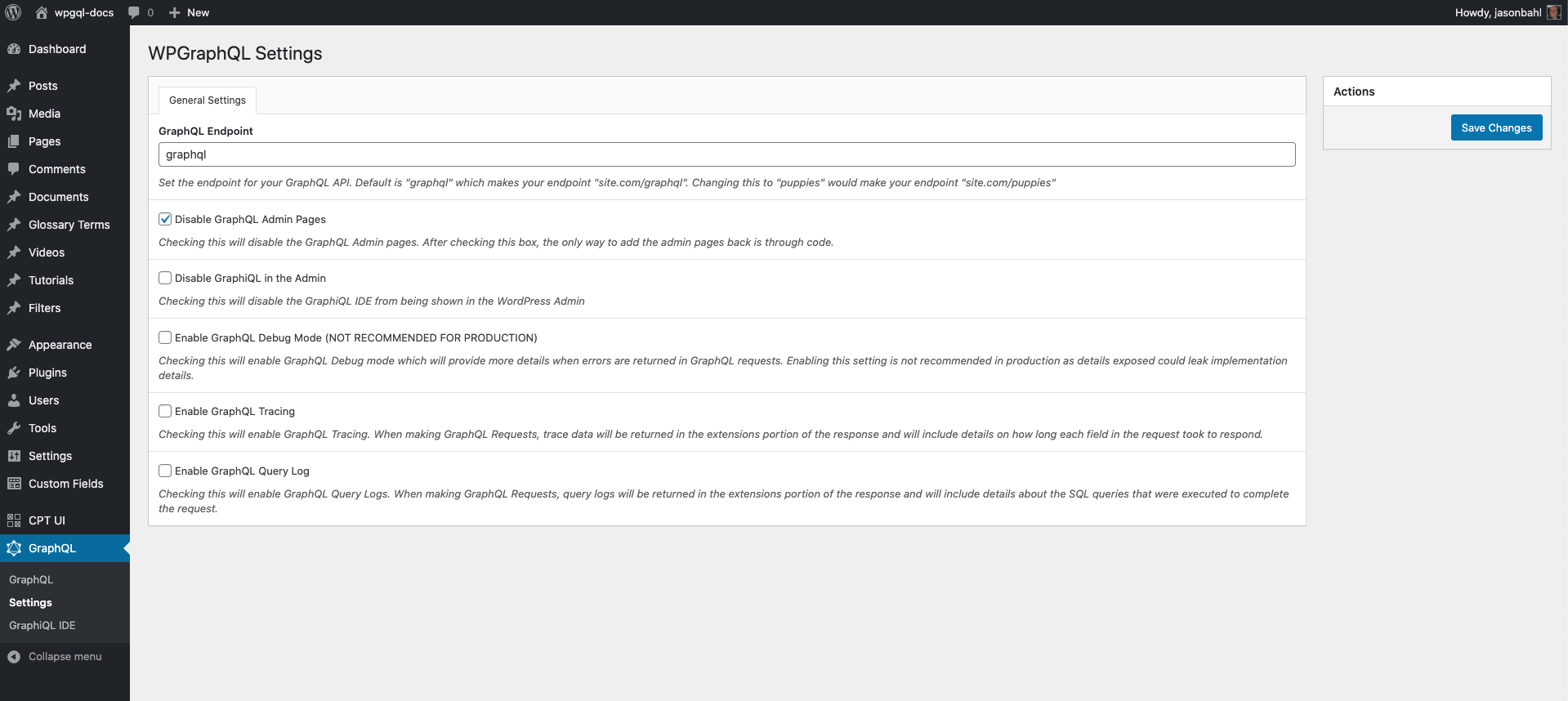
I made some progress on this using Carbon Fields.
The idea is that we'll have a new Admin Menu Page that can serve as a "Getting Started" page for WPGraphQL.
Then under that will be the submenus:
- Settings
- GraphiQL IDE
Other plugins can of course add their own submenus as well.
Settings
The settings page is using Carbon Fields pulled in as a composer dependency.
Here's what it looks like currently (still WIP).
Extending Settings Pages
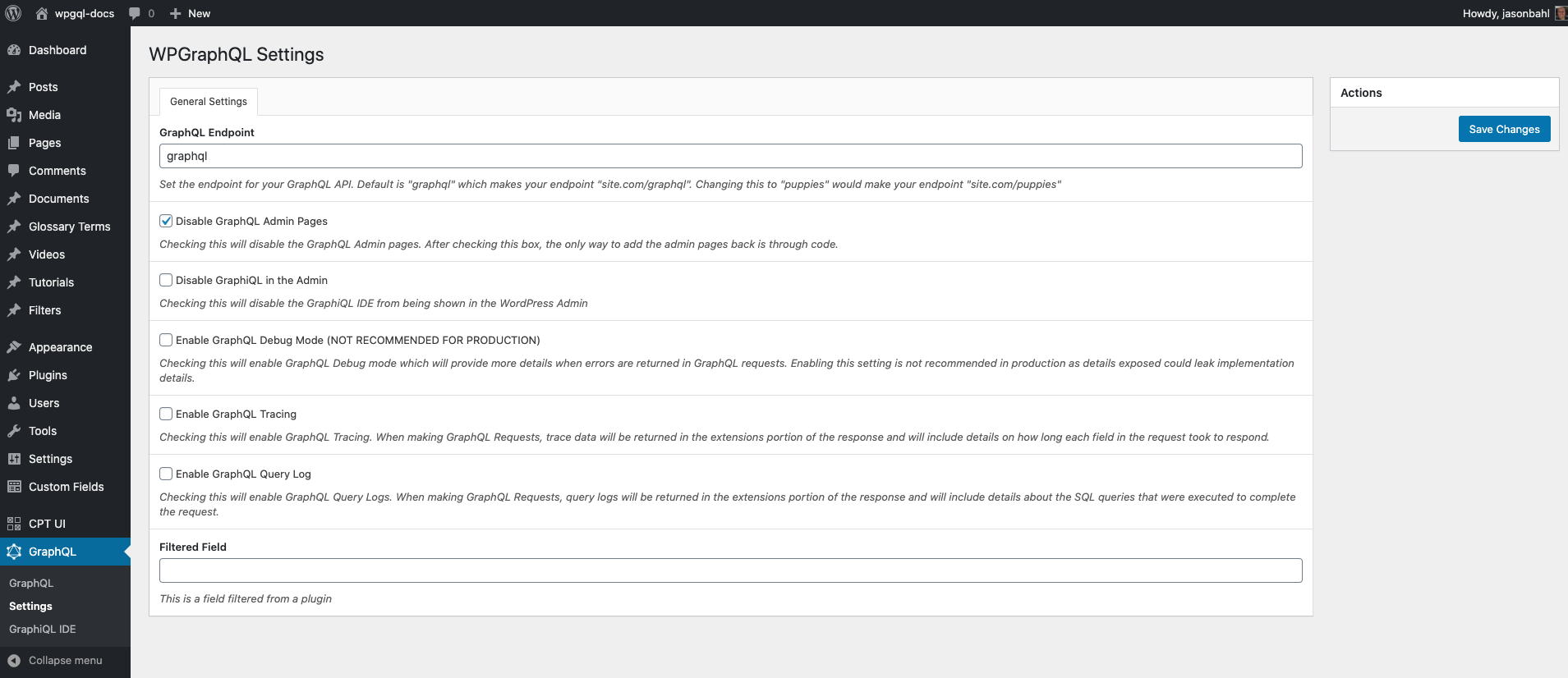
3rd party plugins can extend the settings page by adding their own fields using existing Carbon Fields APIs along with some filters added by WPGraphQL.
Add a new field
add_filter( 'graphql_settings_fields', function( $fields ) {
  $fields[] = Carbon_Fields\Field::make( 'text', 'filtered_field', __( 'Filtered Field', 'wp-graphql' ) )
  ->set_help_text( __( 'This is a field filtered from a plugin', 'wp-graphql' ) );
  return $fields;
} );
This adds a new field (see the bottom field)
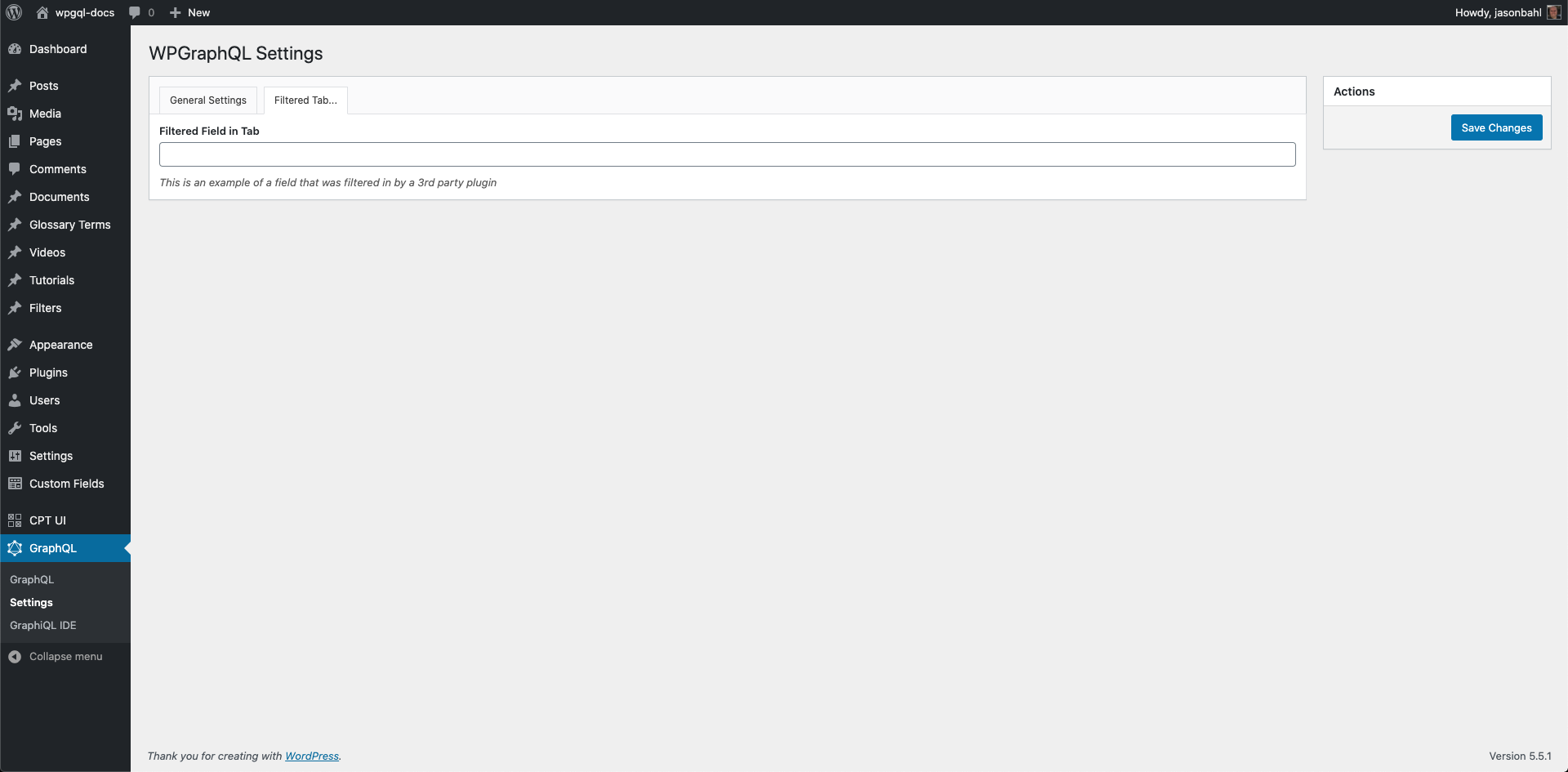
Add a new settings tab
add_action( 'graphql_settings_container', function( $graphql_settings ) {
  $graphql_settings->add_tab( __( 'Filtered Tab...', 'wp-graphql' ), [
     Carbon_Fields\Field::make( 'text', 'filtered_tab_field', __( 'Filtered Field in Tab', 'wp-graphql' ) )
       ->set_help_text( __( 'This is an example of a field that was filtered in by a 3rd party plugin', 'wp-graphql' ) )
    ] );
} );
This adds a new tab and can have it's own fields
jasonbahl
on 9 Sep 2020
Maybe I’m missing something here, but why not just do this with the regular Wordpress settings API? Why Carbon Fields? Just because of that extra tab so plugins can add settings?
drewbaker
on 10 Sep 2020
@Drew WordPress core doesn't have a Field API. The WP Settings API is very minimal and doesn't address so many common issues related to having settings pages and forms. So all the things related to settings pages has to be solved (and maintained) by anyone adding settings pages.
Things like:
- Form & Field Markup
- Client and Server Validation
- Sanitization
- i18n
- extendability
Carbon Fields solves these things, so I can focus on the primary goals of WPGraphQL.
I wish WordPress had some sort of formal fields API, but since it doesn't every plugin is on its own re-inventing the wheel.
I don't feel like my time is best spent on wheel re-inventing...figuring out (and maintaining) best practices for form/field markup, validation rules, etc.
While the initial look at the settings page has just checkboxes, text fields and an example of an additional tab, Carbon Fields also supports many more Field types, including things like repeating groups of fields, etc.
Having a re-usable Field API available should allow extension plugin authors to move faster on their ideas because they will be able to focus on the value of their plugin and not have to worry about figuring out things like setting form/field markup, validation, etc.
jasonbahl
on 10 Sep 2020
OK, that makes sense. I've only ever built settings page by myself, never had to extend someone else's.
drewbaker
on 10 Sep 2020
After some discussion and pushback in Slack, I'm exploring non-Carbon fields ideas.
The WP Settings API alone isn't feature complete. . .it doesn't have proper fields API to go with it, etc. . .but there are some minimal abstractions that exist that we can borrow. For example: https://github.com/tareq1988/wordpress-settings-api-class
I'm exploring this approach today.
I think it could give us the best of both worlds. Some flexibility for extension plugins to hook in and provide their own settings with a cohesive look and feel, and keep the maintenance burden fairly low.
jasonbahl
on 10 Sep 2020
Ok, so I reworked things to NOT use Carbon Fields.
Instead I'm using the class mentioned above, with some changes and a new API abstraction.
Here's the settings page when you activate WPGraphQL (might still change a bit):
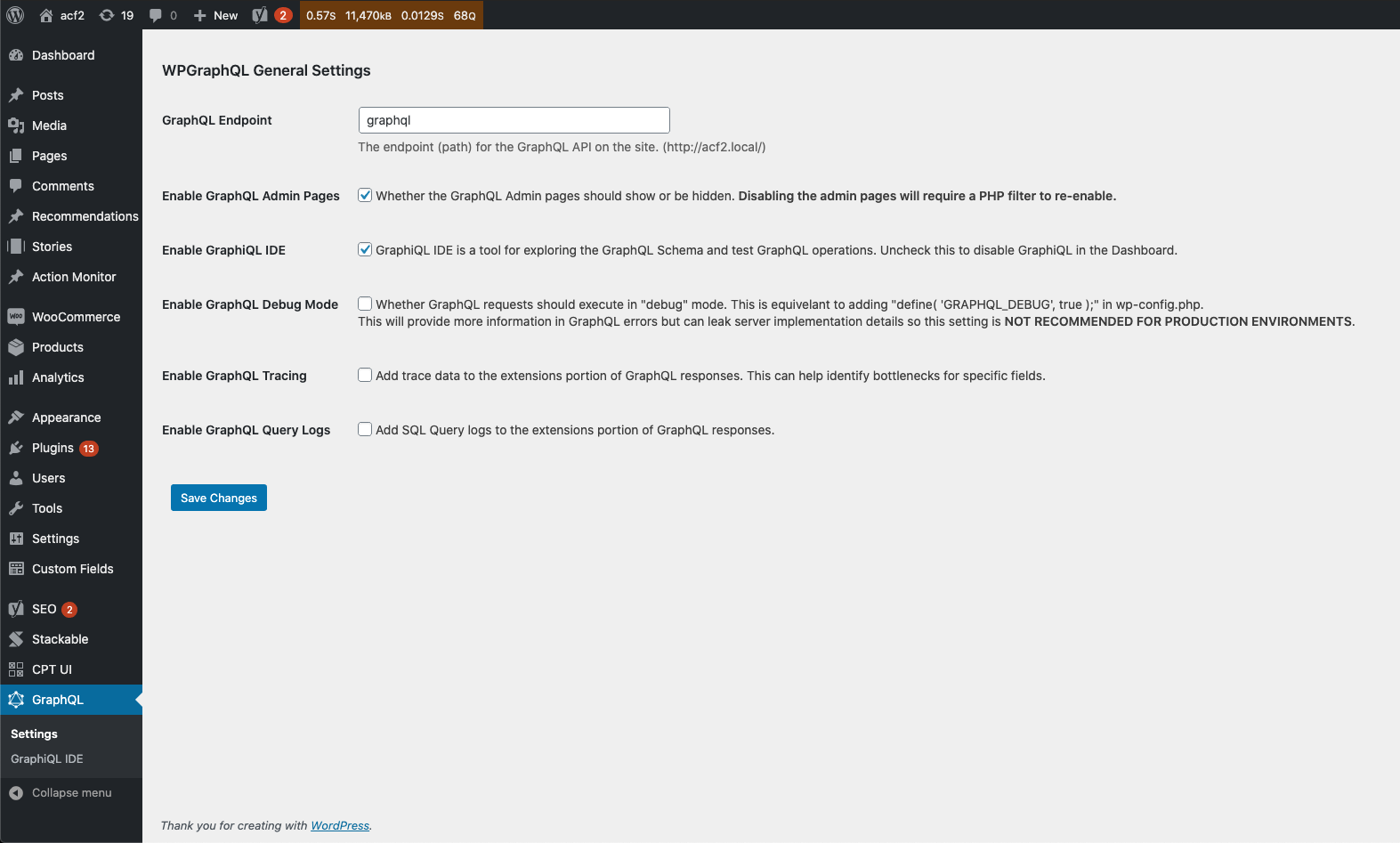
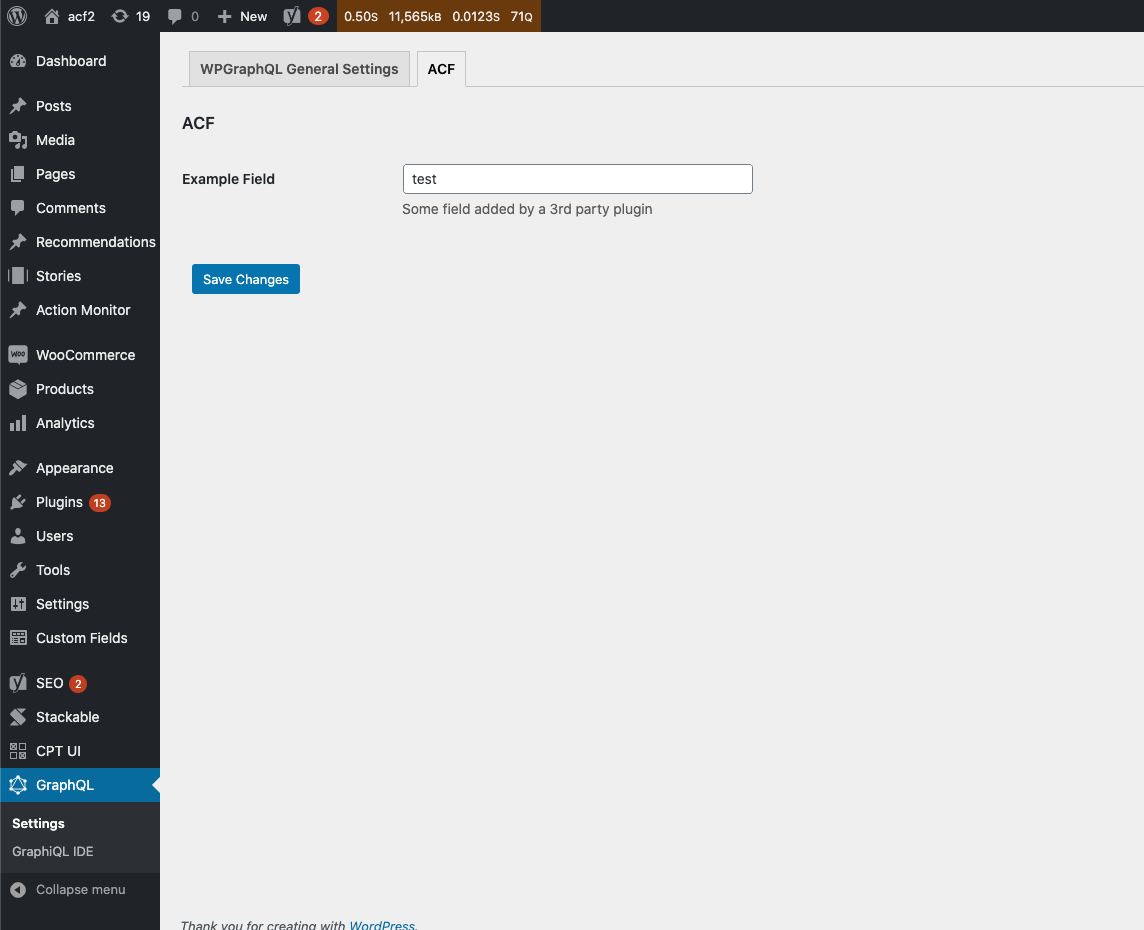
Then, 3rd party extensions can extend like so:
add_action( 'graphql_register_settings', function() {

        // This registers a new tab within the GraphQL Settings page
    register_graphql_settings_section( 'graphql_acf', [
        'title' => __( 'ACF', 'wp-graphql' ),
    ]);

        // This registers fields to the graphql_acf tab
    register_graphql_settings_fields( 'graphql_acf', [
        [
            'name'              => 'acf_field_one',
            'label'             => __( 'Example Field', 'wp-graphql' ),
            'desc'              => __( 'Some field added by a 3rd party plugin', 'wp-graphql' ),
            'type'              => 'text',
            'default'           => 'default value...',
        ],
    ]);

} );
And you end up with:
jasonbahl
on 10 Sep 2020
@jasonbahl "Enable GraphQL Admin pages" should probably be able to be refreshed by activating and deactivating the plugin, in case you uncheck it by mistake :thinking:.
kidunot89
on 11 Sep 2020
Also acf2.local is a leak as to what's coming next! YES! 😉
drewbaker
on 11 Sep 2020
Related issues
 reallyfabdigital
·
3Comments
reallyfabdigital
·
3Comments
 CodeProKid
·
3Comments
CodeProKid
·
3Comments
 saulirajala
·
3Comments
TylerBarnes
·
4Comments
saulirajala
·
3Comments
TylerBarnes
·
4Comments
 benknight
·
3Comments
benknight
·
3Comments
Most helpful comment
@TylerBarnes @henrikwirth @jasonbahl I'd like to recommend an "Extensions page" for quick installation of common WPGraphQL extensions as well.