Wp-graphql: Query custom post types by slug returns null
I think I found another bug. I registered a custom post type and am trying to query a post by it's slug, but it returns null. When I query the same post by the ID, database ID or URI there is no problem.
Example query
{
  byId: blogPostBy(id: "cG9zdDo0NQ==") {
    title
    id
    slug
  }
  bySlug: blogPostBy(slug: "test") {
    title
    id
    slug
  }
}
This returns:
{
  "data": {
    "byId": {
      "title": "Blogpost test",
      "id": "cG9zdDo0NQ==",
      "slug": "test"
    },
    "bySlug": null
  }
}
Context
I registered my custom post type with the following code:
register_post_type('blog', [
    'graphql_plural_name' => 'blogPosts',
    'graphql_single_name' => 'blogPost',
    'has_archive' => true,
    'labels' => [
        'add_new' => 'New blog post',
        'name' => 'Blog',
        'singular_name' => 'Blog post',
    ],
    'menu_position' => 10,
    'public' => true,
    'rewrite' => ['slug' => 'blog'],
    'show_in_graphql' => true,
    'show_in_rest' => true,
    'supports' => ['editor', 'title'],
]);
I am using the following WordPress plugins and versions:
- WordPress 5.4.2
- WP GraphQL 0.10.3
- WP GraphiQL 1.0.1
 sboerrigter
All 21 comments
Hmm. I can't replicate this.
I've used the same code as you to register a post type:

Then I added post with the same title and slug as you:

And I can successfully query with your same query:
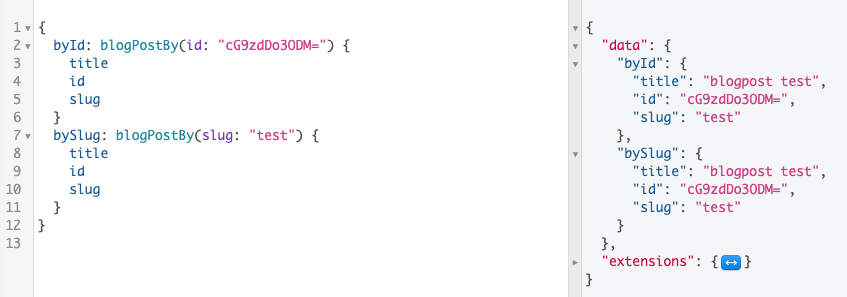
I'm curious if there's another plugin or custom code you have that's causing underlying issues 🤔
Deprecated fields
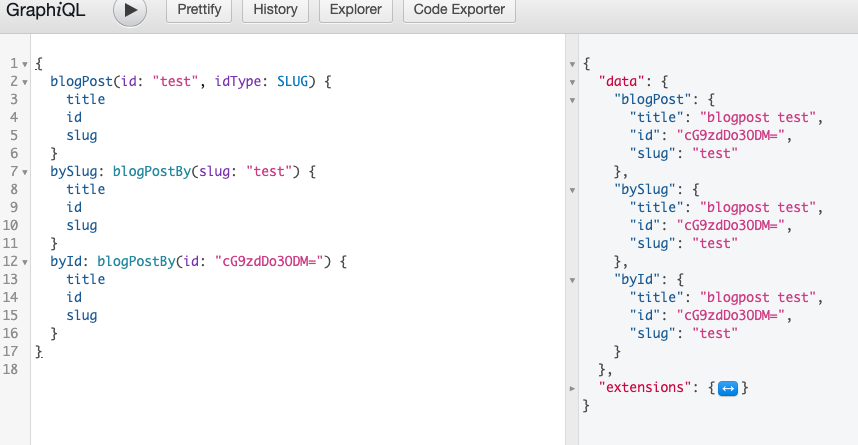
One thing to note is that the $postType . by fields to fetch single post nodes have been deprecated and will be removed in a future release of the plugin.
Instead I would recommend using:
{
  blogPost( id: "test" idType: SLUG ) {
    title
    id
    slug
  }
}
As seen here:
 jasonbahl
on 25 Jul 2020
jasonbahl
on 25 Jul 2020
Thanks for looking into this!
I also tested this now with all other plugins turned off (except wp-graphql and wp-graphiql) and all code in my theme commented, except the register_posttype() function. I still have the same issue.
I indeed ended up using blogPost( id: "test" idType: SLUG ) instead of blogPostBy(slug: "test") indeed. That does work for me. I guess it is not worth fixing this if blogPostBy() will be removed in the future so I'll close this one.
sboerrigter
on 25 Jul 2020
Im having the same issue with v0.11 of the plugin. I had it working with v10.2, since 10.3 the idType: SLUG looks to have broken for me.
using the same code to register the post type as above on a clean WP install v5.4.2 with only WPGraphQL V0.11.0 and WPGraphiQL V1.0.1:

 chrisAlwinYS
on 7 Aug 2020
chrisAlwinYS
on 7 Aug 2020
@chrisAlwinYS have you flushed your permalinks after registering the post type?
jasonbahl
on 7 Aug 2020
@jasonbahl Yep, deactivated and reactivated the plugins, refreshed the GraphiQL page, re-written the query. Not really sure why it's happening only to custom posts types. I have been going through the differences in the repo since 0.10.2. Ill flag if I find something. I will also test on an Apache server over the weekend to try and isolate the issue, as im running valet as my local php environment.
chrisAlwinYS
on 7 Aug 2020
@chrisAlwinYS can you share your CPT registration code?
jasonbahl
on 7 Aug 2020
@jasonbahl It's the same as previously posted in this issue.
`add_action('init', function () {
register_post_type('blog', [
    'graphql_plural_name' => 'blogPosts',
    'graphql_single_name' => 'blogPost',
    'has_archive' => true,
    'labels' => [
        'add_new' => 'New blog post',
        'name' => 'Blog',
        'singular_name' => 'Blog post',
    ],
    'menu_position' => 10,
    'public' => true,
    'rewrite' => ['slug' => 'blog'],
    'show_in_graphql' => true,
    'show_in_rest' => true,
    'supports' => ['editor', 'title'],
]);
});`
chrisAlwinYS
on 8 Aug 2020
@jasonbahl Looking at the source code it looks like the post_type is not being passed as a query_vars in the $wp global variable.
Line 302: src->Data->NodeResolver.php
`$allowed_post_types = \WPGraphQL::get_allowed_post_types();
        $post_type = 'post';
        if ( isset( $this->wp->query_vars['post_type'] ) && in_array( $this->wp->query_vars['post_type'], $allowed_post_types, true ) ) {
            $post_type = $this->wp->query_vars['post_type'];
        }
        $post = get_page_by_path( $this->wp->query_vars['name'], 'OBJECT', $post_type );
        return ! empty( $post ) ? $this->context->get_loader( 'post' )->load_deferred( $post->ID ) : null;`
therefore its running the function get_page_by_path with the default post_type value "post".
Further investigation; removing the $post_type = 'post'; does solve the issue for custom post types but breaks on the default post_type "post"
chrisAlwinYS
on 8 Aug 2020
I have having this same exact problem, and it has nothing to do with custom posts. As you can see, querying for a single post by slug is broken; yet querying for multiple posts by slug is working as expected.

 e10jc
on 13 Aug 2020
e10jc
on 13 Aug 2020
@e10jc What version of the WPGraphQL plugin are you running?
chrisAlwinYS
on 13 Aug 2020
I'm re-opening this. Getting reports on slack as well.
Looking into this now.
jasonbahl
on 16 Aug 2020
@e10jc What version of the WPGraphQL plugin are you running?
I tried the latest from master; the issue persists. Now I went back down to 0.10.2 and the issue is not there.
e10jc
on 16 Aug 2020
I can confirm that both idTypes URI and SLUG no longer work for me. In 10.x we fixed an issue with hierarchical URIs but the same query no longer works at all.
query GET_POST_BY_SLUG($uri: ID!) {
      areaProfile(id: $uri idType: URI) {
        slug
      }
    }
Give null an any URI supplied.
If I change to slug and a non-hierarchical post type it also returns null.
It also looks like it's resolving slug and uri the same. I feel like uri should be inclusive of the rewrite slug or post type name whilst slug is exclusive of that and hierarchy (as represented in the WP dashboard).
URI: "/post_type/slug" or "/post_type/parent-slug/slug"
SLUG: "slug"
 seagyn
on 16 Aug 2020
seagyn
on 16 Aug 2020
It seems that I can not query by Slug at all now. I am trying to query default "post" post type. It's the same for custom post types.

 sven-ra
on 27 Aug 2020
sven-ra
on 27 Aug 2020
@sven-ra I'm not seeing the same behaviour. I'm running v0.12 of the wp-graphql on WordPress 5.5. Are you running custom permalinks? or any other special settings?
chrisAlwinYS
on 27 Aug 2020
Same is happening for me running the same version. Had to go all the way
back to 0.9 to get it to work.
On Thu, 27 Aug 2020 at 12:43, Chris Alwin notifications@github.com wrote:
>
>
@sven-ra https://github.com/sven-ra I'm not seeing the same behaviour.
I'm running v0.12 of the wp-graphql on WordPress 5.5. Are you running
custom permalinks? or any other special settings?—
You are receiving this because you commented.
Reply to this email directly, view it on GitHub
https://github.com/wp-graphql/wp-graphql/issues/1397#issuecomment-681871141,
or unsubscribe
https://github.com/notifications/unsubscribe-auth/AAFVUHDSOT6GFSES6BWKWFLSCY2G5ANCNFSM4PGAJHVQ
.
seagyn
on 27 Aug 2020
@sven-ra I'm not seeing the same behaviour. I'm running v0.12 of the wp-graphql on WordPress 5.5. Are you running custom permalinks? or any other special settings?
I am running wp-graphql v0.12.1 (currently latest) and WP 5.5. I do have custom permalinks, but even when I change it back to "Post name" the problem persists.
sven-ra
on 27 Aug 2020
Okay did some further digging and found out that the Slug option disappears when the post type is set to hierarchical mode.
sven-ra
on 27 Aug 2020
Yes, that's by design. Its to prevent issues fetching posts with potentially the same "slug" but are nested.
chrisAlwinYS
on 27 Aug 2020
Same is happening for me running the same version. Had to go all the way back to 0.9 to get it to work.
Same here
 homerjam
on 29 Aug 2020
homerjam
on 29 Aug 2020
I'm still having this issue. Querying a non-hierarchical custom post type with id / idType SLUG or URI returns null.
Version 0.14.0
Query:
query MyQuery {
  post(id: "tra-da-vietnamese-iced-tea", idType: SLUG) {
    id
  }
  component(id: "motorbike-guides", idType: SLUG) {
    collections {
      items {
        title
      }
    }
  }
  components {
    edges {
      node {
        id
        slug
      }
    }
  }
}
Result:
{
  "data": {
    "post": {
      "id": "cG9zdDozOTE2Nw=="
    },
    "component": null,
    "components": {
      "edges": [
        {
          "node": {
            "id": "cG9zdDozODc2NA==",
            "slug": "food-drink"
          }
        },
        {
          "node": {
            "id": "cG9zdDozODUxNw==",
            "slug": "destinations"
          }
        },
        {
          "node": {
            "id": "cG9zdDozODUxMQ==",
            "slug": "motorbike-guides"
          }
        },
        {
          "node": {
            "id": "cG9zdDozODQ2OQ==",
            "slug": "hotel-reviews"
          }
        },
        {
          "node": {
            "id": "cG9zdDozNzcwNQ==",
            "slug": "subscribe"
          }
        },
        {
          "node": {
            "id": "cG9zdDozNzY4Nw==",
            "slug": "support"
          }
        },
        {
          "node": {
            "id": "cG9zdDozNzYwNg==",
            "slug": "category-nav"
          }
        },
        {
          "node": {
            "id": "cG9zdDozNjExOA==",
            "slug": "about"
          }
        },
        {
          "node": {
            "id": "cG9zdDozNjExNQ==",
            "slug": "home"
          }
        }
      ]
    }
  },
  "extensions": {
    "debug": [
      {
        "type": "DEBUG_LOGS_INACTIVE",
        "message": "GraphQL Debug logging is not active. To see debug logs, GRAPHQL_DEBUG must be enabled."
      }
    ]
  }
}
 benknight
on 28 Oct 2020
benknight
on 28 Oct 2020
Related issues
 saulirajala
·
3Comments
jasonbahl
·
4Comments
saulirajala
·
3Comments
jasonbahl
·
4Comments
 CalebBarnes
·
4Comments
jasonbahl
·
4Comments
CalebBarnes
·
4Comments
jasonbahl
·
4Comments
 nikosolihin
·
5Comments
nikosolihin
·
5Comments
Most helpful comment
I'm re-opening this. Getting reports on slack as well.
Looking into this now.