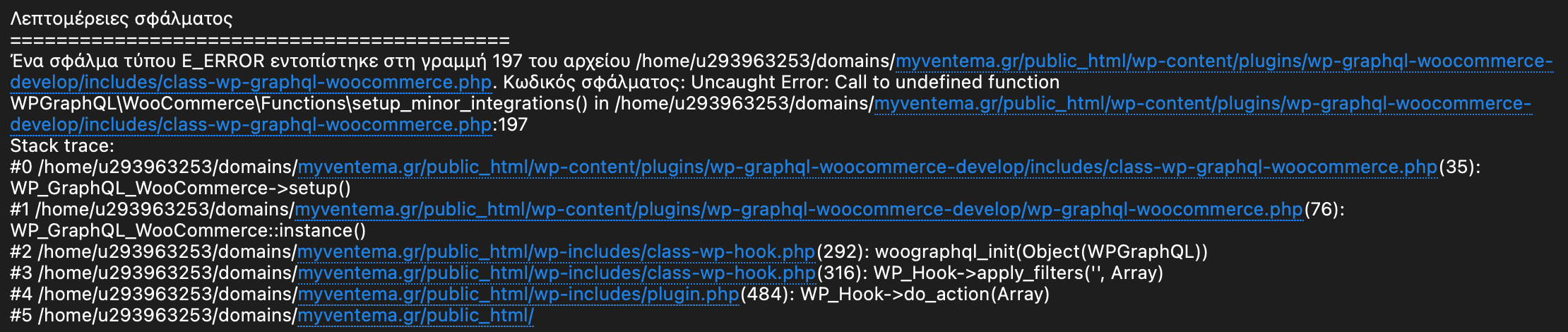
Wp-graphql-woocommerce: Getting a critical error when I try to install wp graphql and wp graphql woocommerce
 nisfikas
All 7 comments
nisfikas
on 7 Jul 2021
@nisfikas Are you installing WPGraphQL WooCommerce thru composer, or a WP Bedrock setup?
If so, are you installing v0.10.1 or v0.10.2? v0.10.2 is a hotfix release to resolve the very issue you are having.
 kidunot89
on 7 Jul 2021
kidunot89
on 7 Jul 2021
I tried with v0.10.2 but I am still having the same issue.
I am installing the plugin via Wordpress --> Plugins --> Add New
nisfikas
on 8 Jul 2021
@nisfikas Try running composer install from within the plugin directory.
 menachemkorf
on 13 Jul 2021
menachemkorf
on 13 Jul 2021
+1 I'm having the same issue, tried uploading the plugin. Got this error. It works with v0.10.1.
 2xSamurai
on 20 Jul 2021
2xSamurai
on 20 Jul 2021
Getting this error on trying to install v0.10.2 after uploading plugin via ftp & clicking "activate" in wordpress admin panel.
fatal error: Uncaught Error: Class 'WPGraphQL\WooCommerce\WooCommerce_Filters' not found in

/home/webdmgyr/cms.productionstaging.sleepsolutions.webdev.press.webdev.press/wp-content/plugins/wp-graphql-woocommerce-master-10.2/includes/class-wp-graphql-woocommerce.php:200 Stack trace: #0

/home/webdmgyr/cms.productionstaging.sleepsolutions.webdev.press.webdev.press/wp-content/plugins/wp-graphql-woocommerce-master-10.2/includes/class-wp-graphql-woocommerce.php(35): WP_GraphQL_WooCommerce->setup() #1

/home/webdmgyr/cms.productionstaging.sleepsolutions.webdev.press.webdev.press/wp-content/plugins/wp-graphql-woocommerce-master-10.2/wp-graphql-woocommerce.php(76): WP_GraphQL_WooCommerce::instance() #2

/home/webdmgyr/cms.productionstaging.sleepsolutions.webdev.press.webdev.press/wp-includes/class-wp-hook.php(287): woographql_init(Object(WPGraphQL)) #3

/home/webdmgyr/cms.productionstaging.sleepsolutions.webdev.press.webdev.press/wp-includes/class-wp-hook.php(311): WP_Hook->apply_filters('', Array) #4 /home/webdmgyr/cms.productionsta in

/home/webdmgyr/cms.productionstaging.sleepsolutions.webdev.press.webdev.press/wp-content/plugins/wp-graphql-woocommerce-master-10.2/includes/class-wp-graphql-woocommerce.php on line 200

There has been a critical error on this website. Please check your site admin email inbox for instructions.
Wordpress version 5.6.4
WP GraphQL wordpress plugin: Version 1.5.2
WP Gatsby wordpress plugin: Version 1.0.11
WooCommerce wordpress plugin: Version 4.8.0
 Petermhen
on 22 Jul 2021
Petermhen
on 22 Jul 2021
Issue was solved by downloading v0.10.2 from the release page & uploading that folder via ftp then activating plugin in wordpress admin:
https://github.com/wp-graphql/wp-graphql-woocommerce/releases/tag/v0.10.2
I previously cloned the repository's master branch and uploaded that folder via ftp then clicked "activate" on the plugin in Wordpress admin, which resulted in the error.
Petermhen
on 22 Jul 2021
Related issues
 huniqcast
·
4Comments
huniqcast
·
4Comments
 ardiewen
·
3Comments
ardiewen
·
3Comments
 ricokahler
·
5Comments
huniqcast
·
3Comments
ricokahler
·
5Comments
huniqcast
·
3Comments
 dpacmittal
·
5Comments
dpacmittal
·
5Comments
Most helpful comment
Issue was solved by downloading v0.10.2 from the release page & uploading that folder via ftp then activating plugin in wordpress admin:
https://github.com/wp-graphql/wp-graphql-woocommerce/releases/tag/v0.10.2
I previously cloned the repository's master branch and uploaded that folder via ftp then clicked "activate" on the plugin in Wordpress admin, which resulted in the error.