Wp-graphql-woocommerce: Alternative shipping data (when shipToDifferentAddress === true) and transaction ID, won't appear in WordPress
Describe the bug
I have a checkout form, which allows the user to set a different shipping address, compared to his billing address. The object I am sending via fetch() to the server is:
const orderData = {
    billing: {
        address1: "109 Hills Road Valley",
        address2: "Station Road",
        city: "Example City",
        company: "Other Company GmbH",
        country: "DE",
        email: "[email protected]",
        firstName: "Firstname",
        lastName: "Lastname",
        phone: "089123456789",
        postcode: "80808",
        state: "Bavaria",
    },
    clientMutationId: "50e75f32-9f72-4e16-a5a4-41f4ff76ff2c",
    isPaid: false,
    paymentMethod: "paypal",
    shipToDifferentAddress: true,
    shipping: {
        address1: "Beispielstrasse 14",
        address2: "2. Aptartment",
        city: "Berlin",
        company: "D Company GmbH",
        country: "DE",
        email: "[email protected]",
        firstName: "Peter",
        lastName: "Pan",
        phone: "089123456789",
        postcode: "12342",
        state: "Berlin",
    },
    transactionId: "b1605b91-1d3a-4008-aa7b-290a098631bd",
}
````

**Then I am sending the orderData via the checkout mutation to the WordPress server**
(async () => {
await fetch(SiteConfig.graphqlUrl, {
method: "POST",
headers: {
"Content-Type": "application/json",
"woocommerce-session": Session ${ cart.wooSession }
},
body: JSON.stringify({
query: CHECKOUT_CART,
variables: {
input: {
...orderData,
},
},
}),
})
.then((res) => res.json())
.then((res) => {
setCart(() => {
return {
...finalStoreState,
order: res.data
};
});
})
.catch(function(error) {
setCart((prevState) => {
return {
...prevState,
error,
checkoutProcessing: false
};
});
});
})();
```
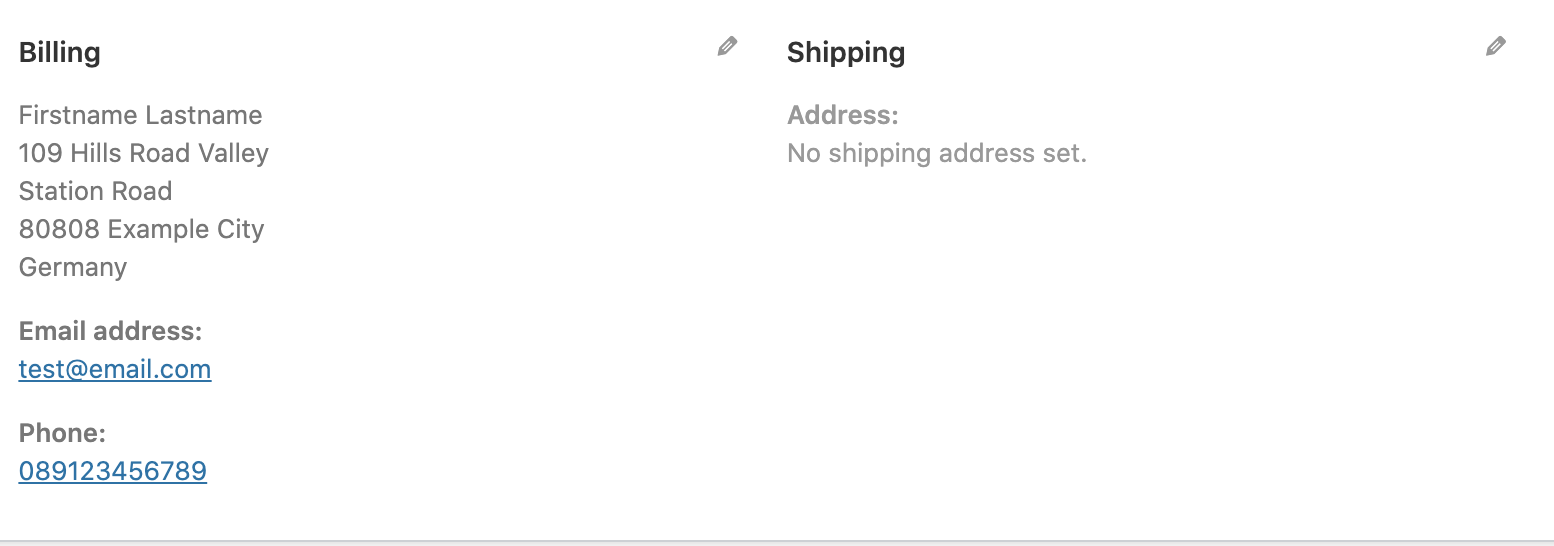
The order appears in WordPress, but without the additional shipping information. Also the transaction ID won't be saved:
To Reproduce
I am working with:
- gatsby-source-wordpress-experimental@^3.1.3
- WooCommerce 4.7.1
- WpGraphQL 1.0
- WpGatsby 0.6.8
- WooGraphQL 0.7.0
Expected behavior
- Additional shipping data should be saved in WordPress backend
- Transaction ID should be saved inn WordPress
 MobyDigg
All 3 comments
@MobyDigg Can you update to WooGraphQL v0.7.0 and retry? I'm having trouble recreating your issue.
 kidunot89
on 3 Dec 2020
kidunot89
on 3 Dec 2020
@kidunot89 I did update to WooGraphQL 0.7.0, used gatsby clean. Now the company shows in the billing address, but still nothing for the shipping data and the transaction ID.
MobyDigg
on 3 Dec 2020
@kidunot89 I found out when this happens and found another bug:
- If you do not have a shipping method selected for the respective shipping zone, the order will be saved in WooCommerce, but the shipping data won't be transferred. In my opinion, this should return an error. This produces the error:

- If the country of the customer is not within a shipping zone, the checkout mutation returns
null. I think it should return an error instead. In the case of the image above: The customer selected U.S.A. as a shipping destination, but WooCommerce only handles all countries in Europe.
It works as expected, when you add a shipping zone with all selectable countries from the checkout form AND a shipping method. For instance, if you have a customer with a shipping country in Europe, like:

MobyDigg
on 3 Dec 2020
Related issues
 ricokahler
·
5Comments
ricokahler
·
5Comments
 huniqcast
·
4Comments
huniqcast
·
4Comments
 dpacmittal
·
5Comments
dpacmittal
·
5Comments
 aresrioja10
·
6Comments
aresrioja10
·
6Comments
 aidnurs
·
3Comments
aidnurs
·
3Comments
Most helpful comment
@kidunot89 I found out when this happens and found another bug:
null. I think it should return an error instead. In the case of the image above: The customer selected U.S.A. as a shipping destination, but WooCommerce only handles all countries in Europe.It works as expected, when you add a shipping zone with all selectable countries from the checkout form AND a shipping method. For instance, if you have a customer with a shipping country in Europe, like: