Wp-graphql-woocommerce: Product galleryImages not sorting by MENU_ORDER field
Describe the bug
galleryImages(where: {orderby: {order: ASC, field: MENU_ORDER}})
MENU_ORDER sorting does not seem to have any effect nor reflect the sort order of gallery images in the admin when editing a product.
To Reproduce
Steps to reproduce the behavior query:
query MyQuery {
  product(id: "5988", idType: DATABASE_ID) {
    galleryImages(where: {orderby: {order: ASC, field: MENU_ORDER}}) {
      nodes {
        databaseId
      }
    }
  }
}
Result:
{
  "data": {
    "product": {
      "galleryImages": {
        "nodes": [
          {
            "databaseId": 15299
          },
          {
            "databaseId": 15298
          },
          {
            "databaseId": 15297
          },
          {
            "databaseId": 15293
          },
          {
            "databaseId": 15268
          },
          {
            "databaseId": 9369
          }
        ]
      }
    }
  }
}
Expected behavior
Expect to get galleryImages in same order as returned by resolver in class-post-connection-resolver.php
Printing out the $query_args from wp-graphql-woocommerce/includes/data/connection/class-post-connection-resolver.php
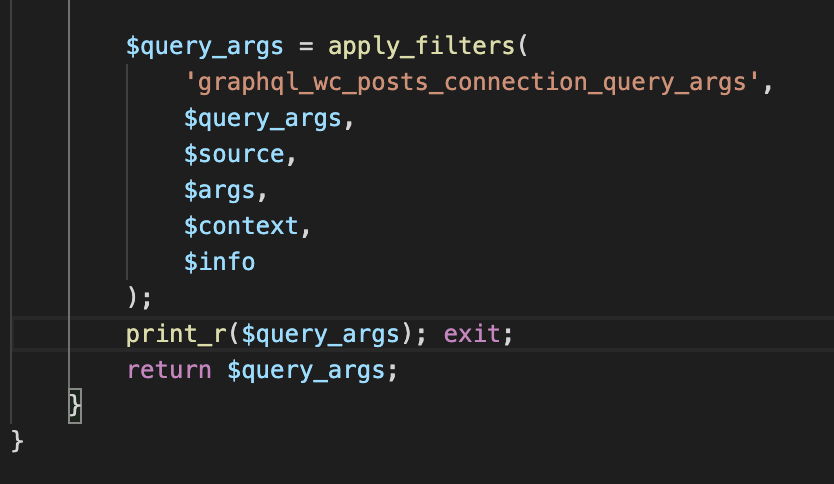
print_r($query_args);:
Array
(
    [ignore_sticky_posts] => 1
    [post_type] => attachment
    [no_found_rows] => 1
    [post_status] => inherit
    [posts_per_page] => 11
    [graphql_cursor_offset] => 0
    [graphql_cursor_compare] => <
    [graphql_args] => Array
        (
            [where] => Array
                (
                    [orderby] => Array
                        (
                            [0] => Array
                                (
                                    [field] => menu_order
                                    [order] => ASC
                                )

                        )

                )

        )

    [orderby] => Array
        (
            [menu_order] => ASC
        )

    [fields] => ids
    [post__in] => Array
        (
            [0] => 15268
            [1] => 9369
            [2] => 15299
            [3] => 15293
            [4] => 15298
            [5] => 15297
        )

)
The order in the above post__in array is the correct "menu order" at least how it is displayed in WC product admin.
I would expect the graphQL result to reflect that order, or at least change based on order: ASC or DESC ... but the graphQL result is always in the same order, so it seems MENU_ORDER field has no bearing on the result at all.
Solution
Following how WooCommerce gets gallery images, for now I have just created a custom field with register_graphql_field and a custom type which just gives me what I need, the srcset and the alt tag, and the returned result is the same order as the gallery image sorting in the admin:
add_action( 'graphql_register_types', 'register_mdf_custom_types' );
function register_mdf_custom_types() {
    register_graphql_object_type( 'mdfGalleryAttachment', [
      'description' => __( "Just srcset and alt in admin gallery order", 'mdf-graphql' ),
      'fields' => [
        'srcset' => [
            'type' => 'String',
            'description' => __( 'src set', 'mdf-graphql' ),
        ],
        'alt' => [
            'type' => 'String',
            'description' => __( 'alt', 'mdf-graphql' ),
        ]
      ],
    ] );
}
add_action( 'graphql_register_types', function() {
  register_graphql_field( 'Product', 'galleryAttachments', [
     'type' => ['list_of'=>'mdfGalleryAttachment'],
     'description' => __( 'The galleryAttachments of the product', 'wp-graphql' ),
     'resolve' => function( $product ) {

        $attachment_ids = $product->get_gallery_image_ids();
        $return = [];

        if ( $attachment_ids && $product->get_image_id() ) {
            foreach ( $attachment_ids as $attachment_id ) {
                array_push($return,[
                    "srcset"=>wp_get_attachment_image_srcset( $attachment_id, 'thumbnail' ),
                    "alt"=>get_post_meta( $attachment_id, '_wp_attachment_image_alt', true )
                ]);
            }
        }
        return $return;
     }
  ] );
} );
 paplco
All 4 comments
@paplco If I'm not mistaken, the IDs of the gallery images are stored in meta for the product and the order should be determined by the order the IDs are in in the meta. Ordering by menu order attempts to use the menu_order value in the database for each image, and that's not how the images are ordered on each product.
The order should be orderby => post__in because the query is passing an array of Image IDs to the post__in argument, and that is the order they're stored in on the product, and the order I believe you want to match.
If post__in is passed to WP_Query, WPGraphQL should respect orderby post__in, but perhaps there's a bug where that's not happening? 🤔
 jasonbahl
on 26 Jun 2020
jasonbahl
on 26 Jun 2020
Oops. Didn't mean to close. I'll let @kidunot89 decide how to handle this beyond my previous response.
jasonbahl
on 26 Jun 2020
@paplco This PR should resolve this issue.
Like @jasonbahl the MENU_ORDER orderby field actually has no bearing galleryImages connection due to the fact they are meta. WooCommerce decides their order by the order their IDs are saved in on the Product edit page. To account for this, I made the default ordering the order their IDs are provided to WP_Query, which should be ordering you desire.
 kidunot89
on 26 Jun 2020
kidunot89
on 26 Jun 2020
@jasonbahl @kidunot89
That makes sense, thank you!
paplco
on 5 Jul 2020
Related issues
 jacobarriola
·
5Comments
jacobarriola
·
5Comments
 ricokahler
·
5Comments
ricokahler
·
5Comments
 jake-101
·
7Comments
jake-101
·
7Comments
 kenchoong
·
5Comments
kenchoong
·
5Comments
 aresrioja10
·
6Comments
aresrioja10
·
6Comments