Wp-calypso: Notifications: No quote indicator
Steps to reproduce
- Create a new blog post in a blog you are subscribed to receive notifications from.
- Add a quote to the blog post.
- Check your Notifications.
What I expected
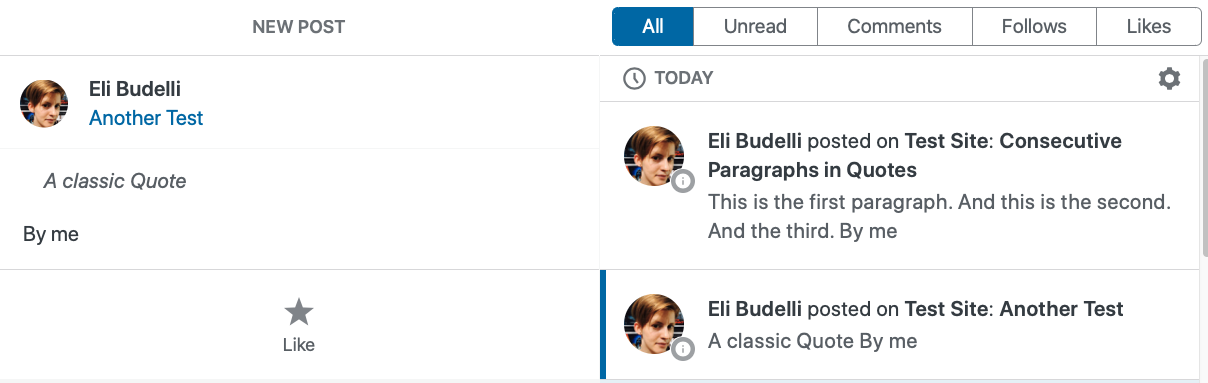
To see a quote indicator on the notification.
What happened instead
Ther's no indication that the text is a quote.
Browser / OS version
Safari 13.1.2
Screenshot / Video
Context / Source
 elibud
All 6 comments
elibud
on 21 Aug 2020
Looking into this
- Prior art D39223-code.
- Developer Console query -
/notifications/?http_envelope=1&fields=id%2Cnote_hash%2Ccontent&number=20 - Output of
do_blockson the HTML string of a Note which contains a quote is:
<blockquote class="wp-block-quote">
<p>Lorem ipsum dolor sit amet, consectetur adipiscing elit, sed do eiusmod tempor incididunt ut labore et dolore magna aliqua. Ut enim ad minim veniam, quis nostrud exercitation ullamco laboris nisi ut aliquip ex ea commodo consequat. Duis aute irure dolor in reprehenderit in voluptate velit esse cillum dolore eu fugiat nulla pariatur. Excepteur sint occaecat cupidatat non proident, sunt in culpa qui officia deserunt mollit anim id est laborum.</p>
<p><cite>That’s a quote!</cite></p></blockquote>
- After "cleaning" with
wp_ksesthe<cite>tag is removed but the<blockquote>is retained sans-classname. apps/notifications/src/panel/templates/summary-in-list.jsxis looking at thesubjectwhen it needs to look at thebodyof each Note.
 getdave
on 1 Sep 2020
getdave
on 1 Sep 2020
@davemart-in I've been looking into this with @marekhrabe. We want to be clear on the task.
Is it:
- Make quotes look like quotes in the Notification listing and detail (when you click on a Notification and it slides over to reveal more info) view?
- Make quotes look like quotes in the Notification detail view _only_?
The listing is intentionally devoid of styling and HTML tags to avoid breaking the layout with images and other random HTML that could be in a post summary so this would break with convention if we go down that route.
getdave
on 1 Sep 2020
We have also check the behavior on mobile (it would be good to match it, I think) and on mobile the view in the list (small previews) is always plaintext without styling and only in the detail once you open it, you will see quote styles etc…
In this case my vote would be towards:
- Make quotes look like quotes in the Notification detail view only?
 marekhrabe
on 1 Sep 2020
marekhrabe
on 1 Sep 2020
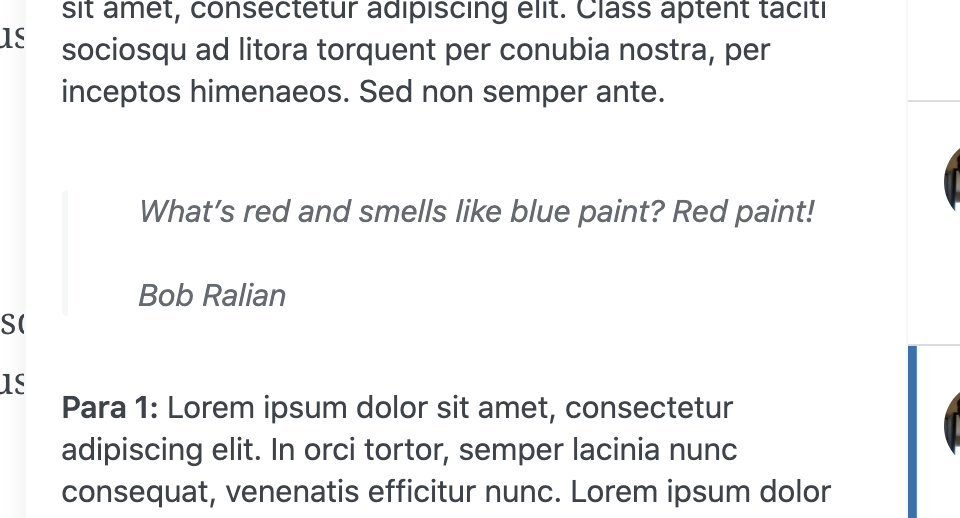
@getdave @marekhrabe yes, it's option 2. The styling is only needed in the preview that slides out. The truncated list item on the right can remain unstyled.
 davemart-in
on 1 Sep 2020
davemart-in
on 1 Sep 2020
Fixed by @blackjackkent in D49621-code and #45710 .
 kwight
on 30 Sep 2020
kwight
on 30 Sep 2020
Related issues
 gedex
·
3Comments
gedex
·
3Comments
 aduth
·
3Comments
aduth
·
3Comments
 BrookeDot
·
3Comments
BrookeDot
·
3Comments
 spen
·
3Comments
spen
·
3Comments
 hoverduck
·
3Comments
hoverduck
·
3Comments