Wp-calypso: Editor: Content is cut in half in the editor
Steps to reproduce
Shorter steps to reproduce:
- Insert a columns block
- Add an image
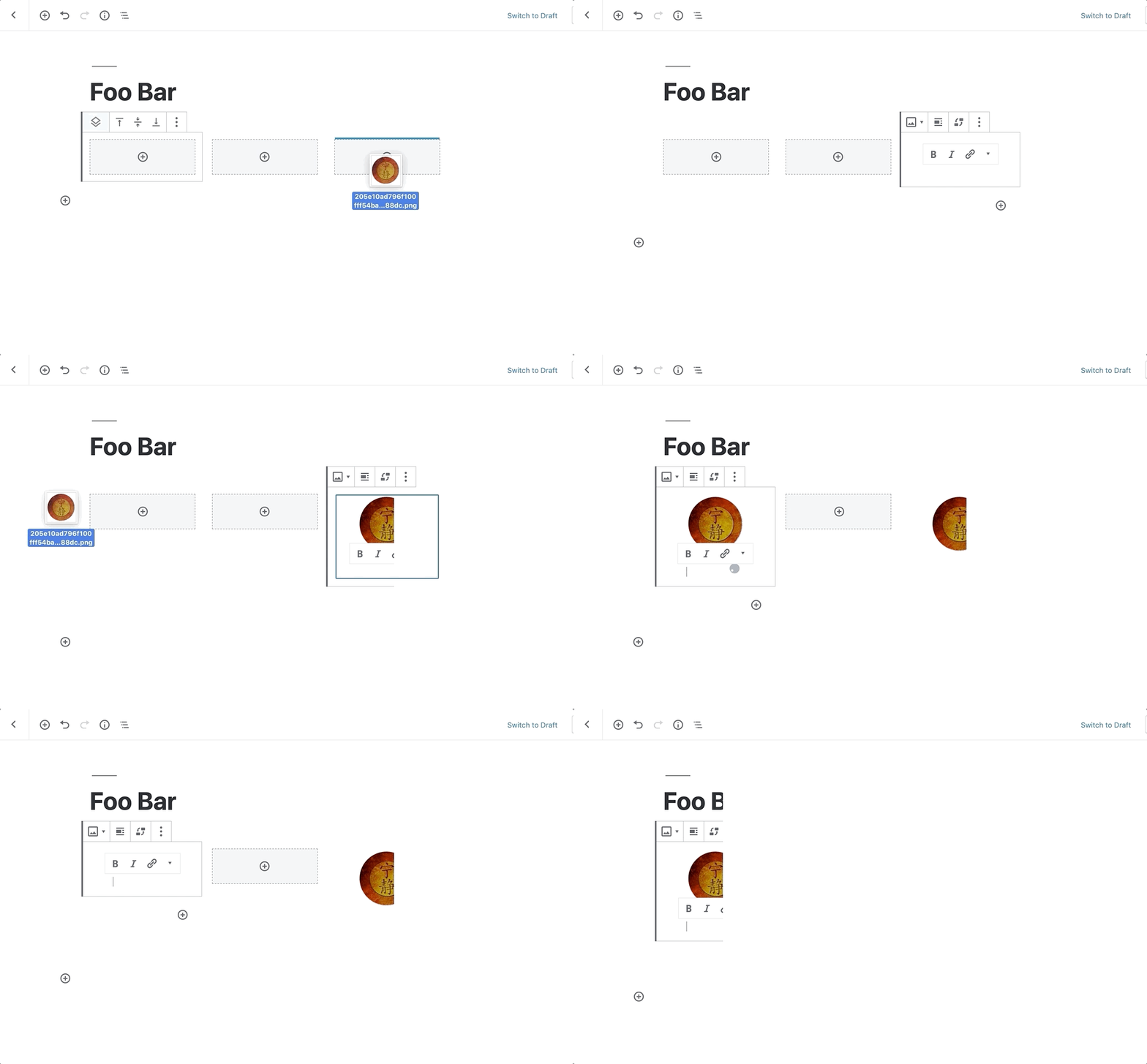
Using Chrome:
- Starting at URL: https://wordpress.com/start/
- Select Business on "What kind of site are you building"
- Go through the remainder of the signup flow and select "start with a free site" (other options don't matter)
- A new home page is created with some default blocks
- Load new home page in the editor, and resize the browser window (error occurs between 1100 and 1500 wide).
What I expected
Placeholder content fully loads in all browser sizes
What happened instead
The blocks get cut in half on certain browser window sizes. Video: https://cld.wthms.co/yWrezy
Exiting out and returning to the editor the home page results in the same issue.
Browser / OS version
Chrome / Mac
Screenshot / Video
Video: https://cld.wthms.co/yWrezy
Context / Source
For those that don't know the browser size is the source of the issue, it looks like the content didn't load properly and would not know to resize the browser to see all of it.
user-report
 ktyfuller604
All 17 comments
I helped a user recently who had the same issue, but I'm not sure how they arrived at the problem.
Summary
They had a page which included a columns block that had 6 columns and an image in each column. With another block added below the columns block, the page editor view was breaking in Chrome.
See this video: https://cld.wthms.co/nvfKk0
What I Did
I exported the site's contents and imported into a test site. The problem persisted on the page that was imported, but I cannot recreate this problem manually by simply adding a columns block with 6 columns on a fresh blank page.
Context/Source
11305879-hc
 tijosh
on 19 Jun 2019
tijosh
on 19 Jun 2019
Just noting here that 2118566-zen has replied that it's no longer a problem for them but keeping this issue open as @ktyfuller604 can still reproduce the error.
 adelineyaw
on 19 Jun 2019
adelineyaw
on 19 Jun 2019
Similar issue in 2122759-zen
I feel like I have seen this issue a few times as well, related to the new Business themes.
 kathleenjross
on 20 Jun 2019
kathleenjross
on 20 Jun 2019
See related core issue in https://github.com/WordPress/gutenberg/issues/14652
 gwwar
on 26 Jun 2019
gwwar
on 26 Jun 2019
I think this is a Chrome rendering bug. Folks also noted that this affects the media and text block so there might be something a bit off with how the resizer controls are implemented.
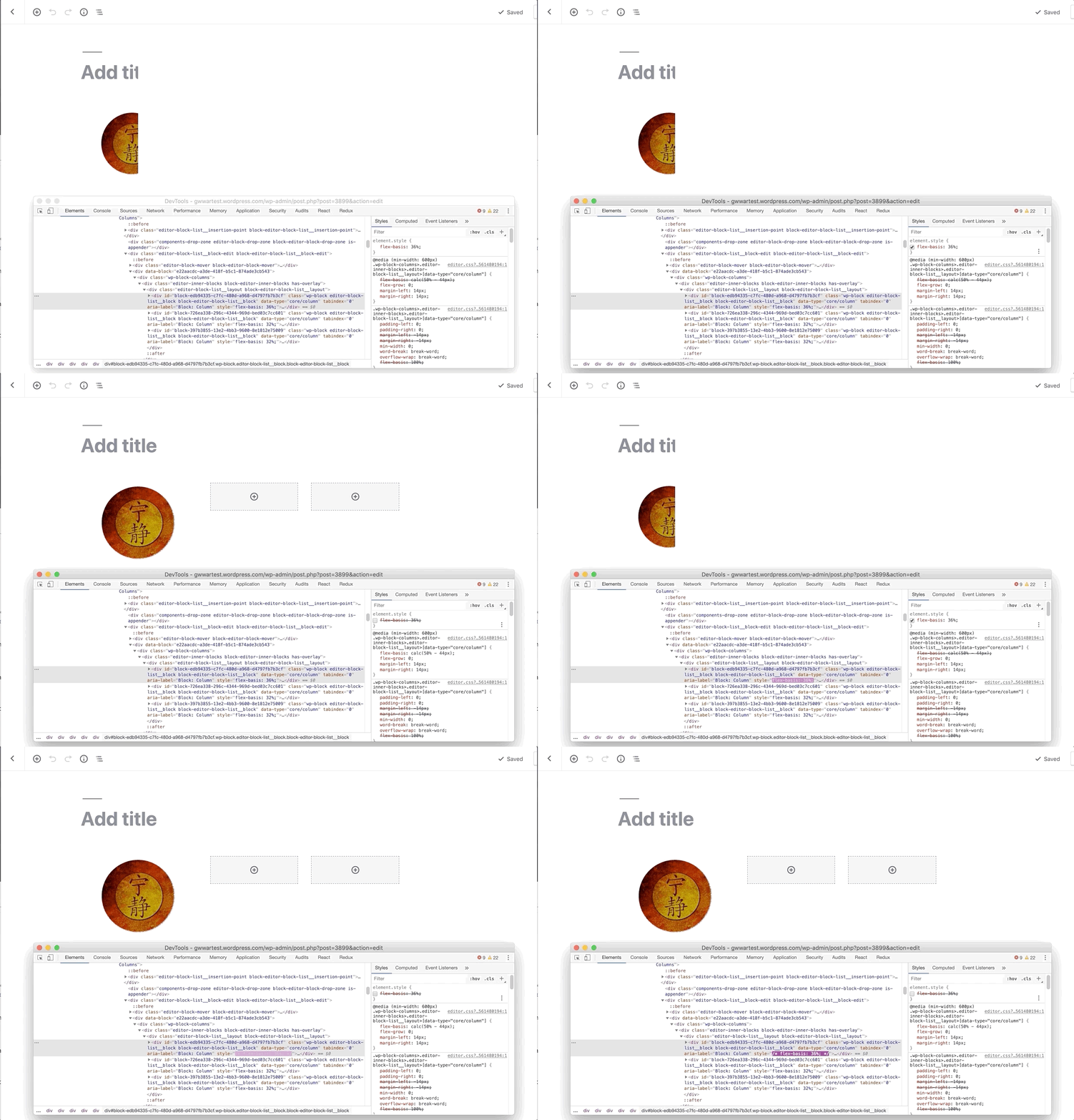
Turning Hardware Acceleration on and off doesn't appear to affect this. (Broken in both cases).
gwwar
on 26 Jun 2019
@glendaviesnz I believe this will need to be fixed upstream in the Gutenberg project. So feel free to target a PR to that repo.
gwwar
on 26 Jun 2019
gwwar
on 27 Jun 2019
This will be fixed in the next Gutenberg update.
 glendaviesnz
on 27 Jun 2019
glendaviesnz
on 27 Jun 2019
Excited this will be fixed in the next Gutenberg Update!
I had a very similar issue (only it wasn't using columns) so I wanted to note it here as well.
Steps to reproduce
- Starting at URL: https://wordpress.com/page/skyenatureblog.com/1081
- In the right sidebar, I clicked "Try the new block Editor"
- When the page loaded, half the screen was blank
Screenshot / Video
Video w/ console errors:
Browser / OS version
Mac / Chrome Version 75.0.3770.100
Mac / Ghost Version 2.1.0.7
Mac / Firefox Version 67.0.4 (it was working correctly in Firefox- didn't see the error there)
 isocialtish
on 30 Jun 2019
isocialtish
on 30 Jun 2019
Noting I've seen this myself and it goes away when I move the window :/ That's cool that it'll be fixed though!
 supernovia
on 1 Jul 2019
supernovia
on 1 Jul 2019
one more here: https://en.forums.wordpress.com/topic/page-format-7/
chrome / windows
supernovia
on 1 Jul 2019
Just noting that I've noticed it myself on my Windows computer using Chrome, and we also had a report from a user in 2131828-zen who had this browser/computer info:
Browser - Chrome Version 75.0.3770.100
Operating system - Windows NT 10.0
Screen size - 1366 x 768
https://whatsmybrowser.org/b/XYP6MVQ
 sophiegyo
on 2 Jul 2019
sophiegyo
on 2 Jul 2019
This will be fixed when v6.1 of the Gutenberg plugin is published. We'll try another attempt to get that on WordPress.com on July 10th when it's released.
gwwar
on 2 Jul 2019
Report from user in 2144538-zen.
They had this browser/computer info:
Chrome 75 on Windows 10
Internet Explorer 11 on Windows 10
 susanjanec
on 4 Jul 2019
susanjanec
on 4 Jul 2019
I had a report of this from a user in #13894213-hc
who is unable to edit their homepage (their only page). They are using Chrome.
They were able to update their site in Safari.
 msilbers
on 9 Jul 2019
msilbers
on 9 Jul 2019
Similar report in #13166098-hc
Only related to the Chrome browser.
Chrome 75.0 on Windows 10.0.0
 lizswafford
on 10 Jul 2019
lizswafford
on 10 Jul 2019
Closing this out since v6.1.1 landed in https://github.com/Automattic/wp-calypso/issues/34386
gwwar
on 20 Jul 2019
Related issues
 jjchrisdiehl
·
3Comments
jjchrisdiehl
·
3Comments
 BrookeDot
·
3Comments
BrookeDot
·
3Comments
 spen
·
3Comments
spen
·
3Comments
 kellychoffman
·
3Comments
kellychoffman
·
3Comments
 gedex
·
3Comments
gedex
·
3Comments
Most helpful comment
This will be fixed when v6.1 of the Gutenberg plugin is published. We'll try another attempt to get that on WordPress.com on July 10th when it's released.