Wp-calypso: Gutenlypso: wrong publish button animation
Steps to reproduce
- Starting at URL: https://wpcalypso.wordpress.com/block-editor/post
- Write some test content and click on Publish.
- Upon confirming the Publish, notice the weird animation on the button.
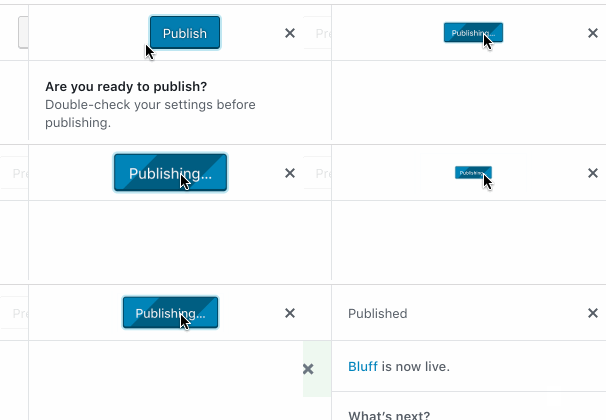
The button size shouldn't be animated at all. Also one more important note for debugging is that this can't be reproduced with latest master in dev. Seem to only be affecting wpcalypso and horizon.
 vindl
vindl
All 3 comments
This is due to a collision between mangled CSS animation names. Namely, the Gutenberg .components-button.is-busy animation is colliding with the animate appear animation, which leads to undesired results. The sources involved:
Gutenberg styles
.components-button {
    // snip …
    &.is-busy {
        animation: components-button__busy-animation 2500ms infinite linear;
        background-size: 100px 100%;
        background-image: repeating-linear-gradient(-45deg, $light-gray-500, $white 11px, $white 10px, $light-gray-500 20px);
        opacity: 1;
    }
    // snip …
}
@keyframes components-button__busy-animation {
    0% {
        background-position: 200px 0;
    }
}
https://github.com/WordPress/gutenberg/blob/13459da2de90fba6279668b8ab6771020e8f4a2b/packages/components/src/button/style.scss#L178-L183
https://github.com/WordPress/gutenberg/blob/13459da2de90fba6279668b8ab6771020e8f4a2b/packages/components/src/button/style.scss#L228-L232
Enter Calypso styles
The above styles work well enough in isolation, however the following styles are also loaded:
So?
The animation names in the sources don't collide, however some build step run for production builds is mangling the names. That's why the issue isn't present in development. The styles are effectively the following:
.components-button.is-busy {
animation: a 2500ms infinite linear;
/* snip … */
}
/* 👍 All good */
@keyframes a {
0% {
background-position: 200px 0;
}
}
/* 🤦♂️ Oh wait, that's ignored ☝️ */
/* 💥 Animation is overwritten 👇 */
@keyframes a {
0%,
20% {
transform: scale( 0, 0 );
}
100% {
transform: scale( 1, 1 );
}
}
If multiple keyframe sets exist for a given name, the last one encountered by the parser is used. @keyframes rules don't cascade, so animations never derive keyframes from more than one rule set.
Check it out!
These are current builds of stylesheets loaded in the editor. Search for @keyframes a in both of them and you'll see the issue:
@keyframes a{0%{background-position:200px 0}}
https://wpcalypso.wordpress.com/calypso/gutenberg-editor.5553ac50908a32ff8a5c.css
@keyframes a{0%,20%{transform:scale(0)}to{transform:scale(1)}}
https://wpcalypso.wordpress.com/calypso/build.a4bf0136982a999f910a.css
What's the solution?
I haven't tracked down where exactly this occurs, but the most simple solution may be to disable this type of name mangling from CSS minification.
 sirreal
on 8 Dec 2018
sirreal
on 8 Dec 2018
I took a bit of time to see if I could configure the minification to leave animation names alone, but it wasn't clear to me after a short period how and where the minification is happening and whether or not it could be configured. I'm not planning to continue investigation.
Maybe @Automattic/team-calypso have insight into where this occurs and whether we can configure it.
sirreal
on 10 Dec 2018
Thanks to @sirreal's excellent research, it was very easy to fix this in #29288. All you need to know is that our CSS minification is done inside the webpack-rtl-plugin 😜 and that it uses cssnano. The optimization that renames the animations can be turned off and is marked as potentially breaking in the docs:
 jsnajdr
on 10 Dec 2018
jsnajdr
on 10 Dec 2018
Related issues
 lamosty
·
3Comments
lamosty
·
3Comments
 rickybanister
·
3Comments
rickybanister
·
3Comments
 samouri
·
3Comments
samouri
·
3Comments
 roccotripaldi
·
3Comments
samouri
·
3Comments
roccotripaldi
·
3Comments
samouri
·
3Comments