Wp-calypso: Gutenberg: White/blank screen in Edge
Steps to reproduce
- Starting at URL: wordpress.com
- Start a new post on a site you've opted into Gutenberg on or opt-in to Gutenberg once the Editor opens
- See a blank/white screen instead of Gutenberg
What I expected
To be able to use the Gutenberg editor
What happened instead
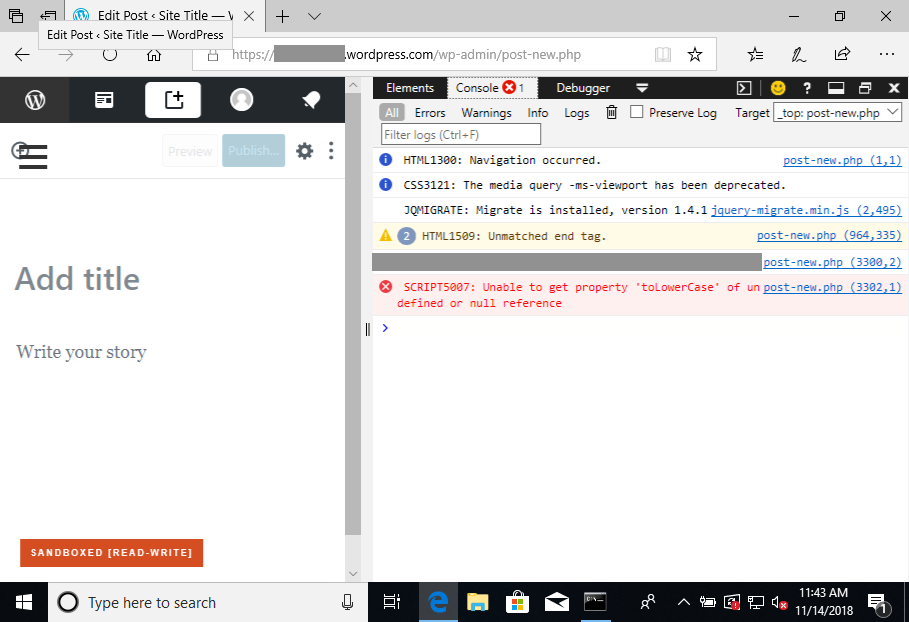
The editor does not load and shows a blank/white screen instead
This error can be seen in the console:

Browser / OS version
Reproduced on Windows 10/IE 12 17.17134 (Browserstack)
Screenshot / Video

Context / Source
user-report
 kriskarkoski
All 10 comments
Hello!
I've also had this twice in the last hour.
HC-8053837
HC-2563502
 aleone89
on 14 Nov 2018
aleone89
on 14 Nov 2018
Another case reported here 6703301-hc
 sandymcfadden
on 14 Nov 2018
sandymcfadden
on 14 Nov 2018
Another one in 6239207-hc
 carladoria
on 14 Nov 2018
carladoria
on 14 Nov 2018
Here 1839667-hc
 jjchrisdiehl
on 14 Nov 2018
jjchrisdiehl
on 14 Nov 2018
A couple cases for Edge conflicts:
8054630-hc
8007364-hc
And one for Explorer:
8060164-hc
 desnum
on 14 Nov 2018
desnum
on 14 Nov 2018
Noting that this error doesn't seem to guarantee the white screen; after clearing browser data, Gutenberg would load while still getting the console error.
 kwight
on 14 Nov 2018
kwight
on 14 Nov 2018
By the way, don't test this with an automattician account; the troublesome script is bypassed in that case. 🙃
kwight
on 14 Nov 2018
Fix available for review in D20838-code. Sandboxing seems to mitigate the issue somehow, so it's tough to test, but I'm hoping that eliminating the script error will allow a clean load for anyone on Edge.
kwight
on 14 Nov 2018
D20838-code is deployed, and seems to do the trick; I can sign up for an account in Edge, opt in to Gutenberg, be forwarded to wp-admin, and have Gutenberg load right away.
kwight
on 15 Nov 2018
Another report in 8063683-hc
 chaitanyamsv
on 15 Nov 2018
chaitanyamsv
on 15 Nov 2018
Related issues
 vparkhere
·
3Comments
vparkhere
·
3Comments
 rickybanister
·
3Comments
rickybanister
·
3Comments
 hoverduck
·
3Comments
jjchrisdiehl
·
3Comments
rickybanister
·
3Comments
hoverduck
·
3Comments
jjchrisdiehl
·
3Comments
rickybanister
·
3Comments