Wp-calypso: Me: Sign Out should completely sign you out
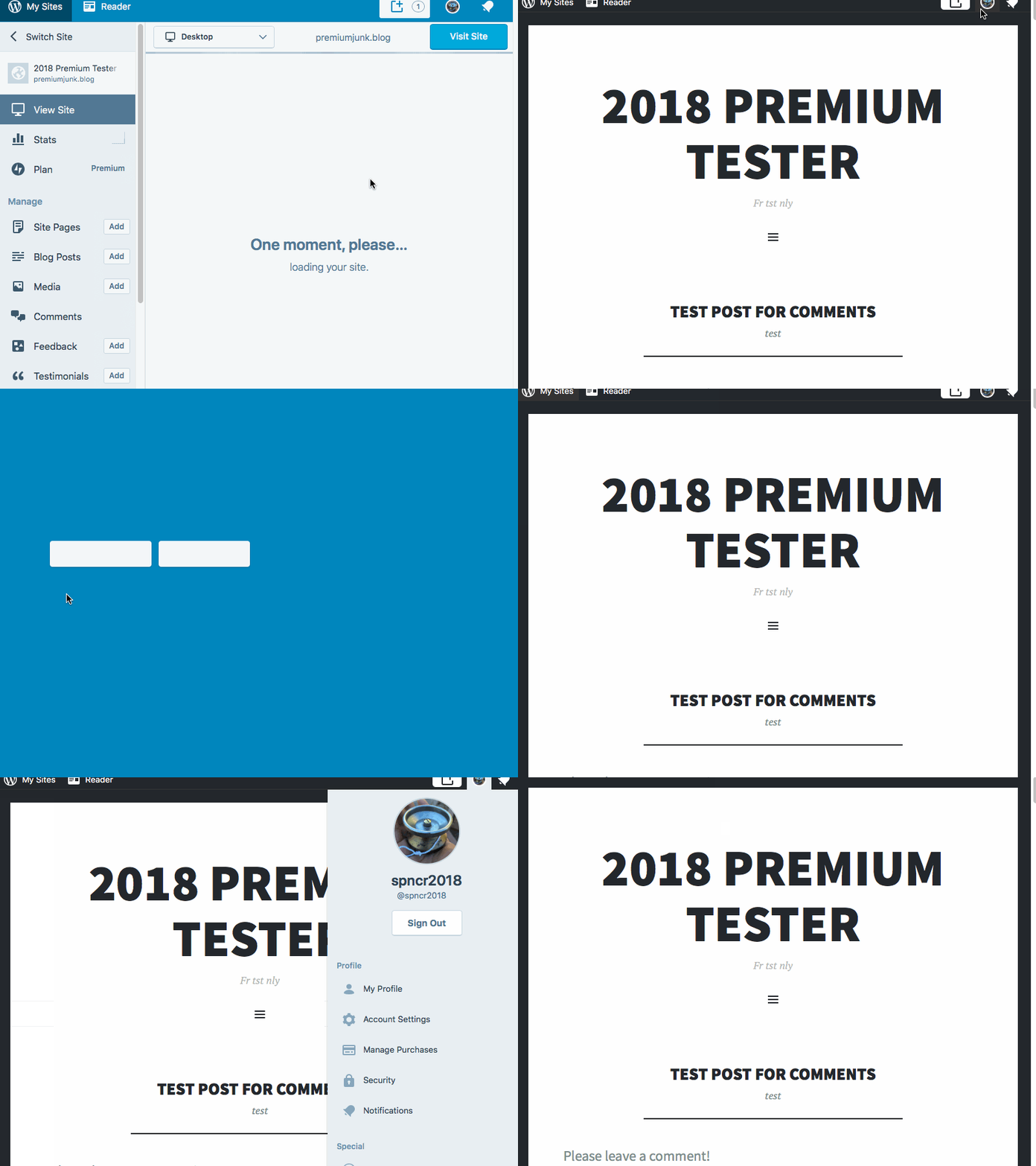
Steps to reproduce
- Start from a site you own, while signed into WordPress.com as the owner. (necessary - probably a cookie that is retained?)
- Click on your profile icon in the masterbar, then my profile (or any other button that leads you to
/me) - note if you signed out straight from the masterbar drop down, you'd avoid this bug. - Sign out from
WordPress.com/mearea. - Return to the site you loaded in step 1, notice the masterbar is still present and you can sign out a 2nd time.
- If you go to stats or any other section of WordPress.com, you are actually signed out. Only the masterbar makes it seem like you're still signed in.
What I expected
For my own site to not have the masterbar, since I've signed out.
What happens
The masterbar is present, even though I am signed out.
Browser / OS version
Tested in Chrome, Firefox and Safari.
Screenshot / Video
Context / Source
user-report
5107225-hc
 ghost
ghost
All 14 comments
Had another user bring up the same issue in another report. Thanks for opening this issue!
 rfaile313
on 24 Jul 2018
rfaile313
on 24 Jul 2018
OP user came back to ask about the status of the bug. I gave them a general update. 3030537-hc
 jessestu
on 30 Jul 2018
jessestu
on 30 Jul 2018
Also reported in 1744917-zen
 katinthehatsite
on 25 Jan 2019
katinthehatsite
on 25 Jan 2019
1744917-zen came back asking if a solution had been found yet. Advised that a solution was still being worked on.
 rickmgithub
on 2 Feb 2019
rickmgithub
on 2 Feb 2019
I just tested this and I can't seem to be able to replicate it. @davipontesblog are you able to replicate this?
 davemart-in
on 12 Jun 2020
davemart-in
on 12 Jun 2020
I was able to replicate this: https://d.pr/v/kKmHFq/HLYZFDAw4K
It seems like the masterbar has a behavior on its own, and keeps a separate cookie for login. Clicking anywhere there takes you back into calypso which knows you are signed off - but the mastebar continues to show as if I was logged in. You will see this when performing this second, alternate test here:
- Log in to WordPress.com
- Access an atomic site under a different tab which you own
- Notice masterbar not recognizing you are logged in
- Go back to WordPress.com tab and perform any action that triggers a WP Admin action on the site, like clicking on My Site > Wp admin, or Customizer.
- Go back to the tab with the atomic site, and refresh. See logged in masterbar now.
Recording: https://d.pr/v/oyQ5RR/X6yMwknr7P
It seems like there are two authentication events running in separate there between calypso and the masterbar which is causing this issue.
cc @davemart-in
 davipontesblog
on 15 Jun 2020
davipontesblog
on 15 Jun 2020
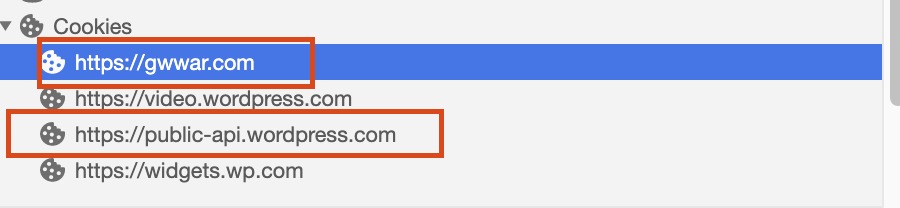
If we visit the frontend of a WordPress.com site @blackjackkent as a hint there are two cookies set: one on the site domain and another for public-api. Naturally we'll run into same origin limitations while trying to manipulate values from the client, so I'd recommend taking a peak at how auth is set (with no cookies on either domain).
It's highly likely that we need to 🔍 pieces of this in wpcom code (your sandbox) vs being able to fully do this from the Calypso client side of things.
 gwwar
on 25 Jun 2020
gwwar
on 25 Jun 2020
@kwight and I have been investigating this further; posted some info at p9o2xV-V4-p2 about our findings and discussion about what the best solution might be.
 blackjackkent
on 1 Jul 2020
blackjackkent
on 1 Jul 2020
Did we verify which site types this affects?
- [ ] Simple
- [ ] Standalone Jetpack (with SSO enabled)
- [ ] Atomic
If y'all are stuck, let me know if you'd like an extra set of 👀 to help trace.
gwwar
on 1 Jul 2020
The general consensus here seems to be that this is a more complex issue than it appeared at first glance and the behavior is not entirely unintended, but that there's a discussion to be had around whether there's a way to make it clearer to the user in UX. Kirk's comment on the P2 linked above does a pretty good further summary of the issues.
blackjackkent
on 1 Jul 2020
This is a long standing issue, there's some historical discussion on 4113-wpcom, along with the many links branching off it.
Summary
This issue happens on Simple sites with custom domains, and all Atomic sites. It goes a little something like this.
- A user logs in on wordpress.com.
- They visit their site, mywonderful.blog. Since they've never visited this URL in this browser before, cross-site cookie rules means that there's no way for us to know that they're logged in from that first request, even though they logged in on wordpress.com.
- To fix that, there's some JS (see
wpcom-remote-login.phpon WPCOM) which loads in the page's header, and asks wordpress.com if they're logged in. If they are, it redirects tohttps://r-login.wordpress.com/remote-login.php, which generates some signatures, and redirects back tohttps://mywonderful.blog/remote-login.php. https://mywonderful.blog/remote-login.phpverifies the signatures, and sets cookies to confirm that the user is logged in.
So, when they later click the logout button on wordpress.com, the auth cookies stored for wordpress.com are dutifully invalidated, but the logged in cookies for mywonderful.blog are not, since it would involve redirecting to mywonderful.blog, as well as every other site with a custom domain that the user has visited in that browser, just to delete the logged in cookie.
There are a couple of important things to note about this:
- The logged in cookie is only used to decide whether to display things like the master bar, the "Edit" link on posts, etc. It is never used to authenticate the user.
- When clicking a link that requires an auth check the user is always redirected to wordpress.com: either Calypso, or via mywonderfulblog.wordpress.com.
Addressing This Issue (History)
In WordPress 4.7 (released 2014), session cookies were introduced. You can see the manifestation of this by visiting /wp-admin/profile.php on a self-hosted site, and seeing the "Log Out Everywhere Else" button: specific browser sessions can be invalidate on the server side, no longer requiring cookies to be invalidated on the client side.
WordPress.com being the giant beast that it is, required a custom implementation of sessions, which landed in 2015. I don't believe the existence of sessions is exposed anywhere to end users, and I'm not aware of any work done to make use of sessions to solve this particular problem.
Addressing This Issue (Today)
As can be surmised, this issue hasn't been addressed previously due to it being low impact, but extremely high complexity to solve. In order to address it (entirely off the top of my head), these are the major tasks that need to be tackled:
- Investigate whether
remote-login.phpmakes use of the sessions API. If it does, great! If it doesn't, implement that. - Investigate whether the
wordpress_logged_incookie obeys sessions. If it does, great! If it doesn't, implement that (possibly in Core, that would also need to be tested). - Review the WPCOM codebase for anything that relies on the
wordpress_logged_incookie, and ensure it's obeying sessions.
Addressing This Issue (Jetpack bonus edition)
I'm fairly certain that Jetpack SSO doesn't log you out when you log out of wordpress.com. Jetpack SSO behaves more like "logging into my Jetpack site account using my WordPress.com credentials", rather than "logging into my WordPress.com account". So, you stay logged in on your Jetpack site, in much the same way you can logout of your Google account, but stay signed into your WordPress.com account that was authed with Google.
Allowing users to invalidate all of their Jetpack SSO logins would be a large project unto itself, I wouldn't recommend tackling it as part of solving this problem.
 pento
on 28 Jul 2020
pento
on 28 Jul 2020
Thanks for the excellent recap and summary @pento.
this issue hasn't been addressed previously due to it being low impact, but extremely high complexity to solve
I'm not going to close this issue. I think doing so would risk having this issue be brought up again in the future. For now though I don't think we can invest the resources needed to fix the issue. I've pulled this from the Janitor backlog.
davemart-in
on 28 Jul 2020
@pento I tested this (as I had another report from a user) and the button "Log Out from Everywhere" is also available from the User RC and it will log me off all the site sessions I have opened.
I understand that this will also log me out of all sessions opened in other browsers, etc... just a note here in case this would help solving this issue in any way :)
 mlaetitia
on 23 Aug 2020
mlaetitia
on 23 Aug 2020
Thanks for the confirmation, @mlaetitia! It's good to know that, as it suggests at least some of the required Sessions API support has already been built, which would hopefully reduce the complexity of fixing this issue. 🙂
pento
on 24 Aug 2020
Related issues
 BrookeDot
·
3Comments
BrookeDot
·
3Comments
 hoverduck
·
3Comments
hoverduck
·
3Comments
 samouri
·
3Comments
samouri
·
3Comments
 kellychoffman
·
3Comments
kellychoffman
·
3Comments
 spen
·
3Comments
spen
·
3Comments