Wp-calypso: Rewind: Auto configured credentials during Pressable NUX flow aren't saved
Steps to reproduce
- Starting at URL: https://my.pressable.com/sites
- Create a new Pressable site.
- Open the Pressable site settings.
- At the top of the settings page, select the link to set up Jetpack: "To finish activating Jetpack Premium, please follow this link."
- Connect the new site to a WordPress.com account.
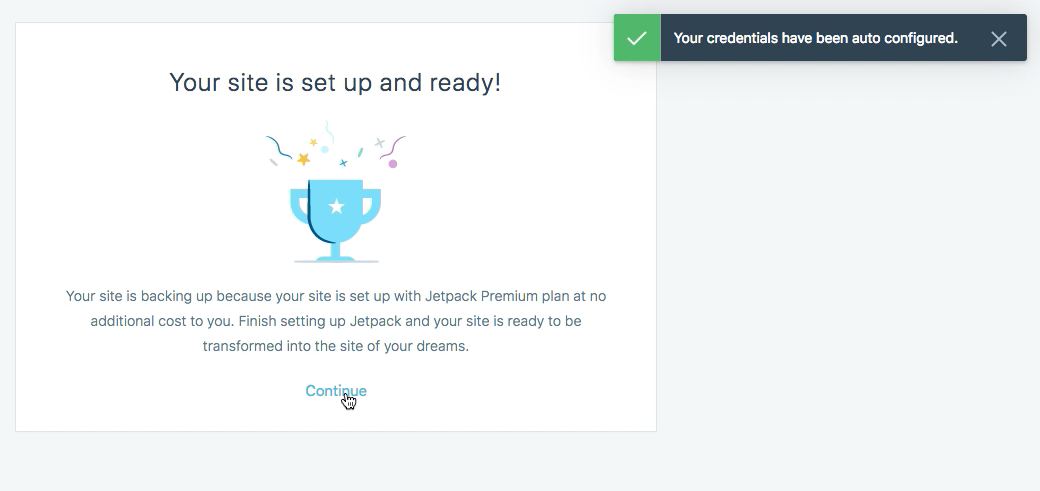
- On the "Start backing up your site" screen, choose to share your credentials and confirm you get a success message about credentials being auto configured.
- Finish the Pressable NUX flow.
What I expected
I expected my site to be set up with Jetpack, with my credentials auto configured for Rewind.
What happened instead
When I returned to my site's WP Admin I saw a nudge to set up Jetpack backups. Opening the site in Calypso, I saw messages that I needed to add my site's credentials. At that point, if I added my site's credentials it worked and the backups started.
Browser / OS version
macOS 10.13.3 / Chrome 64
Screenshot / Video
I have a screencast of the full flow; please ping me if it would help (not sharing here as it includes private details).
Success message in Pressable NUX flow:
Jetpack backup nudge in WP Admin:

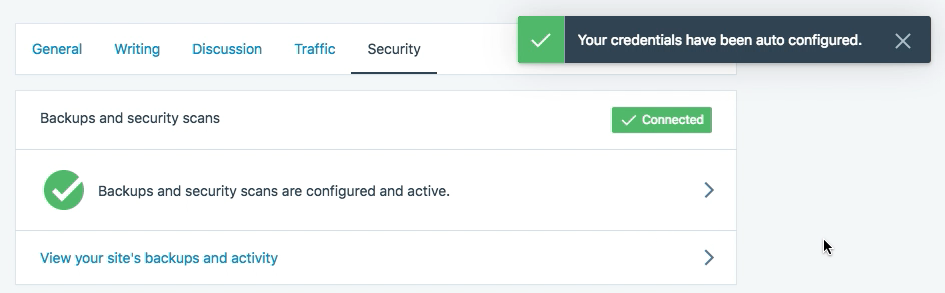
Success message after auto configuring credentials again in Calypso Security settings:
Context / Source
manual-testing #flow-testing
 rachelmcr
All 12 comments
I confirmed that this is still an issue after this flow launched to production. I tried going through this flow while logged in to my site's WP Admin and without being logged in to WP Admin, and in both cases I see the success message but my credentials aren't actually saved.
@Automattic/poseidon just want to make sure this is on your radar.
rachelmcr
on 26 Feb 2018
I see a couple issues here.
First, this JITM:
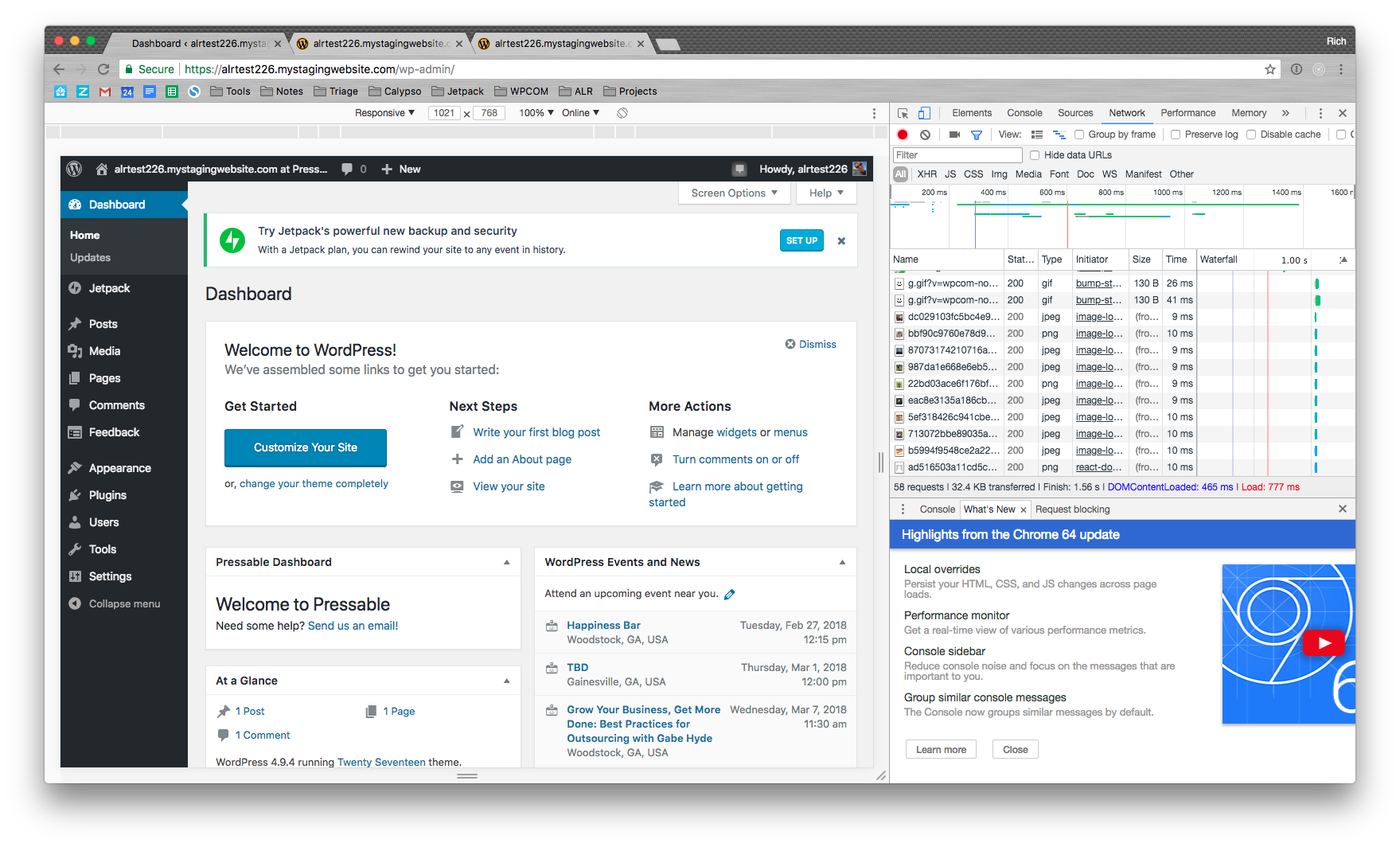
Is showing for sites in provisioning state. That should not be the case. Not sure who can fix the JITM @dereksmart can you point me in the right direction there?
Second, I am unable to reproduce this particular behavior:
Opening the site in Calypso, I saw messages that I needed to add my site's credentials.
Can anyone confirm if this is happening consistently? Also, when this happened (the notice at the top of the activity log), has anyone tried to look in Site Settings > Security to see if the credentials appear there?
During my testing of this, my credentials are detected (and subsequently stored properly) as soon as I hit the "Share Credentials" button in the NUX flow. If someone is able to reliably reproduce this step NOT provisioning credentials, I'll need to possibly do a screenshare or slack call to debug for that specific site in real time. Happy to do this, but I'd guess that there isn't a problem with the credentials, and more a problem of a bad state machine condition for a short period after the autodetecting is run
cc @dmsnell
 rcoll
on 26 Feb 2018
rcoll
on 26 Feb 2018
This happens to me consistently in my testing (at least half a dozen times today). Every time it happened I double checked in Site Settings > Security and confirmed the credentials were not there. I'll ping you on Slack for a screenshare.
rachelmcr
on 26 Feb 2018
I can confirm - credentials aren't set. Activity page contains 'Add credentials' card; Site settings has "Add site credentials button under security tab; wp-admin has credentials JITM. After activating it once again(via Activity page) - credentials was added successfully
 brbrr
on 26 Feb 2018
brbrr
on 26 Feb 2018
The fact that we're getting the response "Your credentials have been auto configured" makes it seem like this is a problem on the back-end. @rcoll I'll poke you soon in Slack to continue investigating this
 dmsnell
on 26 Feb 2018
dmsnell
on 26 Feb 2018
Just tried again as a non-a11n and it went through fine.
For anyone able to reproduce, please do the following for me when you have a moment:
- When you get to the screen in the NUX flow that has the "Share credentials" button, please open the network tab in your browser dev tools.
- Clear out anything that's already there, and then hit the "Share credentials" button.
- I'm interested in the Request and Response details for two specific requests, labeled
activateandrewind. - I'm mainly interested in the responses for those two requests. Please share them here and we can figure out what's going on :-)
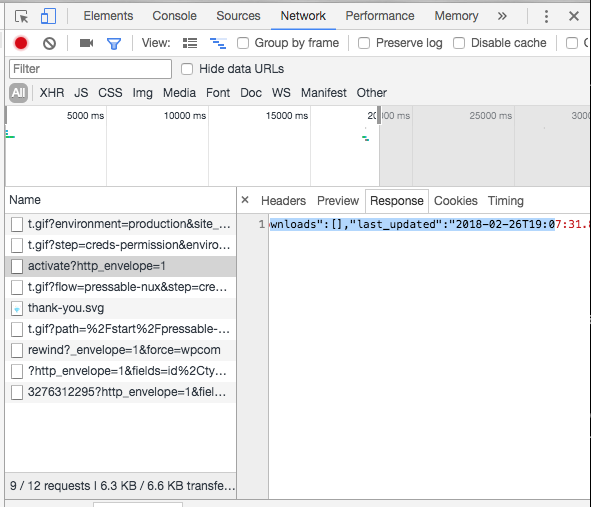
Thanks.
rcoll
on 26 Feb 2018
I reproduced the issue (site ID 143321501). Here's the response for the activate request:
{"code":200,"headers":[{"name":"Content-Type","value":"application\/json"}],"body":{"ok":true,"error":"","rewind_state":{"can_autoconfigure":true,"state":"awaiting_credentials","downloads":[],"last_updated":"2018-02-26T19:36:17.513+00:00"}}}
Here's the response for the rewind request:
{"body":{"can_autoconfigure":true,"state":"awaiting_credentials","downloads":[],"last_updated":"2018-02-26T19:36:18.430+00:00"},"status":200,"headers":{"Allow":"GET"}}
That's beautiful, thanks so much. Definitely indicative of a problem. I'll take a look at this with @dmsnell shortly.
rcoll
on 26 Feb 2018
Howdy all, I have a solution for this but don't want to ship and go AFK for the night. The fix is on the VP side, and likely requires no action in Calypso or WPCOM. I'll ship first thing in the morning.
rcoll
on 26 Feb 2018
The fix has been deployed. Please test and let me know the results. Thanks all!
rcoll
on 27 Feb 2018
@rcoll Looks good to me!
I'm still occasionally getting a failure, but no longer seeing the erroneous "Your credentials have been auto configured" success message in those cases. (I think it may be a timing issue — connecting too soon after creating the Pressable site — but I'll investigate an open an issue for the back end if I can reliably reproduce those failures.)
rachelmcr
on 27 Feb 2018
e2e test for Pressable NUX flow can constantly reproduce this issue: https://github.com/Automattic/wp-e2e-tests/pull/967
Video: http://take.ms/J1xBQ
Responses for both activate & rewind are "Failed to load response data"
wp-json/jetpack/v4/jitm?:
[{"content":{"message":"Get help from a Jetpack Concierge","icon":"<div class=\"jp-emblem\"><svg id=\"jetpack-logo__icon\" xmlns=\"http:\/\/www.w3.org\/2000\/svg\" x=\"0px\" y=\"0px\" viewBox=\"0 0 32 32\"><path fill=\"#00BE28\" d=\"M16,0C7.2,0,0,7.2,0,16s7.2,16,16,16c8.8,0,16-7.2,16-16S24.8,0,16,0z M15.2,18.7h-8l8-15.5V18.7z M16.8,28.8 V13.3h8L16.8,28.8z\"\/><\/svg><\/div>","description":"Your Jetpack Premium subscription includes a complimentary one-on-one consultation with a Jetpack expert.","classes":""},"CTA":{"message":"Schedule now","hook":"","primary":true},"template":"default","ttl":300,"id":"concierge_premium","feature_class":"concierge","expires":3628800,"max_dismissal":2,"url":"https:\/\/jetpack.com\/redirect\/?source=jitm-concierge_premium&site=e2eflowtesting1519886393631828.mystagingwebsite.com&u=1","jitm_stats_url":"https:\/\/pixel.wp.com\/g.gif?v=wpcom2&rand=74e295b347dcec7bc40051a91f22cb28&x_jetpack-jitm=concierge_premium"},{"content":{"message":"Try Jetpack's powerful new backup and security","icon":"<div class=\"jp-emblem\"><svg id=\"jetpack-logo__icon\" xmlns=\"http:\/\/www.w3.org\/2000\/svg\" x=\"0px\" y=\"0px\" viewBox=\"0 0 32 32\"><path fill=\"#00BE28\" d=\"M16,0C7.2,0,0,7.2,0,16s7.2,16,16,16c8.8,0,16-7.2,16-16S24.8,0,16,0z M15.2,18.7h-8l8-15.5V18.7z M16.8,28.8 V13.3h8L16.8,28.8z\"\/><\/svg><\/div>","description":"With a Jetpack plan, you can rewind your site to any event in history.","classes":""},"CTA":{"message":"Set up","hook":"","primary":true},"template":"default","ttl":300,"id":"rewind_available","feature_class":"rewind","expires":3628800,"max_dismissal":2,"url":"https:\/\/jetpack.com\/redirect\/?source=jitm-rewind_available&site=e2eflowtesting1519886393631828.mystagingwebsite.com&u=1","jitm_stats_url":"https:\/\/pixel.wp.com\/g.gif?v=wpcom2&rand=caec5e389a8e2735545a151a6abba2a2&x_jetpack-jitm=rewind_available"}]
Related issues
 samouri
·
3Comments
samouri
·
3Comments
 vparkhere
·
3Comments
vparkhere
·
3Comments
 kellychoffman
·
3Comments
kellychoffman
·
3Comments
kellychoffman
·
3Comments
kellychoffman
·
3Comments
 spen
·
3Comments
spen
·
3Comments