Wp-calypso: Me: Accessibility: Not possible to tab through Interface Language options using keyboard
It's not possible to tab through Interface Language options using your keyboard, which also makes it tricky for those using screen readers to navigate the options.
Steps to reproduce
- Starting at URL: https://wordpress.com/me/account
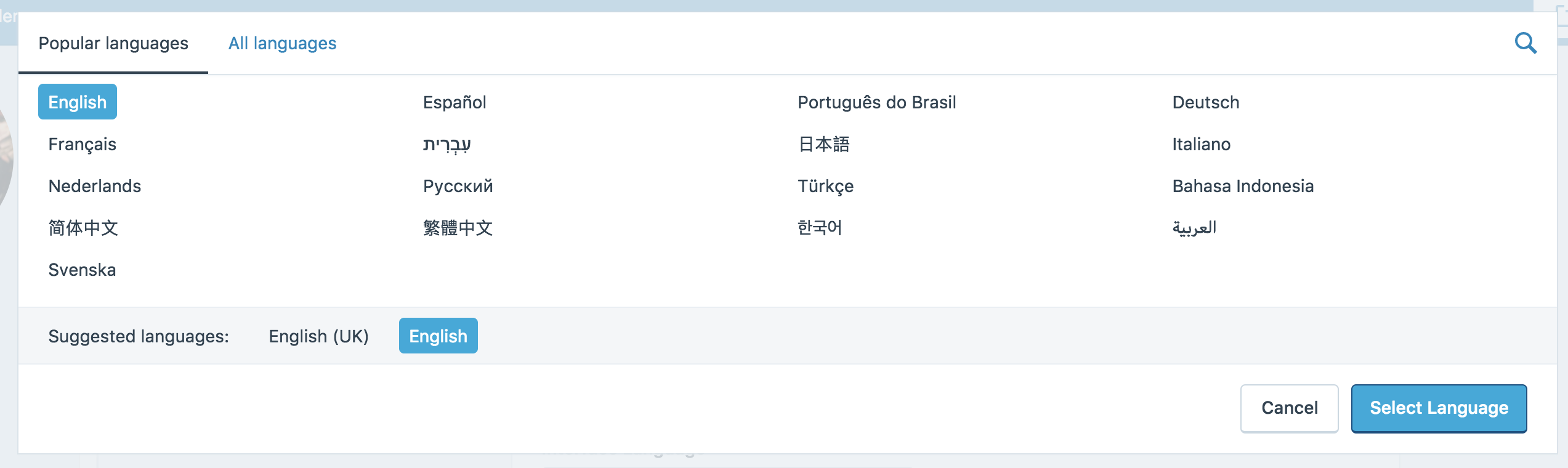
- Select the Interface Language dropdown menu to open a modal with different language options.
- Attempt to tab through the list of languages using your keyboard.
What I expected
I expected to be able to tab through the different options using the tab key on my keyboard.
What happened instead
It's not possible to navigate through the different options using only your keyboard. This makes it hard for people who navigate the web using their keyboard or screen readers to set their language.
@davidakennedy took a look and provided the following summary:
The language setting works well with a mouse and shifts my focus when I click it. However, because the controls for it are not standard HTML elements with keyboard accessibility built in (like a button or select menu), but instead div elements. These don’t have any added JavaScript to handle keyboard accessibility, with screen readers rely on. So if you try to click on it in a screen reader, you get lost.
More context and discussion found at: p4vt7e-3o-p2
Context / Source
user-report #empathy #perspective #reallife #painpoint
 SiobhyB
All 2 comments
Hi @SiobhyB @davidakennedy
I'm making updates to the Language Picker so I'll take a look at this, and hopefully will get a fix for
21223 out of it too.
If you have any further suggestions let me know. 👍
 ramonjd
on 23 Jan 2018
ramonjd
on 23 Jan 2018
21753 Merged
ramonjd
on 15 Feb 2018
Related issues
 spen
·
3Comments
spen
·
3Comments
 BrookeDot
·
3Comments
BrookeDot
·
3Comments
 jjchrisdiehl
·
3Comments
jjchrisdiehl
·
3Comments
 hoverduck
·
3Comments
spen
·
3Comments
hoverduck
·
3Comments
spen
·
3Comments
Most helpful comment
Hi @SiobhyB @davidakennedy
I'm making updates to the Language Picker so I'll take a look at this, and hopefully will get a fix for
21223 out of it too.
If you have any further suggestions let me know. 👍